How to Integrate Leela Zero to Sabaki on MacOS
I started playing go in November of last year and fell in love with the game immediately. Learning about the history of go and creating…
How to Integrate Leela Zero to Sabaki on MacOS
I started playing go in November of last year and fell in love with the game immediately. Learning about the history of go and creating intricate stone formations brings me great joy. I’ve been studying the game through books and YouTube tutorials, but recently I made a new go friend who suggested using AI to improve my gameplay faster. While there are some go AI sites available, they are either limited or require a subscription. After trying out many GUI apps, I finally found an easy-to-install method that I hope you will find helpful.
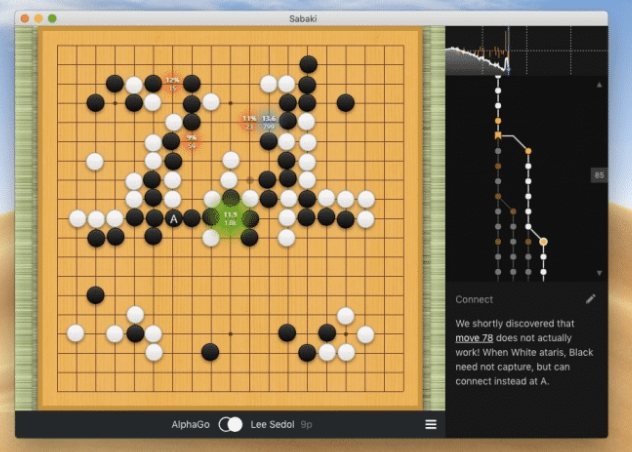
Using Sabaki and AI to review go games
Install Leela Zero
For analyzing the game of go, we will be using Leela Zero, an open-source engine that utilizes deep neural networks and is available free of charge.
- Download the Leela Zero source code by running the following command:
git clone --recursive https://github.com/gcp/leela-zero- Make sure to download the source code to a location that you can easily find, such as your Desktop.
- Navigate to the
srcdirectory within theleela-zerorepository by running the following command:
cd /path/to/leela-zero/src/- Compile the Leela Zero source code by running the
makecommand. This will create a program file calledleelaz. Note that this process may take some time.
- If you want to run a CPU-only version of Leela Zero, you will need to comment out a line in the
config.hfile. Open the file using a text editor and comment out the line that reads#define USE_OPENCLby adding two forward slashes (//) at the beginning of the line. Similarly, comment out the line that reads#define USE_HALF. Save the file and proceed with running themakecommand.
- Once the
leelazfile has been created, move it to a directory where you can easily find it, such as your Desktop. To do this, run the following commands:
cd ~/Desktop
mkdir leela-zero-go
mv /path/to/leelaz ~/Desktop/leela-zero-go/- Download the latest network file for Leela Zero from this link. Make sure to download the file named
best-network.gz. Once downloaded, move the file to the directory where you placed theleelazfile.
Install Sabaki
To help us visualize the game, we will be using Sabaki, a highly regarded desktop interface. Here is a guide on how to install Sabaki.
- To install the latest version of Sabaki, go to the Sabaki source code link. Under
Assets, locate the appropriate version for your Mac
- For Macs running on Intel processors, download
sabaki-v###-mac-x64.7z. - For Macs running on M1 or later (ARM), download
sabaki-v###-mac-arm64.7z.
- Once the file has been unzipped, move the Sabaki app to the
Applicationsfolder on your Mac.
Integrate Leela Zero with Sabaki
Now that we have installed all the necessary components, we can finally integrate them.
- Open Sabaki from your
Applicationsfolder. - Navigate to the
Enginesmenu located in the top left corner of the screen and turn onShow Engine Sidebar. - From the Engine sidebar, click on the play button in the top left corner and select
Manage Engines.

- To add the Leela Zero engine, click on the
Addbutton.
- Enable GTP logging to directory and link it to the directory that contains both the
leelazand the network files.
- In the engine section, fill out the following information:
- The file path of the
leelazfile. - The file path of the network file in the following command format:
--gtp -w /Users/<AppleUserID>/Desktop/leela-zero-go/best-network.gz --noponder. - Set the time settings to:
time_settings 0 5 1.

Congratulations! You are now ready to improve your Go game. Have fun!

Sample Go game being reviewed
References
- Sabaki GitHub repository: https://github.com/SabakiHQ/Sabaki
- Sabaki official website: https://sabaki.yichuanshen.de/
- Sabaki tutorial video on YouTube (Windows only): https://www.youtube.com/watch?v=YZShSVPF6yA
- Leela Zero GitHub repository: https://github.com/leela-zero/leela-zero
- Leela Zero Network files: https://leela.online-go.com/networks/?C=M&O=D
메타데이터
- post_id
- d829fbd701f2
- slug
- how-to-integrate-leela-zero-to-sabaki-on-macos-d829fbd701f2
- url
- https://medium.com/@michaelchang_47707/how-to-integrate-leela-zero-to-sabaki-on-macos-d829fbd701f2
- canonical_url
- https://medium.com/@michaelchang_47707/how-to-integrate-leela-zero-to-sabaki-on-macos-d829fbd701f2
- author_url
- https://medium.com/@michaelchang_47707
- status
- ok
- fetched_at
- 2026-07-25 20:51:28




