(1/3) Scaling Flutter for Enterprise: How We Built a Modular Multi-App Architecture
When Flutter projects begin, they often start simple.
(1/3) Scaling Flutter for Enterprise: How We Built a Modular Multi-App Architecture
Photo by Sean Pollock on Unsplash
When Flutter projects begin, they often start simple.
A few screens. A handful of features. One team.
Everything feels manageable.
But as products grow into enterprise-scale platforms — with multiple apps, shared business logic, growing engineering teams, and long-term maintainability requirements — the architectural decisions made early either accelerate development or become a constant source of friction.
Over the past few years, I worked on a large-scale Flutter platform where maintainability, modularity, and team collaboration were critical.
To solve this, we adopted a combination of:
- Melos monorepo management
- Mason code generation
- Feature-based clean architecture
- Strict package boundaries
- Reusable shared modules across multiple applications
The Challenge of Scaling Flutter
Many Flutter applications begin with a monolithic structure like this:
lib/
 ├── screens/
 ├── widgets/
 ├── services/
 ├── models/
 ├── utils/
 └── main.dartf
This works well for MVPs and small products.
However, as the codebase grows, problems begin to appear.
Tight Coupling
Features start depending on each other directly.
Authentication logic leaks into unrelated modules.
Business rules get scattered across UI layers.
Reduced Reusability
When building multiple apps (e.g., customer app and admin app), logic gets duplicated.
Slower Development Velocity
Small changes trigger full project rebuilds, tests, and analysis.
CI/CD pipelines become heavier.
Inconsistent Code Structure
As teams grow, each developer structures features differently:
- Some use BLoC
- Some use providers
- Folder structures drift
- Naming conventions diverge
At scale, this becomes a serious maintenance problem.
We needed a more modular approach.
Why We Chose a Monorepo with Melos
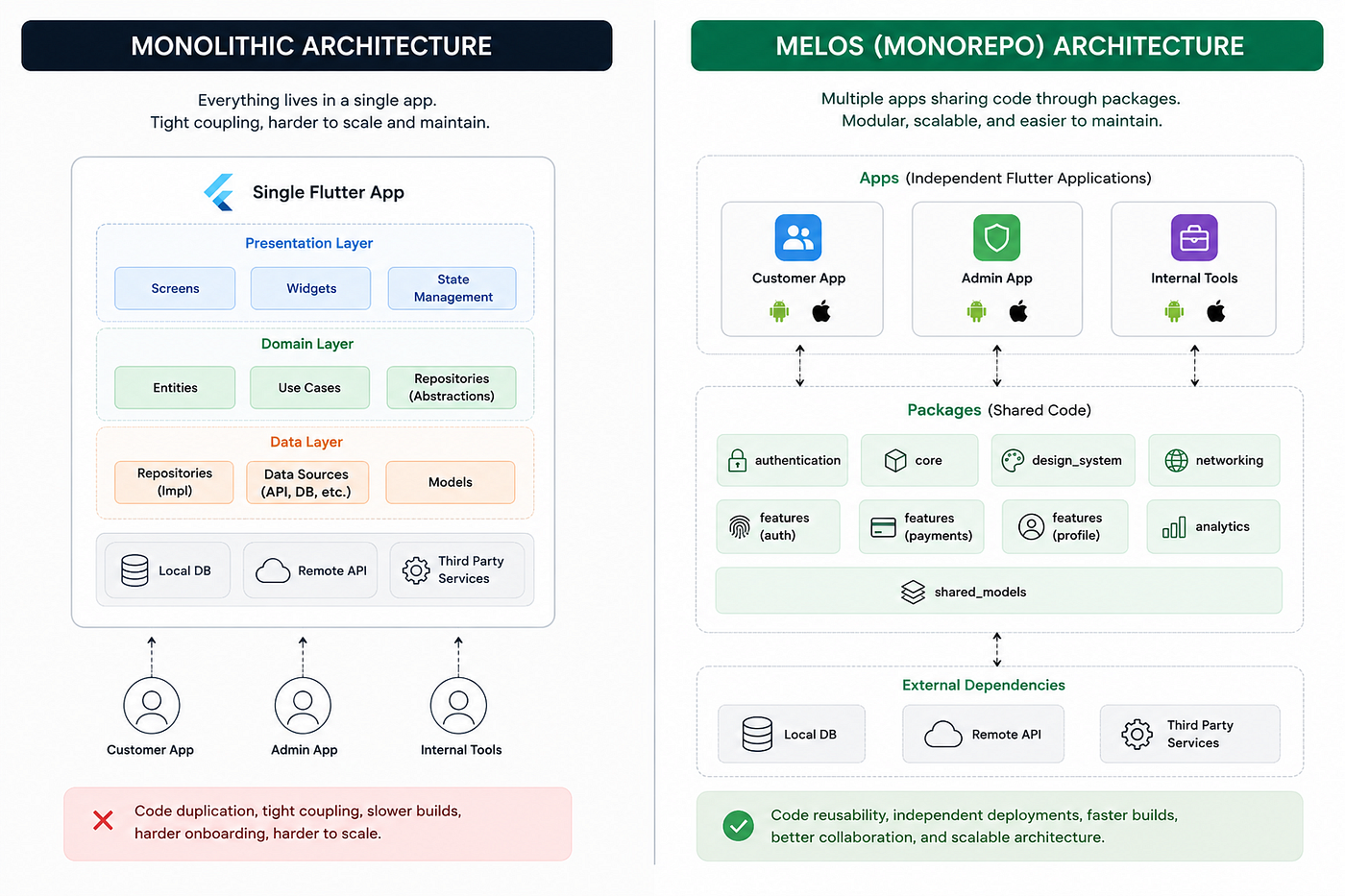
We adopted Melos to manage a Flutter monorepo.
Instead of one large application, we split the workspace into multiple apps and reusable packages.
Project Structure
workspace/
 ├── apps/
 │   ├── customer_app/
 │   ├── admin_app/
 │   └── internal_tools/
 │
 ├── packages/
 │   ├── authentication/
 │   ├── networking/
 │   ├── design_system/
 │   ├── shared_models/
 │   ├── analytics/
 │   └── feature_modules/
 │
 └── melos.yaml
Each app remained independently deployable while sharing core functionality.
Benefits of Melos
1. Shared Code Across Multiple Apps
We extracted reusable packages instead of duplicating logic:
- Authentication
- API clients
- Shared UI components
- Analytics
- Domain models
2. Independent App Deployment
Each app had its own:
- Bundle ID
- Release pipeline
- Environment configuration
Examples:
- Customer app
- Internal tools app
- Admin dashboard
3. Faster CI/CD
We could scope builds and tests:
melos exec --scope=authentication flutter testInstead of running everything.
4. Better Team Collaboration
Package boundaries reduced merge conflicts.
Teams could work independently on different modules.
5. Strong Architectural Boundaries
Imports became intentional.
Cross-feature dependency issues were significantly reduced.
Using Mason for Consistency
As the system grew, maintaining consistent structure manually became difficult.
That’s where Mason helped.
We created custom bricks for:
- Features
- Screens
- BLoC components
- Repositories
- Use cases
- API integrations
Instead of manually creating boilerplate, developers could run:
mason make feature --name paymentsAnd instantly generate a full feature scaffold.
Why Mason Was Valuable
Standardized Architecture
Every feature followed the same structure.
Faster Onboarding
New engineers could generate production-ready modules instantly.
Reduced Boilerplate
Repetitive setup work was automated.
Feature-Based Architecture
One of the key decisions was organizing code by feature instead of technical layers.
Instead of:
lib/
 ├── blocs/
 ├── screens/
 ├── repositories/
 ├── models/
We structured by feature:
features/
 ├── authentication/
 ├── payments/
 ├── profile/
 ├── claims/
This keeps all related logic in one place.
Clean Architecture Inside Each Feature
Each feature was divided into three layers:
Presentation Layer
Responsible for UI and state management.
presentation/
 ├── bloc/
 ├── pages/
├── widgets/- UI rendering
- User interaction
- State management
- Event dispatching
No business logic lives here.
Domain Layer
The core business logic.
domain/
 ├── entities/
 ├── repositories/
├── usecases/- Business rules
- Interfaces/contracts
- Use case orchestration
Fully independent of Flutter.
Data Layer
Handles external data sources.
data/
 ├── datasources/
 ├── models/
├── repository_impl/- API calls
- Local storage
- DTO mapping
- Repository implementation
Why This Separation Matters
Testability
Domain logic can be tested without Flutter.
Replaceable Infrastructure
Data sources can be swapped easily (API → mock).
Clear Responsibilities
- UI → presentation
- Business logic → domain
- Infrastructure → data
This separation reduces accidental complexity.
Shared Design System
We extracted a shared design system package.
It included:
- Typography
- Colors
- Buttons
- Inputs
- Dialogs
- Layout components
Benefits:
- Consistent UI across apps
- Faster development
- Centralized updates
One change updates all apps.
Lessons Learned
1. Modularization must be intentional
Over-modularization creates unnecessary complexity.
We only extracted packages when:
- Code was reused
- Boundaries were stable
- Ownership was clear
2. Tooling matters
Melos and Mason helped enforce consistency across the team.
Without tooling, architecture tends to drift.
3. Architecture is about scale
Simple apps don’t need this complexity.
But at enterprise scale, structure becomes essential.
When to Use This Approach
This setup works best for:
- Enterprise Flutter applications
- Multi-app ecosystems
- White-label platforms
- Large engineering teams
- Long-term products
Not ideal for:
- MVPs
- Small apps
- Solo prototypes
Final Thoughts
Flutter scales extremely well when paired with the right architecture.
For us, combining:
Melos + Mason + Feature-Based Clean Architecture
resulted in a system that was:
- Modular
- Maintainable
- Scalable
- Consistent
- Team-friendly
The biggest takeaway is simple:
Scaling Flutter is less about Flutter itself, and more about how intentionally you structure your codebase.
메타데이터
- post_id
- d844780bbfac
- slug
- scaling-flutter-for-enterprise-how-we-built-a-modular-multi-app-architecture-d844780bbfac
- url
- https://medium.com/@guwanchbayryyev/scaling-flutter-for-enterprise-how-we-built-a-modular-multi-app-architecture-d844780bbfac
- canonical_url
- https://medium.com/@guwanchbayryyev/scaling-flutter-for-enterprise-how-we-built-a-modular-multi-app-architecture-d844780bbfac
- author_url
- https://medium.com/@guwanchbayryyev
- status
- ok
- fetched_at
- 2026-06-22 00:13:37




