Meet AX Engine: Faster Local LLMs on Your Mac, No Magic Required
If you’ve ever tried to run a large language model locally on a Mac, you know the drill. You download a model, fire up a runtime, and then…
Meet AX Engine: Faster Local LLMs on Your Mac, No Magic Required
If you’ve ever tried to run a large language model locally on a Mac, you know the drill. You download a model, fire up a runtime, and then watch the tokens crawl out one… by… one. Apple Silicon is genuinely fast, but most of the tooling around it was built to be general, not fast. We thought we could do better — so we built AX Engine.
Today, the team at DEFAI is opening up AX Engine: a Mac-first LLM inference runtime, local server, SDK, and benchmark toolkit built from the ground up for Apple Silicon. It’s written in Rust, talks directly to Apple’s Metal-backed MLX kernels, and it’s open source under the MIT license.
So what actually is it?
The short version: AX Engine https://github.com/defai-digital/ax-engine is the runtime layer that sits above MLX and makes your local models run faster and more predictably.
We want to be honest about what that means, because the local-inference world is full of inflated benchmarks. AX Engine doesn’t claim to have faster tensor math than MLX — MLX compiles and runs the same compute graph either way, and Apple’s kernels are excellent. What we own is everything around the model: how tokens get speculated, how requests get scheduled, how KV cache state is managed, and how all of it gets benchmarked and verified.
That layer is where the speed actually comes from.
The headline: up to 2.4x faster decoding
Here’s the part you came for. On supported models, our n-gram acceleration reaches up to 2.4x the decode throughput of mlx_lm on high-hit benchmark rows — with no second draft model and no changes to your model files.
A few real numbers from our M5 Max benchmarks:
- Qwen 3.6 35B A3B (4-bit): 105 tok/s on mtplx → 183tok/s with AX n-gram+mtp acceleration


- The trick is a bigram/trigram table built at runtime that predicts up to four draft tokens per step. The target model verifies them all in a single forward pass, and a self-tuning accept-rate gate backs off automatically when the predictions stop helping. No extra draft model to download, no babysitting.
We’re also upfront about the caveats: these are effective-throughput numbers, and n-gram hit rates depend on your prompts and output patterns. Every benchmark ships with telemetry counters so you can see exactly what happened — accepted tokens, rejected drafts, cooldowns, the works.
Built for people who care about control
Speed is the hook, but the reason we built AX Engine is control. Most local runtimes treat inference as a black box. AX Engine treats it as a contract.
ax-engine-server gives you a local HTTP adapter with OpenAI-compatible routes, so your existing code mostly just works. ax-engine-bench records correctness, determinism, route identity, and performance as checked-in, auditable evidence — not screenshots of one good run. There's a Python binding, a Rust SDK, and a JavaScript preview client, all sitting over the same backend-resolution rules.
And because model coverage is never finished, AX Engine gives you escape hatches. The repo-owned MLX path is optimized for supported Qwen and Gemma families. For everything else, you can delegate to upstream mlx-lm for other MLX text models, or to llama.cpp for GGUF and non-MLX inference — all from the same AX surface. We never dress up delegated results as our own throughput claims.
What it runs today
Out of the box, AX Engine has hand-written forward passes for the Gemma 4 family (including the MoE and 31B variants), Qwen 3.5, and the Qwen 3.6 / Coder Next architectures with their GatedDelta linear attention. Each architecture is implemented deliberately — adding a model means writing its graph, not bolting on a generic loader. That’s more work for us, and a more reliable result for you.
Getting started takes about 30 seconds
If you live in Python, you’re one line away:
pip install ax-engineThat’s it. Point a session at a local MLX model and you’re generating tokens:
python
import ax_enginesession = ax_engine.Session(mlx=True, mlx_model_artifacts_dir="/path/to/model")
result = session.generate([token_id, ...], max_output_tokens=128)
print(result.output_tokens)Want an OpenAI-compatible endpoint instead? There’s a shim for that — pip install "ax-engine[openai]", launch python -m ax_engine.openai_server, and point any OpenAI client at http://127.0.0.1:8080. Your existing code barely changes.
Prefer the command-line server and benchmark tools? Grab them from Homebrew:
brew install defai-digital/ax-engine/ax-engineax-engine-bench doctor
ax-engine-server --helpYou’ll need macOS 14 or later on Apple Silicon (M2 Max or newer) and Python 3.10+. The full Rust workspace is on GitHub too if you want to build from source and poke at the internals — and since it’s MIT-licensed, you really can.
Where we’re going
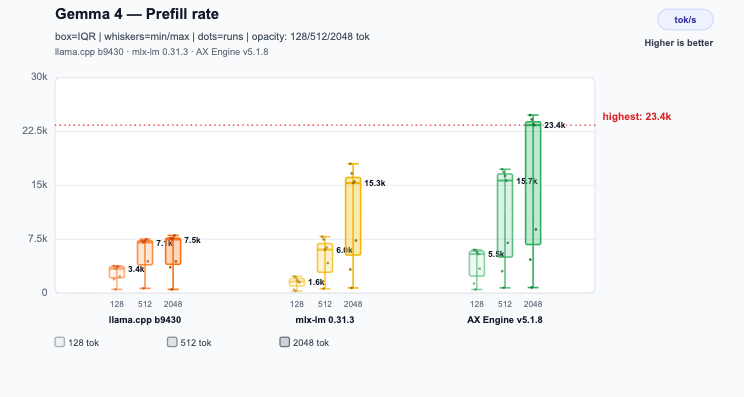
AX Engine is a preview, and we’re building it in the open. Prefill on long prompts for the linear-attention models is still catching up, multimodal isn’t an AX contract yet, and there are more architectures we want to support. We’d rather tell you that now than surprise you later.
If you run models locally on a Mac and you’ve been wishing for something faster, more transparent, and more yours — we’d love for you to try it and tell us what breaks.
Star the repo at github.com/defai-digital/ax-engine, join the conversation on our Discord, or reach us at enquiry@defai.digital. Local inference should be fast and honest about it. That’s the whole idea.
— The DEFAI team
메타데이터
- post_id
- d84be5f341b2
- slug
- meet-ax-engine-faster-local-llms-on-your-mac-no-magic-required-d84be5f341b2
- url
- https://medium.com/@automatosx/meet-ax-engine-faster-local-llms-on-your-mac-no-magic-required-d84be5f341b2
- canonical_url
- https://medium.com/@automatosx/meet-ax-engine-faster-local-llms-on-your-mac-no-magic-required-d84be5f341b2
- author_url
- https://medium.com/@automatosx
- status
- ok
- fetched_at
- 2026-06-12 07:40:50