Part 2: Eliminating RecyclerView Jank: A Deep Dive into Caching & Prefetching
Cracking the cache engine: tuning Scrap Tiers, GapWorker prediction, and Shared Pools for ultra-smooth nested list rendering performance.
Part 2: Eliminating RecyclerView Jank: A Deep Dive into Caching & Prefetching

Eliminating RecyclerView Jank: A Deep Dive into Caching & Prefetching
Not a Medium Member? “Read For Free”
👉 Part 1: Demystifying RecyclerView Architecture: Layout, Drawing, and the View Lifecycle
In Part 1 of this series, we uncovered the fundamental triad (Adapter, LayoutManager, and Recycler) driving the Android list engine. But understanding how views are positioned and drawn is only half the battle. The true magic of RecyclerView lies in its ability to maintain a minimal and bounded memory footprint and buttery-smooth 120Hz performance regardless of whether your list contains 10 items or 10 million.
This performance isn’t an accident. It is orchestrated by a sophisticated, multi-tiered caching architecture and a background predictive pipeline known as the GapWorker.
The Core Philosophy:
RecyclerViewcaching is not about avoiding work entirely—it is about shifting work away from critical frame deadlines.
In this deep dive, we will crack open the caching vault, map out exactly how views traverse memory tiers, and learn how to configure nested list structures to eradicate scrolling jank entirely.
The 4-Tier Memory Pipeline: An Exhaustive Breakdown
When a LayoutManager requests a view for a specific position, RecyclerView.Recycler doesn't immediately check the global pool or allocate memory. It initiates a highly defensive, four-level clearance check.
Let’s look at the operational hierarchy from the fastest, lowest-overhead tier down to the bare-metal allocation fallback.
Tier 1: The Scrap Heaps (mAttachedScrap & mChangedScrap)
Scope: Single layout pass.
Rebind Required: No.
Structural Reality: These are localized ArrayList structures. When a layout pass begins (such as a data mutation or view bounds recalculation), the LayoutManager temporarily shifts views here. They are temporarily detached or marked for reuse within that same layout pass.
mAttachedScrapholds unmodified views that are highly likely to be re-displayed exactly where they were.mChangedScrapholds views flagged for structural animations (e.g., viaItemAnimator).
Performance Cost: Near-zero. While these views still participate in the layout pass for final positioning, they bypass both data rebinding and layout inflation, making them incredibly cheap to process.
Tier 2: Cached Views (mCachedViews)
Scope: Scrolling history retention (Default Capacity: 2, configurable via recyclerView.setItemViewCacheSize(n)).
Rebind Required: No (if data validity and position remain unchanged).
Structural Reality: Think of this as your list’s “Undo” buffer. When an item scrolls off the top or bottom of the screen, it enters mCachedViews. Crucially, it retains its position binding and unique data context. If the user immediately reverses their scrolling direction, RecyclerView pulls the view straight from this cache.
Performance Cost: Extremely low. The system completely bypasses onBindViewHolder(), protecting heavy assets like text parsing or layout sizing states from recalculating.
Stable IDs Integration: If you enable setHasStableIds(true), the cache hit efficiency increases dramatically across dataset mutations, as the cache can lookup items by their permanent unique ID rather than just their volatile position index.
Tier 3: The Developer Hook (ViewCacheExtension)
Scope: Custom developer-defined allocation caching.
Rebind Required: Controlled entirely by your implementation.
Structural Reality: An abstract class (RecyclerView.ViewCacheExtension) that gives engineers explicit control over view caching. RecyclerView will query this only if the view was not found in scrap or mCachedViews.
The Reality Check: It is rarely used in typical apps because it shifts the entire responsibility of view lifecycle management, view tracking, and memory bounds leaks onto the developer.
Tier 4: The Shared Pool (RecycledViewPool)
Scope: Global or localized view type buckets (Default Capacity: 5 per ViewType).
Rebind Required: Yes.
Structural Reality: When mCachedViews exceeds its capacity limit, the oldest view is evicted. Its data association is stripped out, its binding becomes invalid, and it is prepared for reuse inside the RecycledViewPool. Inside the pool, views are separated into distinct sparse arrays keyed strictly by their ViewType.
Performance Cost: Moderate. While it avoids the raw CPU overhead of XML layout inflation (onCreateViewHolder), it demands a full execution pass through onBindViewHolder() to map new dataset variables onto the recycled view shell on the main thread.
Transient State Exception: A
ViewHoldercan also enter a transient state (such as during active custom layout transitions or item animations). During this period,RecyclerViewmay completely avoid recycling it to prevent cutting off the visual execution.
Technical Architectural Comparison Matrix
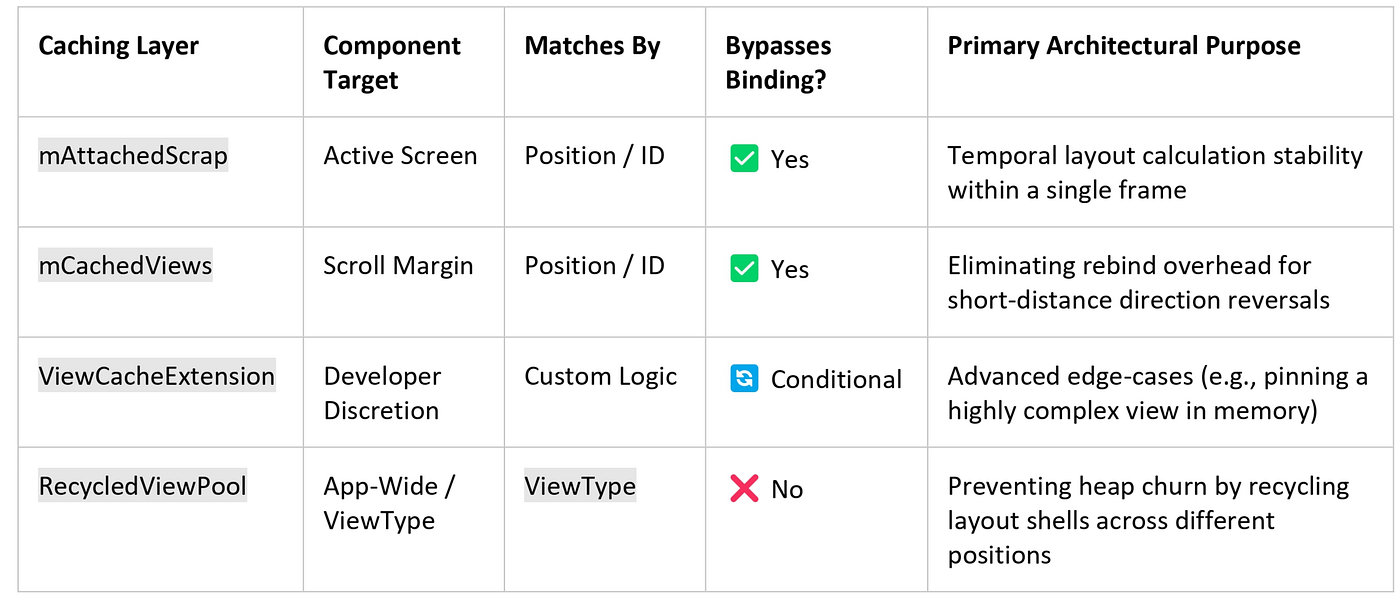
Technical Architectural Comparison Matrix
Nested List Prefetching & The GapWorker Pipeline
Building a vertically scrolling feed containing horizontal item strips (like Netflix or Google Play Store) is a notorious recipe for rendering stutter.
Historically, when a new horizontal row scrolled into view, its parent RecyclerView had to inflate a brand-new row view, while its inner child RecyclerView simultaneously initialized, allocated its layout constraints, and inflated its child elements—all on the main UI thread in a single frame.
Enter the GapWorker Pipeline
To solve this, modern Android versions utilize an internal subsystem called GapWorker.
The GapWorker coordinates prefetch work across threads, issuing tasks ahead of time, while still respecting main thread constraints for final view operations. It predicts which items are about to scroll into view based on current scrolling velocity and prepares items ahead of time.
           [User Scroll Input] ➔ [Velocity Detected]
                               │
                               ▼
                        [GapWorker Loop]
                               │
            (Predicts upcoming layout boundaries)
                               │
                               ▼
                   [Prefetch Query Dispatched]
                               │
                               ▼
                      [Cache Tier Search]
            (mAttachedScrap ➔ mCachedViews ➔ Pool)
                               │
                               ▼
           [Early Acquisition & Preparation of VH]
                               │
             (Shifts workloads off active frame)
                               │
                               ▼
          [Main Thread Sync ➔ Bind Completion ➔ Draw]
When nested prefetching is configured correctly:
- The outer list row is prefetched.
- The
GapWorkerlooks inside the incoming nested row, detects the child layout manager, and schedules the early acquisition and preparation of ViewHolders before they ever cross the visual viewport boundary. - Threading Nuance: While the background thread handles forecasting and layout preparation, the final data population via
onBindViewHolder()still safely completes on the main UI thread handler when the item is realized.
Advanced Velocity Insight: Prefetch reduces perceived latency, not actual work — it simply redistributes it across time. The effectiveness of the pipeline depends heavily on scroll velocity — fast, aggressive flings can easily outrun the background prefetch pipeline, causing sudden fallback binding work to hit the main thread all at once. Over-aggressive prefetching can also compete with active UI thread work and reduce overall frame performance if not profile-tuned carefully.
Code Implementation: Sharing the RecycledViewPool and Optimizing Prefetching
To make nested lists scroll fluidly, we must apply two strategic optimizations:
- Provide a shared
RecycledViewPoolso all nested rows pull from a centralized memory pool rather than allocating individual pools per row. - Explicitly specify
initialPrefetchItemCounton the inner layout manager so theGapWorkerknows how many items to construct ahead of time.
import android.view.LayoutInflater
import android.view.View
import android.view.ViewGroup
import androidx.recyclerview.widget.LinearLayoutManager
import androidx.recyclerview.widget.RecyclerView

class ParentFeedAdapter(
    private val contentGroups: List<List<String>>,
    // Centralized single pool passed down from the hosting Activity/Fragment
    private val sharedPool: RecyclerView.RecycledViewPool
) : RecyclerView.Adapter<ParentFeedAdapter.RowViewHolder>() {

    class RowViewHolder(view: View) : RecyclerView.ViewHolder(view) {
        val childRecyclerView: RecyclerView = view.findViewById(R.id.child_recycler_view)
    }

    override fun onCreateViewHolder(parent: ViewGroup, viewType: Int): RowViewHolder {
        val view = LayoutInflater.from(parent.context)
            .inflate(R.layout.item_parent_row, parent, false)
        return RowViewHolder(view)
    }

    override fun onBindViewHolder(holder: RowViewHolder, position: Int) {
        val rowData = contentGroups[position]

        // 1. Setup the child LayoutManager with explicit prefetch rules
        val childLayoutManager = LinearLayoutManager(
            holder.childRecyclerView.context,
            LinearLayoutManager.HORIZONTAL,
            false
        ).apply {
            // Tells GapWorker to request up to 4 horizontal elements for prefetching
            // while this row is still scrolling into view. The system may adapt this
            // number based on frame deadlines or thread contention.
            initialPrefetchItemCount = 4
        }

        holder.childRecyclerView.apply {
            layoutManager = childLayoutManager

            // 2. Attach the shared pool to avoid allocating a pool instance per row
            setRecycledViewPool(sharedPool)

            // 3. Bind the child adapter
            adapter = ChildItemAdapter(rowData)

            // Optimizes internal view invalidation checks
            setHasFixedSize(true)
        }
    }

    override fun getItemCount(): Int = contentGroups.size
}
🧪 Real-World Engineering Scenario: The Stuttering Horizontal Strip
The Problem
You are engineering a content discovery app featuring horizontal rows nested inside a vertical scrolling feed (similar to Netflix). During fast scrolling down the vertical feed, every time a new horizontal carousel appears on screen, the scroll indicator jumps or hitches significantly, dropping frame rates well below 60 FPS.
The Analysis
Profiling the application via Systrace reveals massive layout blocks on the main thread exactly when rows hit the screen bounds. Looking at the XML constraints of the nested child container reveals that its height layout attribute was declared as wrap_content.
Because the height is highly dynamic and unbounded, it interferes with accurate prefetch distance calculations. The GapWorker cannot determine the spatial footprint of the upcoming row, which effectively prevents background preparation for that item. When it becomes visible, the main thread is slammed with synchronous inflations for the row container and all its internal sub-elements simultaneously.
The Fix
- Modify the XML layout of the child container or inner item templates to have a static, fixed height or explicit dimensional constraints instead of
wrap_content. - Apply the shared
RecycledViewPoolconfiguration shown in the code architecture above, pairing it with an accurateinitialPrefetchItemCount. This allows theGapWorkerto accurately measure layout bounds ahead of time and load views cleanly during scroll margins.
🎯 Common Mistakes Checklist
- Using
wrap_contentin Scrolling Containers: Applying dynamic sizing constraints inside nestedRecyclerViewconfigurations, which destabilizes layout calculation bounds and can interfere with accurate prefetch distance calculations. - Inflating Unique Pools Per Nested Row: Failing to share a single
RecycledViewPoolacross nested structural carousels, resulting in memory waste and continuous layout thrashing. - Modifying Cache Sizes Blindly via
setItemViewCacheSize(): Artificially expandingmCachedViewsto massive capacity limits traps heavy, stale object view trees inside the heap, leading to major garbage collection pressure. - Misusing
notifyDataSetChanged(): Calling this broad updater marks all current ViewHolders as completely invalid, causing an immediate, full layout pass and rebind across the entire view hierarchy that blows past cache efficiencies. - Over-Prefetching Items: Specifying an unreliably large
initialPrefetchItemCountthat forces the background worker loop to aggressively contend with the main UI thread for allocation bandwidth.
📊 RecyclerView Performance Checklist
Ensure your lists are optimized by verifying these rules in your production codebase:
- [ ] Fixed Sizing: Set
setHasFixedSize(true)if layout mutations do not alter item width or height dimensions. - [ ] Shared Pools: Share a centralized
RecycledViewPoolacross all identical nested view structures. - [ ] Prefetch Count Tuning: Set
initialPrefetchItemCountmatching the approximate maximum number of child items visible on screen at one time. - [ ] No
wrap_content: Avoid variablewrap_contentheights/widths on nested scroll structures to protect prefetch tracking distance accuracy. - [ ] Lightweight Binding: Keep
onBindViewHolder()clean. Delegate structural string formatting, calculations, and complex logic out to background processing pipelines or your ViewModel architecture.
🧠 Memory Caching Mental Model Summary
To permanently internalize this caching framework, use this quick reference check:
- Scrap Tiers: The layout workspace. Clean views are held safely here for fractional milliseconds during layout calculations to prevent positioning jitters.
- Cached Views (
mCachedViews): The immediate history buffer. Keeps views bound to their exact positions for minor scrolling micro-adjustments. - RecycledViewPool: The structural warehouse. Views here are stripped of their data identities, organized strictly by blueprint categories (
ViewType), and require complete re-binding before reuse. - The GapWorker Rule: Leverage the system’s background windows by providing explicit numbers via
initialPrefetchItemCountto shift layout initialization workloads off the user's primary frame budget.
🙋 Frequently Asked Questions (FAQs)
If mCachedViews keeps elements completely intact, why shouldn’t I set its size to 50?
Increasing the size traps a massive amount of fully constructed view hierarchies directly inside memory. This significantly inflates your app’s RAM footprint. Furthermore, if your underlying dataset changes, all 50 cached views instantly become invalid, forcing a massive, sudden re-binding wave that can freeze the UI thread.
Do views inside the RecycledViewPool retain their internal state data?
No. When a view enters the RecycledViewPool, its structural identity is preserved, but its connection to its previous data position is severed. It is marked as clean structural scrap, which is why it must pass entirely through onBindViewHolder() before it can safely appear on screen.
Why isn’t my nested prefetching working even though I set initialPrefetchItemCount?
Ensure your nested RecyclerView is using a layout manager that supports it (such as LinearLayoutManager or GridLayoutManager). Additionally, if your nested container view's height or width layout constraints are set to wrap_content, it can interfere with accurate prefetch distance calculations, which frequently prevents background prefetching algorithms from executing.
💬 Let’s Discuss!
As you optimize your list caching layers, consider these questions:
- Have you profiled your application’s memory allocation trends during rapid scrolling to track if your heap experiences high object mutation churn because of missing
ViewTypeoptimization? - If your app leverages nested row layouts, are you passing around a singular, lifecycle-aware
RecycledViewPoolinstance, or is every row generating its own memory allocation pool?
👉 Part 3: Hunting Frame Drops: Diagnosing and Fixing RecyclerView Scrolling Jank
📱 Go Beyond Using Jetpack Compose
If you’re building on Android, understanding what happens under the hood separates developers who use Compose from those who master it. I highly recommend “Mastering Jetpack Compose Internals”. It’s a deep, architecture-first walkthrough of the composition tree, the slot table, snapshot state, and the runtime that powers modern Android UI — capped off with a full case study building a real app called Mosaic.
- E-book: Available on Google Play
- Kindle Edition: Available on Amazon
- Also available in Paperback & Hardcover
메타데이터
- post_id
- d878aae665d5
- slug
- part-2-eliminating-recyclerview-jank-a-deep-dive-into-caching-prefetching-d878aae665d5
- url
- https://blog.stackademic.com/part-2-eliminating-recyclerview-jank-a-deep-dive-into-caching-prefetching-d878aae665d5
- canonical_url
- https://blog.stackademic.com/part-2-eliminating-recyclerview-jank-a-deep-dive-into-caching-prefetching-d878aae665d5
- author_url
- https://medium.com/@sivavishnu0705
- status
- ok
- fetched_at
- 2026-07-25 23:20:03