Why agents keep making up your components, and how RAG and a graph can fix it your design system.
Teams are wiring their design system into AI agents. Figma MCP, skill files, plugins that promise the agent builds screens straight from…
Why agents keep making up your components, and how RAG and a graph can fix it your design system.
Teams are wiring their design system into AI agents. Figma MCP, skill files, plugins that promise the agent builds screens straight from your library.
Small system, mostly fine.
Big system, it falls apart. The agent invents components that don’t exist, makes up props, hands back something confident and wrong. The older and bigger the system, the worse it gets.
For the record, this is a hypothesis. I haven’t tested it.
Skill files just move the problem
The trendy fix right now is skill files. Write a doc per component, explain when to use it, hand the agent the stack.
It helps. The agent has more to work with.
But you’ve given it a phone book and asked it to call the right person. 30 components, fine. 400 components, 3 naming conventions, and a few “temporary” patterns from 2018, and the agent reads everything then guesses which file matters. That guess is the weak spot you were trying to fix, and a lot of it is hanging on the promise that “the model will become better”.
In fact, you moved the problem one room over. And the designers still have to write every one of those files :) which, at speed and very often as an ad hoc job, requires coherence to succeed.
RAG as a search tool
There’s a known technique for this, well, not for design systems per se. RAG, retrieval-augmented generation. Engineers use it to stop models hallucinating across big document sets. Here comes the hypothesis that it should work the same on a component library.
You embed every component once and store it. A request comes in. A retriever fetches only the handful of components that fit, with their docs attached (context), and hands those to the model. The model picks from a short list instead of 400 options. Less room to wander, less room to invent, well, fewer tokens as well.
User question
   -> Component index
   -> Rewrite + search (semantic + keyword)
   -> Graph expansion (pull in dependencies)
   -> Rerank candidates (order by best fit)
   -> LLM picks + builds (with docs as context)
   -> Spec / code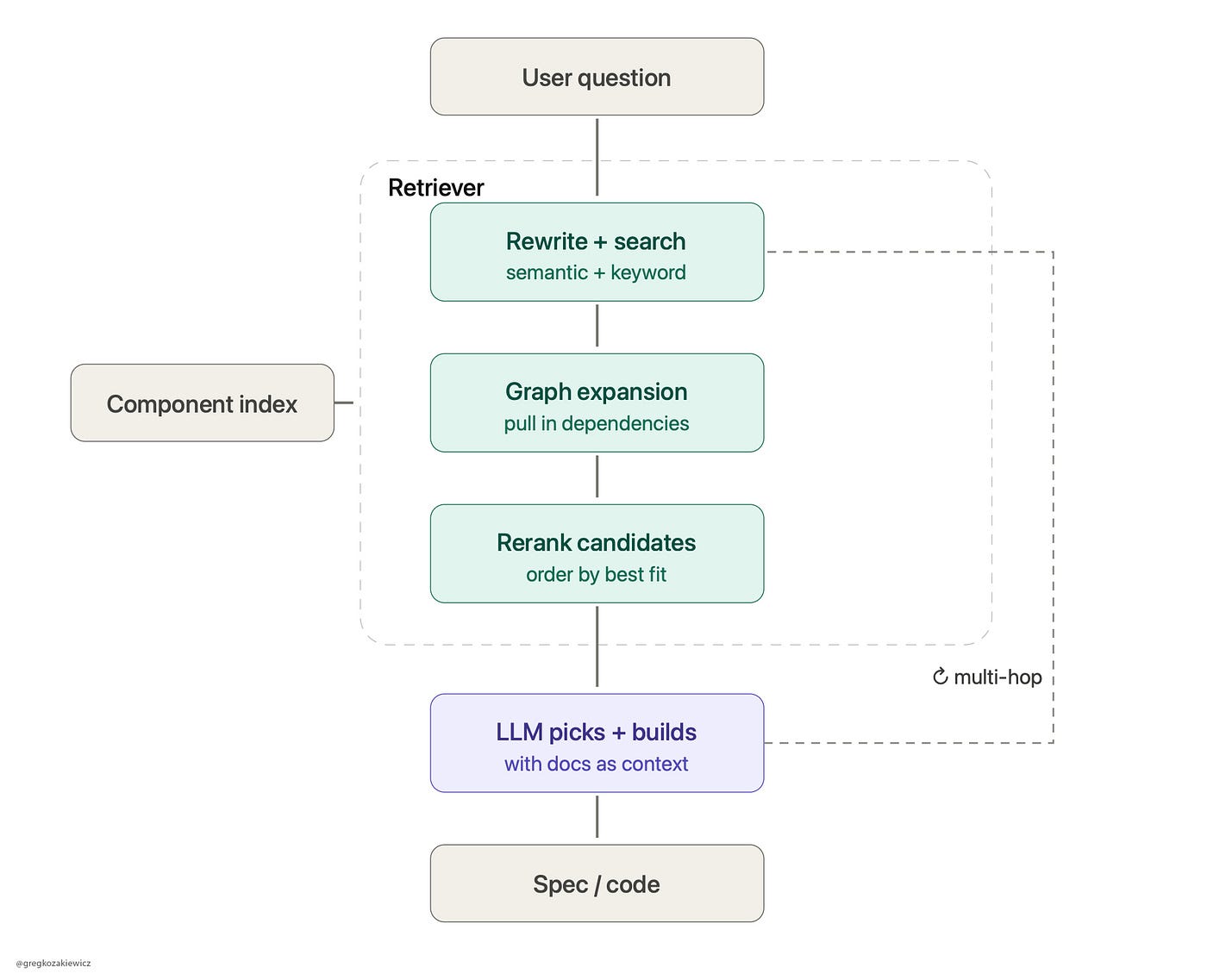
Graph expansion is where the guessing stops
Plain retrieval (RAG) ranks by similarity. Ask for a date picker, it hands back things that read like a date picker. Good. Now watch what can go wrong.
Components don’t live alone. They snap together. A form field needs a label and an error slot. A modal needs a trigger, a close button, and somewhere to trap focus. A table needs rows, a header, and usually pagination.
Order a door hinge. It turns up without the screws. You got the hinge. You still can’t hang the door. A component pulled out on its own is that hinge, and the model will happily invent the screws.
That’s most of the hallucination, right there. The agent isn’t blind to your library. It got handed half an assembly and filled in the rest from memory.
Graph expansion fixes the shape of what you fetch. You map the system as a graph. Components are the nodes. The edges are the relationships: this requires that, this composes with that, never put this one inside that one. Retrieve a component, walk its edges, and the model gets the whole working unit instead of a loose part.
This is the bit plain RAG can’t do, and it’s the bit that makes a design system a system. The value is in how the parts connect. A graph is that knowledge, written down where a machine can read it.
Some of it you get for free. Your code already knows a field is built from a label and an input, so you pull those edges straight from the components. The rest is soft knowledge living in people’s heads. Which two patterns always travel together. Which combination quietly breaks accessibility.
Someone has to write that down, and it’s the designer who knows it. The engineer indexes it and serves it fast. You decide what connects to what. That’s systems thinking, and it’s why this is yours to own even though it wears an engineering coat.
Realistically, who needs it?
Not every system. Small library, dump it in the context window and move on.
The big, old, tangled ones are where it pays off, or is even a must. A decade of tenure, half the original team gone, naming that’s a museum of old arguments.
Now I can almost hear it: “Sounds good, do it.” Standard leadership approval without taking responsibility. Every component in the index has to be coherent enough to be found and picked correctly. A clear description, an honest “don’t use this here”, real dependencies, a working example.
On a system growing since 2015, that’s a mountain. No shortcut. Making the system make sense was always the real work. The agent just shows how much got skipped. It’s real work that leaders think can be done in a “week” or so.
And just to give a more vivid example. I put a lot of effort into making sure my child understands the multiplication table, fractions, percentages. When it comes to solving algebra, you need to know a few mathematical formulas, Pythagoras, the area or volume of a cone, etc. The fact that a child may remember the sophisticated, powerful formula won’t work if they don’t have the basic knowledge. Then the perception is that the child is bad at math, and the justification is that it’s genetic, like one of the parents. It’s the same with a design system. If your foundations are crap, the same crappy result will follow. Blame will be on the team’s performance, on legacy, on people not taking it seriously, etc. The warning is simple: fix the foundation first, or everything you build on top of it inherits the crack.
Sampling
Now an ad hoc hypothesis. Vector search ranks by distance. It’s weak on near-duplicates. A Button, an IconButton, and a link styled as a button sit almost on top of each other in that math, and the retriever (RAG) can’t tell them apart.
So at the rerank step, you ask a model to judge the short list. “Given this request, which of these 5 fits?” MCP has a built-in way to do this, called sampling: the system requests that judgment from the model through the agent.
Run it a few times. Lands on the same component every time, you trust it. Flip-flops, and your docs or your shortlist are bad. Sampling picks better. It also tells you where your system is incoherent.
Thanks for reading
Again, that’s my thought on the future. Keen to hear the feedback, especially from a technical perspective.
Teams keep reaching for a magic skill file that makes the agent behave. My guess is the boring index does the real work. The file barely matters.
And it only pays off if someone made every component honest about what it is. If your design system can’t explain itself to a person, it won’t explain itself to a machine. That part hasn’t changed in 25 years.
DesignSystems #AI #ProductDesign #DesignLeadership #RAG #AIAgents #DesignEngineering
메타데이터
- post_id
- d8b6c745bfeb
- slug
- why-agents-keep-making-up-your-components-and-how-rag-and-a-graph-can-fix-it-your-design-system-d8b6c745bfeb
- url
- https://medium.com/design-bootcamp/why-agents-keep-making-up-your-components-and-how-rag-and-a-graph-can-fix-it-your-design-system-d8b6c745bfeb
- canonical_url
- https://medium.com/design-bootcamp/why-agents-keep-making-up-your-components-and-how-rag-and-a-graph-can-fix-it-your-design-system-d8b6c745bfeb
- author_url
- https://medium.com/@pencilrebel
- status
- ok
- fetched_at
- 2026-06-09 15:37:30