Building a Workato Recipe Flow: From Workato JSON to Flawless Flowcharts
How I used an LLM to visualize complex automations and then taught it to fix its own mistakes.
Building a Workato Recipe Flow: From Workato JSON to Flawless Flowcharts
How I used an LLM to visualize complex automations and then taught it to fix its own mistakes.
**Workato** is a powerful integration platform (iPaaS) that allows you to build complex automation recipes. But as these recipes grow, with nested if-else blocks, try-catch error handling, and loops, understanding the logic from the raw JSON export becomes a nightmare. It's a wall of text that’s incredibly difficult to visualize.
What if we could automatically generate a clean, readable flowchart from that JSON? And what if, when the generation failed, the system could automatically fix itself?
That’s exactly what I set out to build: a FastAPI application that leverages a Large Language Model (LLM) to convert Workato recipe JSON into Mermaid.js flowcharts, complete with a self-correction loop to ensure the final output is always perfect.
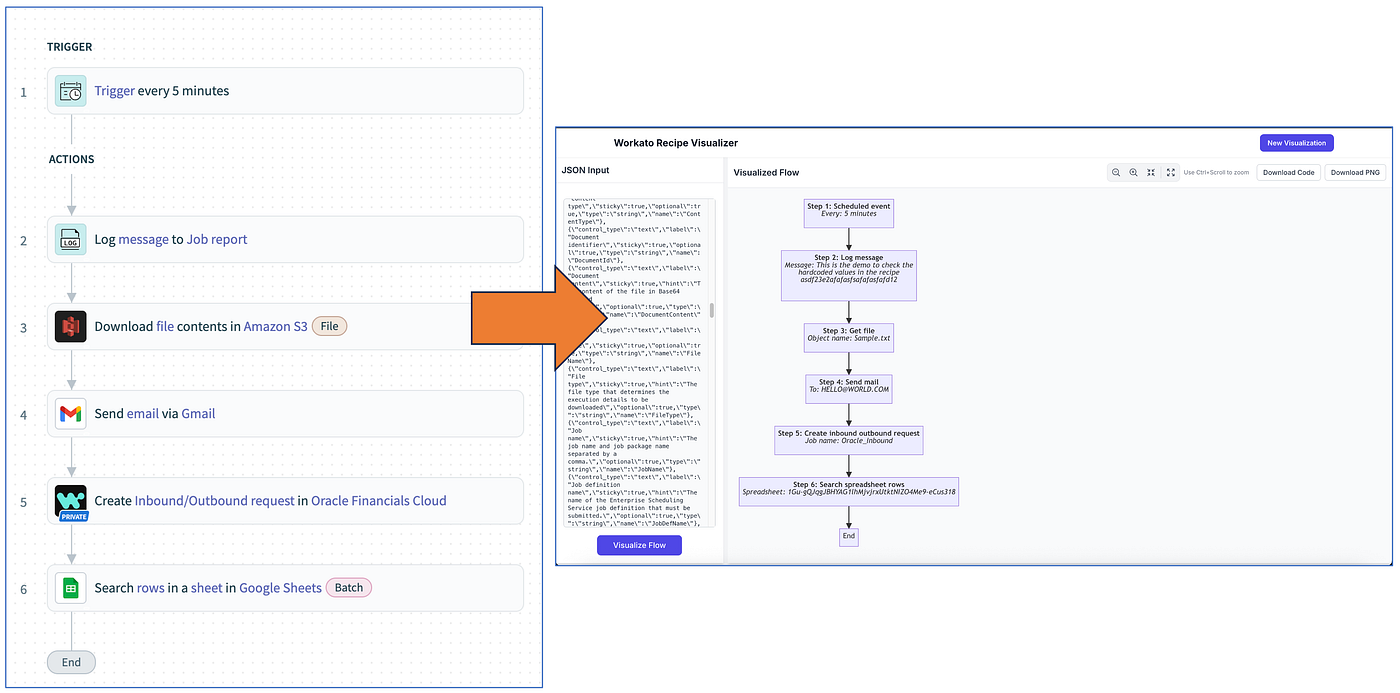
The Core Idea: Translating JSON to a Diagram
The goal is simple: take a complex Workato recipe JSON and translate it into **Mermaid chart **syntax, a simple, markdown-like language for creating diagrams.
For example, we want to turn this…
{
  "keyword": "if",
  "number": 10,
  "as": "_p[10]",
  "input": { "condition": "((_p[6].data.name CONTAINS _p[4].data.entry_code))" },
  "block": [
    {
      "provider": "workato",
      "keyword": "update_variable",
      "name": "update_variable",
      "number": 11,
      ...
    }
  ]
}
…into this:
graph TD
    step11{{"Step 11: If<br/>Name contains entry code"}}
    step12["Step 12: Update variable"]
    EndIf11(( ))

    step11 -- Yes --> step12
    step11 -- No --> EndIf11
    step12 --> EndIf11
This is a classic translation task, and it’s a perfect fit for an LLM. However, simply throwing the raw JSON at a model like GPT-4 won’t work reliably. The output will be inconsistent and often syntactically incorrect.
To build a robust solution, I broke the problem down into three key challenges:
- Taming the JSON: Pre-processing the Workato JSON to make it AI-friendly.
- Guiding the AI: Using advanced prompt engineering to get the exact output we need.
- Achieving Perfection: Implementing a self-correction loop for when the AI inevitably makes a mistake.
1. Taming the JSON Beast with Normalization
Workato JSON is not designed for human (or AI) readability. It has two major issues: deeply nested blocks and cryptic data pill references (e.g., _p[10].data.name).
To solve this, I wrote a normalize_recipe function that acts as a pre-processor. It does two critical things:
A. Flattening the Structure
It recursively traverses the entire JSON, including all nested block arrays, and pulls every action out into a single, flat list. This turns a complex tree into a simple, linear sequence of steps that the AI can easily follow.
B. Standardizing Data Pills
It finds all the “alias” references (like "as": "_p[10]") and replaces every instance of that alias with a simple, standardized identifier like "step_11". This de-mystifies the data flow, making it crystal clear which step is referencing which.
Here’s our traverse_and_normalize_blocks helper:
def traverse_and_normalize_blocks(node: Dict, data_as: List, data_w: List):
    """
    Recursively processes a given node and all its children in the 'block' array,
    ensuring no steps are skipped.
    """
    # 1. Process the current node itself
    if isinstance(node, dict) and "number" in node:
        step_number = node.get('number') + 1
        as_val = f"step_{step_number}"

        if "as" in node and node["as"]:
            data_as.append({"as": node["as"], "step": step_number})

        data_entry = {
            "step": step_number,
            "as": as_val,
            "comment": node.get("comment"),
            "keyword": node.get("keyword"),
            "input": node.get("input")
        }
        data_w.append(data_entry)

    # 2. After processing the current node, recurse into any child blocks.
    if isinstance(node, dict) and "block" in node:
        for child_block in node.get("block", []):
            traverse_and_normalize_blocks(child_block, data_as, data_w)
By feeding the AI this clean, normalized JSON, we’ve already increased the chances of success by an order of magnitude.
2. Guiding the AI with Precision Prompt Engineering
You can’t just ask an LLM to “make a flowchart.” You have to give it a detailed blueprint. My system prompt became a comprehensive rulebook for generating Mermaid code, covering everything from syntax to high-level logic.
Here are some of the most critical rules I included:
- Declare-Then-Link Strategy: To avoid common Mermaid rendering errors, I instructed the AI to first declare all nodes with their labels at the top of the script, and only then create the links (
-->) between them. This is the single most important rule for guaranteeing valid syntax. - Strict Rules for
If/ElseBlocks: Conditionals are tricky. My prompt enforces a strict pattern:
- The condition must be a diamond shape:
NodeID{{...}}. - Every
ifblock must end at a single, invisible "convergence node" (e.g.,EndIf1(( ))). - The “Yes” and “No” paths must both connect to this convergence node.
- If a path is empty (e.g., an
ifwith noelse), it must link directly to the convergence node. This prevents stray arrows and logical errors.
- Handling
try/catchand Loops: Similar rules were defined for other blocks.try/catchblocks use a solid arrow for the success path and a dotted arrow for the error path (-.->), while loops are enclosed in asubgraph.
This level of detail in the prompt turns the LLM from a creative guesser into a deterministic-acting translator.
# A snippet from the AI prompt generation logic
system_prompt = """
You are an expert in creating highly robust Mermaid flowcharts. Your task is to convert Workato recipe JSON into a syntactically perfect and safely renderable `graph TD` definition.

### Core Directives & Syntax Rules

**1. Output Format**
* Respond **only** with raw Mermaid code.
* Do **not** include markdown fences (like ` ```mermaid `)...

**2. Core Generation Strategy: Declare-Then-Link (CRITICAL)**
* To prevent `rank` errors, you **MUST** first declare all nodes, and only then create the links between them.

**3. Conditional Blocks (If/Else):**
* **Convergence Node (CRITICAL & MANDATORY):** *Every* `if` block, without exception, **must** conclude at a single, **invisible convergence node** (e.g., `EndIf1(( ))`).
...
"""
3. The Magic Ingredient: A Self-Correction Loop
Even with normalization and a great prompt, LLMs can still make mistakes — a misplaced quote, a malformed node ID, a forgotten end statement. These subtle errors will cause Mermaid.js on the frontend to fail.
So, how do we handle this? We tell the AI what it did wrong.
This is the most powerful part of the application. It creates a closed-loop system where the AI debugs its own code.
Here’s the workflow:
- Generate: The backend generates the first version of the Mermaid code and sends it to the frontend.
- Validate: The frontend attempts to render the diagram using the Mermaid.js library inside a
try...catchblock. - Report Failure: If the render fails, the JavaScript error message (
e.message) is captured. - Send Feedback: The frontend makes a call to a
/api/correctendpoint, sending thetask_idand the raw error message. - Correct: The backend wakes up the same AI conversation, but with a new prompt:
“The previous Mermaid code you generated failed to render with the following error:
[the error message from the frontend]. Please analyze the error and the original JSON to generate a corrected version." - Repeat: The new code is sent to the frontend, and the loop continues until the diagram renders successfully or we hit a retry limit.
# The background task that runs the correction
async def run_correction_in_background(task_id: str, error_message: str):
    task = task_store.get(task_id)
    logger.info(f"Correction attempt {task.get('attempt', 1)} for task {task_id}...")

    # We call the same generation function, but this time with error_feedback
    mermaid_content, new_history = await generate_mermaid_code(
        recipe_json=normalized_json_str,
        chat_history=task["chat_history"],
        error_feedback=error_message, # <-- The crucial feedback
        task_id=task_id
    )
    # ... update task status ...
This self-healing mechanism is incredibly effective. It can fix issues like invalid node IDs (123_node instead of node_123), syntax errors, or logical flaws that the initial prompt didn't cover.
Putting It All Together: The Tech Stack
To make this all work smoothly, I used a modern, asynchronous Python stack:
- FastAPI: For building the high-performance, async API.
- LangChain: To manage interactions with the OpenAI model, making it easy to handle chat history and structured prompts.
- BackgroundTasks: FastAPI’s built-in feature to run the AI generation and correction processes without blocking the server, providing a snappy user experience.
- Tenacity: A library to add automatic retries to the LLM API calls, making the system resilient to transient network errors.
Final Thoughts
Building this tool was a fascinating exercise in practical AI engineering. It reinforced three key lessons:
- Garbage In, Garbage Out: Pre-processing and cleaning your input data is often more important than tweaking the model itself. Our JSON normalization step was critical.
- Prompting is Programming: A well-structured, detailed prompt is the source code that controls the LLM’s behavior. It needs to be precise, unambiguous, and cover all edge cases.
- Embrace Imperfection: LLMs are not perfect. Instead of aiming for a flawless first attempt, building systems that can identify and recover from errors is a more robust and realistic approach. The self-correction loop turns a fallible tool into a reliable one.
By combining data pre-processing, meticulous prompt engineering, and a self-healing feedback loop, we can move beyond simple AI demos and build truly robust, practical applications that solve real-world problems.
메타데이터
- post_id
- d8ec3d922e48
- slug
- building-a-workato-recipe-flow-from-workato-json-to-flawless-flowcharts-d8ec3d922e48
- url
- https://medium.com/@djajafer/building-a-workato-recipe-flow-from-workato-json-to-flawless-flowcharts-d8ec3d922e48
- canonical_url
- https://medium.com/@djajafer/building-a-workato-recipe-flow-from-workato-json-to-flawless-flowcharts-d8ec3d922e48
- author_url
- https://medium.com/@djajafer
- status
- ok
- fetched_at
- 2026-06-20 20:29:01