Stop Overbuilding AI Agents. Start With the Workflow.
Most AI agent projects do not fail because the model is weak.
Stop Overbuilding AI Agents. Start With the Workflow.
Most AI agent projects do not fail because the model is weak.
They fail because the system gives the model the wrong amount of freedom.
A simple workflow becomes an “agent.” A retrieval assistant gets tools it does not need. A single-agent system turns into multiple agents before the first version is properly tested.
This is one of the most common mistakes teams make when building with AI.
They start by asking:
Which agent pattern should we use?
But the better question is:
Where does this workflow actually need autonomy?
That one shift changes the architecture.
Because not every AI feature needs an agent. Not every agent needs tools. Not every tool-using agent needs planning. Not every planning system needs multiple agents.
A good agentic system should feel boring in the right places.
The predictable parts should stay predictable. The uncertain parts are where the agent earns its place.
The real decision is control vs judgment
The mistake is treating agent patterns like a menu of impressive technical options.
ReAct. Planner-executor. Reflection. Tool-using agents. Supervisor agents. Multi-agent orchestration.
These patterns are useful, but they are not automatically useful for every product.
The real design question is simpler:
Where does the system need judgment, and where does it need control?
A support assistant answering questions from documentation does not need the same architecture as a DevOps agent investigating a failed deployment.
A healthcare booking assistant should not have the same freedom as a research assistant preparing a market landscape.
A sales proposal assistant that touches pricing and commitments needs a different approval layer than a content assistant drafting social posts.
This is why agent design should start with the workflow, not with the pattern.
The pattern should serve the workflow.
Not the other way around.

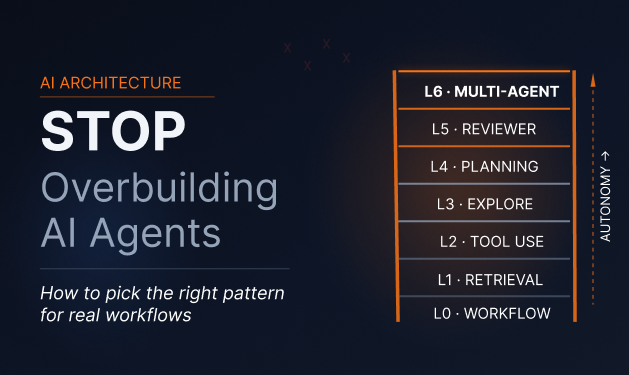
The agent pattern ladder
Think of agent patterns as a ladder.
At the bottom, you have fixed workflows. They are predictable, controlled, and easy to test.
As you move up, you add more autonomy.
First retrieval. Then tools. Then exploration. Then planning. Then review. Then specialist agents.
Each step can unlock more value.
Each step also adds more complexity.
That is the tradeoff most teams underestimate.
The goal is not to climb the ladder as fast as possible. The goal is to stop at the lowest level that can solve the problem safely.

Level 0: Keep it as a workflow
Sometimes the best agent pattern is no agent at all.
Use a fixed workflow when the process is already known.
For example, imagine a SaaS user requests a trial extension.
The system may only need to:
- Check whether the user already used an extension.
- Check the account type.
- Apply the extension rule.
- Notify the user.
- Log the action.
There is no deep reasoning needed here.
The business logic already knows what should happen.
Adding an agent may only introduce uncertainty, cost, latency, and debugging work.
This is where many teams should start.
If the backend already knows the decision path, do not ask an AI agent to rediscover it.
Use this level for trial extension rules, account status checks, form validation, static policy-based routing, standard notification flows, and simple ticket categorization.
The rule is simple:
If the path is known, keep it deterministic.
Level 1: Add retrieval before autonomy
Many AI assistants do not need to act.
They need to answer from trusted information.
A user asks:
Does our current plan include API access?
The assistant should search pricing docs, product policies, contract terms, or an internal knowledge base.
It does not need five tools. It does not need planning. It does not need multiple agents.
It needs reliable retrieval.
This is usually a retrieval-first assistant, not a full agent.
Use this level for product documentation assistants, internal knowledge search, HR policy lookup, sales enablement assistants, customer onboarding help, and website chatbots that answer from approved content.
The job here is not creativity.
The job is grounding.
The system should find the right source and explain it clearly.
Level 2: Give one agent a small toolbelt
The moment the assistant needs to do something in another system, you move beyond basic retrieval.
For example:
I want to book a cardiology consultation for next week.
Now the assistant may need to:
- Understand the request
- Check doctor availability
- Match the department or location
- Confirm a slot
- Book the appointment
- Send confirmation
This is where a tool-using agent can make sense.
But the key word is small.
A good first version may only need three or four tools:
check_availabilitycreate_bookingreschedule_bookingsend_confirmation
Do not give the agent ten tools because ten tools look powerful.
Every extra tool increases the chance of confusion.
The tool should be predictable. The agent should decide when to use it within clear boundaries.
That is the balance.
Use this level for appointment booking, CRM updates, calendar scheduling, refund eligibility checks, order status checks, lead qualification, and internal operations tasks.
The safest tool-using agents are not the ones with the most tools.
They are the ones with the clearest tools.

Level 3: Add an explore-and-act loop
Some tasks cannot be solved through a fixed path.
The agent has to investigate.
For example:
Find out why yesterday’s deployment caused payment failures.
The system may need to:
- Check deployment history
- Inspect logs
- Compare error rates
- Review payment gateway responses
- Look at environment changes
- Identify the likely cause
- Recommend a rollback or fix
The next step depends on what the agent finds.
This is where an explore-and-act loop makes sense.
The agent looks at evidence, chooses the next action, learns from the result, and continues until it has enough information.
But this level needs strict limits.
Without limits, the agent may keep searching forever, repeat tool calls, or burn tokens without improving the answer.
A practical explore-and-act setup should include maximum steps, maximum tool calls, clear stop conditions, tool-call logging, confidence thresholds, and a human escalation path.
The agent should explore.
It should not wander.
Level 4: Split planning from doing
Planning becomes useful when the work has multiple stages.
For example:
Create a launch readiness plan for our new AI support agent.
A useful system should not immediately jump into writing the final answer.
It should first break the work into stages:
- Product readiness
- Knowledge base readiness
- Integration readiness
- QA and evaluation
- Support team handover
- Launch communication
- Post-launch monitoring
Then it can work through each stage.
This is where a planner-executor pattern helps.
The planner defines the structure. The executor handles each part.
Use this level for product launch plans, migration planning, research reports, implementation roadmaps, content campaign planning, market research, and technical architecture drafts.
Planning is useful when the work has a natural sequence.
It is not useful when the task is tiny.
Do not use a planner to answer:
What is our refund policy?
Use a planner for:
Build a 30-day rollout plan for a new refund automation workflow across support, billing, and customer success.
That is where planning earns its place.
Level 5: Add a reviewer before the output leaves
Some outputs should not be trusted on the first pass.
A sales proposal assistant may draft a proposal, but that does not mean the proposal should go directly to the prospect.
A reviewer should check:
- Is the pricing language accurate?
- Are unsupported claims removed?
- Are timelines realistic?
- Does the proposal match the prospect’s industry?
- Does it avoid legal or compliance risk?
This does not always require a complex multi-agent setup.
Sometimes a simple maker-checker loop is enough.
One agent creates. Another checks against clear criteria. A human approves when needed.
Use this level for sales proposals, client-facing reports, SQL generation, release notes, compliance-sensitive answers, medical intake summaries, security recommendations, and financial explanations.
The reviewer must have specific criteria.
“Make it better” is weak.
Better criteria would be:
- Check whether the answer uses approved claims only.
- Check whether the SQL query touches only allowed tables.
- Check whether the medical summary avoids diagnosis language.
- Check whether pricing terms match the latest contract.
Review loops are useful when quality can be measured.
If the reviewer is vague, it only adds delay.

Level 6: Use specialists only when one agent becomes messy
This is where multi-agent architecture starts to make sense.
But it should not be the default.
Use multiple agents when one agent has too many jobs, too much context, or too many permissions.
For example, an enterprise onboarding assistant may need separate capabilities:
- One agent understands product setup.
- One agent handles billing questions.
- One agent checks security requirements.
- One agent prepares training material.
- One coordinator decides what happens next.
This can work because each specialist has a clearer job.
But it can also create new problems.
Routing becomes harder. Debugging becomes harder. Cost increases. Latency increases. Agents may disagree. Failures become harder to trace.
Multi-agent systems can make hard problems easier.
They can also make simple problems harder.
Use specialists when one agent can no longer safely hold all context, different domains need different permissions, the workflow crosses teams or systems, parallel work creates real value, and the routing logic is clear enough to test.
Avoid multi-agent systems when one agent can still do the job, the workflow has only one domain, tool access is simple, the system is not yet evaluated, or you cannot explain the routing logic.
The goal is not to add more agents.
The goal is to reduce confusion.
A simple pattern picker
Here is a practical way to think about it.
If the steps are always the same, use a fixed workflow.
If the user needs answers from trusted content, use retrieval.
If the user needs something done in another system, use one agent with a small toolbelt.
If the agent must investigate before answering, use an explore-and-act loop.
If the work has many known stages, use a planner plus executor.
If the output needs careful checking, use a reviewer loop.
If the task crosses domains, permissions, or contexts, use specialists.
If the action affects money, data, access, compliance, or safety, add guardrails and human approval.
This is the useful version of agent architecture.
Not:
Which pattern is most advanced?
But:
What is the smallest system that can complete this task safely and reliably?
What this looks like in real products
SaaS support assistant
A user asks:
Why can’t I invite more teammates?
Start with retrieval.
The answer may be in plan limits or account settings documentation.
If the assistant also needs to check the user’s account, add one account lookup tool.
If it needs to upgrade the plan, hand off to checkout or human approval.
Do not start with a multi-agent system.
A simple path works:
Retrieval assistant → account lookup tool → upgrade handoff or approval
Healthcare booking assistant
A patient says:
I need to see a doctor for chest discomfort.
This is not just scheduling.
The assistant may need safety boundaries, triage rules, escalation language, doctor availability, and booking tools.
A practical architecture may look like:
Controlled intake flow → triage guardrails → availability tool → booking tool → human escalation for risk signals
The agent should not freely improvise medical advice.
It should guide, route, and escalate.
This is a case where autonomy should be narrow, even if the conversation feels natural.
GitHub PR review agent
A developer opens a pull request.
The system may need to:
- Read changed files
- Understand codebase context
- Check for security issues
- Identify risky logic changes
- Suggest improvements
- Avoid noisy comments
This is not a basic chatbot.
A useful setup may be:
Code context retrieval → tool-using review agent → checklist-based reviewer → final comment generator
A reviewer loop matters here because bad comments create friction for developers.
The goal is not to make the agent sound smart.
The goal is to make comments accurate, specific, and worth reading.
Sales proposal assistant
A salesperson asks:
Create a proposal for this prospect based on our last call.
The assistant may need CRM notes, product information, pricing rules, case studies, and approved messaging.
A safe architecture may be:
Retrieval from CRM and sales assets → proposal generator → claim checker → human approval
This is a good example of why “agentic” does not mean fully autonomous.
The system can draft.
The human should approve.
The final proposal should not go out unchecked.
Before you ship, check the control layer
Choosing the right pattern is only the first part.
A production-ready agent also needs control.
Before shipping, check five things.

1. Tool boundaries
Every tool should have a clear job.
Ask:
- What can this tool do?
- What can it not do?
- What input does it require?
- What should it return?
- What errors can it produce?
- Can the agent misuse it?
If the tool description is vague, the agent will eventually misunderstand it.
2. Stop conditions
Every loop needs an exit.
Define maximum steps, maximum retries, maximum tool calls, timeout rules, escalation rules, and confidence thresholds.
An agent that cannot stop is not autonomous.
It is unfinished.
3. Human approval
Some actions should pause before execution.
Use approval for refunds, cancellations, account changes, medical escalations, legal language, production deployments, security changes, and pricing commitments.
This is how teams make agents useful without giving them unsafe freedom.
4. Observability
You should be able to answer:
- What did the agent decide?
- Which tools did it call?
- What did each tool return?
- Why did it stop?
- Where did it fail?
- What did the user see?
If you cannot inspect the run, you cannot improve the system.
5. Evaluation
Do not test agents only with happy-path demos.
Test confusing user inputs, missing data, tool errors, permission issues, contradictory instructions, long conversations, sensitive actions, and edge cases from real users.
A good evaluation set should reflect the messy cases users actually bring.
That is where agent design becomes real.
The better way to think about agent patterns
Agent patterns are not labels.
They are control choices.
A tool-using agent gives the model controlled access to systems.
An exploration loop gives it permission to investigate.
A planning layer gives it structure.
A reviewer gives it quality control.
A multi-agent setup gives it specialization.
A human approval step gives it accountability.
The best architecture usually gives the agent the smallest amount of freedom needed to complete the task well.
That may sound less exciting than a fully autonomous multi-agent system.
But it is how reliable agentic products are built.
Final takeaway
The future of AI agents will not be won by teams that add the most agents.
It will be won by teams that know where agents are actually needed.
Start with the workflow.
Find the uncertain parts.
Add tools only where action is required.
Add planning only when the task needs structure.
Add review only where quality matters.
Add specialists only when one agent can no longer handle the work cleanly.
Add human approval wherever the cost of a wrong action is too high.
That is how you choose the right agentic design pattern without copying the hype or overbuilding the system.
메타데이터
- post_id
- d8f58ae3e9d8
- slug
- stop-overbuilding-ai-agents-start-with-the-workflow-d8f58ae3e9d8
- url
- https://medium.com/saastoagent/stop-overbuilding-ai-agents-start-with-the-workflow-d8f58ae3e9d8
- canonical_url
- https://medium.com/saastoagent/stop-overbuilding-ai-agents-start-with-the-workflow-d8f58ae3e9d8
- author_url
- https://medium.com/@kaushalverma
- status
- ok
- fetched_at
- 2026-06-17 12:55:42