Git and GitHub: A Beginner's Guide
Definitions
Git and GitHub: A Beginner's Guide
Definitions
What is Git?
Git is a version control system that is used to handle projects. In layman's terms, it's another tool/coding language to easily manage code, versions, and collaborations.
What is GitHub?
GitHub is a platform to collaboratively share and store code and have an organized workflow. It is also used to host a static website.
Important Terminologies
Push: The action of sending your commits to a remote repository. Pull: The action of fetching changes from a remote repository and merging them into your current branch. Fetch: The action of retrieving updates from a remote repository without merging them into your current branch. Merge: The process of integrating changes from one branch into another, typically the main branch. Checkout: To switch from one branch to another
The Working

- The first step is to have Git installed in the system.
Refer to this: Git — Installing Git
2. After installing git, we need to configure the environment with our GitHub credentials to start working from the terminal.
git config --global user.name 'The_user_name'
git config --global user.email 'Email_id'

## You can remove the --global to confine the scope
To check if the configuration is proper or not, Run:
git config --global --list3. Go to GitHub and create a repository.

GitHub Repository Page
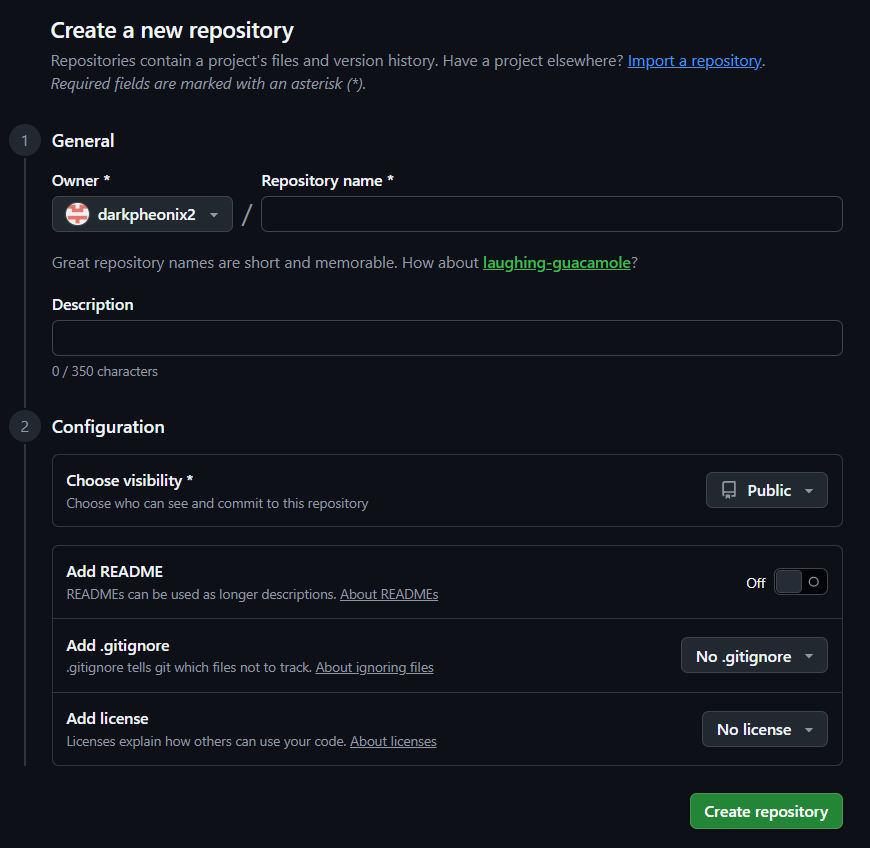
Creating the repository on GitHub
4. Connect the remote and local repository.
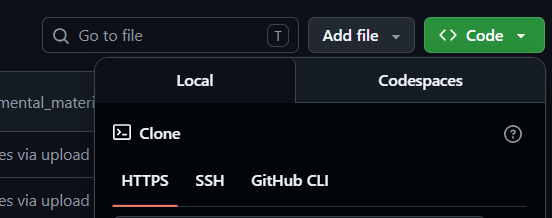
Copy the HTTPS link to connect the remote and local repo
Copy the link of the repo from the GitHub page and then run:
git remote add origin repository_link5. Next is to pull changes from the remote repo to the local repo:
git pull origin main6. Now use:
git statusto check for any changes to the current branch that have been made in the local repo with respect to the remote repo.
The red color indicates that the file has been modified, while the green color signifies that the file has been added to the staging area
7. Now, we add files to the staging area so that later they can be committed and pushed to the remote repo. Use:
git add <file_name> # -> for specific file
# or
git add . # -> for all the files- Next, we make these changes permanent in our current repo by using:
git commit -m 'It is the message for this commit'- Next, we push the changes from our local repo to the remote repo using the push command.
Use:
git push origin 'Branch_name_where_changes_need_to_be_pushed say main or feature_branch'Now the GitHub repo will display your code. Done!!

Summarized workflow
Branching and Testing
Branching is the practice of creating a cloned repository to work on code development without affecting the main codebase.
- Create a branch:
git branch 'Branch_name'- Start using the code from the branch:
git checkout 'Branch_name'To delete a branch, use:
git branch -d 'Branch_name'Once you are done with making changes in the branch, you would want to replace the code of the main branch with the branch code you wrote so that the developed feature can be used.
To do this, follow the steps above for pushing all the local changes to the remote branch, and then create a Pull request. It is done by going to the GitHub Page and clicking the Create Pull Request button. The merging of the branches is done by clicking Merge Pull Request on the GitHub interface.
Some Helpful Commands
- To check the git version:
git -- version- If you want to prevent some files from being pushed or committed, use a .gitignore file and add the files that need to be ignored by git when adding or committing.
- To undo changes to a file or unstage, use:
git restore 'file_name'
# or
git restore -- staged 'file_name' - Use:
git diffto check the changes
- When switching branches but don’t want to commit, then stash the temporary files to keep them in the branch:
git stashTo bring the stash file back, use:
git stash popIf you like this blog and want to connect:
메타데이터
- post_id
- d959f39da00a
- slug
- git-and-github-a-beginners-guide-d959f39da00a
- url
- https://medium.com/@nakulmehta3001/git-and-github-a-beginners-guide-d959f39da00a
- canonical_url
- https://medium.com/@nakulmehta3001/git-and-github-a-beginners-guide-d959f39da00a
- author_url
- https://medium.com/@nakulmehta3001
- status
- ok
- fetched_at
- 2026-06-24 11:06:28



