DevOps Interview Series #4: What Would You Do If AWS RDS Storage Is Full?
Imagine you’re on-call and suddenly receive alerts:
DevOps Interview Series #4: What Would You Do If AWS RDS Storage Is Full?
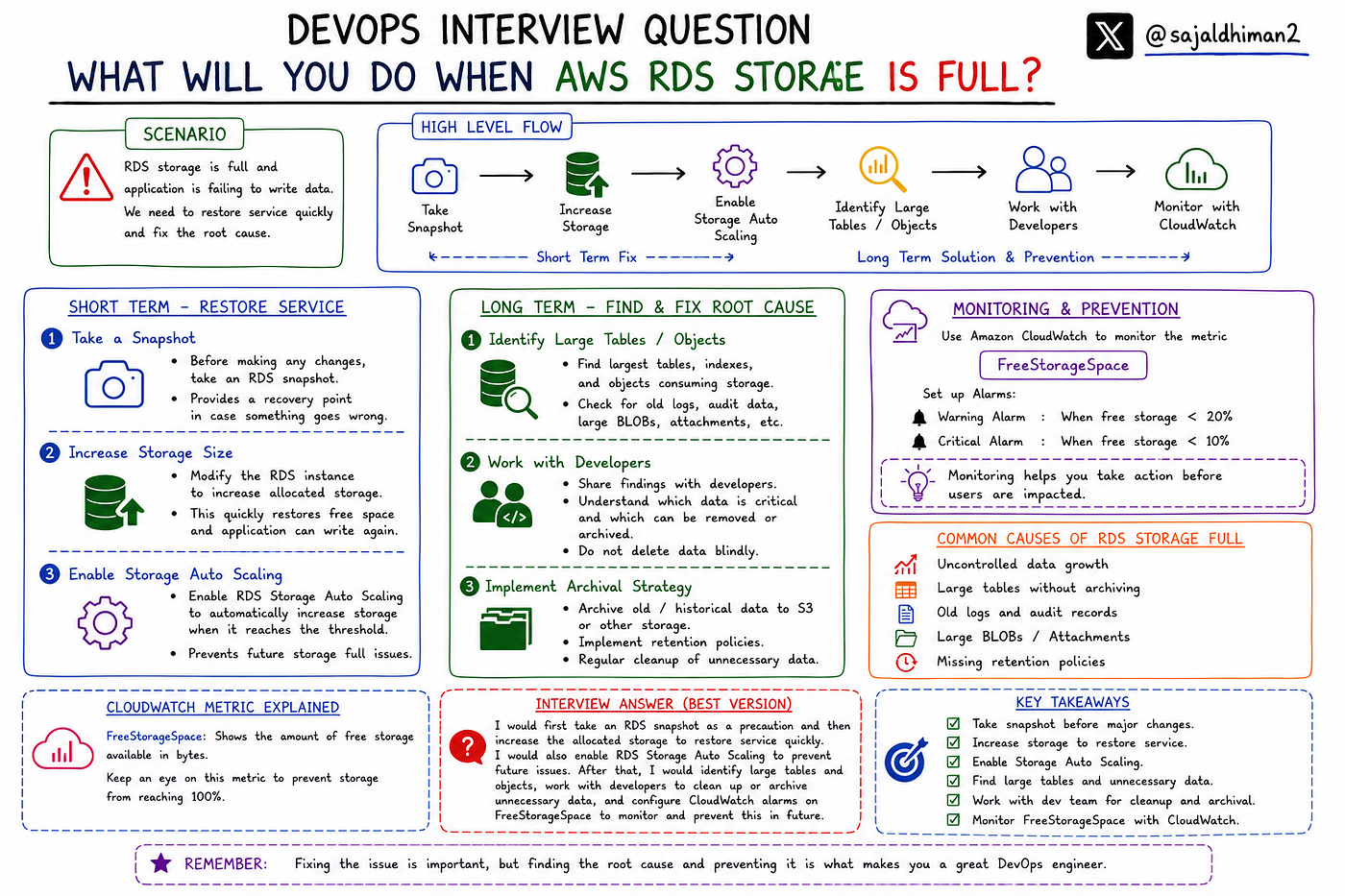
Imagine you’re on-call and suddenly receive alerts:
🚨 Database storage utilization is at 100%
🚨 Applications are failing to write data
🚨 Users are reporting errors
One of the most common production incidents in AWS is running out of database storage.
So the interview question is:
“What would you do if AWS RDS storage is full?”
Let’s walk through both the short-term fix and the long-term solution.
— -
# Immediate Goal: Restore Service
When an RDS instance runs out of storage, applications may fail because the database can no longer accept writes.
At this stage, restoring service becomes the top priority.
— -
# Step 1: Take a Snapshot
Before making any significant changes, create an RDS snapshot.
Why?
Because snapshots provide a recovery point in case something goes wrong during remediation.
Even though increasing storage is generally safe, having a backup is always a good operational practice.
— -
# Step 2: Increase Storage Size
The fastest way to restore service is to increase the allocated storage.
AWS allows you to modify the RDS instance and allocate additional storage.
Example:
Current Storage: 100 GB
Increase To: 150 GB or 200 GB
Once the modification is applied, the database gets additional free space and application writes can resume.
This is usually the quickest production fix.
— -
Step 3: Enable Storage Auto Scaling
Many teams forget this until an incident occurs.
AWS provides Storage Auto Scaling for RDS.
When enabled, AWS automatically increases storage when predefined thresholds are reached.
Benefits:
✅ Reduces operational overhead
✅ Prevents unexpected outages
✅ Handles storage growth automatically
A common interview mistake is saying “configure Auto Scaling Group.”
RDS does not use EC2 Auto Scaling Groups.
The correct answer is:
Enable RDS Storage Auto Scaling.
— -
# Long-Term Investigation
Increasing storage solves the symptom.
It does not solve the root cause.
Now we need to understand:
Why did the database grow so large?
— -
# Step 4: Identify Large Tables
Investigate the largest tables inside the database.
Questions to ask:
- Which tables consume the most storage?
- Is growth expected?
- Are old records being retained unnecessarily?
Many times, a single table is responsible for most of the storage consumption.
— -
# Step 5: Identify Large Objects and Unused Data
Review:
- Old logs
- Audit records
- Historical transactions
- Large BLOBs
- Attachments
- Temporary data
You may discover years of unused information occupying significant storage.
— -
# Step 6: Discuss with Developers
Storage cleanup should never be done blindly.
Work with the development team to understand:
- Which data is business critical?
- Which data can be archived?
- Which data can be deleted safely?
Often developers can identify tables containing obsolete records that are no longer needed.
— -
# Step 7: Implement Archival Strategy
Instead of keeping everything in the production database:
- Archive old records
- Move historical data to S3
- Use data retention policies
- Implement lifecycle management
This prevents uncontrolled growth.
— -
# Monitoring and Prevention
The best incident is the one that never happens.
Set up proactive monitoring.
— -
# CloudWatch Monitoring
AWS CloudWatch provides a metric called:
FreeStorageSpace
This metric shows how much storage remains available on the RDS instance.
Create CloudWatch Alarms such as:
- Warning at 20% free storage
- Critical alert at 10% free storage
This gives engineers enough time to act before users are affected.
— -
# Interview Answer
If an interviewer asks:
“What would you do if AWS RDS storage is full?”
A strong answer would be:
“I would first take an RDS snapshot as a precaution and then increase the allocated storage to restore service quickly. I would also ensure RDS Storage Auto Scaling is enabled to prevent future outages. After the immediate issue is resolved, I would investigate large tables and database objects, work with developers to identify unnecessary data, implement archival strategies, and configure CloudWatch alarms using the FreeStorageSpace metric for proactive monitoring.”
— -
# Quick Troubleshooting Flow
RDS Storage Full
↓
Take Snapshot
↓
Increase Storage
↓
Enable Storage Auto Scaling
↓
Identify Large Tables
↓
Review Data Growth
↓
Archive or Clean Up Data
↓
Monitor FreeStorageSpace
↓
Prevent Future Incidents
— -
# Key Takeaways
✅ Take an RDS snapshot before major changes
✅ Increase storage to restore service quickly
✅ Enable RDS Storage Auto Scaling
✅ Investigate large tables and objects
✅ Work with developers before deleting data
✅ Configure CloudWatch alarms on FreeStorageSpace
✅ Focus on both immediate recovery and long-term prevention
— -
## Final Thought
A good engineer fixes the outage.
A great engineer fixes the root cause and ensures it never happens again.
When RDS storage becomes full, don’t stop after increasing storage.
Find out why it happened and implement monitoring to prevent the next incident.
메타데이터
- post_id
- d9ba755b822d
- slug
- devops-interview-series-4-what-would-you-do-if-aws-rds-storage-is-full-d9ba755b822d
- url
- https://medium.com/@sajaldhiman16/devops-interview-series-4-what-would-you-do-if-aws-rds-storage-is-full-d9ba755b822d
- canonical_url
- https://medium.com/@sajaldhiman16/devops-interview-series-4-what-would-you-do-if-aws-rds-storage-is-full-d9ba755b822d
- author_url
- https://medium.com/@sajaldhiman16
- status
- ok
- fetched_at
- 2026-06-13 07:35:29


