Microsoft Fabric Spark Settings, High Concurrency & Domains Explained for DP-700
Learn how Spark Pools, Jobs, and High Concurrency work in Microsoft Fabric and how Domains and OneLake improve data governance.
Microsoft Fabric Spark Workspace Settings & Data Governance Explained (DP-700 Guide)
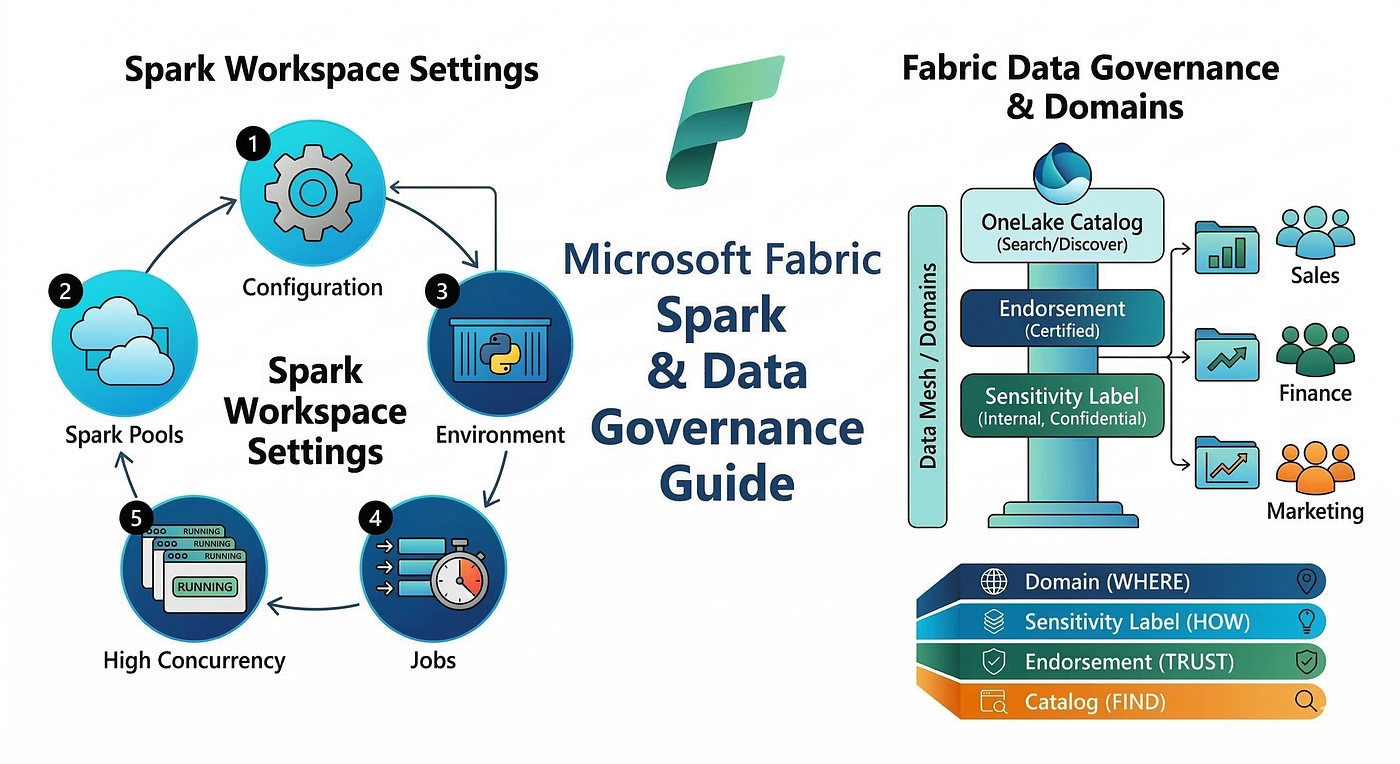
Microsoft Fabric provides powerful tools for data engineering, data governance, and distributed analytics. Two critical areas every Fabric data engineer should understand are Spark Workspace Settings and Fabric Data Governance using Domains.
This guide explains how Spark settings work inside a workspace and how Fabric organizes and governs data using domains.
Understanding Spark Workspace Settings in Microsoft Fabric
To configure Spark for a workspace:
- Open Microsoft Fabric.
- Navigate to your Workspace.
- Click Workspace Settings.
- Under Data Engineering, select Spark Settings.
Inside Spark settings, you will see four main sections:
- Pool
- Environment
- Jobs
- High Concurrency
Each section controls a different aspect of Spark execution.
1. Spark Pools (Compute Management)
The Pool tab controls the compute resources used to run Spark workloads.
A Spark pool defines the cluster configuration used to run notebooks, pipelines, and jobs.
Fabric Capacity
Fabric capacity is configured in two stages:
- An Azure Administrator provisions Fabric capacity in the Azure portal.
- A Fabric Administrator selects that capacity when creating the Fabric environment.
This capacity determines how many compute resources are available for Spark workloads.
Node Types
All Fabric Spark pools are memory optimized.
Node sizes include:
| Node Size | vCores    |
| --------- | --------- |
| Small     | 4 vCores  |
| Medium    | 8 vCores  |
| Large     | 16 vCores |
vCore = Virtual CPU core used for distributed compute.
In Fabric:
Total vCores = Fabric Capacity × 2Types of Spark Pools
Starter Pool
Fabric provides a Starter Pool by default.
Features include:
- Memory optimized configuration
- Medium node size
- Auto scale enabled
- Dynamic allocation enabled
This pool allows quick startup without manual configuration.
Custom Pool
You can create a Custom Spark Pool when specific compute requirements are needed.
Custom pools allow you to configure:
- Node size
- Scaling rules
- Resource limits
Custom pools are commonly used for large-scale data processing workloads.
When to Use Spark Pools
Spark pools are best suited for large distributed workloads, such as:
- Big data transformations
- Machine learning workloads
- Large ETL pipelines
They are not ideal for small incremental loads where a lightweight compute engine may be more efficient.
2. Environment Tab (Runtime and Libraries)
The Environment tab defines the execution environment for Spark workloads.
An environment acts as a container for Spark configuration, including:
- Spark runtime version
- Libraries
- Spark properties
- Hardware configuration (Spark pool)
Runtime Configuration
Here you can choose the Spark version used by notebooks.
Different runtime versions may include different:
- Python versions
- Spark features
- Performance optimizations
Library Management
You can install additional libraries for notebooks, such as:
- Python packages
- Spark connectors
- Data processing libraries
These libraries become available to all notebooks using that environment.
3. Jobs Tab (Resource Allocation Behavior)
The Jobs tab controls how Spark jobs allocate compute resources.
There is an important configuration that affects how jobs consume cores.
Setting ON — The “Reserver”
When this option is ON:
- The job reserves the maximum number of cores immediately.
Result
- The job is guaranteed enough compute resources.
- Other jobs may have to wait.
This ensures the job will not fail due to scaling limitations.
Best Use Case
Use this when:
- Jobs are critical
- Failure is not acceptable
- Predictable performance is required
Setting OFF — The “Sharer”
When this option is OFF:
- The job starts using only the minimum cores.
Result
- Multiple jobs can run simultaneously.
- If a job later requires more cores and capacity is unavailable, it may stall or fail.
Best Use Case
Use this when:
- You have many small workloads
- High concurrency is preferred
- Efficient resource usage is required
DP-700 Exam Tip
| Setting | Behavior                         |
| ------- | -------------------------------- |
| ON      | Reliability and priority         |
| OFF     | Concurrency and resource sharing |
4. High Concurrency
High concurrency allows multiple workloads to share a single Spark session, reducing startup overhead.
This significantly improves performance when running many notebooks.
There are two types of high concurrency in Fabric.
Notebook High Concurrency
Multiple notebooks can share the same Spark session.
Benefits include:
- Reduced cluster startup time
- Lower compute consumption
- Faster execution for small jobs
Pipeline High Concurrency
In pipelines, Fabric uses Session Tags.
These tags allow multiple notebook activities in a pipeline to reuse the same Spark session.
Instead of creating new clusters for every notebook step, the pipeline reuses an existing session.
This improves:
- Execution speed
- Resource efficiency
- Pipeline throughput
Managing Workspace Access Roles
Fabric workspaces support role-based access control.
Available roles include:
- Admin
- Member
- Contributor
- Viewer
These roles control permissions such as:
- Managing content
- Editing notebooks
- Running pipelines
- Viewing reports
Data Mesh and Domains in Microsoft Fabric
Modern data platforms use data mesh architecture, where data ownership is decentralized across business domains.
Examples of domains include:
- Sales
- Finance
- Marketing
- Operations
In Microsoft Fabric, domains help organize data according to business ownership.
What Is a Domain?
A Domain is a logical grouping of data aligned with a business function.
Domains organize workspaces and all their data assets.
When a workspace is assigned to a domain, all items inside belong to that domain, including:
- Lakehouses
- Warehouses
- Notebooks
- Datasets
- Reports
Domains improve data ownership, governance, and discoverability.
Domain Roles in Microsoft Fabric
There are three key domain roles.
Fabric Admin
The Fabric Admin has the highest level of control.
Responsibilities include:
- Creating domains
- Editing domains
- Deleting domains
- Assigning domain admins
- Assigning domain contributors
- Associating workspaces with domains
Only Fabric Admins can create or delete domains.
Domain Admin
A Domain Admin is typically a business owner responsible for managing a domain.
They can:
- Update domain description
- Manage domain contributors
- Associate workspaces with the domain
- Update the domain image
- Override delegated tenant settings
However, they cannot:
- Delete domains
- Rename domains
- Add or remove other domain admins
Domain Contributor
A Domain Contributor is responsible for assigning workspaces to domains.
Requirements:
- Must be a Workspace Admin
Capabilities include:
- Assigning a workspace to a domain
- Changing domain assignments
They cannot access the Admin Portal Domains tab.
Role Summary
| Role               | Responsibility     |
| ------------------ | ------------------ |
| Fabric Admin       | Creates domains    |
| Domain Admin       | Manages domains    |
| Domain Contributor | Assigns workspaces |
Domain Settings Delegation
Some tenant-level governance settings can be delegated to domains.
This allows different departments to configure their own governance rules.
Examples include:
- Default sensitivity labels
- Certification settings
Tenant administrators must enable delegation before domain admins can override these settings.
Domain Image
Each domain can have an image or color theme.
This image appears in the OneLake catalog and helps users visually identify domain-specific data.
When users filter by domain, the domain image becomes part of the catalog theme.
Default Domain
A Default Domain automatically assigns workspaces to a domain.
Behavior includes:
- Existing workspaces without a domain are assigned to the default domain.
- Existing domain assignments remain unchanged.
- New workspaces created by certain users are automatically assigned.
Users creating workspaces in this domain often become Domain Contributors.
Domains and Subdomains
Domains can contain subdomains to further organize data.
Example:
Finance Domain → Accounts Subdomain → Payroll Subdomain
Important rules:
- Subdomains inherit admins from the parent domain
- Subdomains cannot have their own domain admins
Workspace Assignment to Domains
Workspaces determine domain membership.
When a workspace is assigned:
- All items inside belong to that domain.
Workspaces can be assigned using:
- Workspace name
- Workspace admin
- Capacity
Note: “My Workspace” cannot be assigned to a domain.
Domain-Level Governance Features
Domains support governance mechanisms such as:
Sensitivity Labels
Labels classify data sensitivity.
Examples:
- Public
- Internal
- Confidential
- Highly Confidential
A default label can be applied automatically to all items in a domain.
Endorsement (Certification)
Endorsement indicates data trustworthiness.
There are two levels:
| Level     | Meaning               |
| --------- | --------------------- |
| Promoted  | Useful data           |
| Certified | Official trusted data |
Certification is performed by approved domain experts.
OneLake Catalog
The OneLake Catalog is the central discovery tool in Microsoft Fabric.
Users can search data using:
- Domain
- Sensitivity label
- Endorsement status
- Item type
- Owner
This helps organizations avoid duplicate datasets and find trusted data quickly.
The Fabric Data Governance Stack
Fabric governance works across four layers.
| Layer             | Purpose                        |
| ----------------- | ------------------------------ |
| Domain            | Organize data by business area |
| Sensitivity Label | Protect sensitive data         |
| Endorsement       | Mark trusted datasets          |
| OneLake Catalog   | Enable data discovery          |
Together these ensure data is organized, protected, trusted, and discoverable.
DP-700 Quick Memory Trick
Remember the governance stack like this:
Domain → Where the data belongs Sensitivity Label → How sensitive the data is Endorsement → How trustworthy the data is Catalog → How users find the data
Final Thoughts
Microsoft Fabric combines distributed computing with modern data governance principles.
Understanding:
- Spark workspace configuration
- Resource allocation
- High concurrency
- Domain-based governance
is essential for building scalable and governed data platforms.
For DP-700 exam preparation, focus especially on:
- Spark pools and environments
- Job resource allocation behavior
- High concurrency sessions
- Domain roles and governance features
Mastering these concepts will help you design efficient data engineering solutions inside Microsoft Fabric.
References
- Microsoft Fabric Documentation — Spark Workspace Admin Settings https://learn.microsoft.com/en-us/fabric/data-engineering/workspace-admin-settings
- Microsoft Fabric Documentation — Domains in Microsoft Fabric https://learn.microsoft.com/en-us/fabric/governance/domains
메타데이터
- post_id
- d9dbe94f2f74
- slug
- microsoft-fabric-spark-settings-high-concurrency-domains-explained-for-dp-700-d9dbe94f2f74
- url
- https://medium.com/@likhith0715/microsoft-fabric-spark-settings-high-concurrency-domains-explained-for-dp-700-d9dbe94f2f74
- canonical_url
- https://medium.com/@likhith0715/microsoft-fabric-spark-settings-high-concurrency-domains-explained-for-dp-700-d9dbe94f2f74
- author_url
- https://medium.com/@likhith0715
- status
- ok
- fetched_at
- 2026-07-11 23:42:18




