Building Offline-First Mobile Systems: How Data Synchronization Works in Offline-First Apps
You’re chatting with a friend on the subway.
Building Offline-First Mobile Systems: How Data Synchronization Works in Offline-First Apps
You’re chatting with a friend on the subway.
You type a message. You hit send. It shows up instantly in the conversation, sitting there like it always does.
Then the train dips into a tunnel.
Signal drops.
Did it reach the server?
Did your friend receive it?
Or is it still waiting on your device until the connection comes back?
You don’t know. And from where you’re sitting, there’s no way to know — until the connection comes back.
That gap — between “the app shows something happened” and “the server actually knows it happened” — is what synchronization exists to close.
In the previous article, we designed the main building blocks of an Offline-First architecture: Local Database, Repository, Remote API, Sync Engine, Network Monitor, Background Workers, and Pending Operations Queue.
Now let’s focus on the part that connects all of them: Data Synchronization.
In a chat app, synchronization answers one important question:
How can the app keep local messages and server messages consistent?
This is where Offline-First becomes more than local caching.
The app not only saves data locally.
It also needs a reliable way to send local changes, receive remote changes, retry failed work, and avoid duplicates.
The Main Sync Flow
When the user sends a message, the app should not wait for the API response before showing it.
The message should be written locally first.
Then the sync system takes responsibility for sending it later.
The flow looks like this:
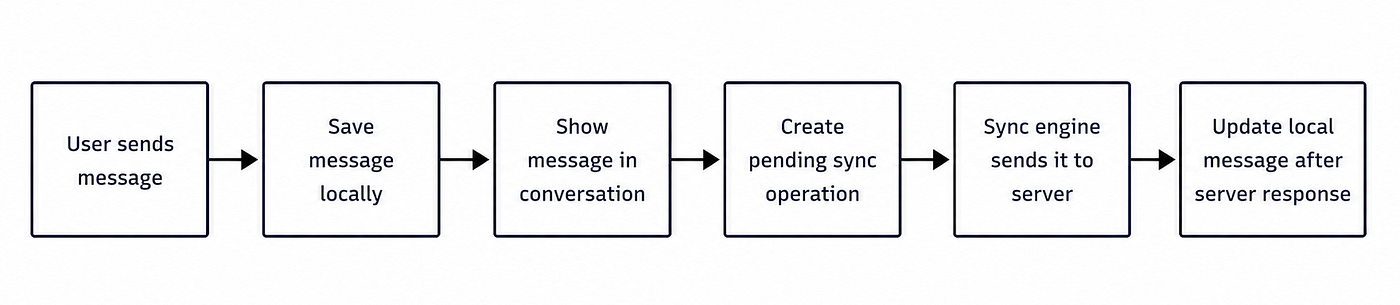
The important point here is that the UI does not depend directly on the network.
The UI reads from the local database.
The sync engine works in the background to make the local state match the remote state.
Push Sync
Push Sync means sending local changes from the device to the server.
In a chat app, examples of local changes are:
- Sending a message
- Deleting a message
- Marking messages as read
- Updating delivery state
For example, when the user sends a message, we save it locally first:
data class Message(
    val localId: String,
    val serverId: String?,
    val conversationId: String,
    val text: String,
    val status: MessageStatus
)
enum class MessageStatus {
Sending,
Sent,
Failed
}At this point, the message exists locally, but the server does not know about it yet.
So we need another record that tells the sync engine what should happen.
data class PendingOperation(
    val id: String,
    val type: OperationType,
    val entityId: String,
    val retryCount: Int
)
enum class OperationType {
SendMessage,
DeleteMessage,
MarkAsRead
}The message is the data.
The pending operation is the instruction.
This separation is important.
The messages table keeps what the user sees.
The pending_operations table keeps what the sync engine still needs to do.
If the app closes, the pending operation is still stored locally.
When the app opens again, sync can continue.
Pull Sync
Push Sync sends local changes.
Pull Sync receives remote changes.
In a chat app, Pull Sync can receive:
- New messages
- Delivered updates
- Read receipts
- Deleted messages
- Conversation updates
The flow is simple:

Again, the UI does not read directly from the API.
The API response updates the local database.
Then the UI reacts to the new local state.
This keeps one clear rule in the app:
The local database is the source of truth.
Incremental Sync
The app should not download the whole conversation every time it reconnects.
That may work for small conversations, but it becomes expensive when the conversation has hundreds or thousands of messages.
A better approach is Incremental Sync.
Instead of asking the server:
Give me all messages.The app asks:
Give me messages after sequence 120.For example:
data class ConversationSyncState(
    val conversationId: String,
    val lastSyncedSequence: Long
)
Each conversation can store the last synced sequence.
Then, when the app reconnects, it only asks for changes after that point.
This makes sync faster, cheaper, and easier to scale.
Retry Logic
Network requests fail all the time.
That is normal in mobile apps.
So the sync engine needs retry logic.
But not every failure should be retried forever.
Retryable failures:
- No internet
- Timeout
- Server unavailable
Non-retryable failures:
- Invalid request
- Unauthorized user
- Backend rejected the operation
A simple rule could look like this:
fun shouldRetry(error: SyncError): Boolean {
    return when (error) {
        SyncError.NoInternet -> true
        SyncError.Timeout -> true
        SyncError.ServerUnavailable -> true
        SyncError.InvalidRequest -> false
        SyncError.Unauthorized -> false
    }
}
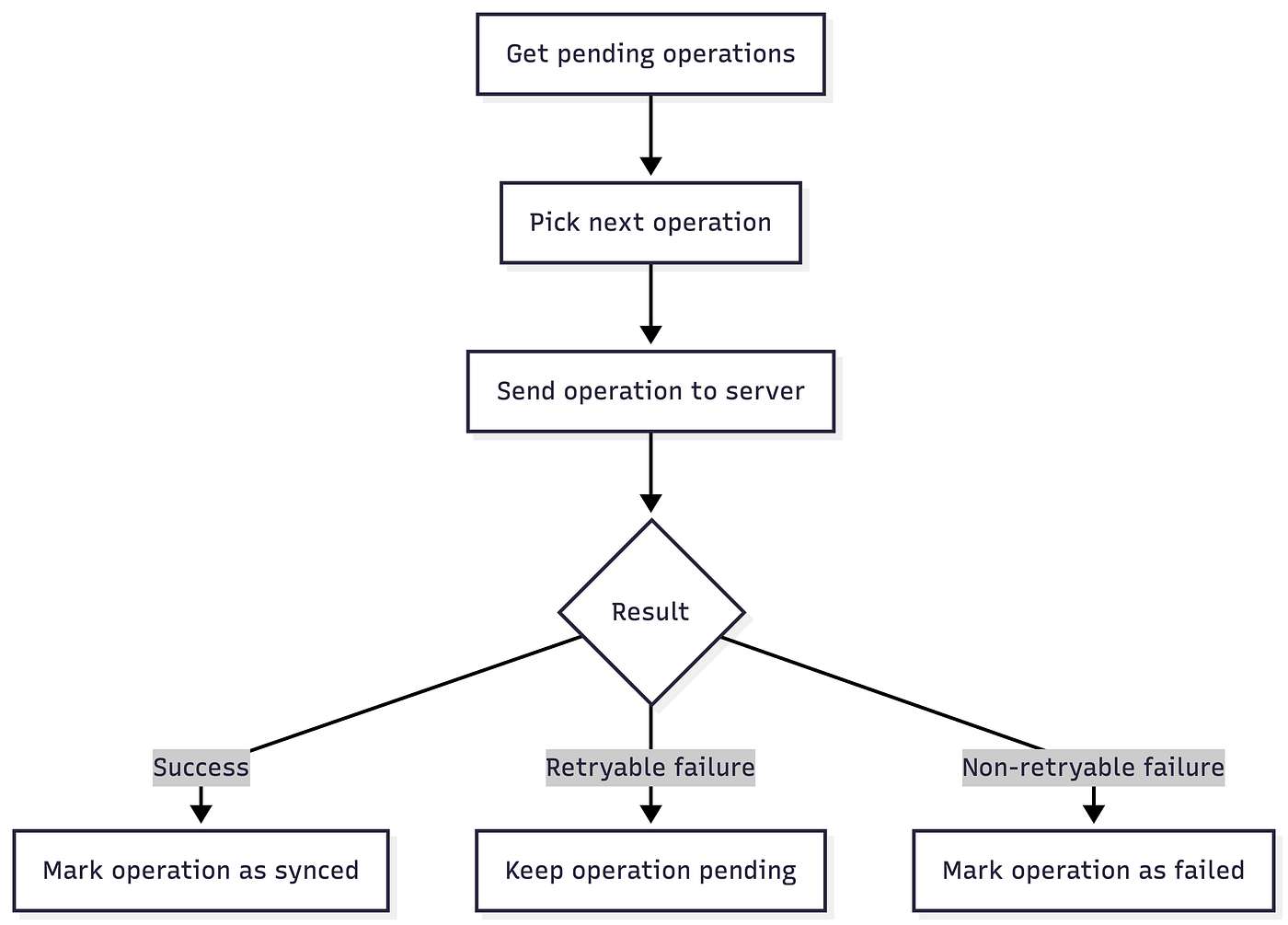
If the error is retryable, the operation stays pending.
If the error is not retryable, the operation should be marked as failed.
The user should have a clear way to recover.
For example:
Sending...
Sent
Failed — Tap to retry
A failed message should not disappear silently.
Idempotency
Retry creates another problem.
What if the app sends a message, the server receives it, but the response never reaches the app?
From the app’s point of view, the request failed.
So it retries.
Without protection, the server may create the same message twice.
That is why each message should have a stable client-generated ID.
For example:
data class SendMessageRequest(
    val clientMessageId: String,
    val conversationId: String,
    val text: String
)
The clientMessageId is created once on the device.
Every retry sends the same clientMessageId.
So if the server receives the same request again, it can recognize it as the same message, not a new one.
This is one of the most important ideas in synchronization:
Retry makes sync possible. Idempotency makes retry safe.
Conflict Resolution
In chat apps, conflicts are usually simpler than in other domains because messages are mostly append-only.
But conflicts can still happen with actions like editing a message, deleting a message, or syncing read receipts from multiple devices.
The important rule is that conflict resolution should follow product rules, not random technical rules.
For example:
- For read receipts, the highest read sequence usually wins.
- For deleted messages, delete may win over edit.
- For sending messages, idempotency prevents duplicate sends.
So conflict resolution is not only a sync problem.
It is a product decision.
Sync Engine Flow
The sync engine does not need to be complicated in concept.
At a high level, it does this:
A simplified version could look like this:
class SyncEngine(
    private val pendingOperations: PendingOperationRepository,
    private val remoteDataSource: RemoteMessageDataSource
) {
    suspend fun sync() {
        val operations = pendingOperations.getPendingOperations()
        operations.forEach { operation ->
            try {
                remoteDataSource.execute(operation)
                pendingOperations.markAsSynced(operation.id)
            } catch (error: SyncError) {
                if (shouldRetry(error)) {
                    pendingOperations.markForRetry(operation.id)
                } else {
                    pendingOperations.markAsFailed(operation.id)
                }
            }
        }
    }
}
This is not complete production code.
The point is the responsibility.
The sync engine should not control the UI.
It should only move pending local changes toward the server and update local state based on the result.
Common Mistakes
Keeping pending operations only in memory
If the app is killed, the sync work is lost.
Pending operations should be stored locally.
Making the UI wait for the API
In Offline-First apps, the UI should read from local state.
The API should not be the first source of truth for the screen.
Retrying without idempotency
Retry without a stable clientMessageId can create duplicate messages.
Downloading everything again
Full sync is simple, but it does not scale well.
For chat, incremental sync is usually better.
Hiding failed messages
If a message fails, the user should know.
A failed message should have a visible state and a retry option.
What’s Next?
In this article, we focused on how data moves between the device and the server.
But users do not see sync engines or pending operations.
They see UI states.
They see messages as sending, sent, failed, or retrying.
That is what we will discuss in the next article:
Optimistic Updates.
메타데이터
- post_id
- da0495c2ab49
- slug
- building-offline-first-mobile-systems-how-data-synchronization-works-in-offline-first-apps-da0495c2ab49
- url
- https://medium.com/@muhmmadnabil/building-offline-first-mobile-systems-how-data-synchronization-works-in-offline-first-apps-da0495c2ab49
- canonical_url
- https://medium.com/@muhmmadnabil/building-offline-first-mobile-systems-how-data-synchronization-works-in-offline-first-apps-da0495c2ab49
- author_url
- https://medium.com/@muhmmadnabil
- status
- ok
- fetched_at
- 2026-07-16 14:13:17




