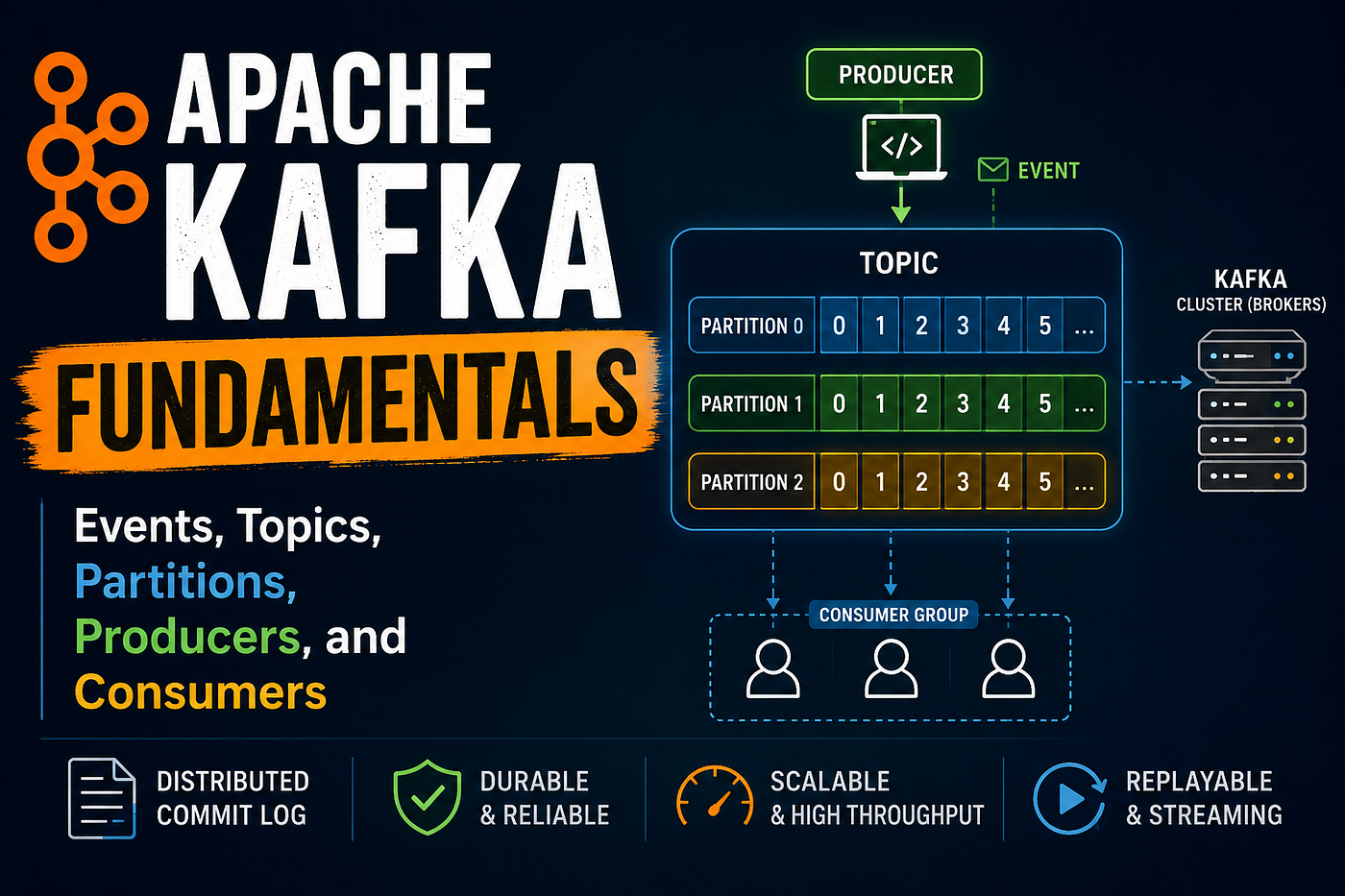
Introduction to Event-Driven Architecture (EDA)
Event-Driven Architecture Explained for Beginners
Introduction to Event-Driven Architecture (EDA)
Event-Driven Architecture Explained for Beginners
Every app you use is built on some kind of structure. That structure decides how different parts of the system talk to each other, share data, and respond to what users do.
When apps are small, a simple setup works fine. But as systems grow — more users, more features, more services — things get complicated fast. You need a design that can handle scale without falling apart.
Event-Driven Architecture (EDA) is one approach that solves this well. You’ve already seen it in action — every time you get a payment notification, an order update, or a Slack message, there’s a good chance EDA is running behind the scenes.
What Is an Event?
Before understanding the architecture, you need to understand what an “event” means here.
An event is simply something that happened. That’s it.
- A user signed up
- An order was placed
- A payment was completed
- A file was uploaded
Each of these is an event. It’s a record of a moment — a fact that something occurred in the system.
Think of it like YouTube notifications. When a creator uploads a video, YouTube doesn’t call each subscriber individually. It just fires off a notification, and whoever is subscribed receives it automatically. The creator doesn’t need to know who’s watching or how many people got notified.
That’s the core idea behind event-driven systems.
What Is Event-Driven Architecture?
In a traditional system, services call each other directly. Service A needs something from Service B, so it sends a request and waits for a response.
In an event-driven system, services don’t call each other. Instead, they produce and consume events.
- A producer generates an event when something happens
- A consumer listens for events and reacts to them
- The two sides don’t need to know about each other
Here’s a simple example:
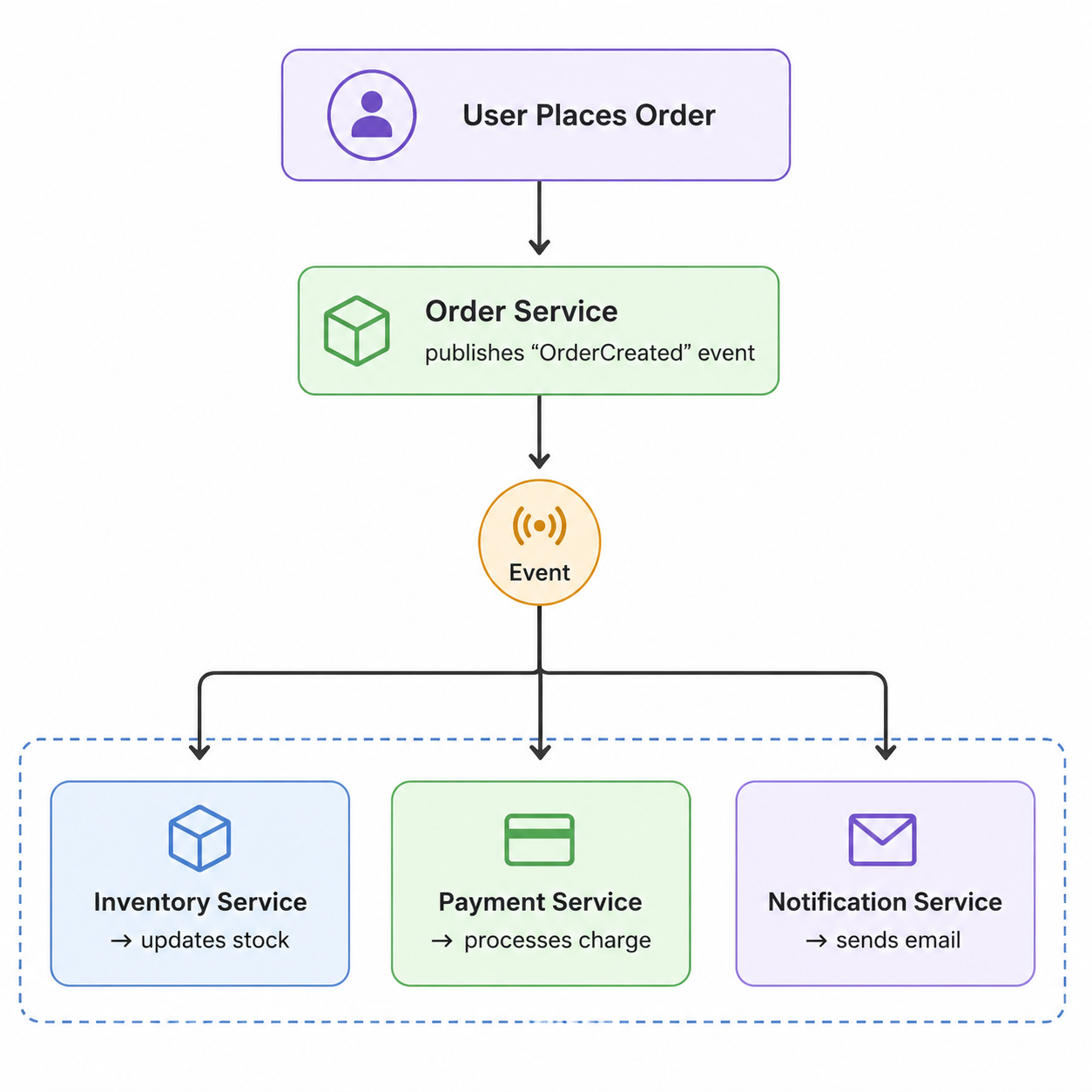
The Order Service doesn’t call the Payment Service or the Email Service directly. It just says “an order was created” and moves on. Each other service picks that up and does its own job.
Core Components of EDA
Event Producer
The producer is whatever generates the event. When a user places an order, the Order Service is the producer. It creates an event and sends it out.
Event Consumer
The consumer listens for events and acts on them. The Email Service, for example, listens for an “OrderCreated” event and sends a confirmation email when it hears one.
Event Broker
The broker sits in the middle. It receives events from producers and delivers them to consumers. It’s basically the messaging layer.
Common brokers you’ll hear about:
- Apache Kafka — built for high-volume event streaming
- RabbitMQ — reliable message queuing
- Amazon SQS — managed queue service on AWS
The Event Itself
The event is just a piece of data — a payload that describes what happened. It usually includes what the event is, when it happened, and any relevant details (like an order ID or user ID).
Why Use Event-Driven Architecture?
Scalability Each service can scale on its own. If your Payment Service is under heavy load, you can scale just that — without touching anything else.
Loose Coupling Services don’t depend directly on each other. The Order Service doesn’t care how many other services are listening. Adding a new service won’t break existing ones.
Faster Processing Multiple consumers can process events at the same time. The Inventory Service, Payment Service, and Email Service all work in parallel — not one after the other.
Real-Time Updates EDA makes it natural to push updates as they happen. That’s why tracking your delivery or seeing a payment confirmation shows up almost instantly.
Flexibility Need to add a new service later? Just subscribe it to the relevant events. No need to change the producer or anything else.
A Real-World Comparison: E-Commerce Without and With EDA
Without EDA
When a user places an order, the Order Service directly calls:
- The Payment Service
- The Inventory Service
- The Email Service
One by one. In sequence.
The problems here:
- If the Email Service is down, the whole flow might fail
- Every service is tightly connected to every other
- Scaling one service affects how others behave
- Adding a new step (like a loyalty points service) means changing the Order Service code
With EDA
The Order Service publishes one event: “OrderCreated.”
Every other service reacts independently. They don’t know about each other. If the Email Service is slow or temporarily down, the other services keep running. The email will go out when it catches up.
This makes the whole system more resilient and easier to maintain.
Common Technologies Used in EDA
Technology What It Does Apache Kafka High-throughput event streaming RabbitMQ Message queuing Redis Pub/Sub messaging and caching AWS EventBridge Cloud-native event bus Apache Pulsar Distributed messaging at scale
If you’re just getting started, RabbitMQ is easier to learn. Kafka is worth exploring once you understand the basics.
The Challenges — Honestly
EDA is not a perfect solution. There are real trade-offs.
Debugging is harder. In a direct call system, you can trace a request step by step. In EDA, events flow through multiple services asynchronously, which makes tracking down a bug more work.
Event ordering isn’t guaranteed. In some setups, events can arrive out of order. If your system depends on strict sequencing, you need to handle that explicitly.
Duplicate events can happen. Network issues or retries can cause the same event to be delivered more than once. Consumers need to handle this gracefully (this is called idempotency).
Eventual consistency. Different services process events at different speeds. There’s usually a small window where the system is in an inconsistent state before everything catches up.
Monitoring is more complex. Watching a distributed event-driven system requires proper tooling. Without it, you’re flying blind.
None of these are reasons to avoid EDA — but they’re things to be aware of before you build with it.
When Should You Use EDA?
Good fit:
- Real-time notifications and updates
- Microservices that need to work independently
- Analytics pipelines processing large volumes of data
- IoT systems with many data sources
- Any system where services need to react to changes without being tightly coupled
Not a good fit:
- Small, simple applications
- Basic CRUD apps with straightforward workflows
- Systems where every step must happen in a strict, synchronous order
EDA adds complexity. If your system doesn’t need that flexibility or scale, a simpler architecture will serve you better.
Conclusion
Event-Driven Architecture changes how services communicate — from direct calls to publishing and reacting to events. The result is a system that’s easier to scale, more resilient to failures, and simpler to extend over time.
It’s not the right choice for every project, but for systems that need to handle real-time data, scale independently, or support many loosely connected services, it’s a solid approach.
If you want to explore this further, start with RabbitMQ for a hands-on feel, or look into Apache Kafka if you’re dealing with high-volume data. Building even a small producer-consumer setup will make the concepts click much faster than reading about them.
메타데이터
- post_id
- da11dbe367e2
- slug
- introduction-to-event-driven-architecture-eda-da11dbe367e2
- url
- https://medium.com/@yashwantsaste/introduction-to-event-driven-architecture-eda-da11dbe367e2
- canonical_url
- https://medium.com/@yashwantsaste/introduction-to-event-driven-architecture-eda-da11dbe367e2
- author_url
- https://medium.com/@yashwantsaste
- status
- ok
- fetched_at
- 2026-06-09 15:37:30