🧭 Azure Route Tables: How Your Messages Know Where to Go
Intermidiate ~ Azure Networking
🧭 Azure Route Tables: How Your Messages Know Where to Go
Intermidiate ~ Azure Networking
Imagine your Azure network is a city, and every VM is a house. Messages (data packets) are like delivery trucks trying to reach the right house.
But how do they know which road to take?
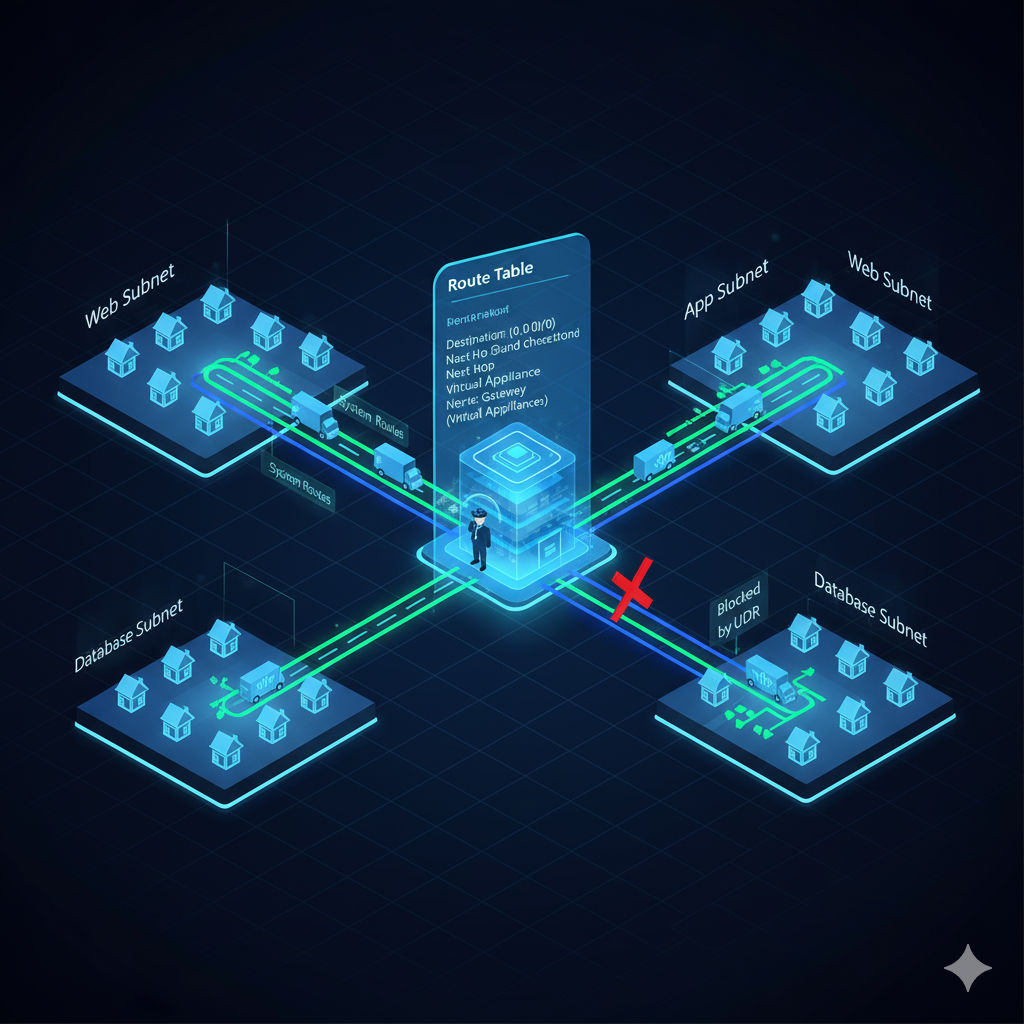
That’s where route tables come in.
🔄 Azure’s Built-In GPS (System Routes)
When you create a VM in Azure, something magical happens:
- VMs in the same street (subnet) can talk to each other ✅
- VMs in different streets (subnets) can talk too ✅
- VMs can even reach the internet ✅
And guess what? You didn’t set up any roads.
🧠 That’s because Azure gives you a default map called the System Route Table. It’s like built-in GPS for your network.
🧱 What Is a Route Table?
A route table is like a custom map you can hang inside a neighborhood (subnet). It tells every VM:
“If you want to go to this place, take this road.”
Each route has:
- Where to go (destination)
- How to get there (next hop)
- Who to ask for directions (IP of the next hop, if needed)
🧠 Why Create Your Own Routes?
Sometimes, you want to take control of the traffic. That’s where User-Defined Routes (UDRs) come in.
You might want to:
- Force all traffic to go through a firewall
- Block internet access
- Send traffic to a special device for inspection
🧠 UDRs override the default GPS. If a match is found, your custom rule wins.
🔧 How to Use a Route Table
- Create a route table
- Add your custom routes
- Attach it to a subnet
❗ Route tables only control outbound traffic from the subnet. Inbound traffic is handled elsewhere.
🧪 Example: Send All Traffic Through a Security Guard
Let’s say:
- You have a web server that talks to a database
- You want all traffic to go through a security guard (virtual appliance)
Steps:
- Deploy the virtual appliance (a VM with firewall software)
- Turn on IP forwarding on its NIC
- Create a route:
- Destination:
0.0.0.0/0(means “everything”) - Next hop: Virtual Appliance
- Next hop IP: IP of the appliance
- Attach the route table to the web server’s subnet
🧠 Now, every message from the web server goes through the security guard first.
🔐 Why Use a Virtual Appliance?
Big companies use them to:
- Stop sensitive data from leaking out
- Block bad websites or apps
- Detect suspicious behavior
- Enforce company rules
It’s not just about where traffic goes — it’s about what happens along the way.
🔁 Can I Reuse Route Tables?
Yes! One route table can be used for many subnets.
Just make sure the routes make sense for all the subnets you attach it to.
🧠 Recap: What You Learned

🔐 Popular Virtual Appliances
These are like super-smart guards for your network:
- Palo Alto VM-Series
- Cisco CSR
- Fortinet FortiGate
- Check Point CloudGuard
- Barracuda CloudGen
They can:
- Block bad traffic
- Detect attacks
- Control apps
- Connect to VPNs
🧭 Final Takeaways
- Azure gives you a default map (system routes)
- Use custom route tables when you want control
- Route tables live on subnets and affect outbound traffic
- Virtual appliances help you inspect and protect your traffic
- Always enable IP forwarding on appliances that forward traffic
🔜 What’s Next?
In the next session, we’ll:
- Build a real route table with a virtual appliance
- Watch how traffic flows through it
- Try force tunneling and hybrid network setups
Let me know if you want this as a cheat sheet or a visual map. I’d love to help you turn this into a team-friendly explainer!
✍️ Written by Shubham 🎓 Making complex systems intuitive through curiosity-driven storytelling
메타데이터
- post_id
- da5b72335d1b
- slug
- part-9-azure-route-tables-how-your-messages-know-where-to-go-da5b72335d1b
- url
- https://medium.com/@barmanshubham70/part-9-azure-route-tables-how-your-messages-know-where-to-go-da5b72335d1b
- canonical_url
- https://medium.com/@barmanshubham70/part-9-azure-route-tables-how-your-messages-know-where-to-go-da5b72335d1b
- author_url
- https://medium.com/@barmanshubham70
- status
- ok
- fetched_at
- 2026-07-10 21:39:18




