I Accidentally Containerised My AI Brain (And It Worked Surprisingly Well)
How I ran Claude Code against a local 30B LLM on Apple Silicon — entirely through Docker — without installing a single Python or node…
I Accidentally Containerised My AI Brain (And It Worked Surprisingly Well)
How I ran Claude Code against a local 30B LLM on Apple Silicon — entirely through Docker — without installing a single Python or node package.
TL;DR: You can run Claude Code pointed at a fully local LLM on your Mac, with both the model server and Claude Code managed by Docker, zero Anthropic API costs, and your code never leaving your machine. Here’s exactly how to do it — including all the ways it can go wrong.
Wait, You Can Do What Now?
Let me set the scene. It’s a Friday afternoon. I’ve just read a Medium article about running Claude Code locally with dflash— a native MLX inference server — and a thing called claude-code-router that translates Anthropic API calls into OpenAI format. Interesting! I start setting it up.
Then someone drops a Docker blog post in my feed.
Docker Model Runner now runs vLLM on Apple Silicon with Metal GPU acceleration. Native Anthropic-compatible API. Managed entirely through Docker.
I stared at it for a moment. Then I closed my terminal and started over.
Here’s the thing: the conventional wisdom for running LLMs on a Mac is that Docker can’t touch the GPU. Docker on macOS runs inside a Linux VM. The VM has no Metal access. Therefore, you must install inference engines natively — pip install mlx-lm, manage a Python venv, juggle HuggingFace model caches. Containers are for the stateless proxy layer only.
Docker just… quietly made that untrue.
The Trick Docker Pulled Off
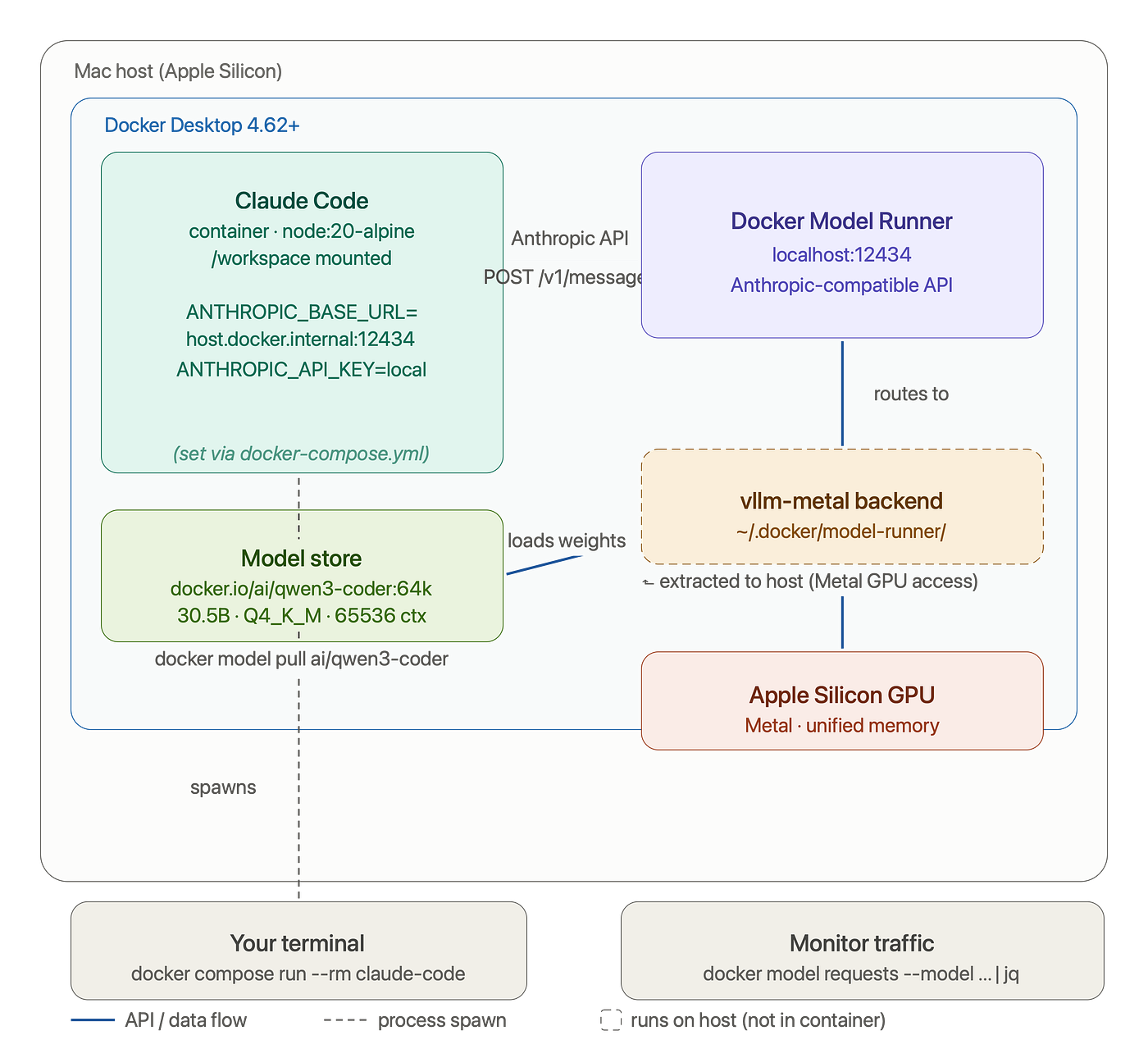
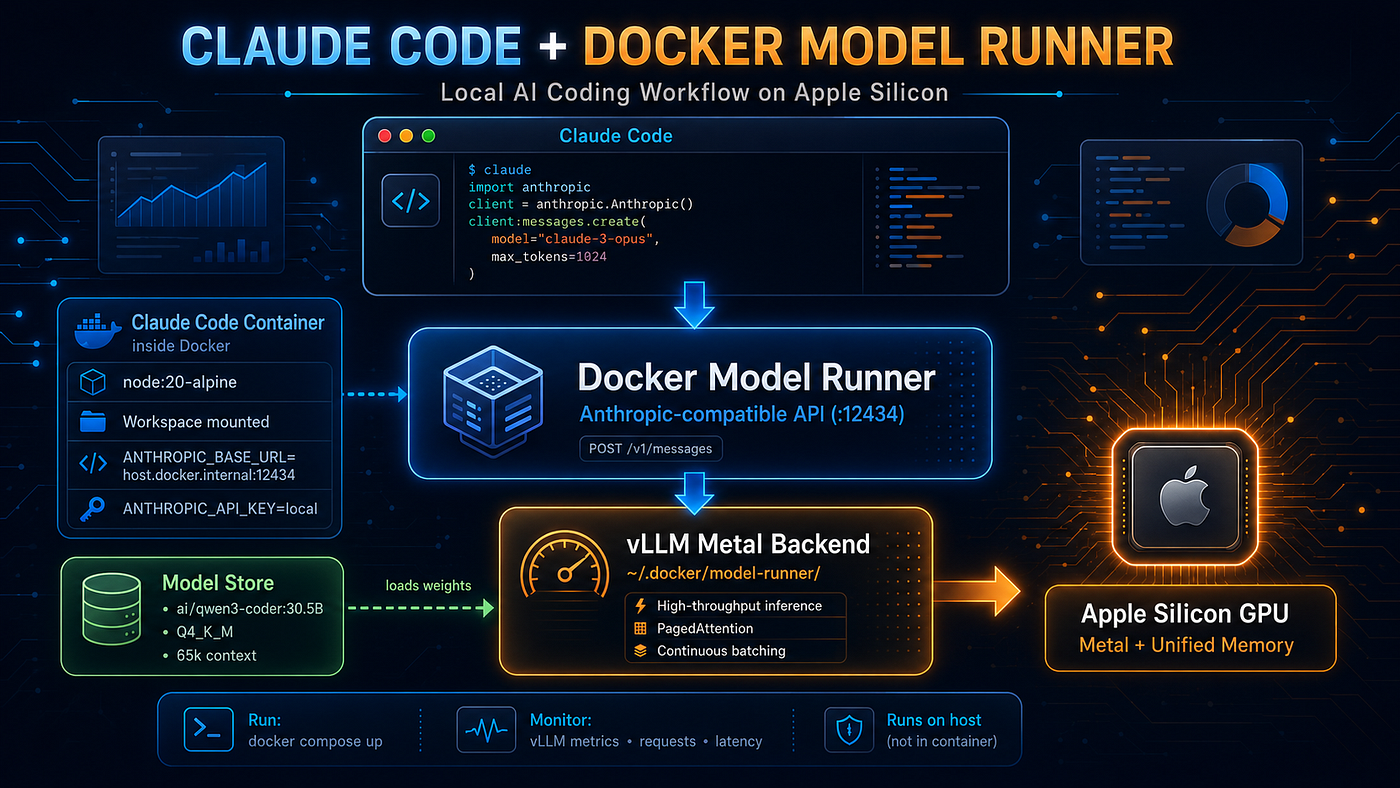
Claude Code (container) │ Anthropic API POST /v1/messages ▼ Docker Model Runner :12434 ← built into Docker Desktop 4.62+ │ ├─ vllm-metal backend │ └─ extracted to ~/.docker/model-runner/vllm-metal/ on HOST │ └─ runs natively → Metal GPU access ✓ │ └─ Model store └─ docker.io/ai/qwen3-coder:64k (30.5B, 65536 ctx)
The sleight of hand is in that word extracted. When you run docker model install-runner --backend vllm, Docker pulls a self-contained Python 3.12 image containing vllm-metal and all its dependencies, then unpacks it onto your Mac host at ~/.docker/model-runner/vllm-metal/. It bypasses the VM entirely for inference. The model runner starts as a native host process when needed, talking Metal directly, then exposes a clean HTTP API back into Docker-land.
The result: you get to manage everything with docker model commands, but the GPU bits run where they need to.
And the API it exposes? Native Anthropic format. No translation layer. No claude-code-router. Just ANTHROPIC_BASE_URL=http://localhost:12434 and you're done.
Prerequisites
Before we start, make sure you have:
- Apple Silicon Mac (M1 through M5 — any of them)
- Docker Desktop 4.62 or later — this version is the minimum for vllm-metal
- ~24 GB unified memory recommended (the 30B model uses ~16 GB at Q4_K_M quantization)
- ~20 GB free disk space for the model weights
- That’s it. No Python. No Node. No
npm install -ganything on your Mac. Claude Code runs inside the container — thenode:20-alpineimage installs it at container build time. Your Mac only needs Docker Desktop.
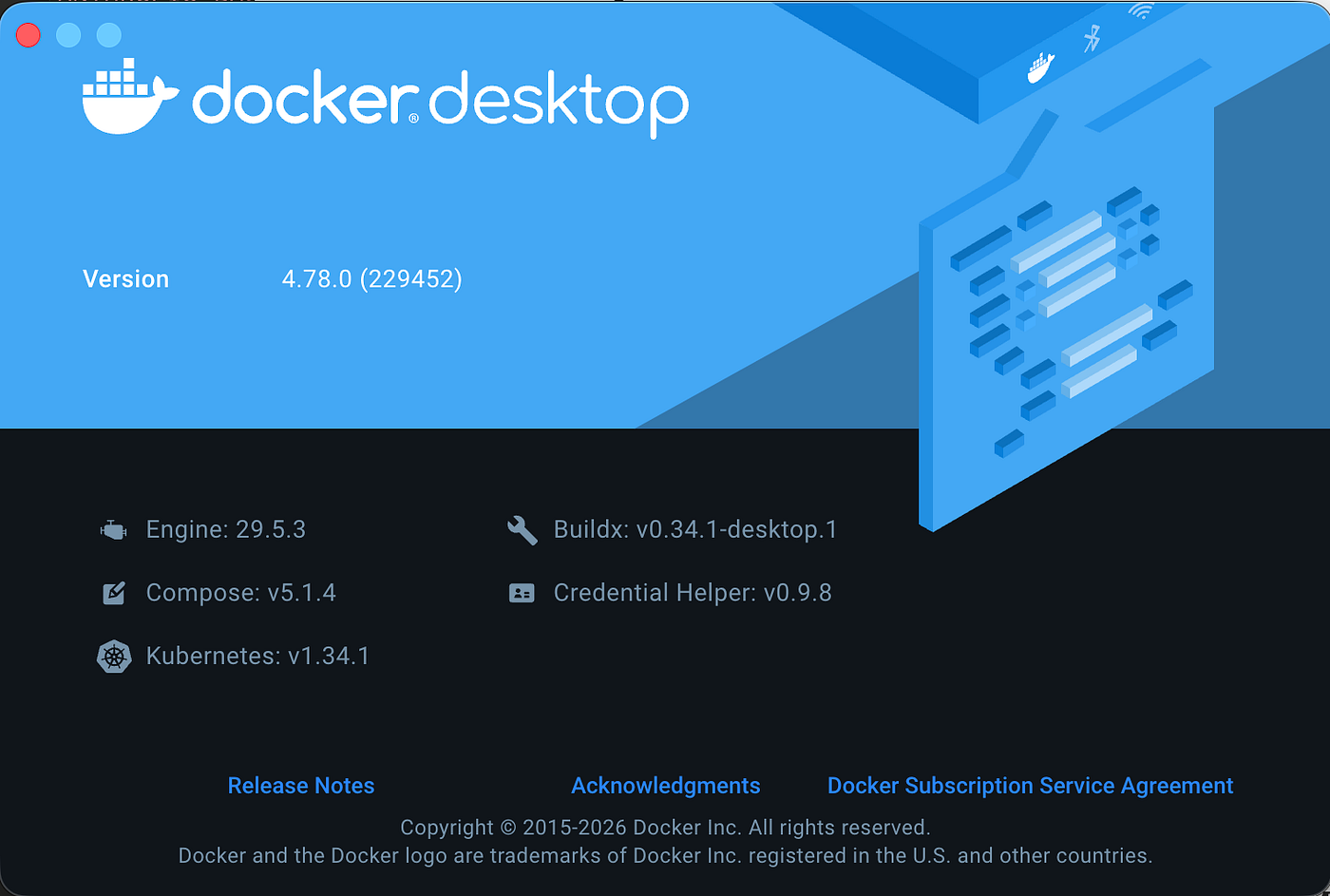
Check your Docker Desktop version: Docker Desktop menu → About Docker Desktop.
Step 1: Enable the TCP Endpoint
Docker Model Runner ships with Docker Desktop but needs TCP mode explicitly turned on:
docker desktop enable model-runner --tcpThis makes DMR accessible at http://localhost:12434. Verify it's live:
curl -s http://localhost:12434/v1/models | jq .You should see a JSON list. If you get connection refused, Docker Desktop might still be starting — give it 30 seconds and try again.
Step 2: Install the vllm-metal Backend
docker model install-runner --backend vllmThis is the magic step. Docker pulls the vllm-metal image and extracts it to your host. First run takes a few minutes — it's essentially downloading a complete Python ML environment. Subsequent runs are instant.
Verify the backend installed:
docker model inspect-runner --backend vllmStep 3: Pull Your Model
docker model pull ai/qwen3-coderFirst run downloads ~16 GB. Go make coffee. Come back. It’ll be done.
Now repackage it with a proper context window (the default 4096 tokens is pitiful for real coding tasks):
docker model package --from ai/qwen3-coder --context-size 65536 qwen3-coder:64kVerify what DMR sees:
docker model listYou should see qwen3-coder:64k in the list. Note the exact ID — you'll need the full form docker.io/ai/qwen3-coder:64k when referencing it inside containers.
Step 4: Run Claude Code in a Container
Create a docker-compose.yml:
services:
  claude-code:
    image: node:20-alpine
    container_name: claude-code-dmr
    stdin_open: true
    tty: true
    environment:
      - ANTHROPIC_BASE_URL=http://host.docker.internal:12434
      - ANTHROPIC_API_KEY=local
    extra_hosts:
      - "host.docker.internal:host-gateway"
    volumes:
      - ${WORKSPACE:-$HOME/projects}:/workspace:cached
      - claude-config:/root/.claude
    working_dir: /workspace
    command: >
      sh -c "npm install -g @anthropic-ai/claude-code &&
             claude config set -g apiBaseUrl http://host.docker.internal:12434 &&
             claude --model docker.io/ai/qwen3-coder:64k"
volumes:
claude-config:Then:
WORKSPACE=~/your-project docker compose run --rm claude-codeWhy host.docker.internal? Inside the container, localhost refers to the container itself — not your Mac. host.docker.internal is Docker's magic hostname that resolves to the host machine's IP. The extra_hosts entry makes this work on Linux too (it's automatic on Mac).
Step 5: Verify You’re Actually Using the Local Model
This is the step most tutorials skip. Just because Claude Code starts doesn’t mean it’s using your local model. Here’s how to be sure:
Check the env vars are injected:
docker exec claude-code-dmr env | grep ANTHROPIC
# Should print:
# ANTHROPIC_BASE_URL=http://host.docker.internal:12434
# ANTHROPIC_API_KEY=local
Check the config isn’t overriding the env:
docker exec -it claude-code-dmr sh
claude config list | grep apiBaseUrl
# Should show: http://host.docker.internal:12434
Watch live requests in real time (the definitive proof):
Open a second terminal and run:
watch -n 2 'docker model requests --model docker.io/ai/qwen3-coder:64k | jq .'
# If watch isn't installed: brew install watch
Then go into Claude Code and type a prompt. You’ll see the raw request payload appear — with your actual prompt and "model": "docker.io/ai/qwen3-coder:64k". That's your traffic, hitting local DMR, zero bytes to Anthropic.
Check the model header in Claude Code itself:
When it’s working, Claude Code’s welcome screen should show:
docker.io/ai/qwen3-coder:64k · API Usage Billing
/workspace
“API Usage Billing” sounds alarming but just means Claude Code is in API mode (as opposed to claude.ai subscription mode) — it does not mean you’re being billed. Your ANTHROPIC_API_KEY=local goes nowhere.
What You’re Actually Running
Worth pausing to appreciate what just happened. The model DMR loaded is:
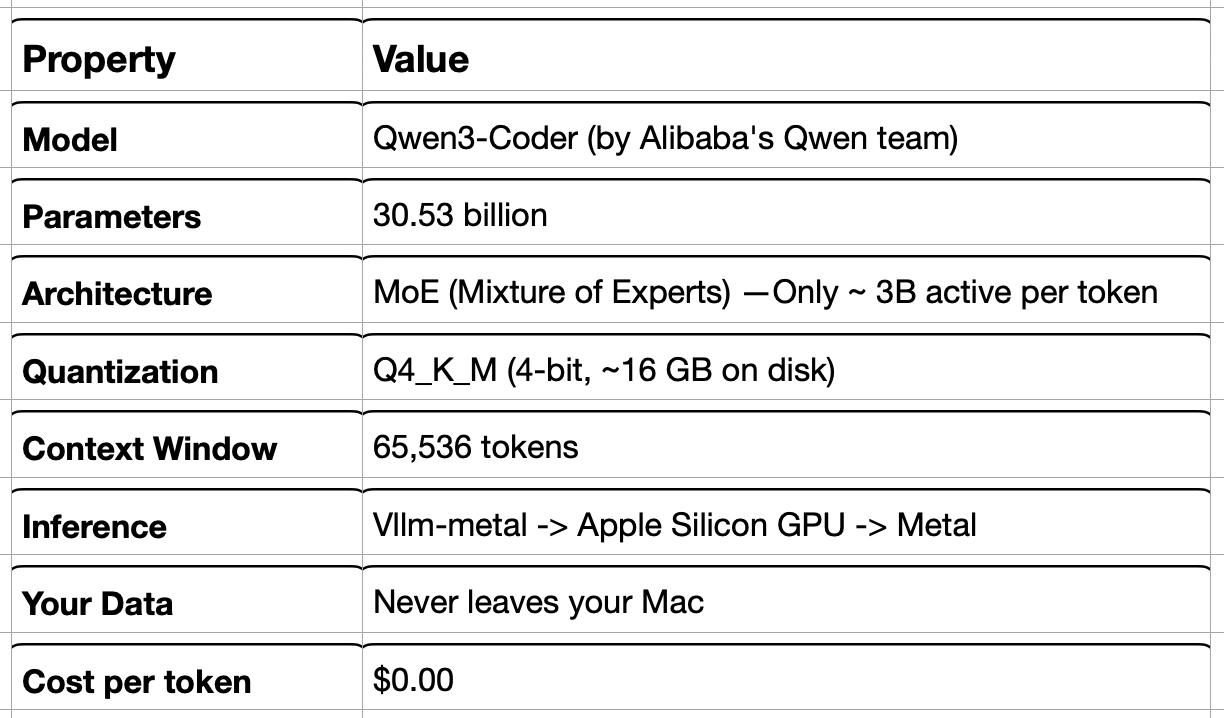
The MoE architecture is why a “30B model” fits comfortably in 24 GB of RAM — it routes each token through only a fraction of its parameters. You get 30B-level quality at ~3B active-parameter compute cost.
Available Models
Not limited to Qwen. Other models to try:
docker model pull ai/devstral-small-2     # Mistral's coding model, 128K ctx
docker model pull ai/glm-4.7-flash        # GLM 4.7, 128K ctx, strong reasoning
docker model pull ai/gpt-oss              # needs context repackaging (default 4096)
For gpt-oss:
docker model package --from ai/gpt-oss --context-size 32000 gpt-oss:32kAll of these use vllm-metal once the backend is installed. DMR auto-routes MLX-format models to vllm-metal.
A Honest Note on Performance
The Docker blog benchmarked vllm-metal against llama.cpp on a 1B model:
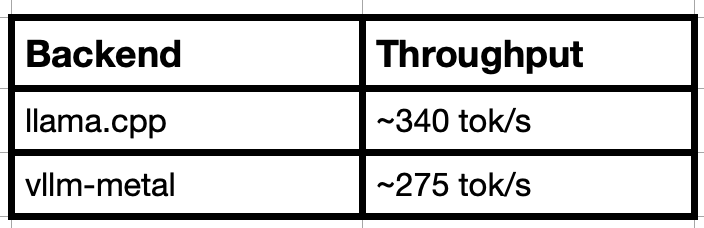
llama.cpp is about 1.2x faster in raw throughput. So why use vllm-metal?
Two reasons. First, production parity — vllm-metal exposes the exact same API surface as a production H100 vLLM cluster. Your local tests are testing the same stack you’d deploy. Second, architecture — paged attention, GQA, zero-copy tensor ops via unified memory. For longer context tasks (the kind Claude Code actually does — reading your whole codebase), the KV cache management advantages compound.
For a ~30B MoE model on M5, expect 20–40 tok/s depending on context length. Enough for a pleasant coding session.
Troubleshooting: Every Mistake We Made
In roughly chronological order of pain.
“connection refused” on port 12434
Symptom: curl: (7) Failed to connect to localhost port 12434
Cause: TCP mode not enabled, or Docker Desktop restarted and DMR isn’t running.
Fix:
docker desktop enable model-runner --tcp
# Wait 10s, then:
curl http://localhost:12434/v1/models
Empty [] from docker model requests
Symptom: docker model requests --model ... | jq . returns []
Cause: The buffer only shows recent requests. If you haven’t sent a request since starting the watcher, it’s empty.
Fix: Send a test curl while watching:
curl -s http://localhost:12434/v1/messages \
  -H "Content-Type: application/json" \
  -H "x-api-key: local" \
  -H "anthropic-version: 2023-06-01" \
  -d '{"model":"docker.io/ai/qwen3-coder:64k","max_tokens":32,"messages":[{"role":"user","content":"say: local LLM confirmed"}]}' | jq .content[0].text
jq: parse error: Invalid numeric literal with --follow
Symptom: Piping --follow output to jq . crashes immediately.
Cause: --follow emits NDJSON (one JSON object per line), not a single array.
Fix:
docker model requests --model docker.io/ai/qwen3-coder:64k --follow | jq -R 'fromjson?'watch: command not found
Symptom: zsh: command not found: watch
Cause: watch isn't bundled on macOS.
Fix:
brew install watchOr without installing:
while true; do clear; docker model requests --model docker.io/ai/qwen3-coder:64k | jq .; sleep 2; doneModel not found / wrong tag
Symptom: Claude Code reports “model does not exist or you don’t have access.”
Cause: Model tag mismatch. The docker model package command creates tags exactly as you name them. If you ran --context-size 32000 the tag ends in :32000k, not :32k.
Fix: Check the exact names:
curl -s http://localhost:12434/v1/models | jq '.[].id'
# Use the exact string including docker.io/ai/ prefix
Claude Code is using Anthropic’s API despite correct env vars
Symptom: The /model menu inside Claude Code shows Anthropic pricing tiers (Opus, Sonnet, Haiku) instead of your local model.
Cause: Claude Code stores apiBaseUrl in ~/.claude/settings.json or ~/.claude.json. A prior authenticated session in the config overrides the env var.
Fix: Inside the container:
claude config set -g apiBaseUrl http://host.docker.internal:12434
claude auth logout
Then relaunch. The /model menu will stop showing Anthropic tiers.
ANTHROPIC_BASE_URL env var set on Mac host but ignored in container
Symptom: You set the env var in your terminal, but docker exec ... env | grep ANTHROPIC shows it's empty inside the container.
Cause: Env vars on the Mac host don’t automatically flow into containers. The docker-compose.yml environment: block is the correct injection point.
Fix: Ensure your compose file has:
environment:
  - ANTHROPIC_BASE_URL=http://host.docker.internal:12434
  - ANTHROPIC_API_KEY=local
And that you’re starting with docker compose run not docker run.
Context window too small for real codebases
Symptom: Claude Code truncates context or errors on large files.
Cause: Default context for some models is 4096 tokens — barely enough for a few files.
Fix: Repackage with a larger context:
docker model package --from ai/qwen3-coder --context-size 65536 qwen3-coder:64kFirst inference is very slow (30+ seconds)
Symptom: Claude Code hangs for 30–60 seconds on the first prompt after starting.
Cause: Normal. The model weights (~16 GB) load from disk into unified memory on first use. Subsequent prompts are fast.
Fix: Nothing to fix. Just wait. You can warm it up explicitly:
curl -s http://localhost:12434/v1/messages \
  -H "Content-Type: application/json" \
  -H "x-api-key: local" \
  -H "anthropic-version: 2023-06-01" \
  -d '{"model":"docker.io/ai/qwen3-coder:64k","max_tokens":1,"messages":[{"role":"user","content":"hi"}]}' > /dev/null
What I’d Add Next
A few things that would make this setup more production-grade:
Prometheus metrics. DMR exposes a /metrics endpoint. Wire it into your existing monitoring stack — or the Enterprise AgentOps Platform you may happen to have running locally.
Model fallback. For very long context tasks (>50K tokens), a local 30B model struggles. A CCR-style router could fall back to claude-sonnet-4-6 for those requests only, keeping short-context work local.
Persistent Claude config volume. Already in the compose file above — the claude-config named volume persists your Claude Code sessions, memory, and settings across container restarts. Don't skip it.
**devcontainer.json integration.** If you're already using VS Code Dev Containers, adding these env vars to your devcontainer config means every project automatically gets local LLM access with no extra setup.
The Bottom Line
The old mental model was: Docker can’t touch GPU on Mac, so local LLM inference means native installs and Python environment management.
The new mental model: Docker Desktop 4.78 extracts the inference server natively (sidestepping the VM entirely for GPU work) while managing everything else through normal docker model commands. You get the reproducibility and cleanliness of containers for the proxy and client layers, and native Metal performance for inference.
The workflow is now:
docker desktop enable model-runner --tcp
docker model install-runner --backend vllm
docker model pull ai/qwen3-coder
docker model package --from ai/qwen3-coder --context-size 65536 qwen3-coder:64k
WORKSPACE=~/myproject docker compose run --rm claude-code
Five commands. Local 30B LLM. Claude Code. Zero cloud API calls.
Your code stays on your machine. Your prompts stay on your machine. Your context stays on your machine.
And it all runs in Docker. Which somehow makes it feel more legitimate.
Built and tested on MacBook Pro M5 with 64 GB unified memory. Docker Desktop 4.78. Claude Code v2.1.193. qwen3-coder:64k (30.53B, Q4_K_M).
All the config files referenced in this post are available as a gitlab repo
Refernces:
Run Claude Code Locally on a Mac: 65 tok/s with a 4-bit Qwen3.6–27B and DFlash Speculative Decoding
메타데이터
- post_id
- da7508364eb7
- slug
- i-accidentally-containerised-my-ai-brain-and-it-worked-surprisingly-well-da7508364eb7
- url
- https://medium.com/tech-learners-journal/i-accidentally-containerised-my-ai-brain-and-it-worked-surprisingly-well-da7508364eb7
- canonical_url
- https://medium.com/tech-learners-journal/i-accidentally-containerised-my-ai-brain-and-it-worked-surprisingly-well-da7508364eb7
- author_url
- https://medium.com/@VinayUmesh
- status
- ok
- fetched_at
- 2026-07-09 16:18:44