How I Automated Part of My Prospecting on Workana Using AI
A Python + Playwright + Gemini bot, $9 in API credits, and the lesson I didn’t expect to learn.
How I Automated Part of My Prospecting on Workana Using AI
A Python + Playwright + Gemini bot, $9 in API credits, and the lesson I didn’t expect to learn.
“When you have $73 to your name, every decision becomes a math problem.”
I want to start with the honest part, because I think it’s the part that matters most.
For the last few months I’d been going through a financial tight spot. The kind where you stare at your bank balance and start mentally categorizing food expenses by gram-per-dollar. By the time I made the decision I’m about to describe, I had $73 USD total to my name.
I took $64 of it and dropped it into a Workana premium plan.
For context: Workana is Latin America’s largest freelance platform, think Upwork but for Brazilian, Argentinian, and Mexican developers chasing clients across the region. The plan I bought gave me 52 proposals per week: 52 chances every week to win a contract, 52 chances to claw back some financial breathing room.
The first thing I did was open the platform and start writing proposals manually. The second thing I did was a small calculation.
The math that broke me
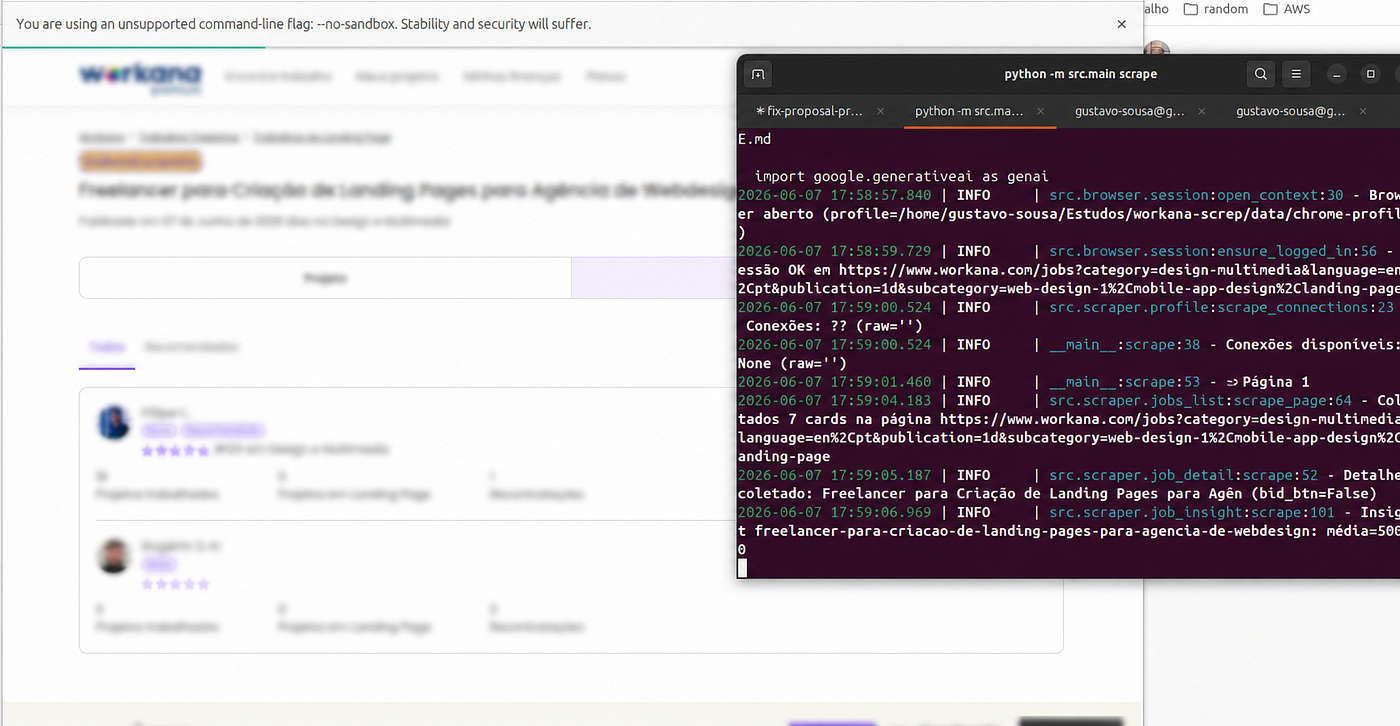
Writing a proposal on Workana isn’t just clicking “submit.” For each job, you need to:
1. Read the project description carefully.
2. Understand what the client actually wants (versus what they typed).
3. Write a personalized opener that proves you read it.
4. Quote a competitive price (Workana shows you competitor averages — if you exist).
5. Pick a delivery time, hours estimate, and portfolio items.
Done well, this takes me about 12 minutes per proposal — sometimes less when the brief is clear, sometimes more when I have to dig through the client’s history.
52 proposals × 12 minutes = roughly 10 hours per week of pure repetitive work. That’s more than a full workday I’d lose every single week just on prospecting, over 40 hours per month, before billing a single client.
I had $9 in disposable income. I had 10 hours a week I couldn’t afford to waste.
So I did what any underemployed developer would do at 2 AM.
I built a bot.
The stack
The whole thing is 1,061 lines of Python across 21 modules. The pieces:
Playwright for browser automation (Chromium, sync API).
Google Generative AI SDK with Gemini 2.5 Flash Lite as the brain.
SQLite for state (“which jobs have I already drafted? which are sent?”).
PyYAML for my profile and filter config.
Rich + Click for the terminal review UI.
Loguru, because I like good logs to make debugging easy.
That’s it. No FastAPI, no Postgres, no Redis, no message queue, no Docker, no Kubernetes. I’m proud of this list because the absence of those tools is the actual engineering decision.
Why Gemini
I picked Gemini 2.5 Flash Lite for three reasons:
- It’s cheap. A typical proposal generation costs me under $0.002 per call. At 52 proposals a week, that’s roughly $0.10 per week in AI costs — about $0.45 a month. I can write that off as a rounding error.
- It’s fast. Flash Lite returns structured JSON in 1–2 seconds. I’m generating 8 drafts per run, not 8,000 — I don’t need batching infrastructure.
- JSON mode actually works. I set
response_mime_type: “application/json”and Gemini returns clean parseable JSON every time. No regex gymnastics on the response.
Here’s the model configuration:
model = genai.GenerativeModel(
model_name="gemini-2.5-flash-lite",
system_instruction=system,
generation_config={
"response_mime_type": "application/json",
"temperature": 0.6,
},
)
Temperature “0.6” is a deliberate compromise: low enough that the JSON shape stays stable, high enough that the prose doesn’t read like the same template recycled 52 times.
The prompt engineering: my real moat
The technical core of this bot is not Playwright. It’s the prompt.
A naive prompt produces proposals that sound like every other AI-generated proposal: “I’m excited about your project!”, “I look forward to discussing this opportunity!”, “I am a passionate full-stack developer with X years of experience…”
Clients on Workana, like clients everywhere, have learned to smell those a kilometer away. So my system prompt is, more than anything, a list of things the AI is not allowed to do:
SYSTEM_INSTRUCTION = """You write short proposals for Workana jobs,
in the voice of the freelancer described below.
Unbreakable rules:
- Greet the client by name when it's available in the job description.
- Direct, human tone. No AI clichés ("I'm excited!", "I hope to…").
- Maximum 5 sentences.
- End by inviting a conversation or call.
- NO bullet points. NO markdown. Plain prose.
- Do NOT mention competitors or the dollar amount in the body.
Respond with JSON ONLY in this format:
{
"content": "proposal text",
"amount": <number>,
"delivery_time": "e.g. 5 days",
"hours_estimate": <number or null>
}"""
Combined with a few-shot section of real, accepted proposals from my history, this produces text that sounds, at least to me, and at least to the clients I’ve won — like I wrote it. The “no AI clichés” rule alone is probably worth more than every other line in the file.
The trick that made it competitive: scraping competitor pricing
Workana shows you the average bid on each job if you have the right plan. I scrape that insight page (*/job/insight/{slug}*), parse the average, and pass it to Gemini as a pre-computed price target:
target_line = ""
if avg_value:
    target = round(float(avg_value) * (1 - discount_pct))
    target_line = f"\nPrice target (USE EXACTLY): ${target}"
Then on the way back, deterministic code verifies the AI actually used the target — and overrides it if not:
if avg and abs(target - amount) > 0.5:
    amount = float(target)   # Override if Gemini drifts

if max_bid and amount > float(max_bid):
    amount = float(max_bid)  # Hard cap from my profile config
This is the part I want to highlight: I do not trust the LLM to be a pricing engine. The LLM writes prose. The deterministic code prices it. Two responsibilities, two systems. When in doubt, give the boring code the final word.
Problems
Problem #1: choosing SQLite
When I started, I wasted an hour deliberating between SQLite, Postgres, and “should I just use a JSON file?”
The right answer was SQLite, and the reason is unglamorous: I have one user (me), one process at a time (no concurrent runs), and I need state that survives reboots. Postgres would have meant installing Postgres, running a Docker container, setting up migrations, and writing a connection pool. SQLite is one file at data/workana.db and import sqlite3.
My schema is three tables: jobs_seen, drafts, submissions. The state-machine upsert is the single most important query in the project:
INSERT INTO jobs_seen (slug, state) VALUES (?, ?)
ON CONFLICT(slug) DO UPDATE SET
  state = CASE
    WHEN jobs_seen.state IN ('drafted','sent') THEN jobs_seen.state
    ELSE excluded.state
  END;
Translation: “If I’ve already drafted or sent a proposal for this job, never downgrade its status — even if the scraper sees it again as ‘open’.” Three lines of SQL that prevent a class of bugs I’d otherwise need a unit test for.
Lesson: pick the dumbest database that solves your actual problem. Most personal projects do not have a database problem; they have an “I picked the wrong database, and now I’m reading documentation instead of shipping” problem.
Problem #2: Gemini’s free tier rate limits
I built the first version on Gemini’s free tier. It worked beautifully for 8 proposals. Then I tried to backfill the whole month and hit rate limit errors after roughly 15 calls in a short .
The fix was uncomfortable but right: I added a billing account and paid the $9 USD required to upgrade to Tier 1. Rate limits jumped to something I will never realistically hit at my scale.
If you’re building anything past a toy project on top of an LLM API, pay for the paid tier. Free tiers are for prototypes. Paid tiers are for things that actually work. The $9 paid for itself the first time I didn’t have to debug a 429.
Problem #3: the Workana DOM is hostile
Workana’s HTML is a snapshot of frontend churn. A single button on the bid form might be selectable by .btn-submit, button[type=submit], input.submit, or .continue-button depending on which version of the form you land on. So my submit logic just tries all of them:
SUBMIT_SELECTORS = [
    "button.btn-submit",
    "button[type='submit']",
    "input[type='submit'].btn",
    "button.continue-button",
]
for selector in SUBMIT_SELECTORS:
    if page.locator(selector).is_visible():
        page.locator(selector).click()
        break
The same defensive pattern shows up everywhere — skill selection, the portfolio modal, the main “Apply” button on a job card. I’m not proud of it, but real-world scraping against someone else’s frontend is mostly graceful degradation against their next deploy.
Problem #4: the BR vs US number-format catastrophe
R$ 1.331,00 is one thousand three hundred thirty-one Brazilian reais.
$1,331.00 is one thousand three hundred thirty-one US dollars.
A naive float(text.replace(“,”, “”)) parser will read 1.331,00 as 1.331 (one and a third reais), price your proposal hilariously low, and embarrass you in front of a real client.
I spent more time on number parsing than I spent on the AI integration. The lesson: internationalization is never the part you budget for.
Problem #5: I don’t trust myself to trust the AI
The pipeline is deliberately split into two commands:
python -m src.main scrape   # Generate drafts (8 per run)
python approve.py           # Interactive review + send
The review step shows me, for each draft: the job description, the competitor average, the AI’s price, the AI’s proposal text. I press y to approve, n to reject, s to skip until next run, or e to edit before sending.
After I approve, the browser opens, fills the form, and then stops and waits for me to press ENTER before clicking submit.
This is friction on purpose. The cost of one bad proposal — one that sounds robotic, prices wrong, or applies to a job I’d never actually take — is reputational, and reputation is the only currency you have as a freelancer with a near-empty bank account. A bot that auto-submits without human review is a bot that eventually torches your account. So I built the human-in-the-loop step in from day one, and I haven’t been tempted to remove it.
What this cost me, total
Workana plan: $64/month (the part I was already paying)
Gemini Tier 1 upgrade: $9 one-time
Monthly Gemini API spend: ~$0.45 (~$0.10/week at 52 proposals)
Time to build the bot: about two days
Time saved: ~10 hours per week (40+ hours per month)
What it actually returned
This is the part I almost didn’t write, because it feels too neat to be true. But it happened, so:
In the first three weeks of running the bot, I closed three projects. Two at $100 each, and one at $2,000. That’s $2,200 in three weeks against a starting bankroll of $73, a $64 Workana plan, and $9 in Gemini credits.
I’m not going to pretend the bot won those contracts on its own; I still wrote the code, took the calls, and delivered the work. What the bot did was let me show up to every single relevant job, with a thoughtful, properly-priced proposal, within minutes of it being posted. On Workana, that timing alone is worth more than most people realize. The first ten proposals on a job get read; the next forty get skimmed at best.
I was always going to be capable of doing this work. I just couldn’t be at my laptop fast enough, often enough, to be seen.
The lesson I wasn’t expecting
went into this to save time on a chore. I came out with a different conclusion entirely.
AI has changed the unit economics of building small tools for your own life.
A bot like this, domain-specific text generation, browser automation, light state tracking — used to require an NLP team and a real budget. Today it requires one developer, one weekend, one $9 API tier, and a willingness to actually read your own code.
Every developer reading this has a workflow that hurts. Manually updating the same spreadsheet every week. Reading the same kinds of PRs and summarizing them. Pulling the same report from the same dashboard at the same time every Monday. Writing the same kinds of emails. Each of those is a Friday-night project away from being solved, and the answer is almost always “Python + Playwright + an LLM.”
If you take one thing from this article: the cost of automating a thing you do has dropped by an order of magnitude in the last 18 months, and most of us haven’t updated our intuitions yet.
Programming is beautiful. It’s especially beautiful when it pays for groceries.
The code is open source (with the embarrassing parts kept embarrassing, for honesty): **Workana Bot**
PRs welcome. If you spot something I’m doing badly, or know a better way to handle Workana’s DOM brittleness, or have prompt-engineering tricks I should steal — open a pull request. I’d genuinely love to make this bot better with you.
If you build something similar for another platform (Upwork, Fiverr, Freelancer.com), I’d love to hear about it in the comments.
메타데이터
- post_id
- dab344b892d8
- slug
- how-i-automated-part-of-my-prospecting-on-workana-using-ai-dab344b892d8
- url
- https://medium.com/@gustavo-me/how-i-automated-part-of-my-prospecting-on-workana-using-ai-dab344b892d8
- canonical_url
- https://medium.com/@gustavo-me/how-i-automated-part-of-my-prospecting-on-workana-using-ai-dab344b892d8
- author_url
- https://medium.com/@gustavo-me
- status
- ok
- fetched_at
- 2026-06-11 05:11:55




