Create service mesh for enhancing security and observability with Istio
In the modern software development, security and observability are vital for application. With existing solution like Istio, we can quickly…
Create service mesh for enhancing security and observability with Istio
In the modern software development, security and observability are vital for application. With existing solution like Istio, we can quickly improve security for inner requests between K8s pods and enable observability for the application services.
Photo by Joshua Hibbert on Unsplash
Let’s clone the demo book management app to quickly got the prepared code.
git clone https://github.com/cuongld2/book-management-app-demo-observability.gitGo to the k8s directory
cd k8s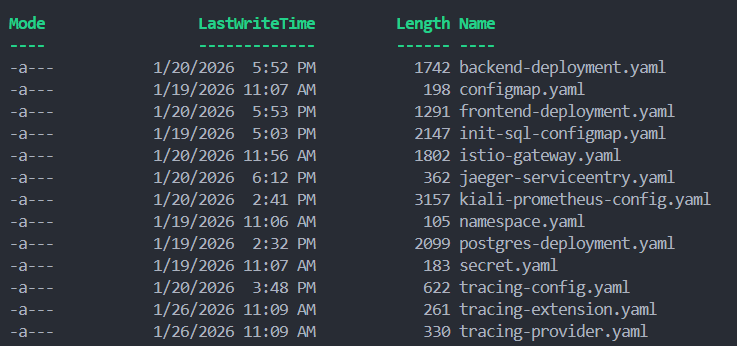
In here, focus on the istio-gateway.yaml , jaeger-serviceentry.yaml , kiali-prometheus-config.yaml , tracing-config.yaml , tracing-extension.yaml , and tracing-provider.yaml .
We will use kiali for visualizing requests to understand how the services connect to each other. We also use jaeger for collecting traces to investigate performance issue if that happens.
Run the following command to enable Istio for the bookmanagement application.
kubectl label namespace bookmanagement istio-injection=enabledThen roll up the services to apply the new change.
kubectl rollout restart deployment backend -n bookmanagement
kubectl rollout restart deployment frontend -n bookmanagement
kubectl rollout restart deployment postgres -n bookmanagement
To be able to access kiali and jaeger from outside of cluster, run the following command to expose the ports.
##Jaeger
kubectl port-forward -n istio-system service/tracing 16686:80

##Kiali
kubectl port-forward -n istio-system service/kiali 20001:20001
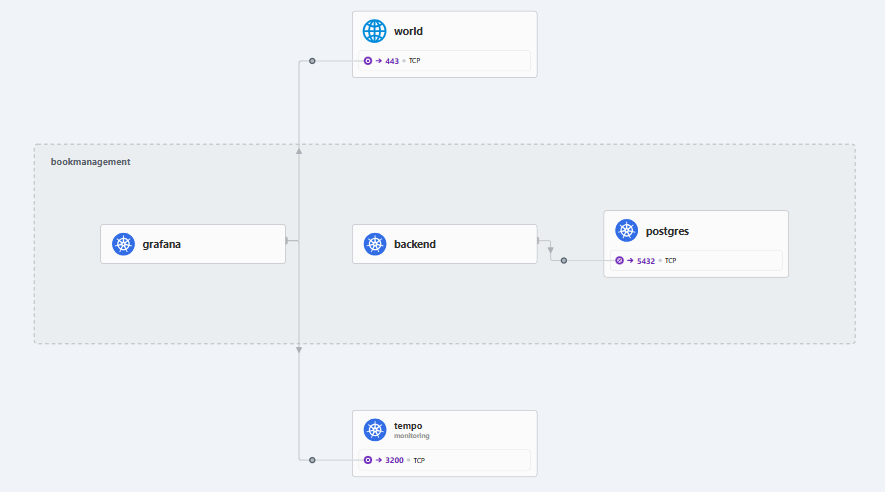
Now from the browser at http://localhost:20001/, we can see the traffice graph that Kiali offers to understand how services communicate at each other and whether we have any issue with communication.

We can also see the traces from Jaeger UI at http://localhost:16686/ as well.

For example with this POST API request, we can see each span of the trace to identify which part of the request taking unusual long time to help with the investigation if needed.
With security, by default, Istio enhance the security level by applying mutual TLS and fine-grained access policies.
Hope this helps.
Happy testing guys!
메타데이터
- post_id
- dafbeddcec72
- slug
- create-service-mesh-for-enhancing-security-and-observability-with-istio-dafbeddcec72
- url
- https://medium.com/@ledinhcuong99/create-service-mesh-for-enhancing-security-and-observability-with-istio-dafbeddcec72
- canonical_url
- https://medium.com/@ledinhcuong99/create-service-mesh-for-enhancing-security-and-observability-with-istio-dafbeddcec72
- author_url
- https://medium.com/@ledinhcuong99
- status
- ok
- fetched_at
- 2026-06-24 18:57:25