Kafka Producer internal steps
Fun fact: according to Kafka: The Definitive Guide, Kafka got its name simply because it’s a system optimized for writing so naming it…
Kafka Producer internal steps
Fun fact: according to Kafka: The Definitive Guide, Kafka got its name simply because it’s a system optimized for writing so naming it after a writer felt fitting and and Franz Kafka’s name just sounds cool for an open source project. Nothing too deep, and nothing about it has to be. Honestly, I love that.
And if we’re talking about writing, we have to talk about producers.
So here’s the real question: how does a producer actually leverage a topic to write messages in the way best suited to its use case?
What should we actually be thinking about when building a producer?
- Throughput — how much am I going to be writing to this topic?
- Latency — how fast does each message need to land?
- Message format — what kind of data am I sending
- Ordering — does sequence matter? Sometimes it absolutely does. (Imagine producing GPS coordinates to reconstruct a trajectory — you can’t shuffle those.)
- Durability — can I afford to lose a record here and there, or is every single one critical?
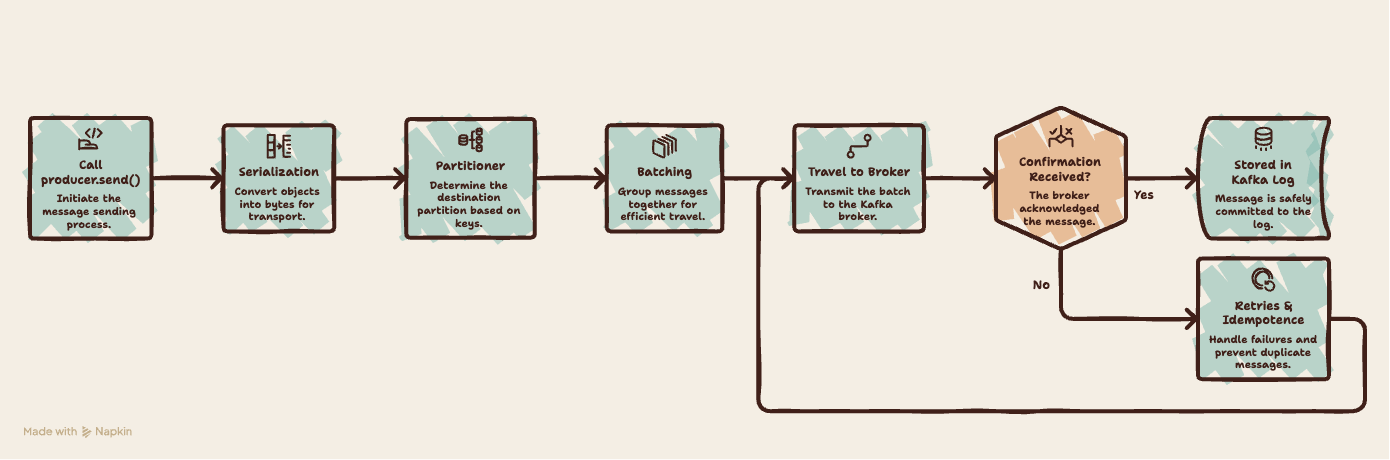
These five questions are the real requirements behind any producer. Every config you’ll touch exists to answer one of them. So the rest of this article follows a single message from send() to stored — and along the way, we’ll see exactly how each of these criteria gets met under the hood.
Production steps :
Step 1: Your message becomes bytes
Everything starts with a ProducerRecord. At minimum it needs two things: the topic name (where the message is going) and the value (the message itself). You can optionally add a key, a timestamp, and some headers .
To actually send it, you first need a producer object. Creating one requires at least three configs: the broker URLs (so it knows where the cluster lives) and a key serializer and value serializer (we’ll get to why in a second).
So you build your ProducerRecord, call send()… and then what?
The first thing that happens is serialization. Your record gets converted into an array of bytes using the serializers you configured. This is why those serializers were required up front – Kafka doesn’t move objects around, it moves bytes.
(Quick question: can one producer handle multiple data types? Nope – and you’ll be thankful for that. One producer, one consistent data format. It keeps things predictable.)
Once the record is serialized, the bytes get handed off to the partitioner – which decides where the message actually goes.
Step 2: Picking a partition
It’s the producer that decides which partition a message lands in. And the big question here is: do we care about order, or not?
Here’s the key rule to remember: order is only guaranteed within a single partition. Kafka doesn’t promise any ordering across partitions – only inside one.
So if you need certain messages consumed in the exact order they were produced, they all need to go to the same partition. How do you make that happen? Give them the same key – by default, messages with the same key always land in the same partition.
If you don’t provide a key, the messages get spread across partitions (roughly randomly), which is totally fine when order doesn’t matter and you just want even distribution.
- If the message has a key, the partition is chosen by hashing that key (same key → same partition, always).
- If the message has no key, the sticky partitioner takes over. It deliberately sticks to one partition until batch.size bytes got produced to it, then switches to another partition and so on. Over time the load spreads out evenly.
So basically give the same key to messages that you want to have in one partition to preserve the order and if you have some weird, specific requirement that the default behavior can’t handle? You can write a custom partitioner and define the logic yourself.
So at this point, we know exactly which partition our message is headed to.
Step 3: batching the records
Now we have our serialized message, and we know which partition it’s headed to. But here’s the thing — we don’t send messages one at a time. That would be inefficient.
Once messages are assigned to partitions, the producer groups them into one mini-batch per partition. Batching always happens — it doesn’t matter whether the message has a key or not. All messages heading to the same partition pile into the same batch.
A batch gets sent when either of these happens first:
- It fills up — the batch reaches
batch.size, which defaults to 16 KB. - It times out — the producer has waited
linger.msmilliseconds, defaulting to 5 ms (it was0before Kafka 4.0).
All these batches-in-progress live in a chunk of producer memory called the buffer (buffer.memory, default 32 MB). But if you produce faster than the producer can ship the buffer fills up. When that happens, send() itself blocks (up to max.block.ms, default 60 seconds) until space frees up. It's the producer's natural backpressure.
Step 4: Making sure the broker has the message (acks & retries)
So the batch fills up or the timer expires, and now it actually gets sent. The producer opens a network connection to the broker that leads the target partition and ships the batch over.
Now — did it arrive? That depends on **acks**, the setting that controls how much confirmation the producer waits for before considering the send successful:
**acks=0** — fire and forget. The producer doesn't wait for any acknowledgment at all. Fastest, but if the message is lost in transit, you'll never know.**acks=1* — the leader broker writes the message and confirms. Safe, unless the leader crashes right after* acking but before the replicas have copied it — then it's lost.**acks=all** — the leader waits until all in-sync replicas have the message before confirming. Slowest, but the strongest durability — the message survives even if the leader dies.
So what happens if no ack comes back? The producer retries. And here’s something that surprises people: it doesn’t retry a small fixed number of times. The retries config defaults to **Integer.MAX_VALUE — basically "keep trying." What actually stops it isn't a counter, it's a clock: `delivery.timeout.ms` (default 2 minutes**). The producer keeps retrying until the send either succeeds or hits that deadline — then it gives up and reports failure.
But what if the broker did write the message, and only the ack got lost on the way back? The producer assumes failure, retries, and now there are two copies of the same message.
That’s the duplicate problem — and it’s exactly what the next piece solves.
Step 5: Retrying without the regret (idempotence)
First, what does idempotent mean? An operation is idempotent if doing it multiple times has the same effect as doing it once. For our producer, it means: even if the same message gets sent several times because of retries, it lands in the partition exactly once.
So how does Kafka pull that off? When idempotence is enabled, every message gets tagged with two things:
- A Producer ID (PID) — assigned by the broker when the producer starts. It identifies who is sending.
- A sequence number — a counter that increments with each message, per partition. it’s an ordered counter tied to each (producer, partition) pair.
Now the broker can play gatekeeper. It remembers the last sequence number it successfully wrote for each (PID, partition), and checks every incoming message.
So to replay our lost-ack scenario: the broker writes message seq=5, the ack gets lost, the producer retries seq=5. This time the broker goes "I already have seq=5," drops the duplicate, and just re-sends the ack. No double write.
There’s a second config in play here: max.in.flight.requests.per.connection — how many batches the producer can have sent but not yet acknowledged on one connection at a time (default 5). This matters for ordering: if batch A and batch B are both in flight, batch A fails and retries while B already succeeded, then B ends up written before A — and the order is broken. Without idempotence you'd have to drop the max in flight config to 1 to stay safe (safe, but it costs you throughput).
With idempotence, the sequence number isn’t just a duplicate detector — it’s also an ordering enforcer. The broker refuses to write a batch until its immediate predecessor is written, so in-flight batches can only commit in order, regardless of arrival order.
The best part: One config — enable.idempotence=true — automatically applies the three settings it needs: acks=all, retries > 0, and max.in.flight ≤ 5. In modern Kafka it's on by default.
To conclude :
Your record becomes bytes (serialization), gets assigned a partition (ordering), waits its turn in a batch (throughput), ships off and waits for an acknowledgment (durability), and gets deduplicated on retry by idempotence (ordering + durability).
And here’s the thing : none of these are settings you get “right” in isolation. They’re trade-off dials between the five things we started with. There's no universally correct producer config — only the one that fits your answers to those five questions.
Config cheat sheet, by step
Step 1 — Serialization
key.serializer/value.serializer— how your objects become bytes (required, no default)
Step 2 — Partitioning
partitioner.class— which partition a record lands in (default: built-in uniform sticky partitioner)
Step 3 — Batching & buffering
batch.size— max size of a per-partition batch (default: 16 KB)linger.ms— how long to wait to fill a batch (default: 5 ms)buffer.memory— total memory for batches waiting to be sent (default: 32 MB)max.block.ms— how longsend()blocks when the buffer is full (default: 60 s)
Step 4 — Sending & acknowledgment
acks— how much confirmation to wait for (default: all)retries— retry attempts on failure (default: Integer.MAX_VALUE)delivery.timeout.ms— total time cap on retrying (default: 2 min)max.in.flight.requests.per.connection— unacked requests per broker connection (default: 5)
Step 5 — Idempotence
enable.idempotence— no duplicates + preserved ordering (default: true)
Resources :
메타데이터
- post_id
- db0f345d0660
- slug
- kafka-producer-under-the-hood-from-send-to-stored-db0f345d0660
- url
- https://medium.com/@rattabines/kafka-producer-under-the-hood-from-send-to-stored-db0f345d0660
- canonical_url
- https://medium.com/@rattabines/kafka-producer-under-the-hood-from-send-to-stored-db0f345d0660
- author_url
- https://medium.com/@rattabines
- status
- ok
- fetched_at
- 2026-06-27 18:23:13



