Simplifying Multi-Package Publishing in Monorepos with Lerna
The Challenge and the Solution:
Simplifying Multi-Package Publishing in Monorepos with Lerna
Pic Courtesy — https://emmer.dev/blog/migrating-existing-repos-to-a-lerna-monorepo/
The Challenge and the Solution:
Publishing multiple packages within a monorepo manually can quickly become overwhelming. Each package requires its own version bump, a separate publish process, and individual pipelines — resulting in significant overhead and potential for error.
After conducting some research and collaborating with the team, I came across Lerna — and it was a game-changer.
What is Lerna?
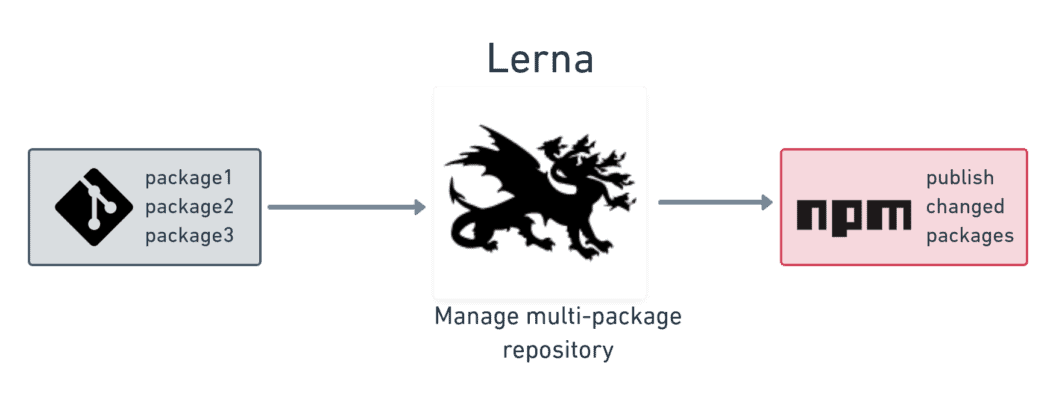
Lerna is a powerful tool designed to manage and automate tasks within a monorepo. It’s particularly useful for projects that consist of multiple packages, allowing you to easily manage versioning, dependencies, and publishing.
In short, Lerna helps teams maintain monorepos by automating tedious tasks like:
- Versioning: Automatically bump versions of your packages based on changes.
- Publishing: Simplify the process of releasing multiple packages at once.
- Dependency Management: Track and manage internal dependencies between packages.
Lerna works by understanding the relationships between packages in a monorepo and managing the complexities that arise when you need to release updates to them. It helps to keep everything in sync and makes the whole process much smoother.
How Lerna Solves the Problem
Lerna tackles the challenges of managing multiple packages in a monorepo head-on. Here’s how:
- Single Command Publishing Before Lerna, you either had to publish each package individually or put in a lot of effort to hardcode your CI pipelines just to publish each package correctly. With Lerna, you can publish all updated packages with a single command. It automatically handles versioning and only publishes the packages that have changed — making the whole process smooth and easy
- Automated Versioning Lerna’s versioning system automatically identifies which packages need to be versioned based on code changes. Whether you use fixed versioning (where all packages share the same version) or independent versioning (with separate versions for each package), Lerna keeps everything in sync and consistent.
- Efficient Dependency Management Lerna understands the relationships between packages. If Package A depends on Package B, it ensures that Package B is published first. This dependency-aware publishing guarantees the correct order and prevents potential issues caused by out-of-sync packages
Getting Started with Lerna
Now that we know how Lerna can simplify publishing and managing multiple packages, let’s dive into how you can set it up for your monorepo. The setup process is quick and easy, and it only takes a few steps to get everything up and running.
- Install Lerna
First, install Lerna globally (or locally in your project):
npm install --global lerna- Initialize Your Monorepo
If you don’t have a lerna.json file in your repo yet, run:
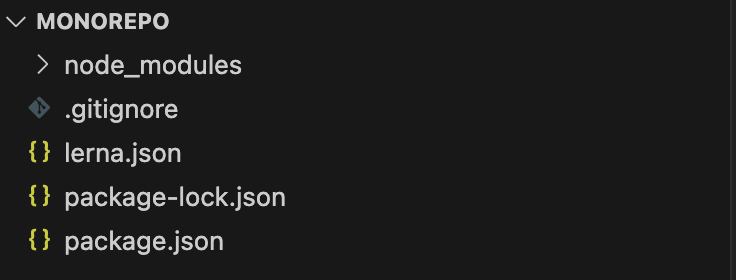
npm install --global lernaThis will set up the basic structure with a packages/ directory for your individual packages, as well as the necessary configuration files.
Pic Courtesy — Google Images
- Configure Lerna for npm Workspaces
We’ll configure Lerna to work with npm and enable npm Workspaces to manage dependencies across your monorepo. To do this, update your lerna.json file to look like this:
{
  "packages": ["packages/*"],
  "version": "independent",  // Independent versioning for each package
  "npmClient": "npm",        // Use npm as the package manager
  "useWorkspaces": true      // Enable npm Workspaces
}
This tells Lerna to use npm as the npmClient and enables npm Workspaces to help manage your packages and their dependencies.
- Set Up
package.jsonfor the Root Project
Now, we need to configure the root package.json to use npm Workspaces and set it as private to prevent the root project from being published. Add the following to your root package.json:
{
  "name": "my-mono-repo",
  "private": true,
  "workspaces": [
    "packages/*"  // Define all the packages within the 'packages' directory
  ]
}
The private: true flag ensures that the root project won't be accidentally published to npm.
- Bootstrap Your Packages
After setting everything up, you need to install dependencies and link internal packages. To do that, run:
lerna bootstrapThis will install all external dependencies and create symlinks between the local packages in the monorepo.
Publish Your Packages
Before publishing, there are a few important Lerna commands that prepare your packages and versioning for release. Here’s what you’ll typically do before hitting publish:
(i) Build the Packages
First, make sure everything is built and ready to go by running:
lerna buildThis command will build all the packages in your monorepo, ensuring that the latest code is compiled and ready for publishing.
(ii) Versioning the Packages
Next, you’ll want to version your packages based on the changes you’ve made. To automatically bump versions, create changelogs, and ensure everything is up-to-date, run:
lerna version --conventional-commits --no-push --yes--conventional-commits: This flag reads your commit messages (following the Conventional Commit format) to determine the version bump (major, minor, or patch).--no-push: Prevents Lerna from pushing changes to the remote repository automatically, in case you want to manually review or push changes later.--yes: Skips the confirmation prompt, making the command fully automated.
After running the version command, it’s always a good idea to check the versions and ensure everything looks good. You can inspect the lerna.json and package.json files to verify that the version changes are correct.
(iii) Publish the Packages
Once versioning is complete and you’re satisfied with the changes, it’s time to publish. The following command will publish the updated packages:
lerna publish from-package --conventional-commits --yesfrom-package: This flag ensures that only the packages with updated versions (from the versioning step) will be published.--conventional-commits: Ensures Lerna uses the Conventional Commit strategy for versioning.--yes: Skips the confirmation prompt to automatically publish the packages.
Pic Courtesy — Google Images
(iv) Push Changes and Tags to you Git Repo (If Needed)
If you’ve used Lerna to version your packages and commit the changes, the next step is to push those changes to your Git repository. This includes the updated version numbers in your package.json files and any other changes you’ve made.
To push the changes (including the version bump) to your remote Git repository, simply run:
git pushHowever, this won’t push your tags. If you want to also push the version tags (e.g., v1.2.0), which mark the specific versions you just published, you will need to do that separately using:
git push --tagsVerify the Publish using lerna
Once your changes are pushed to both your Git repository and NPM, it’s good practice to verify that everything is working as expected. This includes:
- Check the NPM registry: Go to the NPM website and search for your package to ensure it’s been published with the correct version.
- Verify the changelog: Ensure that Lerna has correctly generated the changelog and version information for your packages. This will help you track the changes over time.
Common Pitfalls and Troubleshooting
While Lerna is an incredibly powerful tool for managing monorepos, there are a few common challenges that you may run into. Here’s how to avoid or troubleshoot them:
1. Versioning Conflicts
One of the most common issues is versioning conflicts, especially when using independent versioning. You might accidentally try to publish a package with a version that already exists, or forget to bump the version number before publishing.
How to Avoid:
- Always check the version numbers before publishing. Lerna provides built-in checks during the
lerna versionprocess, so make sure to review the proposed version bump. - Use conventional commits to automate versioning and reduce the chances of manual errors.
What to Do if It Happens:
- If you get an error like
fatal: tag 'v1.2.0' already exists, you can delete the conflicting tag locally and remotely with:
git tag -d v1.2.0
git push --delete origin v1.2.0- Then, run
lerna versionagain.
2. Unpublished Packages
Sometimes, packages that have been updated in the monorepo don’t get published as expected.
How to Avoid:
- Use
lerna publish from-packageto ensure that only updated packages are pushed to NPM. - Double-check your commit history and changelog to ensure Lerna recognizes the changes.
What to Do if It Happens:
- Run
lerna publish from-package --conventional-commits --yesagain to push the packages that might have been missed.
Conclusion: Why Lerna is a Game-Changer for Managing Multiple Packages
Lerna streamlines managing multiple packages in a monorepo, automating versioning, dependencies, and publishing.
Key Takeaways:
- Single Command: Publish all packages with one command.
- Automated Versioning: Auto-bumps versions for consistency.
- CI/CD Integration: Automates publishing with CI/CD.
- Dependency Management: Manages package dependencies and order.
Lerna boosts productivity, reduces overhead, and scales workflows efficiently.
Call to Action: Try Lerna and Engage with the Community
If you’re managing multiple packages in a monorepo or considering switching to a monorepo structure, Lerna is the tool you need to streamline your workflow. Give it a try, and see how much time it saves you!
- Get Started: Lerna Documentation — Set up your project with Lerna and start automating your package management today.
Let’s make managing monorepos easier, together!
메타데이터
- post_id
- db1fd6fa4e33
- slug
- simplifying-multi-package-publishing-in-monorepos-with-lerna-db1fd6fa4e33
- url
- https://medium.com/@zainabghauri7799/simplifying-multi-package-publishing-in-monorepos-with-lerna-db1fd6fa4e33
- canonical_url
- https://medium.com/@zainabghauri7799/simplifying-multi-package-publishing-in-monorepos-with-lerna-db1fd6fa4e33
- author_url
- https://medium.com/@zainabghauri7799
- status
- ok
- fetched_at
- 2026-06-26 12:24:55