EP:1 NumPy Explained for Beginners
If you’re learning Python for Data Science, Machine Learning, Artificial Intelligence, or Backend Development, one of the first libraries…
EP:1 NumPy Explained for Beginners
If you’re learning Python for Data Science, Machine Learning, Artificial Intelligence, or Backend Development, one of the first libraries you’ll encounter is NumPy.
EP:1 NumPy Explained for Beginners
If you’re not a Medium subscriber, you can read the full interview-focused article using this friend’s link: 👉 **Read the full article here**
What is NumPy?
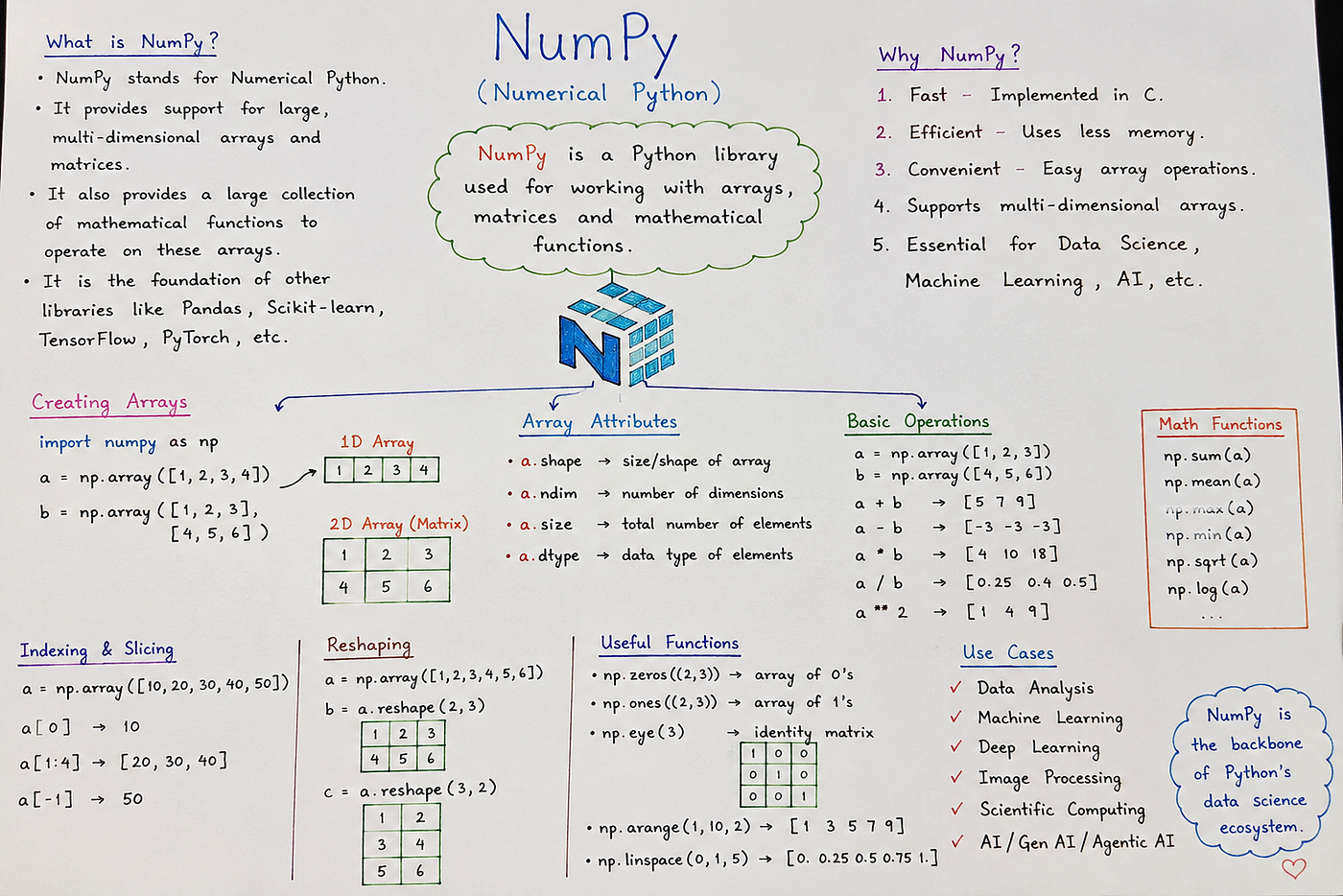
NumPy (Numerical Python) is an open-source Python library designed for high-performance numerical computing.
It provides a powerful data structure called the NumPy Array, which is much faster and more memory-efficient than Python’s built-in list when working with numerical data.
Python List → General-purpose data storage
NumPy Array → High-performance numerical computing
Why Was NumPy Created? instead of Python lists (big Question)
Python lists are incredibly flexible.
They can store different types of data in the same collection.
data = [10, "Hello", True, 15.5]While this flexibility is useful, it comes with a cost.
Python lists:
- Consume more memory
- Are slower for mathematical operations
- Require explicit loops for most calculations

Example 1: Adding Two Arrays
Using Python list
Using Python Lists
a = [1, 2, 3]
b = [4, 5, 6]

result = []

for i in range(len(a)):
    result.append(a[i] + b[i])

print(result)

Output

[5, 7, 9]
Using NumPy
import numpy as np
a = np.array([1, 2, 3])
b = np.array([4, 5, 6])
print(a + b)

o/p [5 7 9]
Example 1: Adding Two Arrays
Why Is NumPy So Fast?
One of the biggest reasons is that NumPy is implemented primarily in C, allowing it to execute operations much more efficiently than pure Python loops.
When you write:
array * 10Python does not multiply each element individually.
Instead:
- Python calls NumPy.
- NumPy executes highly optimised compiled code.
- The CPU processes the entire array efficiently.
This significantly reduces execution time.
Why Does NumPy Use Less Memory?
Python lists store references to Python objects.
List
[10] -> Object
[20] -> Object
[30] -> Objects
Each value carries additional object metadata.
NumPy arrays store values in one continuous block of memory.
NumPy Array
10 20 30
Benefits include:
- Better CPU cache utilisation
- Lower memory consumption
- Faster processing
- Better scalability
Real-World Use Cases
1. Machine Learning
Almost every machine learning library depends on NumPy.
Example:
weights = np.array([0.5, 0.8, 0.3])Libraries such as TensorFlow, PyTorch, and Scikit-learn all work seamlessly with NumPy arrays.
2. Data Analysis
Suppose you have millions of sales records.
NumPy can calculate:
- Average
- Maximum
- Minimum
- Sum
- Standard deviation
Example:
sales = np.array([1200, 1500, 1800, 2100])
print(np.mean(sales))
print(np.max(sales))
3. Image Processing
A digital image is simply a matrix of pixel values.
255 120 45
180 90 30
NumPy efficiently stores and manipulates these matrices.
This is why libraries like OpenCV rely heavily on NumPy.
4. Scientific Computing
Scientists and engineers use NumPy for:
- Physics simulations
- Financial modelling
- Weather forecasting
- Signal processing
- Statistical analysis
When Should You Use Python Lists?
Python lists are a better choice when:
- You need mixed data types.
- You frequently add or remove elements.
- You’re building general-purpose applications.
- Numerical performance isn’t important.
Example:
employee = ["Alice", 28, "Developer", True]When Should You Use NumPy?
Choose NumPy when:
- Working with thousands or millions of numbers
- Performing mathematical calculations
- Handling vectors or matrices
- Analysing datasets
- Building AI or Machine Learning applications
- Processing images
- Performing statistical analysis
Key Advantages of NumPy
- High performance
- Lower memory usage
- Easy mathematical operations
- Vectorised computations
- Industry standard for AI and Data Science
- Excellent integration with Pandas, TensorFlow, PyTorch, Scikit-learn, and OpenCV
Why NumPy Is the Foundation of Modern AI
AI application relies on numerical computation. Whether you’re training a Machine Learning model, building a chatbot with an LLM, creating an AI agent, or analysing millions of records, everything eventually becomes numbers.
Think of NumPy as the mathematical engine behind Python’s AI ecosystem.
1. Data Science
Every data science project starts by loading, cleaning, and analysing data.
Examples include:
- Sales analysis
- Customer analytics
- Business Intelligence
- Financial analysis
- Healthcare data
- Weather prediction
Typical workflow:
CSV File
     ↓
Pandas
     ↓
NumPy
     ↓
Analysis
2. Machine Learning
Machine Learning models learn from numbers.
Example:
Student Marks
Age
Salary
House Price
Temperature
These datasets are stored internally as NumPy arrays before being processed by machine learning algorithms.
Libraries that depend on NumPy include:
- Scikit-learn
- XGBoost
- LightGBM
- CatBoost
Without NumPy, machine learning would be significantly slower.
3. Deep Learning
Deep Learning frameworks represent data as tensors, which are conceptually similar to NumPy arrays.
Examples:
- TensorFlow
- PyTorch
- JAX
Images, videos, and audio are first loaded into NumPy arrays before being converted into tensors for neural networks.
Image
 ↓
NumPy Array
 ↓
Tensor
 ↓
CNN Model
4. Generative AI
Generative AI models such as ChatGPT, Claude, Gemini, and Llama operate on vectors and matrices.
Internally they perform:
- Matrix multiplication
- Vector operations
- Linear algebra
- Probability calculations
Although production models use GPU tensors, NumPy is commonly used for:
- Data preprocessing
- Token processing
- Embedding manipulation
- Model prototyping
- Evaluation
5. Large Language Models (LLMs)
When you ask an LLM a question:
"What is Artificial Intelligence?"The model converts your sentence into:
Tokens
 ↓
Vectors
 ↓
Embeddings
 ↓
Transformer Model
During development, engineers frequently use NumPy to:
- Process embeddings
- Analyse vectors
- Calculate similarity
- Manipulate matrices
- Test algorithms
6. Agentic AI
Modern AI agents don't just answer questions—they can plan, reason, use tools, search documents, and execute workflows.
Examples:
- OpenAI Agents
- AutoGen
- LangGraph
- CrewAI
NumPy is used behind the scenes for:
- Vector calculations
- Numerical scoring
- Ranking results
- Similarity computation
- Performance evaluation
- Decision algorithms
7. RAG (Retrieval-Augmented Generation)
If you're learning RAG, NumPy becomes even more important.
Workflow:
Documents
      ↓
Embedding Model
      ↓
Vector Embeddings
      ↓
Vector Database
      ↓
Similarity Search
      ↓
LLM
Each embedding is simply an array of numbers.
Example:
[0.21, -0.43, 0.18, 0.91, ...]Similarity between vectors is calculated using mathematical operations that NumPy excels at.
8. Vector Databases
Popular vector databases include:
- Pinecone
- Milvus
- Weaviate
- ChromaDB
- Qdrant
- FAISS
Each stores millions of vectors.
NumPy is widely used to:
- Generate vectors
- Normalise vectors
- Compute cosine similarity
- Compute Euclidean distance
- Batch process embeddings
9. Computer Vision
Images are simply matrices of numbers.
Example:
255 180 120
100  80  60
210 140  9
Libraries such as:
- OpenCV
- Pillow
- Detectron2
- YOLO
all use NumPy arrays extensively.
Applications include:
- Face recognition
- Object detection
- OCR
- Medical imaging
10. Natural Language Processing (NLP)
NLP libraries such as:
- spaCy
- NLTK
- Hugging Face Transformers
use NumPy for:
- Token processing
- Embeddings
- Probability calculations
- Similarity search
- Feature extraction
11. Robotics
Robots continuously perform calculations involving:
- Coordinates
- Angles
- Rotations
- Sensor readings
- Camera inputs
These calculations rely heavily on NumPy arrays.
12. Scientific Computing
Researchers use NumPy for:
- Physics
- Chemistry
- Biology
- Astronomy
- Engineering
- Climate modelling
- Financial modelling
NumPy in the AI Ecosystem
Python
   │
   ▼
NumPy
   │
   ├── Pandas
   ├── Matplotlib
   ├── SciPy
   ├── Scikit-learn
   ├── OpenCV
   ├── TensorFlow
   ├── PyTorch
   ├── JAX
   ├── Hugging Face
   ├── LangChain
   ├── LlamaIndex
   ├── FAISS
   ├── ChromaDB
   ├── Pinecone
   └── AI Agents
Almost every modern AI technology — Machine Learning, Deep Learning, Generative AI, Large Language Models (LLMs), RAG, Vector Databases, Computer Vision, Natural Language Processing, and Agentic AI — either uses NumPy directly or builds upon libraries that depend on it.
Questions Based on NumPy
# What Can You Build with NumPy?

At first glance, NumPy looks like a library that only works with arrays. In reality, it's one of the most important building blocks in Python's ecosystem.

From data analysis to modern AI applications, NumPy powers the numerical computations that many popular libraries rely on. Even if you don't use NumPy directly every day, chances are the tools you use are built on top of it.

Let's look at where NumPy is used in real-world applications.

---

## Machine Learning

Machine learning algorithms learn from numerical data, and NumPy provides the fast array operations needed to process that data efficiently.

Common use cases include:

* Loading and storing datasets
* Data cleaning and preprocessing
* Feature normalization
* Matrix and vector operations
* Statistical calculations
* Implementing algorithms such as Linear Regression, Logistic Regression, K-Means, and PCA

Libraries like **Scikit-learn** are built on top of NumPy.

---

## Deep Learning

Before data reaches a neural network, it usually passes through NumPy.

NumPy is widely used for:

* Loading datasets
* Image preprocessing
* Data augmentation
* Feature engineering
* Model evaluation
* Preparing data before converting it into tensors

Although frameworks such as **TensorFlow**, **PyTorch**, and **JAX** use tensors internally, NumPy remains an essential part of the workflow.

---

## Generative AI

Generative AI models process enormous amounts of numerical data using vectors and matrices.

During development, NumPy is commonly used for:

* Data preprocessing
* Token manipulation
* Embedding processing
* Matrix operations
* Linear algebra
* Rapid prototyping

Many GenAI workflows begin with NumPy before moving data into GPU-based frameworks.

---

## Large Language Models (LLMs)

Large Language Models convert text into numerical representations called **embeddings**.

Developers use NumPy to:

* Process embeddings
* Compare vectors
* Calculate cosine similarity
* Perform vector arithmetic
* Analyse model outputs

These operations are fundamental when building applications powered by LLMs.

---

## Agentic AI

Modern AI agents can reason, plan, call APIs, retrieve information, and complete multi-step tasks.

NumPy supports many of the numerical operations behind these systems, including:

* Similarity calculations
* Ranking results
* Decision scoring
* Data transformation
* Performance evaluation

Frameworks such as **LangGraph**, **CrewAI**, and **AutoGen** frequently rely on numerical processing during execution.

---

## Retrieval-Augmented Generation (RAG)

Every RAG application works with **vector embeddings**.

A typical workflow looks like this:

```text
Documents
      ↓
Embedding Model
      ↓
NumPy Arrays (Vectors)
      ↓
Vector Database
      ↓
Similarity Search
      ↓
Large Language Model
NumPy is commonly used to:
- Process embeddings
- Normalize vectors
- Compute cosine similarity
- Calculate Euclidean distance
- Batch-process documents
Vector Databases
Every vector database stores numerical embeddings.
Popular options include:
- FAISS
- ChromaDB
- Pinecone
- Milvus
- Qdrant
- Weaviate
NumPy is frequently used for:
- Creating embeddings
- Transforming vectors
- Preparing data for indexing
- Similarity search
- Analysing search results
Computer Vision
Images are simply arrays of pixel values.
NumPy makes it easy to perform operations such as:
- Resizing
- Cropping
- Rotation
- Colour conversion
- Brightness adjustment
- Image filtering
Libraries like OpenCV and Pillow use NumPy arrays extensively.
Natural Language Processing (NLP)
NLP applications rely heavily on numerical representations of text.
NumPy helps with:
- Word embeddings
- Sentence embeddings
- Feature extraction
- Similarity calculations
- Probability distributions
- Token statistics
Libraries such as spaCy and Hugging Face Transformers use NumPy throughout their processing pipelines.
Data Analysis
NumPy is designed to analyse large datasets efficiently.
Typical tasks include:
- Calculating averages
- Finding maximum and minimum values
- Computing standard deviation
- Detecting trends
- Processing millions of records quickly
It forms the foundation of libraries like Pandas.
Scientific Computing
NumPy is widely used across research and engineering disciplines, including:
- Physics
- Finance
- Engineering
- Medical research
- Weather forecasting
- Scientific simulations
- Statistical analysis
Its speed and optimized mathematical operations make it suitable for computationally intensive applications.
Where Does NumPy Fit in the AI Stack?
NumPy sits at the foundation of the modern Python ecosystem.
Python
   │
   ▼
NumPy
   │
   ├── Pandas
   ├── SciPy
   ├── Scikit-learn
   ├── OpenCV
   ├── TensorFlow
   ├── PyTorch
   ├── Hugging Face
   ├── LangChain
   ├── LlamaIndex
   ├── Vector Databases
   └── AI Agents
Key Takeaways
With NumPy, you can:
- Build machine learning models
- Prepare data for deep learning
- Work with Generative AI applications
- Process LLM embeddings
- Develop RAG pipelines
- Use vector databases
- Build AI agents
- Process images and videos
- Analyse large datasets
- Perform scientific and statistical computing
Final Thoughts
NumPy is much more than an array library. It provides the numerical foundation for Python's data science and AI ecosystem.
Whether you're training a machine learning model, building an LLM-powered application, creating an AI agent, or developing a RAG system, NumPy is likely involved somewhere in the pipeline.
Learning NumPy isn't just about understanding arrays—it's about understanding how modern AI applications process and manipulate data efficiently.
메타데이터
- post_id
- db4e5b34481d
- slug
- ep-1-numpy-explained-for-beginners-db4e5b34481d
- url
- https://medium.com/@sanjaysingh-dev/ep-1-numpy-explained-for-beginners-db4e5b34481d
- canonical_url
- https://medium.com/@sanjaysingh-dev/ep-1-numpy-explained-for-beginners-db4e5b34481d
- author_url
- https://medium.com/@sanjaysingh-dev
- status
- ok
- fetched_at
- 2026-08-18 11:00:21