How I automated a (C5/ISO 27001) compliance internal audit with an AI agent
Original post from github https://github.com/felipeloha/compliance/blob/master/blog-posts/post-02-ai-compliance-audit.md
How I automated a (C5/ISO 27001) compliance internal audit with an AI agent
Original post from github https://github.com/felipeloha/compliance/blob/master/blog-posts/post-02-ai-compliance-audit.md
Annual compliance audits are a known pain. 80+ controls, 200+ individual requirements, policy documents scattered across a compliance tool, a wiki, and vendor portals. The output is a spreadsheet with scores that are already stale by the time the auditor closes the tab.
I built an agent that runs the whole gap analysis in minutes. Once the evidence is indexed locally, the audit is a prompt — you can remediate a control, update the document, and re-run without touching anything else. No re-reading the full framework. No spreadsheet rebuild. Just the delta.
The challenge
A single framework audit — C5 alone covers 17 control families — requires an auditor to locate the relevant documents and evidence for each control, read them, verify they cover the requirements, and decide whether the evidence is current enough to count. At 1–2 engineers and several weeks of wall time, it was one of the highest-cost recurring security activities on the team’s calendar.
The two failure modes I kept running into:
- Evidence discovery — knowing which documents cover which controls is manual institutional knowledge. Documents live in Vanta, Confluence, vendor portals, and shared drives. Finding them per-control takes the majority of the time.
- Staleness — a document can be technically linked to a control in Vanta while being three years old and not actually covering the current requirement text. The tooling doesn’t catch this.
The approach
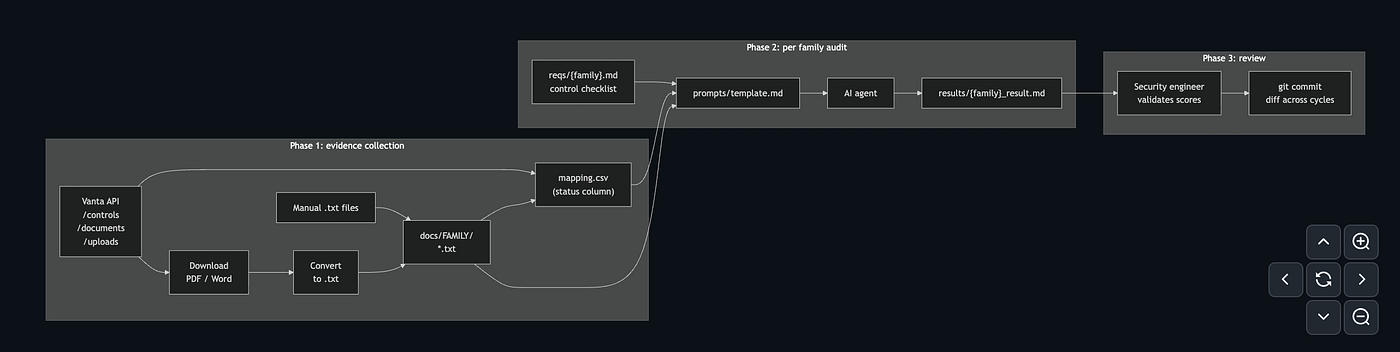
The pipeline has one hard requirement: evidence must be available as local text files. Everything else follows from that.
Downloading everything locally solves the discovery problem once — the mapping index tells the agent exactly which files cover which controls. The content-tier scoring catches staleness regardless of what the CSV says, because the agent reads the document and classifies it, not just checks that it exists.
Three phases: collect evidence first, audit second, review third. The AI only scores what it can read. If a file isn’t locally available, the control gets N/A - not a guess, not a 0. This makes gaps explicit rather than hidden in optimistic defaults.
Architecture
Try it in 5 minutes
The samples/ directory has fictional policy documents for AM, HR, and IDM - enough to run a real audit without a Vanta account.
git clone https://github.com/felipelopezhamann/compliance
cd compliance-audit
uv sync --group dev
Open prompts/template.md in Claude Code or Cursor. Replace {FAMILY} with AM and{FRAMEWORK} with c5. Run it. Results land in audits/c5/results/am_result.md.
The sample produces realistic output: scores of 5–6 because the evidence is procedure-level with no operational evidence — exactly as expected. From there, swap in your own documents and re-run.
How it works
The mapping.csv
The central artifact is a two-level evidence index. Every piece of evidence gets a row: what family it belongs to, which specific control it covers (or blank for family-wide), where the file lives, and whether it’s locally available:
family,control,source_type,link,status,doc_type
AM,,local_file,docs/AM/information-security-policy.txt,ready,documentation
AM,AM-03,local_file,docs/AM/asset-inventory-procedure.txt,ready,evidence
IDM,,confluence,https://yourorg.atlassian.net/wiki/spaces/SEC/pages/123456,needs_manual_fetch,documentation
BCM,,external_url,https://vendor.example.com/sla-doc,needs_manual_fetch,evidence
An empty control column means the evidence applies to all controls in the family. A filled control column scopes it to one specific control. The agent uses both when building its evidence set per control.
The status column does the heavy lifting:
ready- file is locally available, audit proceedsneeds_manual_fetch- URL-only record, the agent flags this control asIncompleteand scores itN/A
Before every audit run, one grep tells you exactly where you have gaps in coverage:
grep needs_manual_fetch audits/c5/mapping.csvThe prompt template
The audit prompt is a single Markdown file you open in your AI coding assistant — Claude Code, Cursor, or any agent that can read local files. No SDK, no framework, no wiring. Fill in two variables and run it.
The key design choice is that the control checklist is the ground truth, not the evidence index. The agent must produce one row per control in the req file, even if there is zero evidence. The full prompt is in[compliance-audit/prompts/template.md](https://github.com/felipeloha/compliance/blob/master/compliance-audit/prompts/template.md).
Before scoring, the agent classifies each document into one of three content tiers by reading it — not by trusting the doc_type field in the CSV:

The tier determines the scoring ceiling:
- Only policy-level content present → cap at 4/10
- Procedure/standard content but no operational evidence → cap at 6/10
- Operational evidence present → eligible for 7–10
A well-written policy that covers every requirement word-for-word is still capped at 4/10. Policy text states intent, not operational reality.
The output table has six columns:

The “Content assessed as” column separates what the document actually contains from what the CSV claims it is. Any mismatch gets flagged in Gaps so the mapping can be corrected.
Populating evidence from Vanta
The mapping.csv can be built manually - drop .txt files into docs/{FAMILY}/ and add rows. For teams with evidence already organized in Vanta, I wrote a bootstrap.py script that automates it: it pulls all controls and linked documents from the Vanta API, converts PDFs to plain text, and writes the mapping index in one pass.
Files that can’t be downloaded — Confluence pages, external URLs, Word documents — are recorded as needs_manual_fetch rather than skipped. The bootstrap knows they exist and where to find them; it just can't read them programmatically.
For Confluence and Google Drive sources, there’s a better path than manual download: if your AI agent has the Confluence or Google Drive MCP configured, it fetches those documents itself during the audit. The source_type field in the mapping tells the agent which tool to call. Controls that were N/A because content wasn't local get scored automatically - no extra step, no manual intervention. External URLs without an MCP still require a manual fetch, but those are typically the minority.
Key decisions
Local files first, integrations second. The pipeline has no runtime dependency on Vanta, Confluence, or any external API. Evidence is downloaded once, stored locally, and the audit runs against that snapshot. This decouples audit runtime from API availability, creates a local record for comparing evidence state across cycles, and makes the prompt deterministic — the agent reads a known set of files rather than discovering evidence on the fly.
**needs_manual_fetch blocks scoring, not silently ignored.** An early version of the prompt gave scores of 0 for URL-only controls. The problem: 0/10 looks the same as "no policy exists" and triggers remediation work, when the actual state is "evidence exists but is not locally available yet". Using N/A + Incomplete keeps the distinction visible and makes audit completeness a first-class metric.
AI scores as first pass, not final verdict. The prompt flags borderline scores (4–7 range) and any control where recency couldn’t be determined for human validation.
In practice, reviewing a 17-family C5 audit takes 2–4 hours for a security engineer who knows the controls — focused on borderline calls and doc_type mismatches, not reading documents from scratch. Roughly 20-30% of borderline scores get adjusted after review: usually upward when a document is more operational than the agent credited, or downward when a procedure looks comprehensive but doesn't address the specific control requirement.
What you get out of it
The most immediate win is speed. What used to take 1–2 engineers several weeks now runs in minutes. The agent reads every document, classifies it, and scores every control while you’re doing something else. The human review that follows is hours, not weeks — focused on borderline scores and missing evidence rather than reading policy docs from scratch.
A typical family audit — 5–10 documents, each a few pages — sits well inside a 200K context window. For frameworks with many large PDFs, you can audit one control at a time; the mapping structure supports this since each row already scopes evidence to a family or a specific control.
The second win is re-runnability. Fix a gap, update the document, run the affected family again. The rest of the scores stay untouched. You don’t re-read the full framework every time something changes — you only look at the delta.
The first full run is usually surprising. Controls you assumed were covered turn out to have only a policy linked — no procedure, no operational evidence — and score 4/10 instead of the 8 someone had in the spreadsheet. Controls with URL-only evidence show up as N/A rather than silently passing. You see the actual state of your posture, not the optimistic version that lives in the compliance tool.
After that, the value compounds. Results are committed to git, so every subsequent cycle shows exactly what improved, what regressed, and what was flagged months ago and never remediated. The prompt stays the same; the evidence and scores evolve with your posture.
Full configuration reference: compliance-audit/README.md
If you’ve tried to automate any part of a compliance audit — bootstrapping an evidence index, classifying documents, or getting consistent scores across cycles — I’d like to hear where it broke down. The parts I found hardest to automate are the ones where the answer genuinely depends on context that isn’t in the document.
Originally published at https://github.com.
메타데이터
- post_id
- db6488322300
- slug
- how-i-automated-a-c5-iso-27001-compliance-internal-audit-with-an-ai-agent-db6488322300
- url
- https://medium.com/@felipelopezhamann/how-i-automated-a-c5-iso-27001-compliance-internal-audit-with-an-ai-agent-db6488322300
- canonical_url
- https://medium.com/@felipelopezhamann/how-i-automated-a-c5-iso-27001-compliance-internal-audit-with-an-ai-agent-db6488322300
- author_url
- https://medium.com/@felipelopezhamann
- status
- ok
- fetched_at
- 2026-07-10 21:29:00