Databricks Data Layout Explained: Partitioning, OPTIMIZE, Z-ORDER & Liquid Clustering
If you’ve worked with Databricks, you’ve probably heard these four terms: Partitioning. OPTIMIZE. Z-ORDER. Liquid Clustering.
Databricks Data Layout Explained: Partitioning, OPTIMIZE, Z-ORDER & Liquid Clustering
If you’ve worked with Databricks, you’ve probably heard these four terms: Partitioning. OPTIMIZE. Z-ORDER. Liquid Clustering.
They are often discussed together, but they solve different problems.The easiest way to understand them is to start with one question:
How can Databricks avoid reading unnecessary Parquet files when I query a Delta table?
This article builds that understanding from the ground up.
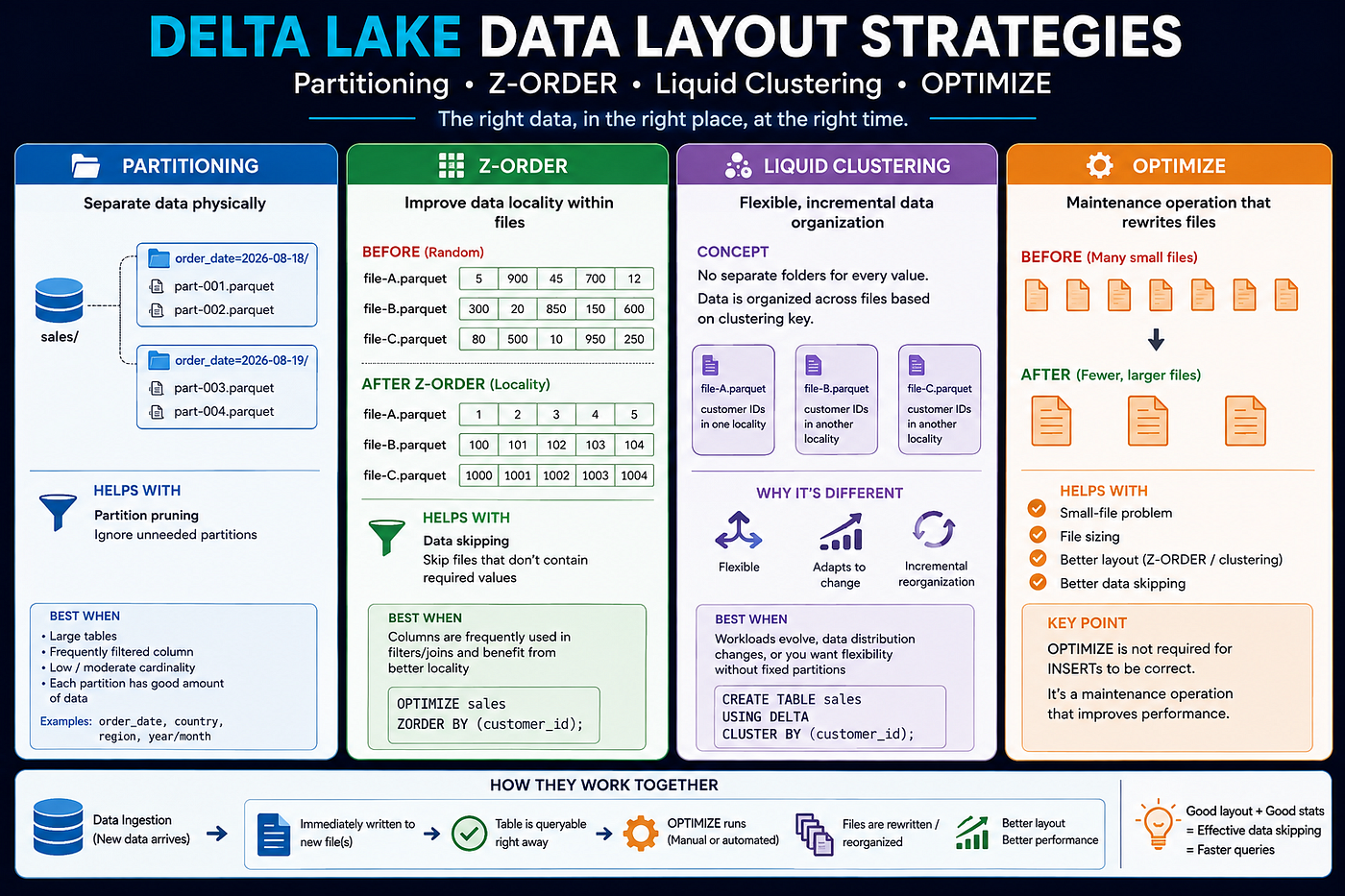
1. First: What does a Delta table actually contain?
A Delta table is essentially:
sales/
│
├── _delta_log/
│
├── part-001.parquet
├── part-002.parquet
├── part-003.parquet
└── ...
The Parquet files contain the actual data.
The _delta_log keeps track of which files belong to the current table version, which files were added/removed, schema changes, transactions, etc.
This is important because Databricks doesn’t normally modify an existing Parquet file when new data arrives.
For example:
BEFORE INSERTA.parquet
B.parquet
C.parquet
+
new data
---------------------------------------AFTER INSERTA.parquet
B.parquet
C.parquet
D.parquet ← new fileThe existing files are generally not opened and modified just to insert new rows.
2. The real performance goal: Read fewer files
Suppose a table has:
100 GB
1000 Parquet files
And you run:
SELECT *
FROM sales
WHERE customer_id = 123;
The ideal situation is:
1000 files
    ↓
Eliminate irrelevant files
    ↓
Read only 5 files
Databricks achieves this using techniques such as:
Partition pruning
       +
Data skipping
       +
Good physical data layout
This is where Partitioning, Z-ORDER and Liquid Clustering come in.
3. Partitioning: Separate data physically
Suppose we create:
CREATE TABLE sales
USING DELTA
PARTITIONED BY (order_date);
The physical layout can look like:
sales/
│
├── order_date=2026-08-18/
│   ├── part-001.parquet
│   └── part-002.parquet
│
└── order_date=2026-08-19/
    ├── part-003.parquet
    └── part-004.parquet
The important point is:
Partitioning creates a physical separation of data based on partition-column values.
Now consider:
SELECT *
FROM sales
WHERE order_date = '2026-08-19';
Databricks can perform partition pruning:
order_date=2026-08-18  → SKIP
order_date=2026-08-19  → READ
Instead of considering files from every date.
When is partitioning useful?
Traditionally, partitioning works well when:
- The table is sufficiently large.
- The partition column is frequently used in filters.
- The column has relatively low/moderate cardinality.
- Each partition contains a reasonable amount of data.
Typical examples:
order_date
country
region
year/month
Be careful with high-cardinality columns such as:
customer_id
transaction_id
Partitioning by millions of unique customer IDs can create huge numbers of partitions and small files.
4. The small-file problem
Suppose a streaming or frequent ingestion process keeps appending data:
part-001.parquet → 5 MB
part-002.parquet → 8 MB
part-003.parquet → 3 MB
part-004.parquet → 7 MB
...
Eventually you might have thousands of small files.
Even if the table contains only 100 GB, managing thousands of files can hurt performance.
100 GB table

Option A:
100 large files
       ↓
Fewer files to manage/read

Option B:
10,000 small files
       ↓
Much more file-management overhead
       ↓
More metadata operations
       ↓
More task scheduling overhead
       ↓
Potentially slower queries
This is where OPTIMIZE comes in.
5. OPTIMIZE: Rewrite files into a better layout
Run:
OPTIMIZE sales;Conceptually:
           BEFORE
A.parquet → 5 MB
B.parquet → 8 MB
C.parquet → 7 MB
D.parquet → 4 MB
E.parquet → 9 MB
             ↓
          OPTIMIZE
             ↓
           AFTER
A'.parquet → larger optimized file
B'.parquet → larger optimized file
OPTIMIZE reads suitable existing files and rewrites them into a better physical layout.
It can help with:
- Small-file problems
- File sizing
- Data layout
- Z-ORDER
- Liquid clustering
6. Does OPTIMIZE delete the old Parquet files?
Not immediately.
Suppose:
BEFORE

A.parquet
B.parquet
C.parquet
D.parquet
After OPTIMIZE, the Delta transaction log can conceptually say:
REMOVE:
A.parquet
B.parquet
C.parquet
D.parquet

ADD:
A'.parquet
B'.parquet
The old files can still physically exist because Delta may need them for older table versions/time travel.
Later, VACUUM can remove obsolete physical files according to retention rules.
So remember:
OPTIMIZE
   ↓
Logically removes old files
   ↓
Creates new optimized files

==========================================

VACUUM
   ↓
Physically deletes obsolete files
OPTIMIZE ≠ VACUUM
7. What is Data Skipping?
Data skipping is one of the most important concepts behind all of this.
Suppose:
file-A.parquet

customer_id:
1 → 1000
Databricks can have statistics such as:
min = 1
max = 1000
Another file:
file-B.parquet

customer_id:
1001 → 2000
Now query:
SELECT *
FROM sales
WHERE customer_id = 1500;
Databricks can reason:
file-A: 1500 is outside 1-1000
        → SKIP
file-B: 1500 is inside 1001-2000
        → READ
This is data skipping.
So:
Good physical layout
       ↓
Better file statistics
       ↓
More effective data skipping
       ↓
Fewer files read
       ↓
Better query performance
8. Z-ORDER: Improve data locality
Now imagine the data is badly distributed.
You might have:
file-A:
customer_id = 1, 50000, 900000, 20...

file-B:
customer_id = 100, 800000, 3000...

file-C:
customer_id = 500000, 50, 9000000...
The min/max range of each file can become extremely wide.
Data skipping becomes less effective.
This is where Z-ORDER can help.
OPTIMIZE sales
ZORDER BY (customer_id);
Z-ORDER reorganizes data so that related values are more likely to be colocated in the same files.
Conceptually:
BEFORE Z-ORDER (random customer IDs)
────────────────────────────────────────

file-A.parquet
→ customer_id: 5, 900, 45, 700, 12

file-B.parquet
→ customer_id: 300, 20, 850, 150, 600

file-C.parquet
→ customer_id: 80, 500, 10, 950, 250

AFTER Z-ORDER BY (customer_id)
────────────────────────────────────────

file-A.parquet
→ customer_id: 5, 10, 12, 20, 45

file-B.parquet
→ customer_id: 80, 150, 250, 300, 500

file-C.parquet
→ customer_id: 600, 700, 850, 900, 950
The exact ranges are not guaranteed; this is a simplified mental model.
The real objective is:
Better data locality → tighter file statistics → better data skipping.
8a. Z-ORDER rewrites data fully, not incrementally
Unlike liquid clustering, Z-ORDER does not selectively touch only the “unorganized” portion of your data. When you run:
OPTIMIZE sales
ZORDER BY (customer_id);
Databricks takes the files being optimized and rewrites all of them from scratch, based on the current values of customer_id across the whole set. There's no concept of "this file is already well-ordered, skip it" — every file that's part of the operation gets reshuffled and rewritten.
100 GB table
       ↓
OPTIMIZE + ZORDER
       ↓
Entire 100 GB re-evaluated and rewritten
       ↓
New optimized files
This matters for two reasons:
Cost. Each time you run ZORDER BY, you're paying the compute cost of rewriting the full dataset (or full partition, if partitioned) again — not just the new data since the last run.
Run 1: OPTIMIZE ZORDER BY (customer_id)  → rewrites 100 GB
+10 GB new data arrives
Run 2: OPTIMIZE ZORDER BY (customer_id)  → rewrites full ~110 GB again
No memory of prior work. Z-ORDER has no awareness that most of the table was already well-clustered from the last run. It re-derives the layout from zero every time, which is simple and predictable, but doesn’t scale as gracefully as liquid clustering’s incremental approach.
This is one of the core reasons liquid clustering scales better on large, frequently-updated tables — Z-ORDER’s cost grows with total table size on every optimization pass, while liquid clustering’s cost is meant to grow with only the portion that actually needs work.
9. Partitioning + Z-ORDER
Partitioning and Z-ORDER can complement each other:
- Partitioning helps Databricks identify the relevant partition.
- Z-ORDER improves data locality within that partition, making data skipping more effective.
Suppose we create a table partitioned by order_date:
CREATE TABLE sales
USING DELTA
PARTITIONED BY (order_date);
Then:
OPTIMIZE sales
ZORDER BY (customer_id);
A simplified physical layout could look like:
sales/
│
├── order_date=2026-08-18/
│   ├── files...
│
└── order_date=2026-08-19/
    ├── file-A.parquet
    ├── file-B.parquet
    └── file-C.parquet
Inside the 2026-08-19 partition, Z-ORDER improves the locality of customer_id values.
So for a query like:
SELECT *
FROM sales
WHERE order_date = '2026-08-19'
  AND customer_id = 20;
the query can benefit from:
Query
  │
  ├── order_date = 2026-08-19
  │          ↓
  │    Partition pruning
  │          ↓
  │    Ignore other partitions
  │
  └── customer_id = 20
             ↓
       Data skipping
             ↓
       Ignore files that
       cannot contain 20
The overall idea is:
Partitioning
    ↓
Find the right partition

Z-ORDER
    ↓
Find the right files within it

    ↓
Read less data
Partitioning narrows the search to the right partition; Z-ORDER helps narrow it further to the relevant files.
10. What happens when new data arrives?
This is one of the most misunderstood parts.
Suppose the 2026-08-19 partition currently contains:
order_date=2026-08-19/
  file-A.parquet → customer IDs around 1-33
  file-B.parquet → customer IDs around 34-66
  file-C.parquet → customer IDs around 67-100
Now new data arrives containing customers 1-33.
The existing files are not normally modified just to accommodate the new rows. Instead, the new data is written as a new Parquet file:
order_date=2026-08-19/
    file-A.parquet → customer IDs around 1-33
    file-B.parquet → customer IDs around 34-66
    file-C.parquet → customer IDs around 67-100
    file-D.parquet → customer IDs around 1-33   ← NEW
Notice that file-A and file-D now contain similar customer IDs.
This is perfectly valid. The table is immediately queryable.
For:
SELECT *
FROM sales
WHERE order_date = '2026-08-19'
  AND customer_id = 20;
Databricks can still use the available file statistics:
file-A → possible → READ
file-B → impossible → SKIP
file-C → impossible → SKIP
file-D → possible → READ
11. What happens when OPTIMIZE runs?
At some point, we may want to improve the physical layout again:
OPTIMIZE sales
ZORDER BY (customer_id);
Databricks can identify suitable files and rewrite them into a better physical layout.
Conceptually:
BEFORE OPTIMIZE
────────────────────────────────
order_date=2026-08-19/
file-A → customer IDs around 1-33
file-B → customer IDs around 34-66
file-C → customer IDs around 67-100
file-D → customer IDs around 1-33   ← newly appended

│
│ OPTIMIZE
│ + Z-ORDER
▼

AFTER OPTIMIZE
────────────────────────────────
order_date=2026-08-19/
file-A' → optimized customer-ID locality
file-B' → optimized customer-ID locality
file-C' → optimized customer-ID locality
The old files are logically removed from the current Delta table version and the new optimized files become active.
Conceptually:
Delta transaction log

REMOVE:
file-A
file-B
file-C
file-D
ADD:
file-A'
file-B'
file-C'
The exact number, size, and contents of the resulting files are decided by Databricks. It is not guaranteed that 4 files will always become exactly 3 files.
The important thing is:
New data arrives
↓
New Parquet file(s)
↓
Table immediately queryable
↓
OPTIMIZE
↓
Files are rewritten/reorganized
↓
Better physical layout
↓
Potentially better data skipping
↓
Better query performance
OPTIMIZE is a maintenance operation. It is not required for the INSERT to be correct or for the new data to be queryable.
12. What happens between INSERT and OPTIMIZE?
This is critical. Suppose:
10:00 → INSERT
10:01 → SELECT
10:10 → OPTIMIZE
The 10:01 query can already see the newly committed data.
You do not need to wait for OPTIMIZE.
However, the physical layout may be temporarily less optimal.
Think:
INSERT
  ↓
New files
  ↓
Immediately queryable
  ↓
Possibly less-optimal layout
  ↓
OPTIMIZE
  ↓
Better physical layout
So OPTIMIZE affects performance/physical organization, not correctness.
13. Now Liquid Clustering
So far, we’ve seen two ways to organize data: partitioning (physical folders) and Z-ORDER (a one-time reorganization command). Liquid clustering is a third approach — and it’s meant to replace both in most new tables.
Create a table with it like this:
CREATE TABLE sales
USING DELTA
CLUSTER BY (customer_id);
The most important thing to understand upfront is what it doesn’t do. It does not create folders like this:
customer_id=1/
customer_id=2/
customer_id=3/
That’s what partitioning does. Liquid clustering never creates a physical folder per key value.
Instead, it works at the file level. Databricks keeps track of a “clustering key” (here, customer_id) and continuously tries to group rows with similar key values into the same Parquet files — without you ever running a manual ZORDER BY command.
file-A → customer IDs in one locality
file-B → customer IDs in another locality
file-C → customer IDs in another locality
The goal is identical to Z-ORDER’s goal — better locality, so file statistics become tighter and data skipping becomes more effective. What’s different is how that locality gets maintained.
14. Why is Liquid Clustering different?
To see why this matters, compare it to partitioning’s core weakness: fixed boundaries.
country=India/
country=USA/
country=UK/
Once you partition by country, that boundary is baked into the table's physical layout. If your query patterns shift, or the data distribution changes, the folders don't reshape themselves — you're stuck with the layout you chose at creation time, or you have to rewrite the table.
Liquid clustering avoids this by never committing to fixed physical boundaries in the first place. The clustering key is just a strategy, and that strategy can change:
ALTER TABLE sales
CLUSTER BY (product_id);CLUSTER BY (customer_id);
After this, future optimization passes will progressively reorganize the table around the new key — product_id instead of customer_id — without needing to drop and recreate anything. This flexibility is a big part of why Databricks now recommends liquid clustering as the default choice for most new tables, instead of partitioning or Z-ORDER.
15. What happens when new data arrives in a Liquid Clustered table?
Just like with partitioned or Z-ORDERed tables, new data doesn’t get force-merged into the existing layout the moment it arrives. Say we already have:
A.parquet
B.parquet
C.parquet
and append:
D.parquet ← new dataD.parquet simply lands as its own file. It is not automatically rewritten into A, B, or C just because those files were already well-clustered.
A
B
C
D ← new
The table is fully valid and queryable right away, even though D.parquet hasn't been "absorbed" into the clustered layout yet. That absorption is a separate, later step — clustering maintenance — not something that happens synchronously on every insert.
16. What does incremental reorganization mean?
This is the part that makes liquid clustering practical at scale. Imagine your table has:
100 GB existing data
+
10 GB new data
The naive way to keep everything perfectly clustered would be to rewrite the whole 110 GB every time anything changes. That’s obviously expensive, and it gets worse as the table grows.
Liquid clustering avoids this by only touching the parts of the table that actually need it:
110 GB
│
├── Already well organized → leave alone
│
├── New data              → evaluate
│
└── Data needing work     → reorganize
Databricks decides internally how much data actually needs to be rewritten — it’s not necessarily just the 10 GB of new data, and it’s not necessarily the full 110 GB either. The point isn’t the exact amount; it’s the principle: don’t rebuild the entire table when only a fraction of it is out of shape. This incremental behavior is what lets liquid clustering scale to very large tables without turning every optimization pass into a full table rewrite.
17. Does Liquid Clustering automatically reorganize on every INSERT?
No.
This is an important distinction.
Don’t think:
INSERT
  ↓
Immediately reorganize entire table
Think:
CLUSTER BY
    ↓
Defines desired physical layout
INSERT
↓
New Parquet filesOPTIMIZE / automated optimization
↓
Incremental physical reorganizationFor supported Unity Catalog managed tables, predictive optimization can automate maintenance operations such as OPTIMIZE when appropriate.
18. Z-ORDER vs Liquid Clustering
Both techniques exist to solve the exact same problem — poor data locality leading to weak data skipping. But they differ in who is responsible for keeping that locality good over time, and that difference matters a lot in practice.
Z-ORDER is a command you run, not a property of the table.
OPTIMIZE sales
ZORDER BY (customer_id);
Nothing about the table “remembers” that it should stay Z-ORDERed by customer_id. It's just an instruction: "reorganize the files that exist right now, using this column." The moment new data lands, that new data is unordered again — and it stays that way until someone runs OPTIMIZE ... ZORDER BY a second time. This means you, or a scheduled job, has to keep deciding:
Which columns should I Z-ORDER on?
How often should this run?
Is the same column still the right choice as query patterns change?
If nobody re-runs it, the layout slowly degrades back toward randomness, and data skipping quietly gets worse.
Liquid clustering is a property you declare on the table itself.
CREATE TABLE sales
CLUSTER BY (customer_id);
Here, customer_id isn't a one-off instruction — it's a standing definition of how the table wants to be organized. Databricks can maintain that layout incrementally and automatically as data changes, rather than waiting for you to manually trigger a rewrite. You don't need to remember to run ZORDER BY customer_id every time you optimize; the clustering key already tells Databricks what "well organized" means for this table.
The practical difference:
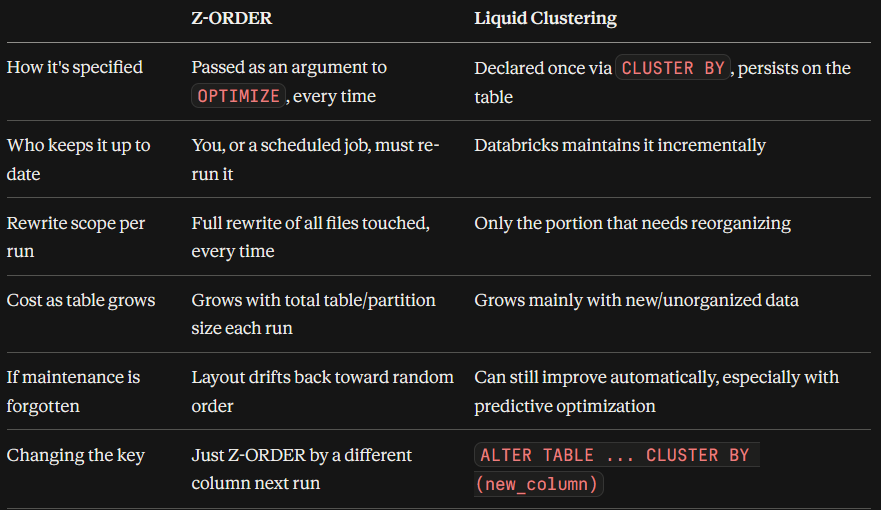
Both ultimately aim at the same outcome — tighter file statistics, better skipping — but Z-ORDER asks you to actively drive that outcome, while liquid clustering asks you to declare the goal once and let the table maintain itself toward it.
19. Why not partition by customer_id?
Suppose:
customer_id = 10 million unique valuesPartitioning could conceptually create:
customer_id=1/
customer_id=2/
customer_id=3/
...
This can result in huge numbers of tiny partitions/files.
That’s a classic high-cardinality partitioning problem.
Liquid clustering can instead use:
CLUSTER BY (customer_id);without creating one filesystem partition per customer.
20. A complete comparison
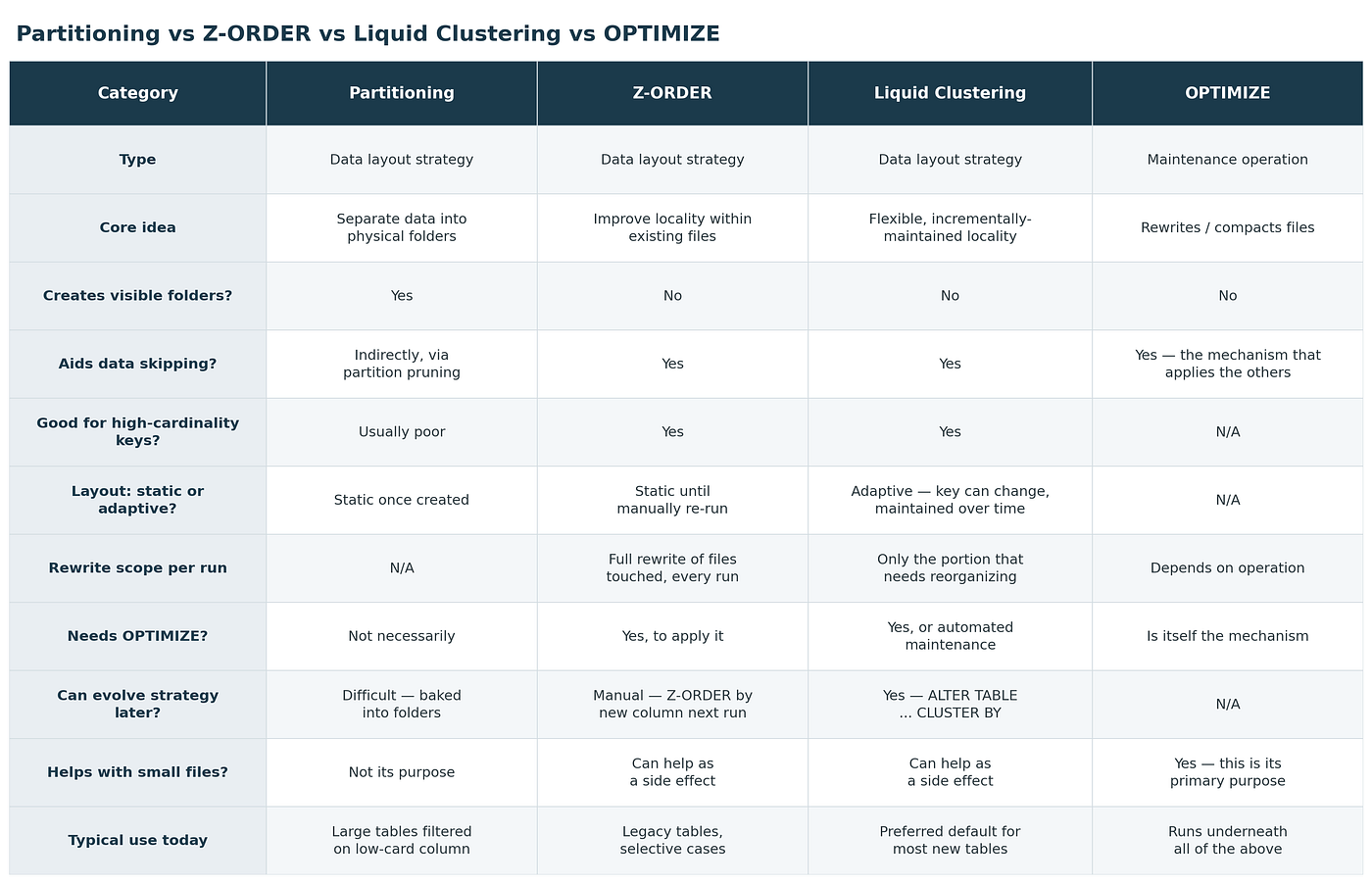
21. The most important mental model
If you remember only this:
                DELTA TABLE
                     │
                     ▼
              Parquet files
                     │
       ┌─────────────┼──────────────┐
       │             │              │
       ▼             ▼              ▼
 Partitioning    Z-ORDER     Liquid Clustering
       │             │              │
       ▼             ▼              ▼
  Separate       Improve        Flexible/
  directories    locality       incremental
       │             │           locality
       └─────────────┼──────────────┘
                     ▼
              Data skipping
                     │
                     ▼
             Read fewer files
                     │
                     ▼
              Faster queries
And:
OPTIMIZE
   ↓
Actually performs physical file
maintenance/reorganization
Thanks for reading! I’m Ayush. If this helped you understand data engineering a little better, I’ve done my job. More coming soon🚀
메타데이터
- post_id
- db6cd2ed2ce0
- slug
- databricks-data-layout-explained-partitioning-optimize-z-order-liquid-clustering-db6cd2ed2ce0
- url
- https://medium.com/@ayushjoshi050/databricks-data-layout-explained-partitioning-optimize-z-order-liquid-clustering-db6cd2ed2ce0
- canonical_url
- https://medium.com/@ayushjoshi050/databricks-data-layout-explained-partitioning-optimize-z-order-liquid-clustering-db6cd2ed2ce0
- author_url
- https://medium.com/@ayushjoshi050
- status
- ok
- fetched_at
- 2026-08-21 17:08:42



