I Tried Many Alternatives to Path Finder on Mac, and Only One Won the Battle!
(Not an ad!)
I Tried Many Alternatives to Path Finder on Mac, and Only One Won the Battle!
(Not an ad!)
This article is free to read as long as you have a medium.com account (no membership needed). Please consider donating to support me: https://buymeacoffee.com/frankliuao
I’ve been a Mac power user for over a decade. I live in my file manager. When you manage multiple projects with hundreds of assets across countless subfolders, the difference between a “good” file manager and a “bad” one isn’t just a matter of preference — it’s the difference between a productive day and an aggravating one.
For years, my sanctuary has been Path Finder. It’s robust, dual-paned, and deeply integrated, a power-user’s dream built on a macOS foundation.
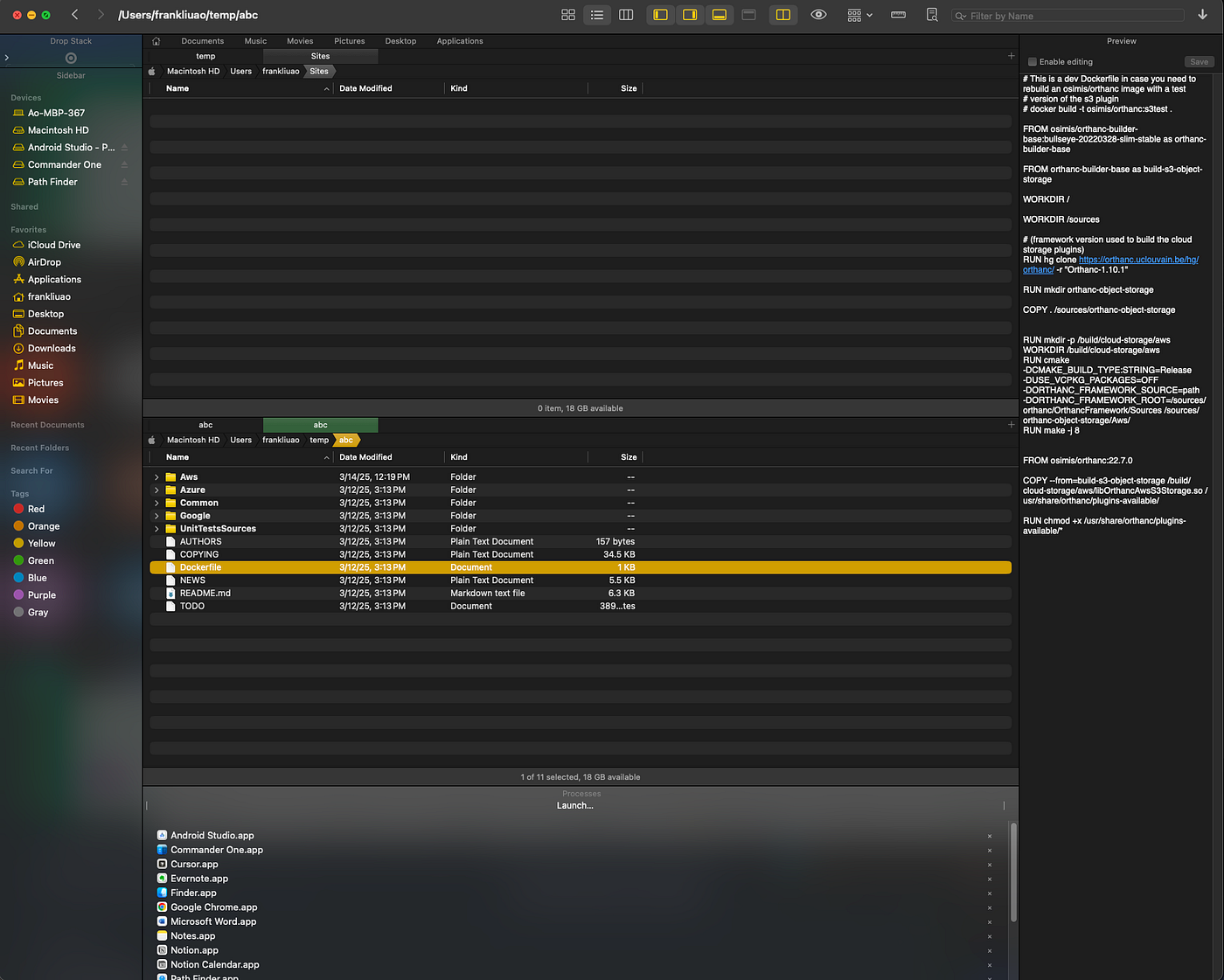
Path Finder (On my own mac)
But, like many of us, I wondered if the grass was greener on the other side. Path Finder isn’t free. It’s not expensive, but still not free, and I like free software in general... 😂 Was there a free, open-source, or just different alternative that could matching Path Finder’s power without the price tag (or at least at a lower price) or subscription model? I decided to embark on a journey, trialing a few popular contenders: Commander One, muCommander (including its twin-like brother Nimble Commander), Marta, ForkLift 4 and TotalFinder.
When I was almost sure I was switching back, I found a winner. Here’s the name of that winner, and why none of the other alternatives could hold a candle to Path Finder for requirements.
The Trial Phase: Frustration and Friction
My first stop was Commander One.

Commander One (my own Mac)
It’s often touted as a top Finder replacement, and its feature list is impressive, especially its integration with various cloud services. However, as soon as I started using it, I felt a sense of friction. The interface felt less intuitive compared to Path Finder’s modular approach. But the real deal-breaker was performance. Commander One felt distinctly slower. Every operation, from navigating folders to copying files, had a perceptible lag. On top of that, the default hotkeys felt “weird” and unintuitive, clashing with the muscle memory I’ve built over years of Mac usage. For example, who really uses F8 to delete a file/folder?
Next, I gave muCommander a try.

muCommander (my own Mac)
I liked the idea of a cross-platform tool, but muCommander’s non-native interface was a constant reminder that it wasn’t built for macOS from the ground up. Also, it looks like a copy of Commander One. This resulted in a disjointed user experience. Like Commander One, it suffered from a lack of speed. Simple tasks that should be instantaneous felt laborious. It just didn’t have the “snappiness” that I consider non-negotiable for any productivity tool. By the way, I also looked at Nimble Commander, which is almost like a twin of muCommander. They function very similarly to each other.

Nimble Commander (from their website)
Finally, I tested Marta.

Marta (from their website)
Marta is a different beast entirely. It’s minimalist, text-based, and incredibly fast for what it does. I can see its appeal for developers or users who prefer a command-line-like experience. But for my workflow, the lack of graphical elements, like file preview, was a major hindrance. Also it doesn’t support the native way of deleting a file/folder. Marta is designed with power users in mind, but its requirement to edit a text configuration file for settings felt like an unnecessary obstacle. It lacks a simple sidebar for quick folder access, a feature I use constantly. While it’s free, lightweight and fast, it just couldn’t match the well-rounded nature of a proper GUI file manager.
The Invisible Pain: Flying Blind without a Previewer
My building frustration was almost capped by a single, critical missing feature: a fast, real, integrated file previewer. I didn’t realize how dependent I was on Path Finder’s preview pane until it was gone.
Path Finder’s preview pane is non-negotiable for my productivity. I can select any file — a PDF, a vector graphic, a code snippet, or a video file — and see a full, high-quality preview in the side panel instantly. It’s a powerful tool for visual identification and quick content checks.
Also I think swapping the second pane from a vertical arrangement to horizontal is also pretty handy, but not as critical as the previewer.
A Savior Found
As my experiment began to fail, I frantically searched for other alternatives. All the previous alternatives I showed above are either free or have a free version. Now I expanded my search to paid ones.
Ironically, I found this savior when I asked Gemini to compare the aforementioned ones with Path Finder and list their cons... Gemini suggested that I look at ForkLift 4 and TotalFinder.

Forklift 4 (from their official website)

TotalFinder homepage
I immediately passed on TotalFinder when I saw their website. Their blogs were stuck in 2021, and their website looks super old as it was made 10 years ago (it’s at least 5 years old judging by the blogs).
When I downloaded and installed the trial for Forklift 4, however, I immediately felt this one could be a gamechanger. Why? Here are its pros that I found:
- Uses hotkeys that are the same as in Finder
- Extremely fast
- Modern look (even than Path Finder)
- Built-in info and preview panel on the right.
- It’s (not a lot, but still) cheaper than Path Finder.

The savior found: Forklift 4 (on my Mac)
The only con, which I’ve already reported to the support team about (I reported it about 1 week ago, but still haven’t heard back, so I guess their customer service isn’t that dedicated), was that their “cut” action (command + x) doesn’t work. This is a tiny feature that I highly enjoyed in Path Finder. I really hope they respond and let me know that I did it wrong, or it’s going to be supported soon.
My Suggestion
Try both Path Finder and Forklift 4’s free versions, and decide on which one you’d like to pay for a full version. My bet is that you’d go with Forklift 4!
I know people typically don’t like donation solicitation, but I’m still trying to get support for my time sharing my knowledge and experience. I made this article free to read, so you could make a decision on whether a donation is justified. It is always appreciated. Here is my page on Buy Me a Coffee: https://buymeacoffee.com/frankliuao
메타데이터
- post_id
- db7eeac8bb32
- slug
- i-tried-many-alternatives-to-path-finder-on-mac-and-only-one-won-the-battle-db7eeac8bb32
- url
- https://medium.com/ao-technologies/i-tried-many-alternatives-to-path-finder-on-mac-and-only-one-won-the-battle-db7eeac8bb32
- canonical_url
- https://medium.com/ao-technologies/i-tried-many-alternatives-to-path-finder-on-mac-and-only-one-won-the-battle-db7eeac8bb32
- author_url
- https://medium.com/@frankliuao
- status
- ok
- fetched_at
- 2026-06-24 04:09:36