Figma AI Revolution
How Code and Design Are Finally Becoming One System
ai generated image
Figma AI Revolution
How Code and Design Are Finally Becoming One System
The way we build software is changing fast. For years, design and development worked like two separate worlds. Designers created screens in Figma. Developers rebuilt them in code. Something always got lost in translation.
Now that gap is closing.
Figma, in partnership with Anthropic, has introduced a powerful AI native ecosystem that connects code and canvas in both directions. This is not just another AI feature. It is a complete shift in how digital products are designed, built, tested, and shipped.
In this article, you will understand everything. From Model Context Protocol to Code to Canvas, from Figma Make to enterprise security, from productivity myths to real performance benchmarks. You will not need to read anything else.
Source reference:
Figma’s AI Design and Code Futu…
The Old Problem: Design and Code Were Always Separate
Traditionally, software development followed a linear process:
• Requirements • Design mockups • Engineering implementation • Testing • Release
Even in agile teams, the workflow still created friction:
• Designers handed off static files • Developers recreated layouts manually • Small design updates required rework • Production UI slowly drifted away from design files
The design canvas and the real codebase lived in parallel realities.
This created:
• Cognitive overhead • Translation errors • Delays in iteration • Outdated design systems
Figma’s new AI ecosystem breaks this model completely.
The Big Shift: Start Anywhere and Go Anywhere
Figma CEO Dylan Field introduced a new philosophy:
You should be able to start in design or start in code and move freely in either direction.
That is the core idea behind this transformation.
Instead of:
Design → Code
Now it becomes:
Design ↔ Code
Two way. Continuous. Intelligent.
This shift is powered by one critical technology.
The Foundation: Model Context Protocol
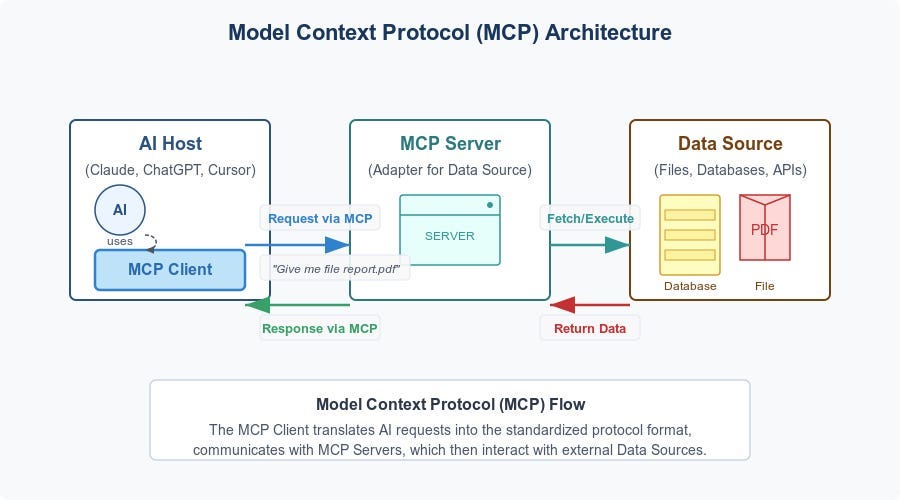
https://diamantai.substack.com/p/model-context-protocol-mcp-explained?utm_source=chatgpt.com
The backbone of this integration is the Model Context Protocol, often called MCP.
Think of MCP as a universal connector for AI systems. Many engineers describe it as the USB C for AI.
Before MCP:
• AI models were isolated • They had knowledge but no access to live design files • They could not deeply understand structured Figma data
After MCP:
• AI agents can read Figma files • They can understand structure and hierarchy • They can generate code from real design data • They can push changes back into Figma
A Figma file is essentially a massive JSON tree. MCP translates that complex structure into something AI models can understand without getting overwhelmed.
There are two server types:
Remote Server • Works for all users • Connects via hosted endpoint • Supports link based prompting
Desktop Server • Requires paid Dev seat • Runs locally • Supports selection based workflows
This infrastructure makes everything else possible.
Code to Canvas: The Feature That Changes Everything
https://help.figma.com/hc/en-us/articles/32596943880599-Edit-a-code-layer?utm_source=chatgpt.com
Code to Canvas reverses the traditional pipeline.
Earlier flow: Design → Code
New flow: Code → Editable Figma Design
Here is how it works in daily workflow:
- Developer builds UI using Claude Code
- Runs it locally or in staging
- Types a simple command like Send this to Figma
- Claude captures the live UI
- It converts the interface into fully editable Figma layers
Not screenshots. Not flat images. Real layers.
This supports:
• Multi screen capture • Dynamic states • Real typography and layout • Full editing inside Figma
This eliminates manual recreation work.
If a developer adjusts layout in production:
The Figma file can instantly reflect that change.
Design becomes a living mirror of production.
How AI Avoids Hallucinating Your Design System
One big risk with AI coding tools is hallucination.
AI might:
• Invent spacing values • Use random colors • Create non standard components
Figma solves this with structured tools inside MCP:
• get_variable_defs retrieves exact design tokens • get_design_context extracts layout and style data • get_code_connect_map maps Figma components to code components • create_design_system_rules defines system rules for AI
This forces AI to follow your system instead of guessing.
The AI works inside constraints. That is why it becomes reliable.
Upstream Innovation: AI Inside FigJam

https://docs.readme.com/main/docs/creating-mermaid-diagrams?utm_source=chatgpt.com
Figma AI does not only work at UI level.
It also helps during early ideation.
Using Claude with FigJam, teams can:
• Convert messy meeting notes into structured flows • Generate state diagrams • Create authentication flow charts • Visualize backend logic
You can even describe a workflow in plain language and generate a diagram instantly.
This reduces what experts call phantom obligation.
Phantom obligation is the mental stress from unorganized tasks and unclear requirements.
AI turns chaos into structure.
That changes how product thinking happens.
Figma Make: From Prompt to Working App
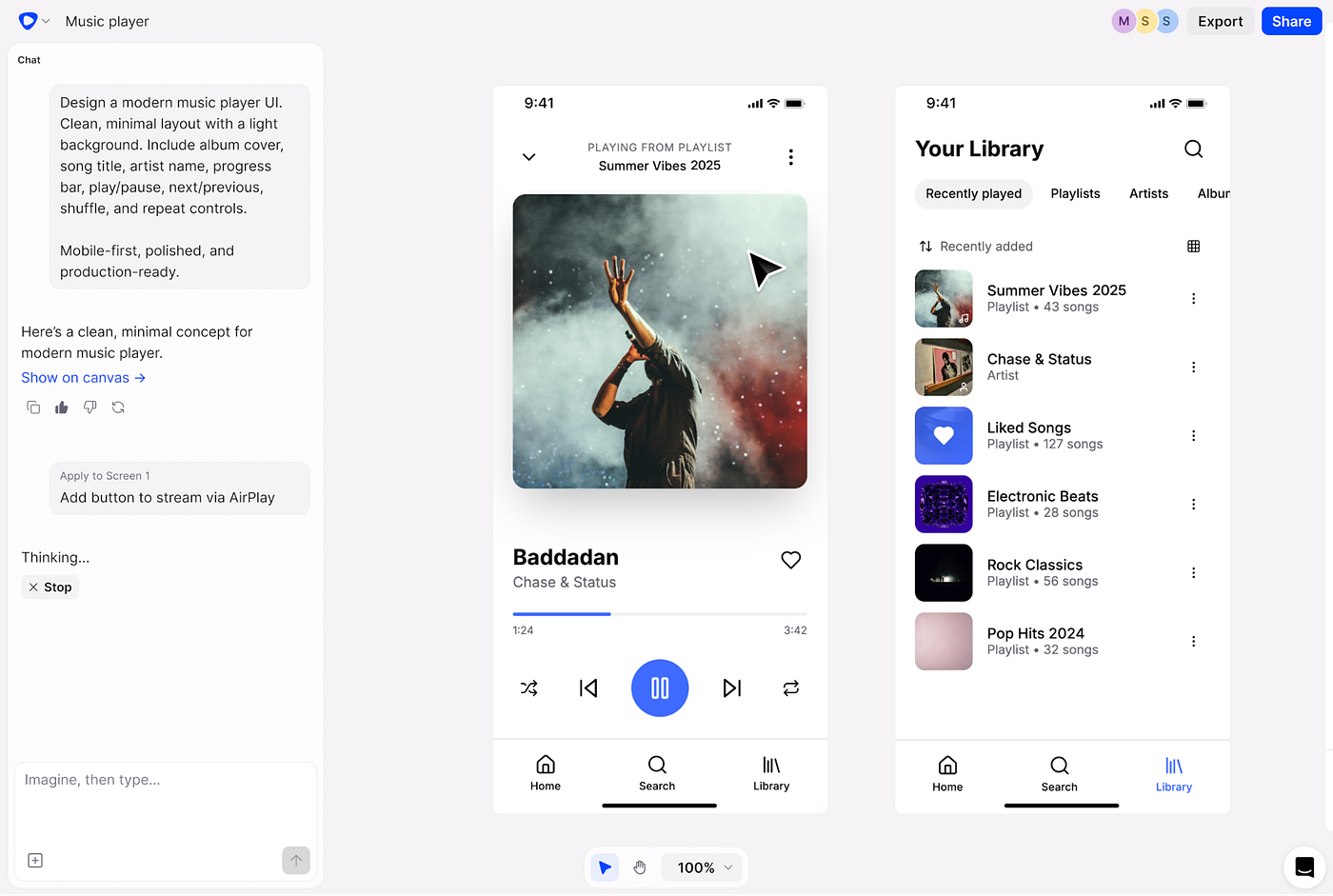
Figma Make allows you to create functional web apps using prompts.
Instead of linking interactions manually, you can say:
Add hover effect Connect form to backend Create authentication flow
It generates real logic.
Key features:
• Live preview and AI chat side by side • Direct edit capability • Integration with React design systems • Backend support • Publish to web
This bridges experimentation and engineering reality.
Figma Sites: Design and Publish Without Leaving Figma
Figma Sites allows users to design and publish responsive websites directly.
Features include:
• Responsive layouts • Built in CMS • Accessibility tagging • SEO optimization • Custom domains
No need for separate website builders.
Design to live site becomes seamless.
Figma Buzz: Marketing Teams Join the System
Figma Buzz focuses on marketing and brand teams.
It offers:
• Pre built templates • Brand controlled asset creation • Easy editing for non designers • Library integration
Now design system consistency extends beyond product UI into marketing materials.
Enterprise Scale: Security and ServiceNow Integration
Large enterprises worry about:
• Data leaks • Role based access • Audit trails • Governance
Figma integrates securely with platforms like ServiceNow.
Through secure authentication:
• Design links generate enterprise apps • Generated code inherits access controls • Audit logs remain intact • Governance rules apply automatically
AI does not replace developers.
It accelerates scaffolding while maintaining enterprise standards.
The Market Reality: SaaS Panic vs Real Growth
There was fear in the market that AI agents would destroy traditional SaaS tools.
Figma experienced major stock decline during that period.
But real metrics tell another story:
• Net Dollar Retention of 136 percent • 46 percent growth in large enterprise customers • Strong global expansion
Companies are not leaving Figma.
They are embedding it deeper into engineering workflows.
The AI Model Behind It: Claude Sonnet 4.6
Claude Sonnet 4.6 powers much of this integration.
Key strengths:
• One million token context window • Hybrid reasoning capability • Strong coding benchmarks • Better instruction following • Reduced hallucination
It performs at human level in certain structured computer tasks.
This technical capability is what makes Code to Canvas possible at scale.
The Hidden Cost: Setup Tax
Let us be honest.
Agentic workflows are not magic.
Teams must:
• Connect systems • Define rules • Map components • Configure tokens • Test iteratively
This setup work takes effort.
But once built, automation compounds speed.
It is not instant productivity.
It is leveraged infrastructure.
The Productivity Paradox
Studies show something interesting.
Developers believe AI makes them 24 percent faster.
Actual measured speed gains are closer to 20 percent or sometimes lower.
Why?
Because debugging AI generated code consumes time.
Also, over reliance can create cognitive debt.
Cognitive debt means losing deep understanding because AI handles too much thinking.
This is why structured integration like MCP matters.
It controls chaos.
Why This Changes the Future of Design
Here is the deeper truth.
AI makes code generation cheaper.
But it makes design thinking more valuable.
When everyone can generate functional software:
The real differentiation becomes:
• User psychology • Aesthetic craft • Information clarity • System level thinking
Figma positions itself not as a tool that competes with AI.
It becomes the operating system where human creativity and AI capability merge.
Final Thoughts
Figma’s AI native ecosystem is not a small feature update.
It is a structural redesign of how software gets built.
Model Context Protocol connects AI to real design data.
Code to Canvas eliminates manual recreation.
Figma Make and Sites expand into prototyping and publishing.
Enterprise integration ensures governance.
Claude Sonnet 4.6 provides the intelligence layer.
There is setup cost.
There are productivity trade offs.
But the direction is clear.
Design and code are no longer separate worlds.
They are becoming one continuous system.
And that changes everything.
Thanks for reading my article.
메타데이터
- post_id
- dbc21b92d323
- slug
- figma-ai-revolution-dbc21b92d323
- url
- https://medium.com/activated-thinker/figma-ai-revolution-dbc21b92d323
- canonical_url
- https://medium.com/activated-thinker/figma-ai-revolution-dbc21b92d323
- author_url
- https://medium.com/@ankitgajera1111
- status
- ok
- fetched_at
- 2026-06-09 15:37:30