Event-Driven Invoice Processing for Oracle Fusion ERP Using OCI Events, Streaming, OCI Document…
Part 1: Setup & Configuration
Event-Driven Invoice Processing for Oracle Fusion ERP Using OCI Events, Streaming, OCI Document Understanding, and OIC
Part 1: Setup & Configuration
Overview
In this two-part blog series, I will demonstrate how to build an event-driven invoice processing solution that automatically creates supplier invoices in Oracle Fusion ERP Cloud when invoice documents are uploaded to an OCI Object Storage bucket.
To implement this solution, I have leveraged several Oracle Cloud Infrastructure services, including OCI Object Storage, OCI Events, OCI Streaming, OCI Document Understanding, and Oracle Integration.
The following diagram provides a high-level overview of the solution architecture, followed by a detailed explanation of the solution flow.

Solution Flow
- An invoice document is uploaded to an OCI Object Storage bucket.
- OCI Object Storage emits an event when the file is created.
- OCI Events captures the event and routes it to OCI Streaming based on configured rules.
- Oracle Integration consumes the event from OCI Streaming.
- Using the uploaded file name, Oracle Integration invokes OCI Document Understanding to extract invoice details from the document stored in Object Storage.
- The extracted invoice information is enriched with ERP-specific master data using an OIC lookup.
- Finally, Oracle Integration invokes Oracle Fusion ERP Cloud APIs to create the supplier invoice automatically.
To implement this end-to-end solution, a few prerequisite configurations are required. You can find the detailed steps in the Prerequisites section later in this blog.
Focusing on the core flow
1. Create a OCI bucket in OCI Object Storage and enable “Emit object events”.

2. Create a Stream Pool & Steam
Navigation: Analytics & AI -> Messaging -> Streaming
Create a Steam along with new stream pool and leave other settings as default
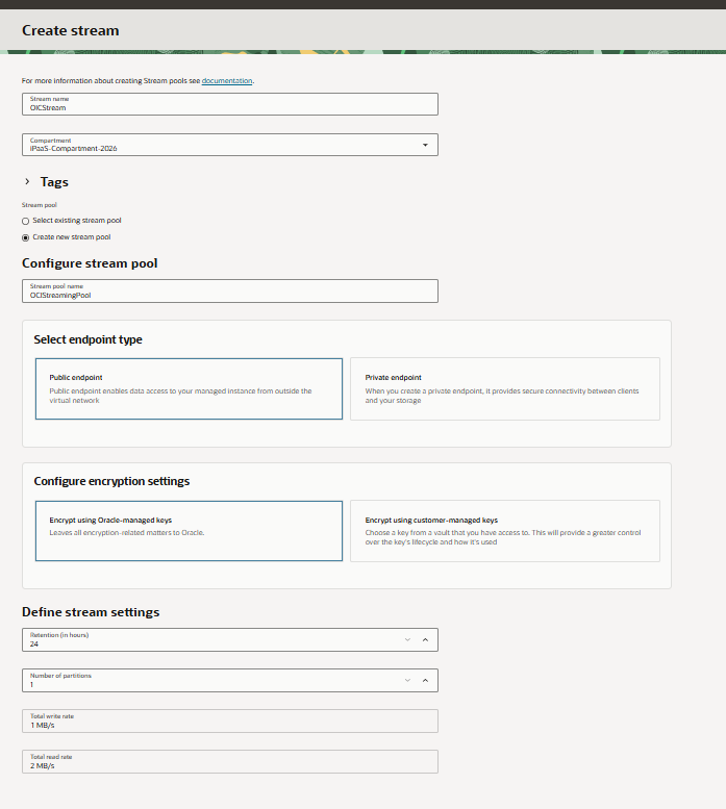
Now note down the Kafka connection setting, which is later used in as username for configuring OCI Streaming adapter connection in OIC.

Next, we need to provide User profiles ‘AUTH_TOKEN’ as password for configuring OCI Streaming adapter connection in OIC, follow the below sequence to generate the token. Once generated, note down the token as you cannot revisit to copy again.

3. Create event rule by setting up Conditions & Actions
Choose the steam you created in Step2

4. Explore OCI Document Understanding Service
Navigation: Analytics & AI -> AI Services -> Document Understanding -> Key value extraction
For Document Source as Local files -> Setup an output location as below -> Upload your Invoice file to analyse the data extraction

Analyse results and its key values for the uploaded Invoice.

The analysed results look good for invoice creation in ERP, which I will demonstrating in my next part.
Prerequisites:
Create a dynamic group and set the matching rule as resource.id = <your OIC instance OAuth ClientID>

For Object Storage:
Set IAM Policies
Allow dynamic-group identity_domain/group_name to manage object-family in compartment compartment_name

Allow dynamic-group identity_domain/group_name to inspect compartments in compartment compartment_name
For OCI Document Understanding:
Set IAM Policy
Allow dynamic-group identity_domain/group_name to manage ai-service-document-family in compartment compartment_nameFor OCI Streaming Service:
Generate a certificate file and import into a keystore
openssl s_client -connect streaming.ap-hyderabad-1.oci.oraclecloud.com:9092 | sed -ne  '/-BEGIN CERTIFICATE-/,/-END CERTIFICATE-/p' > OCIStreaming.cert

keytool -keystore streaming_truststore.jks -alias OSSStream -import -file OCIStreaming.cert
Easiest way to generate these files is to use OCI Cloud Shell and then download the files using Download option under Menu. Refer below:

In Part 2, we’ll configure the OCI Streaming Adapter, invoke OCI Document Understanding directly from OIC, and automatically create AP invoices in Oracle Fusion ERP from uploaded PDF invoices.
References:
메타데이터
- post_id
- dbd5272f44dd
- slug
- event-driven-invoice-processing-for-oracle-fusion-erp-using-oci-events-streaming-oci-document-dbd5272f44dd
- url
- https://medium.com/@sumanthkoditala/event-driven-invoice-processing-for-oracle-fusion-erp-using-oci-events-streaming-oci-document-dbd5272f44dd
- canonical_url
- https://medium.com/@sumanthkoditala/event-driven-invoice-processing-for-oracle-fusion-erp-using-oci-events-streaming-oci-document-dbd5272f44dd
- author_url
- https://medium.com/@sumanthkoditala
- status
- ok
- fetched_at
- 2026-06-20 20:29:01