Inside the Rack: How Liquid Cooling Optimizes Thermal Management for GPU Servers
Exploring the Engineering, Performance Gains, and Deployment Best Practices of Liquid Cooling in AI and HPC Workloads
When air cooling hits its thermal limit, liquid takes over.Discover how precision cooling boosts AI server efficiency.
Inside the Rack: How Liquid Cooling Optimizes Thermal Management for GPU Servers
Exploring the Engineering, Performance Gains, and Deployment Best Practices of Liquid Cooling in AI and HPC Workloads
As AI workloads continue to scale across enterprises, high-performance GPU servers are rapidly becoming the heart of every modern data center. But this unprecedented processing power comes at a cost — heat. Traditional air cooling systems are increasingly failing to meet the thermal demands of modern GPUs like NVIDIA’s H100, A100, or AMD Instinct series. The solution? Liquid cooling, a once-niche technology now going mainstream to power the next generation of GPU-accelerated servers.
This blog delves into how liquid cooling systems work inside server racks, the engineering behind thermal efficiency, and why this shift is essential for long-term operational scalability.
Understanding the Heat Challenge in GPU Servers
GPUs consume significant wattage under full load — often exceeding 300–700W per unit in AI training or high-performance computing (HPC) clusters. Stack a few of these inside a rack, and the thermal envelope quickly surpasses what fans and airflow alone can dissipate.
Traditional air cooling relies on:
- Ambient airflow through fans
- Heat sinks on CPUs and GPUs
- Hot and cold aisle containment
But this method is energy-intensive, space-consuming, and less efficient at higher density. That’s where liquid cooling fundamentally transforms thermal dynamics.
How Liquid Cooling Works in GPU Racks
Liquid cooling uses water or a dielectric fluid to absorb and transport heat away from server components more efficiently than air.
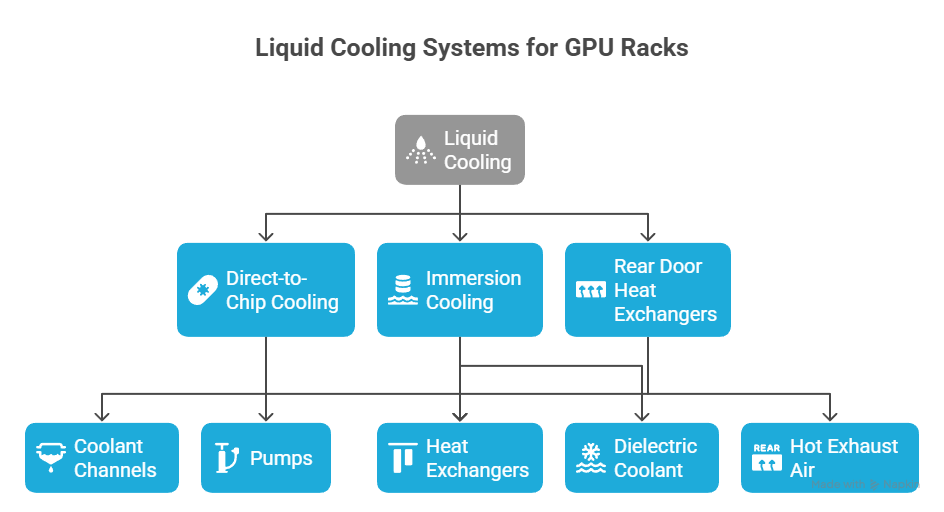
There are three common designs:
1. Direct-to-Chip (D2C) Cooling
- Coolant channels directly contact the cold plates mounted on the GPU, CPU, or memory.
- Pumps circulate the fluid to and from heat exchangers.
- Typically uses water/glycol mix or non-conductive fluids.
2. Immersion Cooling
- Entire servers or boards are submerged in a dielectric coolant.
- Heat is transferred to the fluid and dissipated via external heat exchangers.
3. Rear Door Heat Exchangers (RDHx)
- Installed at the rear of server racks to absorb hot exhaust air through liquid-cooled radiator doors.
- Best used in tandem with D2C solutions.
Each setup has trade-offs in terms of cost, complexity, and retrofitting feasibility.
Technical Advantages of Liquid Cooling for AI Infrastructure
1. Superior Thermal Conductivity
- Liquids transfer heat 25–50x better than air.
- Enables GPU turbo performance by reducing throttling.
- Lowers junction temperatures of H100s from ~85°C to ~45–50°C.
2. Higher Rack Density
- Eliminates the need for massive airflow clearance.
- Packs more GPUs per rack (e.g., 8–10x A100s) without overheating.
- Vital for AI inference and training clusters.
3. Energy Efficiency
- Reduces data center Power Usage Effectiveness (PUE) from ~1.6–1.8 to ~1.1–1.3.
- Decreases fan usage and HVAC dependency.
4. Sustainability
- Less electrical cooling, more recyclable heat reuse.
- Compatible with closed-loop heat recovery systems.
5. Longer Hardware Lifespan
- Stabilized thermal conditions reduce component stress.
- Enhances MTBF (mean time between failures) on GPUs, DIMMs, and power circuits.
Real-World Deployment Considerations
Implementing liquid cooling isn’t plug-and-play. Here’s what enterprises must evaluate:
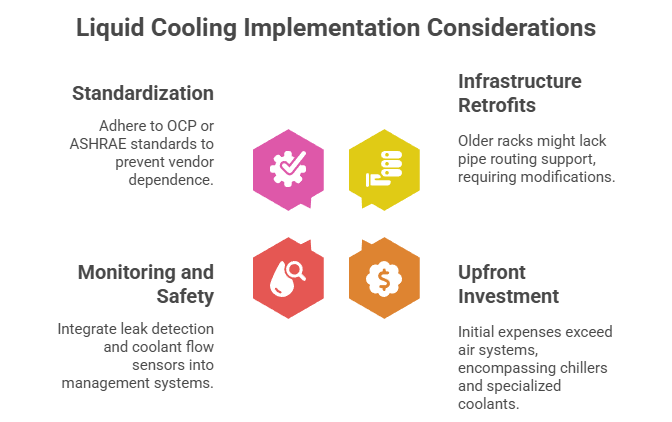
1. Infrastructure Retrofits
- Older air-cooled racks may not support pipe routing or cold plate integration.
- Requires rear-door manifold systems or custom tray designs.
2. Upfront Investment
- Capital costs are higher than air systems.
- Requires chillers, pumps, sensors, and possibly dielectric coolant.
3. Monitoring and Safety
- Leak detection, coolant flow sensors, and telemetry must be integrated into existing BMC or DCIM systems.
4. Standardization
- Use Open Compute Project (OCP) or ASHRAE-certified specs to avoid vendor lock-in.
- GPU manufacturers like NVIDIA provide reference designs (e.g., HGX A100 with liquid cold plates).
Liquid Cooling in Action: GPU Workloads at Scale
Industries deploying massive AI and HPC stacks are already going liquid:
- Genomics & Bioinformatics: Large-scale DNA sequencing models.
- Autonomous Vehicles: Edge training clusters powered by NVIDIA H100s.
- Financial Services: Risk models running deep neural networks.
- AI-as-a-Service Platforms: GPU hosting companies offering cooled colocation.
Cloud providers like Microsoft Azure, Google Cloud, and Meta’s AI Research Lab have all embraced custom liquid cooling for specialized workloads.
Programming Considerations for AI in Liquid-Cooled Environments
For developers and ML engineers, running in liquid-cooled environments doesn’t change your code — but it unlocks potential for:
- Higher sustained clock speeds in long training sessions
- Longer batch execution windows without thermal throttling
- More cores per node, enabling distributed GPU frameworks like:
- Horovod, Ray, PyTorch DDP, TensorFlow MultiWorkerMirroredStrategy
Combine this with container orchestration like Kubernetes with GPU plugins or NVIDIA’s Device Plugin, and you’ve got a truly optimized, high-throughput training pipeline.
The Future of Data Centers Is Liquid
As enterprise GPU adoption surges — from LLM training to real-time recommendation engines — data centers must evolve. The transition from hot aisles to liquid-cooled, AI-native infrastructure is inevitable. Cooling is no longer a facility concern; it’s a workload enabler.
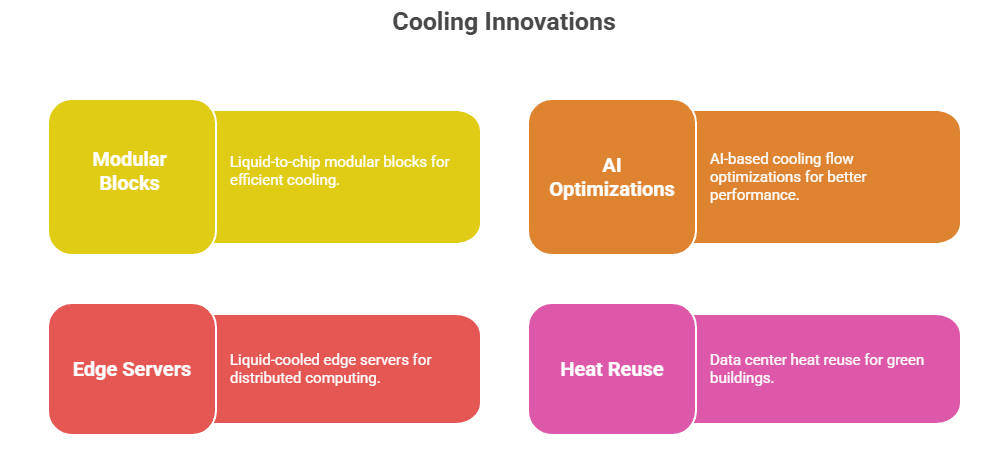
Expect innovations in:
- Liquid-to-chip modular blocks
- AI-based cooling flow optimizations
- Liquid-cooled edge servers
- Data center heat reuse for green buildings
Conclusion: Liquid Cooling Is No Longer Optional for AI Workloads
With GPU power scaling faster than Moore’s Law, modern server infrastructure must innovate on all fronts — especially thermal management. Liquid cooling isn’t just about controlling heat; it’s about unlocking performance, reducing operational costs, and enabling dense, energy-efficient AI clusters.
Enterprises planning AI expansion, especially with models like GPT-4, BLOOM, or NVIDIA Megatron, must now consider liquid cooling not as a luxury but as an architectural foundation.
If you’re looking to scale your virtual environments with GPU acceleration, check out **StackGPU — a leading platform offering GPU-powered virtual machines ideal for AI training, 3D rendering, scientific simulations, and virtual desktop infrastructure (VDI)**.
메타데이터
- post_id
- dbebb0613a98
- slug
- inside-the-rack-how-liquid-cooling-optimizes-thermal-management-for-gpu-servers-dbebb0613a98
- url
- https://medium.com/@StackGpu/inside-the-rack-how-liquid-cooling-optimizes-thermal-management-for-gpu-servers-dbebb0613a98
- canonical_url
- https://medium.com/@StackGpu/inside-the-rack-how-liquid-cooling-optimizes-thermal-management-for-gpu-servers-dbebb0613a98
- author_url
- https://medium.com/@StackGpu
- status
- ok
- fetched_at
- 2026-07-18 10:24:39