Micro Frontends in Production: Where They Help, Where They Hurt, and What to Avoid
A beginner-friendly guide to what micro frontends are, when they help, and the traps to watch out for.
Micro Frontends in Production: Where They Help, Where They Hurt, and What to Avoid
A beginner-friendly guide to what micro frontends are, when they help, and the traps to watch out for.
Where this usually comes up
Imagine you’re on a small team building a web app. One repo. One framework. Life is simple — change something, push a build, done.
Then the company grows. The app grows. Now you have five teams in the same repo. The checkout team’s PR is waiting on the seller dashboard team’s review. Your CI takes 12 minutes. A bug in the profile page is blocking a release of the cart.
This is the moment someone says: “what if each team had their own frontend app, and we just… combined them in the browser?”
That idea is called a micro frontend. And like any architecture pattern, it’s a great answer for some problems and a terrible answer for others. This guide walks you through it from the ground up — what it is, when it helps, what to avoid, and the principles that keep it from becoming a mess.
What is a micro frontend?
Think of a shopping mall.
The mall is a building — it has the entrance, the directory, the bathrooms, and security. But the actual shops inside are owned by completely different companies. Each shop decides what to sell, how to lay it out, and when to repaint the walls. The mall just gives them a space.
A micro frontend works the same way:
- The shell is the mall — it owns the layout, the navigation, and shared things like login.
- Each remote is a shop — its own app, its own team, its own deploy schedule.
- The user walks through one product, but they’re actually visiting many small apps stitched together.
In a microservices backend, you split your server into smaller services. In a micro frontend, you split your UI the same way.
A picture of what we’re building
Let’s use a generic e-commerce platform as our example:
                    ┌────────────────────────────────────┐
                    │             SHELL (host)           │
                    │  Top nav · Routing · Auth · Layout │
                    └────────┬─────────┬─────────┬───────┘
                             │         │         │
                  ┌──────────┘         │         └──────────┐
                  ▼                    ▼                    ▼
        ┌──────────────────┐  ┌──────────────────┐  ┌──────────────────┐
        │  shop  (:3001)   │  │ account (:3002)  │  │ seller  (:3003)  │
        │                  │  │                  │  │                  │
        │ Browsing, search,│  │ Profile, orders, │  │ Listings,        │
        │ cart             │  │ addresses        │  │ inventory        │
        └──────────────────┘  └──────────────────┘  └──────────────────┘
                  │                    │                    │
                  └────────────┬───────┴────────────┬───────┘
                               ▼                    ▼
                    ┌─────────────────────┐  ┌─────────────────┐
                    │   Design System     │  │   Event Bus     │
                    │  (npm package,      │  │  (cross-remote  │
                    │   versioned)        │  │   messages)     │
                    └─────────────────────┘  └─────────────────┘
The shell is the only app the browser loads first. It then pulls in shop, account, and seller over the network — each a separate codebase, each owned by a different team, each deployed independently.
How it actually works
The two common tools today are Webpack Module Federation and Vite Federation (@originjs/vite-plugin-federation). Both follow the same idea:
- A remote app exposes a piece of itself.
- The shell imports that piece — but at runtime, over the network.
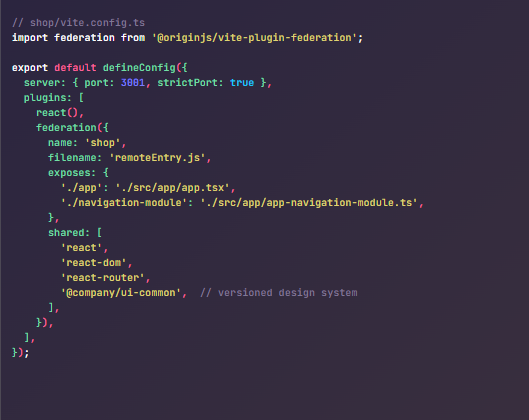
Here’s a Vite example. The remote (shop) says, "you can use my app and my navigation":
The shell then registers the remote and uses it like a normal lazy import:
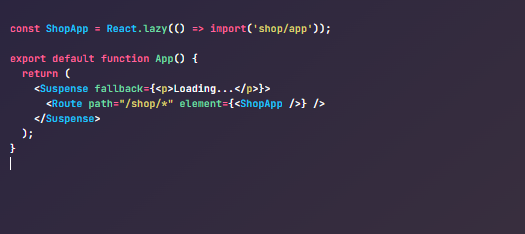
The neat part: when the shop team ships a new version, the shell sees it on the next page load. No rebuild needed.
This is also where the trouble starts.
Advantages: where micro frontends help
These are the wins that make teams choose this approach in the first place.
1. Each team can ship on their own schedule. The seller team doesn’t wait for the shop team. The shop team doesn’t wait for anyone. If you’ve ever been blocked by another team’s broken test, you’ll appreciate this.
2. You can migrate tech without a rewrite. Stuck on an old framework? Move one remote at a time. The rest of the app keeps running. No two-quarter “freeze everything while we rewrite” plan.
3. A bug in one place doesn’t break everything. Each remote is built and deployed separately. If account ships a bad release, the cart still works.
4. Ownership is clear. Each team owns one app. Code reviews go to people who know the code. New engineers learn one piece, not the whole world.
Things to avoid
Here’s what tends to go wrong the first time. Knowing these up front saves a lot of pain.
- Don’t share business state across apps with a global store. If
shopandaccountboth read and write the same Redux store, you've recreated the monolith you tried to split. Each app should keep its own state. Use small messages (events) when one app needs to tell another that something happened.
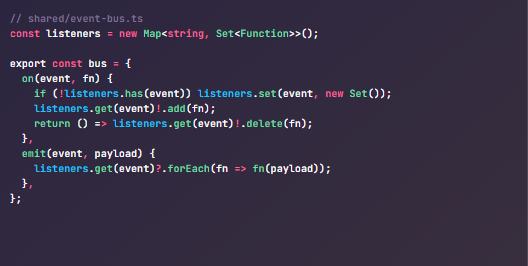
A real-world use: when one remote updates data, it can emit a cache:invalidate event so other remotes refresh their queries. Keeps state decoupled.
2. Don’t let remotes import from each other. The shell composes the remotes. Remotes should never import directly from each other. The moment seller imports from shop, you have a hidden monolith with extra steps.
3. Don’t pin all remotes to “latest” in production. If your shell points at remoteEntry.js and the shop team ships a broken build, your whole product breaks. Use versioned URLs like remoteEntry.abc123.js and roll forward deliberately.
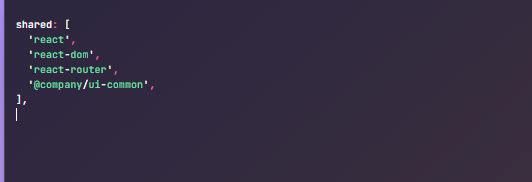
4. Don’t ignore bundle size. Without configuration, every remote bundles its own copy of React, and the user downloads React three or four times. Always use the shared setting:
5. Don’t trust dev mode for federated changes. This one bites everyone. With Vite Federation, your pnpm dev server doesn't actually serve the federated build — it serves source files directly. So changes to exposed modules won't show up in the shell until you do:

Make this part of your team’s PR-testing checklist or you’ll ship “works on my machine” bugs over and over.
6. Don’t skip observability. When something breaks in production, you need to answer “which remote, what version, when?” in seconds. Log the version of each remote on load. You’ll thank yourself.
Best practices
If micro frontends are the right call for you, these principles save you the most pain.
1. Treat shared code like a public API. Anything the shell or another remote depends on — components, events, types — has a shape. Version it. Document it. Never change it silently.
2. One remote, one domain. Each remote should map to a clear product area. If two remotes can’t decide who owns a feature, your boundaries are probably wrong.
3. The shell should stay thin. The shell handles layout, routing, and login. That’s it. Don’t put business logic in the shell — it becomes the bottleneck you tried to escape.
4. Share the design system through a versioned package. Don’t let each team rebuild buttons. Publish your design system as a regular npm package (e.g. @company/ui-common) and require teams to upgrade on a regular cadence.
5. Make auth a shared service, not a shared problem. The shell holds the login state and exposes the token (for example, via an Auth0 provider or a React context). Remotes consume it. They don’t read localStorage themselves.
6. Let remotes contribute to the shell, not the other way around. Instead of the shell hard-coding navigation links for each remote, let each remote register what it owns. A simple navigation module each remote exports:
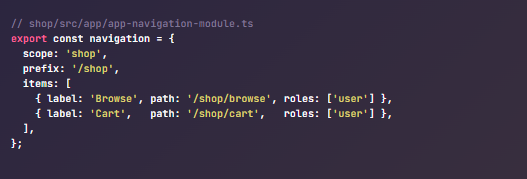
The shell imports each remote’s ./navigation-module and assembles the menu. Add a remote? It registers itself. The shell never changes.
7. Optimise the first load. Pre-fetch critical remotes in parallel. Lazy-load the rest. Watch your Largest Contentful Paint — micro frontends hurt it badly if you’re not careful.
When NOT to use micro frontends
This is honestly the most important section.
Micro frontends are worth the cost when:
- You have multiple teams colliding in one repo.
- Independent deploys are an actual bottleneck — not just a nice idea.
- Your domains are clearly separate (different products, not different pages of the same product).
If you have one team, or two teams that mostly cooperate, you don’t need micro frontends. A modular monolith — one app, well-organised folders, lazy-loaded routes — gives you most of the benefits with almost none of the cost.
The rule of thumb: adopt micro frontends only when team coordination is hurting you more than the extra complexity will.
Summary
Micro frontends solve a specific problem: “too many teams in one frontend codebase, and we can’t ship independently.” For that problem, they’re a strong answer.
For anything else, they introduce more problems than they solve — slower first paint, version drift, shared-state contracts, and operational headaches.
If you decide to use them, remember the short version:
- Keep the shell thin and the remotes independent.
- Communicate through events, not shared stores.
- Let remotes register navigation; don’t hard-code it in the shell.
- Version everything — components, events, remote URLs.
- Share dependencies through Module Federation, not by accident.
- Always test federated changes with build + preview, not dev mode.
- Watch performance and observability from day one.
You can always split a monolith later. It’s much harder to merge micro frontends back together. So start small, and split only when the pain is real.
메타데이터
- post_id
- dc76e4ff4e58
- slug
- micro-frontends-in-production-where-they-help-where-they-hurt-and-what-to-avoid-dc76e4ff4e58
- url
- https://medium.com/@kanista0214/micro-frontends-in-production-where-they-help-where-they-hurt-and-what-to-avoid-dc76e4ff4e58
- canonical_url
- https://medium.com/@kanista0214/micro-frontends-in-production-where-they-help-where-they-hurt-and-what-to-avoid-dc76e4ff4e58
- author_url
- https://medium.com/@kanista0214
- status
- ok
- fetched_at
- 2026-06-09 15:37:30




