5G ROAMING Troubleshooting (Open5GS + PacketRusher/UERANSIM)
This article describes some problems and errors met during 5G Roaming configuration. The main article about configurations themselves can…
Open5GS troubleshooting
I’ve decided to generalize previous ‘ROAMING Troubleshooting (Open5GS + PacketRusher/UERANSIM)’ article to problems I’m facing with Open5GS project. From time to time I meet them again and again as good old friends. Take this is a notebook for myself with exact steps to fix them later on, the notebook which I’ve decided to publish so that others Open5GS enthusiasts spend a bit less time. There would be not so many errors though because I don’t publish every single my own stupidity. Good coding!
Image generated by OpenAI’s DALL·E.
This article describes some problems and errors met during 5G Roaming configuration. The main article about configurations themselves can be found here.
Problems are not sorted nor grouped. These are notes for anyone looking for solution to them. Good luck with your projects!
SCP Failed to connect to NRF
May 26 13:22:26 mtaa open5gs-scpd[10451]: 05/26 13:22:26.276: [scp] WARNING: response_handler() failed [-1] (../src/scp/sbi-path.c:627)
May 26 13:22:26 mtaa open5gs-scpd[10451]: 05/26 13:22:26.276: [sbi] WARNING: [7] Failed to connect to nrf.5gc.mnc070.mcc999.3gppnetwork.org port 80: Connection refused (../lib/sbi/client.c:698)
Solution:
Add the address to the nrf.yaml
@@ -13,8 +13,7 @@ nrf:
           mnc: 70
     sbi:
       server:
-        - address: 127.0.0.10
-          port: 7777
+        - address: nrf.5gc.mnc070.mcc999.3gppnetwork.org
Explanation:
Probable you forgot to make sure the SBI address of NRF matches the one is asked for in SCP. Happened for me.
Previously I was using work-around adding port like this
nrf.5gc.mnc070.mcc999.3gppnetwork.org:7777and it worked fine all the way up to Roaming testing.
The main thing: YOU DO NOT NEED :777 PORT ON FQDN IN THESE CONFIGURATIONS
Same problems was fixed by removing :7777 port from nssf.yaml:
ERRO[0001] [UE][NAS] UE received a 5GMM Failure, cause: Payload was not forwarded
ERRO[0001] [UE][NAS] Receiving Unknown Dl NAS Transport message!! 193
[sbi] WARNING: [7] Failed to connect to nrf.5gc.mnc074.mcc262.3gppnetwork.org port 7777: Connection refused (../lib/sbi/client.c:698)PLMN NOT ALLOWED with UERANSIM
[error] Initial Registration failed [PLMN_NOT_ALLOWED]Solution:
Update open5gs-ue.yaml config to match PLMN in Core including IMSI code (first 5/6 symbols are PLMN).
# IMSI number of the UE. IMSI = [MCC|MNC|MSISDN] (In total 15 digits)
supi: 'imsi-26274000000001'
# Mobile Country Code value of HPLMN
mcc: '262'
# Mobile Network Code value of HPLMN (2 or 3 digits)
mnc: '74'
Explanation:
UERANSIM configuration requires explicit providing the whole IMSI code including adding PLMN code.
It was the first problem we met on the way and the easiest one. The main thing is to remember that only MSISDN identifies the UE itself in IMSI code while first 5 to 6 symbols are reserved for PLMN.
P.s. if you are questioning floating length of PLMN section — it has come with dinosaurs when MNC codes were only 2 digits long and now it costs too much to change. Inefficient but who cares?
ping does not work with PacketRusher/UERANSIM

Assuming you have successfully established a PDU session in PacketRusher/UERANSIM:

Solution:
Use mtr -a to test PDU session correctness:
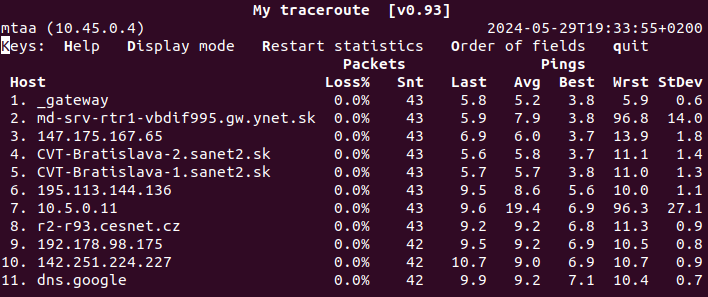
mtr -a <UE assigned address> 8.8.8.8
Explanation:
It works fine even though ping loses its packets. Most probably it happens due to internal routing as long as both UE and UPF (gateway) are located within localhost network.
We have lost many hours trying to find the error in Core or UERANSIM/PacketRusher to fix the ping but accidentally we received piece of help from Juraj Elias. Thanks to him we are not trying to fix ping till the end of time.
Error with CLion IDE
Error occurred in Python: value of type amf_gnb_t' requires 12609704 bytes, which is more than max-value-size
Or how it was displated in GDB console:
"/home/monitoring/.local/share/JetBrains/Toolbox/apps/clion/bin/gdb/renderers/default/commands.py", line 318, in cidr_make_var_with_fallback
    var = cidr_make_var(val, parent_cidr_var, exp, lang, register, True)
  File "/home/monitoring/.local/share/JetBrains/Toolbox/apps/clion/bin/gdb/renderers/default/commands.py", line 367, in cidr_make_var
    referenced_value.fetch_lazy()
gdb.error: value of type amf_gnb_t' requires 12609704 bytes, which is more than max-value-size
The problem is because of max-value-size GDB variable, can be set as:
quickfix:
echo -e "\nset print elements 0\nset max-value-size unlimited" >> ~/.gdbinitThen restart the IDE and enjoy!
메타데이터
- post_id
- dcaa6740eb94
- slug
- 5g-roaming-troubleshooting-open5gs-packetrusher-ueransim-dcaa6740eb94
- url
- https://medium.com/@vidime.sa.buduci.rok/5g-roaming-troubleshooting-open5gs-packetrusher-ueransim-dcaa6740eb94
- canonical_url
- https://medium.com/@vidime.sa.buduci.rok/5g-roaming-troubleshooting-open5gs-packetrusher-ueransim-dcaa6740eb94
- author_url
- https://medium.com/@vidime.sa.buduci.rok
- status
- ok
- fetched_at
- 2026-07-08 12:40:34