Figma Make: The Future of Design-to-Code Has Arrived
“Show me the design.” — Figma, 2025
Figma Make: The Future of Design-to-Code Has Arrived

“Show me the design.” — Figma, 2025
At Config 2025, Figma dropped a bombshell.
Meet Figma Make — the feature that turns your ideas into real, working interfaces with a single sentence.
Yes, you read that right. You tell Figma what to design, and it does it.
UI layouts, interactions, and even ready-to-export code.
We’re officially in the age of prompt-to-prototype.
What Is Figma Make?
Figma Make is your new AI design co-pilot.
You describe what you need in plain English — Make designs it for you, instantly.
Example:
“Design a 3-step onboarding flow for a mobile fitness app. Include progress indicators and a dark theme.”
Output:
- Three screens with text, icons, and transitions.
- Polished visual hierarchy and auto-layout.
- Clickable prototype and optional code export (React, Tailwind, or Next.js).

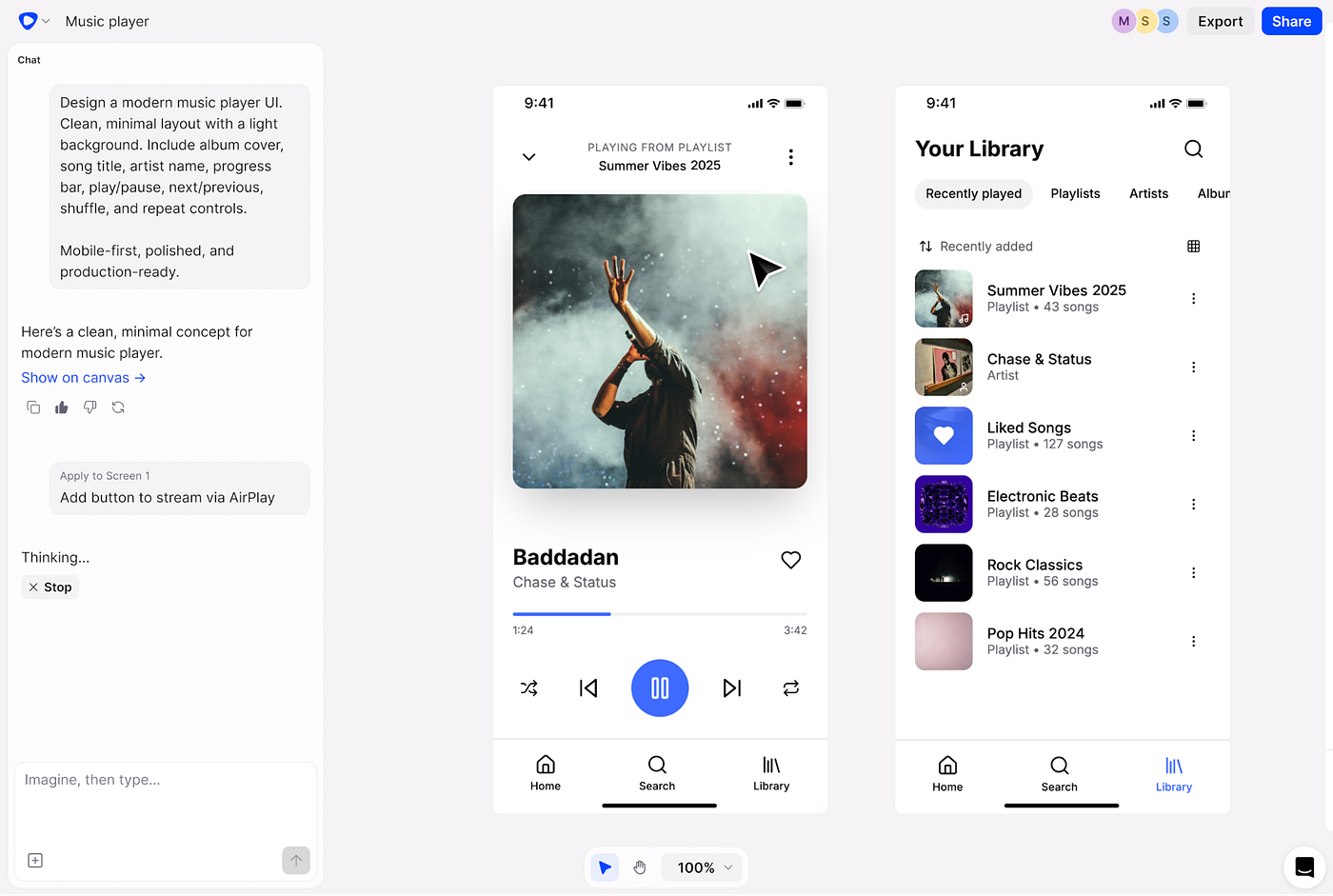
Generated concept using Figma Make — minimalist, cohesive, responsive.
Why Everyone’s Talking About It
Here’s what makes Figma Make a true game-changer

Real-World Use Cases
1. Mobile Onboarding Flow
Prompt:
“Create a 3-screen onboarding flow for a fitness app with illustrations, a progress bar, and a dark theme.”
✅ Make outputs:
- Dynamic 3-screen flow with CTA buttons and pagination.
- Structured components + proper naming conventions.
- Interactivity ready for prototype preview.

2. SaaS Dashboard
Prompt:
“Generate a responsive project dashboard with sidebar navigation, task cards, and performance charts.”
Make delivers:
- Sidebar navigation with auto-layout.
- Stats cards, filters, and task grids.
- 100% responsive — drag to resize, no breakpoints needed.

3. E-Commerce Product Page
Prompt:
“Build a product detail page for sneakers with image carousel, price tag, and ‘Add to Cart’ button.”
The result:
- Beautiful, functional page with semantic layer naming.
- Design tokens applied automatically.
- Exportable to React for instant dev collaboration.
Designers’ Reactions
“This feels like magic. It’s like having a junior designer who gets it instantly.” — UI Designer, Config attendee
“For startups, this cuts 70% of design time. You focus on creativity, not construction.” — Product Manager, SaaS startup
“We used to dread handoff meetings. Now, it’s just copy code and go.” — Frontend Developer
Pro Tips to Get the Best Out of Figma Make
Be specific: Clear prompts = better designs. Link your Design System: The more data Figma has, the smarter it behaves. Iterate fast: Treat Make like your creative partner, not your replacement.🔍 Review outputs: Always double-check contrast, accessibility, and spacing. Mix human + AI: Combine Make’s speed with your design intuition.
Getting Started
- Join the Figma Make Beta (from your workspace settings).
- Open a new Figma file → click “Generate with Make.”
- Enter your design prompt — and watch the magic happen.
- Refine, edit, and export your code.
- Share it in Dev Mode or publish it live using Figma Sites. Official References
🔹 Figma Config 2025 Press Release
🔹 Config 2025 Recap: Figma Make and Beyond
The Big Picture
Figma Make represents a shift in the creative process:
From sketching ideas to speaking them into existence.
It doesn’t replace designers — it amplifies creativity, speeds up iteration, and connects design directly to production.
The gap between “I have an idea” and “Here’s the prototype” is now measured in seconds.
메타데이터
- post_id
- dcfeaaa7df14
- slug
- figma-make-the-future-of-design-to-code-has-arrived-dcfeaaa7df14
- url
- https://medium.com/design-bootcamp/figma-make-the-future-of-design-to-code-has-arrived-dcfeaaa7df14
- canonical_url
- https://medium.com/design-bootcamp/figma-make-the-future-of-design-to-code-has-arrived-dcfeaaa7df14
- author_url
- https://medium.com/@kangning
- status
- ok
- fetched_at
- 2026-06-22 05:41:33