From Replay Buffer to Instant Highlights: Building a Game Streamer for OBS Creators
How I built a lightweight tool that turns OBS replays into highlight clips with a single action.
From Replay Buffer to Instant Highlights: Building a Game Streamer for OBS Creators
How I built a lightweight tool that turns OBS replays into highlight clips with a single action.
Streaming a game is easy.
Creating highlight reels while you’re still live is not.
Most streamers know the feeling:
- Something amazing happens.
- You hit the replay buffer save button.
- OBS stores the recording somewhere.
- Later, you spend time finding the clip, trimming it, organizing it, and replaying it.
I wanted a simpler workflow.
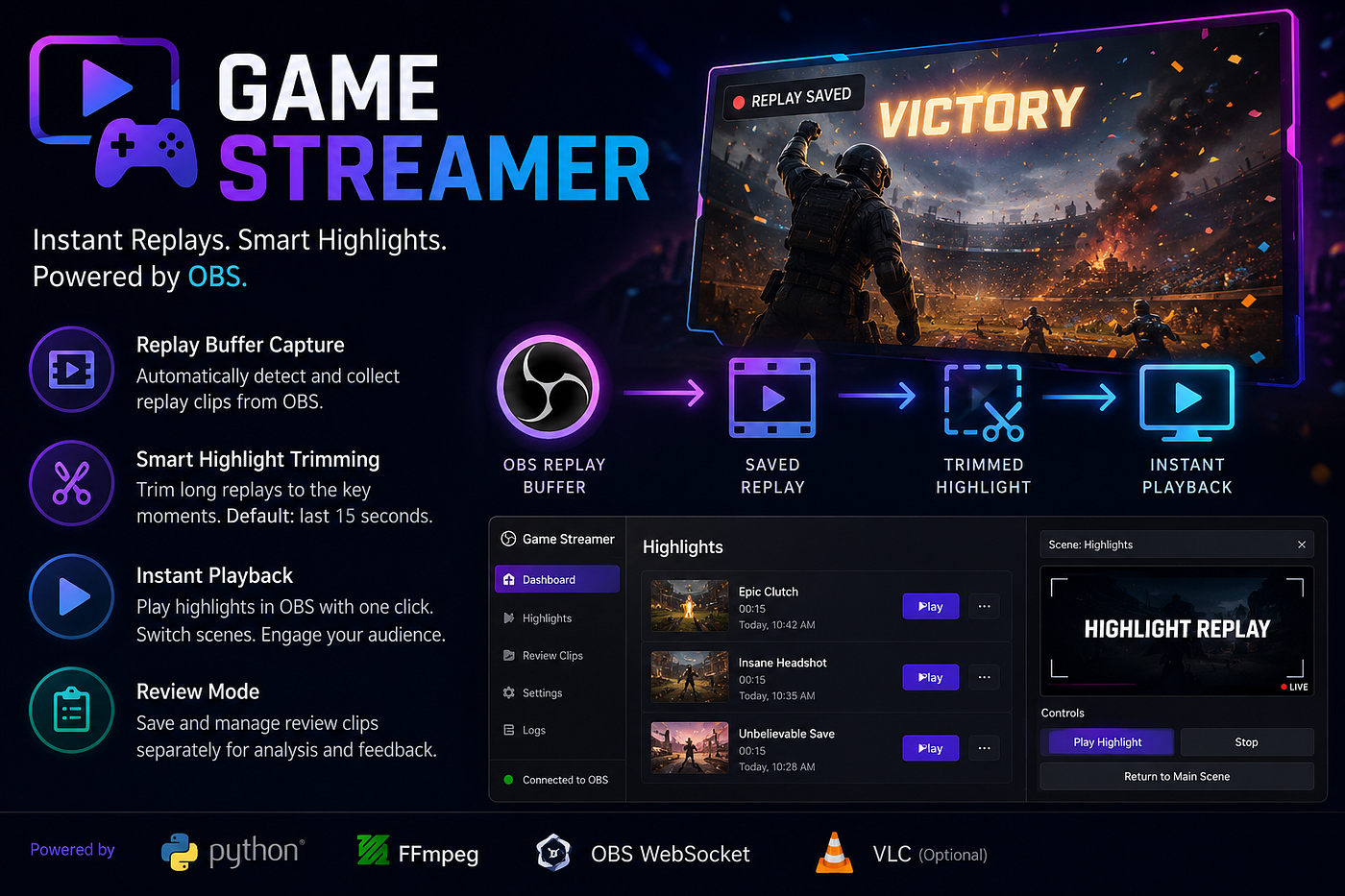
That’s why I built Game Streamer, an open-source Python tool that works alongside OBS Studio to automate replay management, highlight creation, and instant playback. The project uses OBS WebSocket integration, FFmpeg, and a simple folder-based workflow to keep things reliable and easy to understand.
The Problem
OBS Replay Buffer is fantastic for capturing moments that already happened.
However, the workflow after saving a replay usually looks like this:
- Save replay.
- Find the file.
- Open a video editor.
- Trim the interesting section.
- Export it.
- Replay it on stream.
For casual creators this might be acceptable.
For sports events, esports tournaments, volleyball matches, coaching sessions, and live broadcasts, it becomes a bottleneck.
I wanted something that could:
- Save replays automatically.
- Extract only the important moments.
- Build a highlight library.
- Replay highlights directly from OBS.
- Work even when OBS isn’t available.
Introducing Game Streamer
Game Streamer is an OBS-powered streaming helper that automates highlight creation and playback workflows. It can save replay-buffer clips, trim them into highlights, and replay them back through OBS scenes or a local media player.
Core Features
1. Replay Buffer Capture
When OBS saves a replay, Game Streamer can automatically collect it and organize it into a dedicated highlights workflow.
No more hunting through recording folders.
2. Automatic Highlight Trimming
A full replay clip is often much longer than needed.
Game Streamer trims the clip down to the most recent seconds, creating a concise highlight that is immediately ready for playback. The default workflow focuses on the final 15 seconds of the saved replay.
3. Instant Highlight Playback
The tool can:
- Trigger playback inside OBS.
- Use a dedicated Highlights scene.
- Return viewers to the main scene after playback.
If OBS isn’t available, it can fall back to a local media player workflow.
4. Review Mode
For sports referees, coaches, and tournament organizers, highlights are often used for analysis rather than entertainment.
Game Streamer includes an optional review mode for saving and browsing review clips separately from public highlights.
Why I Built It
The original motivation came from sports streaming.
In local tournaments and community events, professional replay systems can be expensive and complicated.
Many organizers already have:
- A laptop
- OBS Studio
- One or two cameras
What they don’t have is an easy way to create instant replays and review clips.
Game Streamer bridges that gap by using tools streamers already know.
Instead of buying specialized hardware, you can build a replay workflow with:
- OBS Studio
- OBS WebSocket
- FFmpeg
- Python
and a little automation.
Technical Architecture
The project intentionally keeps the architecture simple.
OBS Replay Buffer
        │
        ▼
 Saved Replay File
        │
        ▼
 Game Streamer
        │
 ├── Organize Clips
 ├── Trim Highlights
 ├── Review Mode
 └── Playback Control
        │
        ▼
      OBS
Technology Stack
- Python 3.11+
- OBS Studio
- OBS WebSocket
- FFmpeg
- FFprobe
- Optional VLC integration
The goal wasn’t to build a massive streaming platform.
The goal was to create a focused tool that does one thing extremely well: turning saved replays into usable highlights.
Demo Mode
One feature I particularly like is the built-in demo mode.
If OBS isn’t available, the application can operate using sample media files.
This makes development, testing, and demonstrations much easier because you don’t need a live stream running every time you want to test a feature.
Use Cases Beyond Gaming
Despite the name, Game Streamer is intentionally game-agnostic.
Some possible applications include:
Esports Tournaments
- Instant kill replays
- Match highlights
- Best plays compilation
Volleyball & Sports Events
- Point reviews
- Referee assistance
- Coaching analysis
Educational Streams
- Replay important demonstrations
- Review mistakes during training
Live Event Production
- Quick highlight reels
- Audience engagement moments
What I Learned
Building this project reinforced a few important lessons:
Simplicity Wins
Most streaming workflows don’t need a giant cloud platform.
A small automation script can remove hours of repetitive work.
OBS Is More Powerful Than People Realize
OBS combined with WebSocket APIs opens up a huge range of automation possibilities.
You can control scenes, media playback, recording workflows, and much more programmatically.
Sports Streaming Needs Better Open-Source Tools
There are excellent open-source tools for broadcasting.
There are fewer options for replay and review workflows.
I believe this area has a lot of potential for community-driven innovation.
What’s Next?
Some ideas on the roadmap include:
- Better replay queue management
- Multi-camera support
- Scoreboard integrations
- Web-based control panel
- Sports-specific review workflows
- Automated highlight playlists
The long-term vision is to make professional-style replay workflows accessible to anyone running OBS.
Try It Yourself
The project is open source and available on GitHub:
If you’re a streamer, tournament organizer, coach, or OBS enthusiast, I’d love to hear your feedback and ideas.
Sometimes the best tools come from solving a small annoyance that thousands of other people experience every day.
And for me, that annoyance was spending too much time turning replays into highlights.
메타데이터
- post_id
- dd3fa24978de
- slug
- from-replay-buffer-to-instant-highlights-building-a-game-streamer-for-obs-creators-dd3fa24978de
- url
- https://medium.com/@sanketat/from-replay-buffer-to-instant-highlights-building-a-game-streamer-for-obs-creators-dd3fa24978de
- canonical_url
- https://medium.com/@sanketat/from-replay-buffer-to-instant-highlights-building-a-game-streamer-for-obs-creators-dd3fa24978de
- author_url
- https://medium.com/@sanketat
- status
- ok
- fetched_at
- 2026-07-13 12:51:24





