From Prompt to Output: Day-to-Day AI Agent Workflow
disclaimer: all personal opinions, based on the experience of using Hermes and OpenClaw recently
From Prompt to Output: Day-to-Day AI Agent Workflow

disclaimer: all personal opinions, based on the experience of using Hermes and OpenClaw recently
1. Mindset
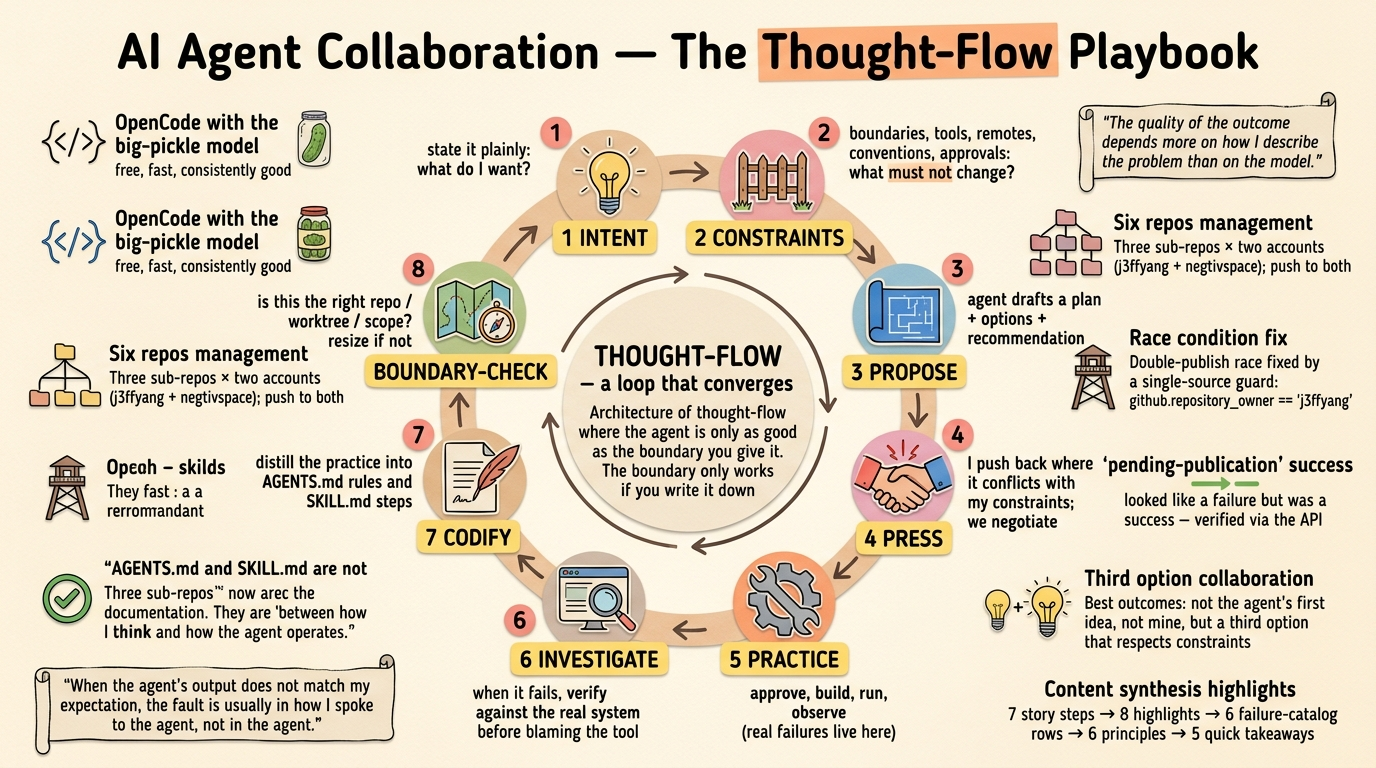
- When the result/output isn’t satisfactory, check the prompt first — unclear instructions are usually the human’s error, not the agent’s
- Tell the story clearly, one chapter at a time.
2. Environment (Pre-requisites)
- Update
~/.openclaw/SOUL.mdand~/.hermes/SOUL.mdif there isn't, to make the agent more specific - Linux is ideal; macOS is fine. Avoid running agents on Windows:
- Administrator privilege is too broad — risk of touching the whole OS
- PowerShell is optional for the OS but often required by agents, which adds friction
- Understand markdown
- Learn basic Unix/Linux as a non-root user
- Python: basic understanding is nice to have
- Result filename convention (OpenClaw and Hermes):
YYMMDD+ time + topic + subtopic, e.g.2605211430-report-summary.md - Avoid spaces in filenames
- Know where to save outputs. Default agent paths:
~/.openclaw,~/.hermes(config, skills, state, including conversation history and output files)
3. Skills (personal opinion)
- Write my own most of the time
- Read others at https://clawhub.ai, https://www.skills.sh and https://hermes-agent.nousresearch.com/docs/skills
- Understand exactly what each installed skill does before you rely on it
- Install skills and plugins only when needed — performance and security. Skills: AI chooses when to use. Plugins: auto hooks (e.g. email) without AI choosing.
- Be skeptical of long skill files; harder to audit and more likely to hide unwanted behavior
4. Prompts and Language
- Prefer English for prompts (vs Chinese or others) when you need precision
- Use precise wording; cross-check with tools like Gemini or Perplexity if needed
- Keep prompts short and precise — saves tokens and reduces errors
- Break work from large to small (goal → steps → single tasks)
- No duplicated messages in the same session
- New task → new session — unrelated history gets loaded as prompt context
- Do not keep correcting an old prompt; that confuses the agent. Start fresh instead
5. Work Style
- Architectural thinking: overall → details, step by step (e.g. build a house: plan → materials → foundation → plumbing, wiring, tiling, paint → finish)
- Run independent pieces in parallel (e.g. plumbing, wiring, tiling at the same time)
- Break work into small pieces when it cannot be done in one shot; start small
- Guardrails: state what must not happen (e.g. “Everything in Python. Do not use Java”)
6. Quality and Testing
- Let AI review your
SKILL.mdbefore you rely on it - Enable verbose mode and watch the test run
- **SKILL.md**: standard skill markdown — YAML frontmatter + declarative human-language instructions
7. Security
- Trust official docs and repos only (e.g. Nous, https://clawhub.ai)
- Stay cautious always
- Trust less when skill files are very long — read before install
8. Closing Note
- AI and agents change fast — stay curious and keep learning
메타데이터
- post_id
- dd41ccc7f5e1
- slug
- from-prompt-to-output-day-to-day-ai-agent-workflow-dd41ccc7f5e1
- url
- https://blog.devgenius.io/from-prompt-to-output-day-to-day-ai-agent-workflow-dd41ccc7f5e1
- canonical_url
- https://blog.devgenius.io/from-prompt-to-output-day-to-day-ai-agent-workflow-dd41ccc7f5e1
- author_url
- https://medium.com/@j3ffyang
- status
- ok
- fetched_at
- 2026-06-21 19:25:17