Playwright Waits: A Deep Dive into `domcontentloaded` vs `networkidle`
How It All Started
Playwright Waits: A Deep Dive into domcontentloaded vs networkidle
How It All Started
It was supposed to be a quick test run. I had written a clean, straightforward Playwright script to test a dashboard page — click a button, wait for the page to load, assert the data was there. Simple enough.
Except it kept failing. Not every time. Just sometimes. The kind of flaky test that makes you question your life choices.
After a few hours of debugging, I realized the problem: my script was asserting content before the page had finished loading it. The DOM was ready, sure — but the data was still being fetched from an API in the background. I was checking too early.
That debugging session sent me down a rabbit hole I’m glad I fell into. Playwright gives you fine-grained control over how you wait for a page to be ready, and two of the most important — and most misunderstood — options are domcontentloaded and networkidle. Understanding the difference between them transformed how I approach test reliability.
What Are These Waits, Exactly?
When you navigate to a page using Playwright, you can pass a waitUntil option to control what "loaded" actually means:
await page.goto('https://example.com', { waitUntil: 'domcontentloaded' });
// or
await page.goto('https://example.com', { waitUntil: 'networkidle' });
Both tell Playwright: “Wait until the page reaches this state before proceeding.” But what they consider “ready” is very different.
domcontentloaded: The Fast-But-Early Wait
What It Actually Means
domcontentloaded fires when the browser has finished parsing the initial HTML document and the DOM tree is fully constructed. At this point, the HTML is parsed and in-memory, and scripts that were blocking the HTML parse have executed.
Crucially, it does not wait for:
- Images and stylesheets to finish loading
- Async JavaScript to finish executing
- Any API calls triggered by JavaScript to complete
- Fonts, iframes, or other subresources
Think of it as the moment the skeleton of the page exists. The furniture hasn’t arrived yet.
When to Use It
domcontentloaded is your best friend when you need speed and you know exactly what you're working with. It shines in scenarios like:
Static or server-rendered pages — If the content you care about is embedded directly in the HTML (not fetched via JavaScript), the DOM is all you need. A server-rendered product page with prices baked into the HTML is a perfect candidate.
Testing page structure — If you’re checking that the right elements exist on the page (not their dynamic content), this wait is more than sufficient.
Checking navigation worked — Asserting the URL changed or a specific heading is present? Fast DOM check is fine.
High-volume test runs where speed matters — On a CI pipeline running hundreds of tests, the cumulative time savings from not waiting for full network activity can be significant.
javascript
// Good use of domcontentloaded
await page.goto('/about', { waitUntil: 'domcontentloaded' });
await expect(page.locator('h1')).toHaveText('About Us');
The Risks
The danger zone for domcontentloaded is dynamic content. If your app loads data via fetch() or axios after the initial HTML parse, those API responses haven't arrived when domcontentloaded fires. You'll assert against empty containers, loading spinners, or skeleton screens — and your test will fail unpredictably.
Another common trap: JavaScript frameworks like React, Vue, or Angular often render client-side. The initial HTML might be nearly empty, with the real content mounted after the framework boots up. domcontentloaded won't wait for any of that.
// Risky: the data table may not have rendered yet
await page.goto('/dashboard', { waitUntil: 'domcontentloaded' });
await expect(page.locator('.data-table')).toBeVisible(); // ❌ Could be a spinnernetworkidle: The Thorough-But-Slow Wait
What It Actually Means
networkidle waits until there are no more than 0 ongoing network connections for at least 500ms. It's Playwright's way of saying: "The page has stopped making network requests."
This means it will wait for:
- All API calls triggered by JavaScript
- Image and stylesheet downloads
- Font loading
- Third-party scripts and analytics
- Anything else that uses the network
It’s the patient, thorough option. It doesn’t call the page “ready” until things have genuinely settled down.
When to Use It
networkidle is the right choice when your test depends on content that arrives asynchronously. Use it when:
Testing data-heavy dashboards — Charts, tables, and stats that populate from an API after page load need the network to settle before you assert.
Single-page applications (SPAs) — React, Vue, and Angular apps often hydrate and then immediately fire off data requests. networkidle covers that lifecycle end-to-end.
Assertions on dynamic content — If you’re checking a price, a count, a user name, or any value that comes from a database via an API, networkidle is the safer bet.
End-to-end flows involving multiple requests — Login, followed by a redirect, followed by a profile fetch — networkidle waits for all of it to settle.
// Good use of networkidle
await page.goto('/dashboard', { waitUntil: 'networkidle' });
await expect(page.locator('.revenue-total')).toHaveText('$48,320');
The Risks
networkidle can be slow — sometimes painfully so. The worst offenders are:
Long-polling and WebSockets — If your app maintains a persistent connection to a server (chat apps, live dashboards, notification systems), networkidle may never fire. Or it may fire only after a long timeout.
Analytics and tracking scripts — Third-party tools like Google Analytics, Segment, or Intercom often fire beacons and pings continuously. Your test ends up waiting for Facebook Pixel to finish doing its thing, which is not the point.
Background refresh loops — Apps that auto-refresh data every few seconds will keep the network busy indefinitely. networkidle will wait the full 500ms after the last request, meaning every refresh cycle resets the timer.
Flakiness on slow CI environments — If network requests occasionally take longer than expected, the “idle” window shifts and your tests behave inconsistently across environments.
// Risky: a live dashboard that polls every 3 seconds will delay or block networkidle
await page.goto('/live-feed', { waitUntil: 'networkidle' }); // ❌ May time out
The Better Alternative: Targeted Waiting
Here’s something important that my debugging journey taught me: both domcontentloaded and networkidle are blunt instruments. They work at the page level, but your tests care about specific elements, not the entire page.
Playwright’s recommended approach for robust tests is to wait for the specific thing you’re about to assert:
// Instead of this
await page.goto('/dashboard', { waitUntil: 'networkidle' });
await expect(page.locator('.data-table')).toBeVisible();

// Prefer this
await page.goto('/dashboard', { waitUntil: 'domcontentloaded' });
await expect(page.locator('.data-table')).toBeVisible(); // Built-in auto-wait
Playwright’s expect assertions have built-in auto-waiting — they'll retry until the assertion passes or a timeout is hit. This is often more precise and faster than waiting for network-level events.
You can also wait for specific responses:
await page.goto('/dashboard', { waitUntil: 'domcontentloaded' });
await page.waitForResponse(resp => resp.url().includes('/api/metrics') && resp.status() === 200);
await expect(page.locator('.revenue-total')).toHaveText('$48,320');
That said, waitUntil is still a valuable tool — it just works best as a first-pass anchor, not a complete solution.
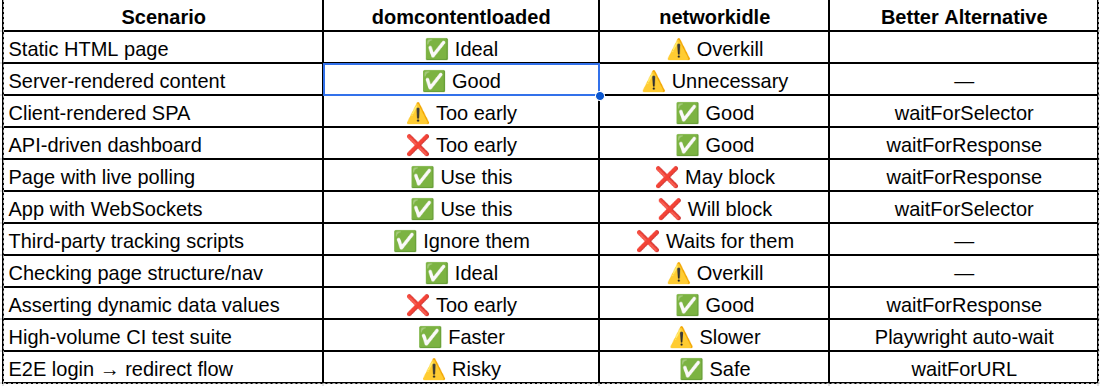
Quick Reference: When to Use What
Key Takeaways
After that frustrating afternoon of flaky tests, here’s what I carry with me:
Use domcontentloaded as your default for speed, especially on server-rendered pages or when you just need the DOM structure.
Reach for networkidle when you know async data matters — but be wary of apps with persistent connections or polling, where it may time out or cause slowdowns.
Layer in specific waits on top of your waitUntil strategy. Playwright's built-in auto-waiting on assertions is powerful — use it. For complex flows, waitForResponse or waitForSelector are your most precise tools.
Don’t treat these as a silver bullet. The real goal is deterministic tests — and that means waiting for the right signal, not just the fastest or most thorough one. Understand your app’s loading behavior, and pick the wait strategy that matches it.
The good news? Once you internalize these distinctions, flaky tests start to feel less like random gremlins and more like solvable puzzles.
메타데이터
- post_id
- dd6fd5f15dda
- slug
- playwright-waits-a-deep-dive-into-domcontentloaded-vs-networkidle-dd6fd5f15dda
- url
- https://medium.com/@dharani.gone8/playwright-waits-a-deep-dive-into-domcontentloaded-vs-networkidle-dd6fd5f15dda
- canonical_url
- https://medium.com/@dharani.gone8/playwright-waits-a-deep-dive-into-domcontentloaded-vs-networkidle-dd6fd5f15dda
- author_url
- https://medium.com/@dharani.gone8
- status
- ok
- fetched_at
- 2026-06-22 17:31:34