How Java stores 'A', 65, and "A" in memory — and why the difference matters more than you think
If everything becomes binary, shouldn’t ‘A’, 65, and “A” look the same to the computer?
How Java stores 'A', 65, and "A" in memory — and why the difference matters more than you think
If everything becomes binary, shouldn’t ‘A’, 65, and “A” look the same to the computer?
I could not sleep yesterday when I suddenly remembered ASCII binary conversion of a character and binary representation of a number are same, then how can we segregate the difference between these two, while watching The Hawking Excitation — The Big Bang Theory (Season 5, Episode 21) when Howard answered “NO” is ASCII Binary. Before this I never gave this concept a thought. Who goes deep while programming right?
The thought kept me awake that If everything becomes binary, shouldn’t ‘A’, 65, and “A” look the same to the computer? This sounds completely logical. We’ve learned that characters map to Unicode code points, and 'A' is Unicode 65, which is binary 01000001. So shouldn't the computer see identical ones and zeros regardless of whether you typed a char, an int, or a String?
The answer I got after I spent some time digging is: partly yes, and mostly no — and the gap between those two answers is where deep understanding of Java and the JVM actually lives.
Let’s walk through this carefully, from primitive types to heap objects to JVM internals, until the full picture snaps into focus.
1. The Three Lines That Start the Confusion
char   c = 'A';
int    n = 65;
String s = "A";
We know 'A' → Unicode 65 → binary 01000001. So all three look like they represent the same concept. The confusion is understandable — but it conflates three distinct things:
- Logical value — the number 65, the character A
- Binary encoding — what bits end up in memory
- Memory representation — how much space, what surrounds it, where it lives
These are not the same thing. Let’s dissect each layer.
2. Primitives — Same Value, Radically Different Bit Widths
Java primitives are stored directly — no object wrapper, no header, just raw bits. But “raw bits” doesn’t mean “identical.” The size (bit width) is baked into the type, not the value.

If you observe, it will be clear that
char c = 'A'andshort s = 65produce identical bits in memory — both are00000000 01000001. Butcharis unsigned and represents a Unicode code point;shortis signed and represents a number. Same bits, completely different meaning.
And int n = 65 is not even close to the same bits — it's 32 bits wide, padded with two extra zero-bytes. The JVM knows the difference because it tracks types in the bytecode itself, not in the raw memory slot.
3. Where Primitives Actually Live
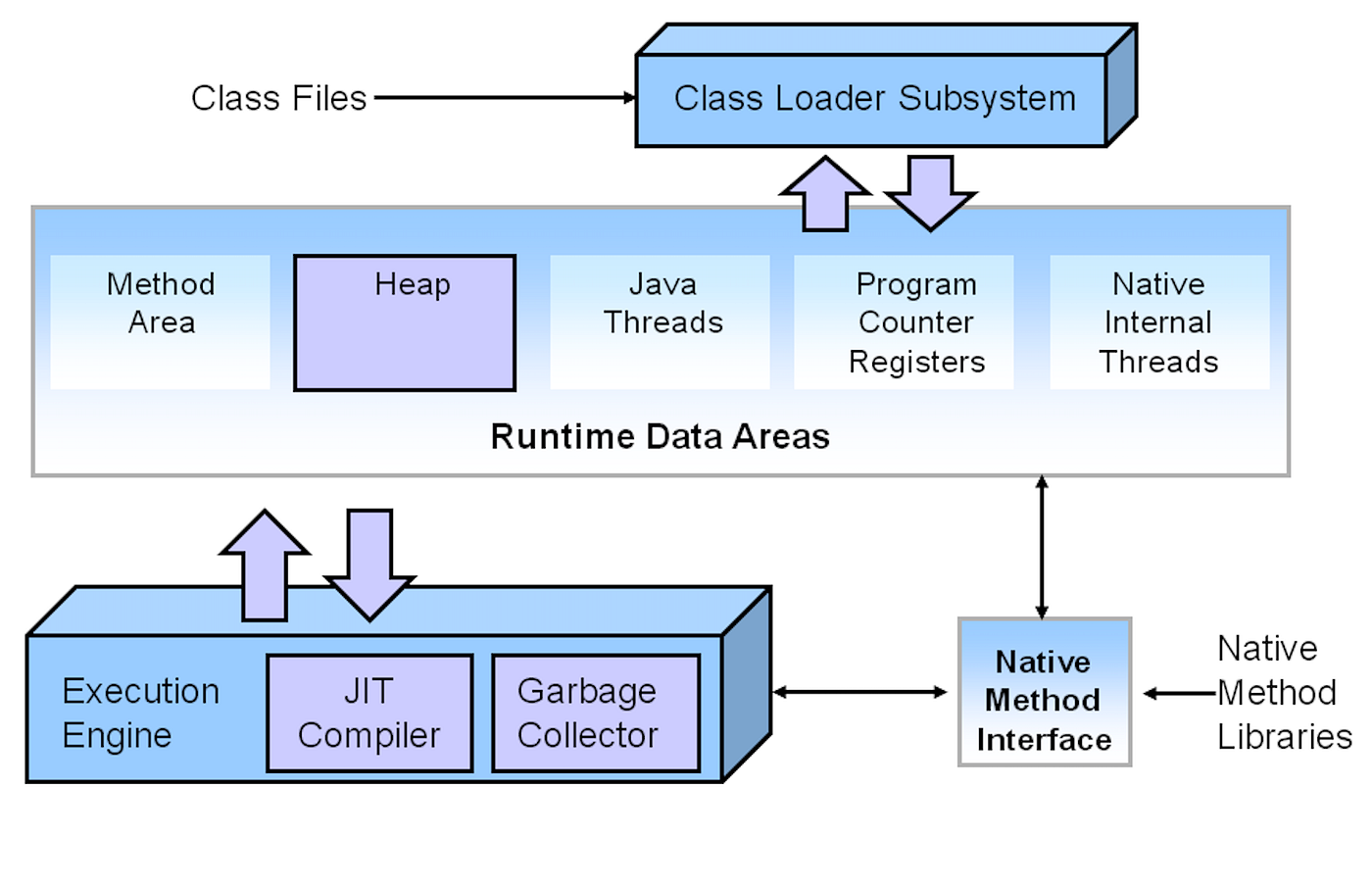
When you declare local primitive variables inside a method, they go into the stack frame for that method invocation. The JVM maintains a per-thread call stack; each method call pushes a new frame, each return pops it.
Inside a frame, the JVM keeps a local variable array. Each slot is 32 bits. A char or int occupies one slot. A long or double occupies two consecutive slots.

Notice: the stack holds a reference for the String — not the String itself. The stack slot just contains a heap address (a pointer). This is the first big architectural difference between primitives and objects.
JVM Spec Note
The JVM local variable array is typed at compile time. The bytecode instructions iload, cload, aload tell the JVM exactly what kind of thing it's loading from each slot. Type information is never stored in the raw bits of a primitive.
4· Heap — What "A" Really Looks Like in Memory
Here’s where the gap becomes a chasm. String s = "A" doesn't store a character. It stores a Java object on the heap. And every Java object has an object header prepended to its fields.
The Object Header
Every object on the HotSpot JVM heap begins with a header occupying 12 bytes on 64-bit JVM with compressed oops (or 16 bytes without compression). This header has two parts:

Mark Word is a multipurpose 64-bit word. Depending on the lock state of the object, it stores different things: the identity hashcode when unlocked, the owning thread pointer when biased-locked, or a pointer to a monitor when inflated to a heavyweight lock. The GC also uses the age bits to decide when to promote an object to the Old Generation.
Klass Pointer points to the class metadata stored in Metaspace (off-heap). This is how the JVM knows this heap blob is a java.lang.String and not, say, a java.util.ArrayList.
The Full String Object Layout (Java 9+ Compact Strings)

The actual character data in
"A"is a single byte0x41. But that byte is wrapped in abyte[]object (which has its own 12-byte header + 4-byte length), which is pointed to by aStringobject (which has a 12-byte header + fields).
Total: roughly 56 bytes on the heap to store one character. Effective or not, I am not commenting on that…!!
5· Compact Strings — The Java 9+ String Optimization You Should Know
Before Java 9, String stored characters internally as a char[] — each character using 2 bytes (UTF-16), even for simple ASCII strings. A 1-character string like "A" wasted 1 byte per character.
Java 9 introduced Compact Strings (JEP 254). Now the internal storage uses byte[] instead of char[], plus a coder byte that indicates encoding:
// Simplified internal structure (Java 9+)
private final byte[] value;   // the actual characters
private final byte  coder;   // 0 = LATIN1, 1 = UTF16
private       int   hash;    // lazily computed hashCodeJava (internal)
For strings that only contain characters in the Latin-1 range (Unicode U+0000–U+00FF, which covers all standard English + most Western European characters), Java 9+ stores each character in 1 byte instead of 2. This cut the memory footprint of typical English-text applications by roughly 10–15%.
Only when a string contains characters outside Latin-1 (like Chinese characters, emoji, or rare Unicode symbols) does it fall back to the UTF-16 2-bytes-per-char encoding — and the coder byte is set to 1 to signal this.
6· String Pool — The Optimization That Changes Object Identity
There’s one more layer specific to Strings: the String Pool (also called the String Intern Pool or String Constant Pool).
String literals in Java source code are automatically interned — the JVM checks if an identical string already exists in the pool. If it does, it reuses the same object instead of creating a new one.
String a = "A";   // interned — goes into String Pool
String b = "A";   // same pool entry — same object!
String c = new String("A");  // forces new heap object — NOT pooled

System.out.println(a == b);           // true  - same object reference
System.out.println(a == c);           // false - different objects
System.out.println(a.equals(c));      // true  - same contentJava
String Pool (part of Heap since Java 7+)

The String Pool lives in the heap (since Java 7 — previously it was in the now-defunct PermGen). Interned strings are subject to garbage collection if no references exist. This is a detail many developers get wrong when they think of the pool as permanent.
7· Heap Generations — Where "A" Goes Over Time
The JVM heap is not a flat block of memory. HotSpot organizes it into generations, based on the observed pattern that most objects die young (the “generational hypothesis”).

When String s = "A" is first created as a non-pooled string, it starts in Eden. If it survives a Minor GC (because something still references it), it moves to a Survivor space. After enough survivals, it gets promoted to the Old Generation.
String Pool entries — because the JVM holds a reference to them — tend to live a long time and often end up in Old Gen.
G1 and ZGC Note
Modern collectors like G1GC (default since Java 9) and ZGC (low-latency, Java 15+) still respect the generational model internally but expose different tuning knobs. ZGC can handle heaps up to 16TB with pauses under 1ms by doing most GC work concurrently. The logical regions above still apply, even if the physical organization differs.
8 · Bytecode — Type Lives Here, Not in the Bits
Here’s the question the original confusion really asks: if raw bits at some memory address are 01000001, how does the CPU/JVM know what they mean?
The answer: it never looks at isolated bits and guesses. The JVM’s type system is enforced at multiple layers:

The bytecode itself carries the full type context. When the JVM executes iload_1 it knows it's loading a 32-bit int. When it executes aload_2 it knows it's loading a reference. The raw bits in memory have no self-describing type — the type knowledge lives entirely in the instruction stream and metadata.
If you somehow extracted raw bytes from JVM memory and looked at them in isolation, you couldn’t determine the type. The bits
00000000 01000001are meaningless without the surrounding context — the bytecode instruction that loaded them, the stack frame slot type, or the object header pointing to a class. Type is contextual, not intrinsic to the bits.
9 · Quick Experiment — Proving It in Code
public class MemoryConfusionClass {
    public static void main(String[] args) {

        // Primitives - value comparison works directly
        char  c  = 'A';
        short sh = 65;
        int   n  = 65;
        System.out.println(c == sh);   // true  - same bits, widening comparison
        System.out.println(c == n);    // true  - char widened to int
        System.out.println((int) c);   // 65

        // Object - identity vs equality
        String s1 = "A";
        String s2 = "A";
        String s3 = new String("A");
        System.out.println(s1 == s2);         // true  - same pool object
        System.out.println(s1 == s3);         // false - different heap objects
        System.out.println(s1.equals(s3));    // true  - same content
        System.out.println(s1.charAt(0) == c); // true  - extract char from String

        // Char/int are NOT directly comparable to String
        // System.out.println(c == s1);  // COMPILE ERROR: incompatible types
    }
}
The last commented line is the punchline: the compiler itself refuses to compare a char to a String, even though intuitively 'A' and "A" feel like the same thing. They live in completely different universes of the type system.
10· Full Mental Model — Putting It All Together

Key Takeaways
— Same logical value does not mean same binary layout in memory
— char and short with value 65 share identical bits — but have different type semantics
— int with value 65 has the same low byte but is 32 bits wide, not 16
— String "A" is a heap object with an object header, fields, and a separate byte array — roughly 56x larger than a primitive char
— Object headers contain the Mark Word (lock state, GC age, hashcode) and Klass Pointer (class metadata in Metaspace)
— Java 9+ uses Compact Strings: Latin-1 chars stored in 1 byte, not 2 — significant memory savings
— String literals are interned in the String Pool; new String(...) bypasses the pool
— Type information never lives in the raw bits — it lives in bytecode instructions, stack frame descriptors, and object headers.

If this clicked for you, the next step is exploring how JVM bytecode verification works at class load time, and how the JIT compiler eliminates type checks at runtime for hot code paths — turning the type-safe abstraction into raw, unboxed machine instructions at peak performance. Let me know if you want me to cover that too.
메타데이터
- post_id
- dd7ef53c15da
- slug
- how-java-stores-a-65-and-a-in-memory-and-why-the-difference-matters-more-than-you-think-dd7ef53c15da
- url
- https://medium.com/@neemo/how-java-stores-a-65-and-a-in-memory-and-why-the-difference-matters-more-than-you-think-dd7ef53c15da
- canonical_url
- https://medium.com/@neemo/how-java-stores-a-65-and-a-in-memory-and-why-the-difference-matters-more-than-you-think-dd7ef53c15da
- author_url
- https://medium.com/@neemo
- status
- ok
- fetched_at
- 2026-06-09 15:37:30