From Code to Cloud: Building and Deploying a Scalable Node.js API with Docker and GitHub Actions
Modern backend development goes beyond writing endpoints. Production APIs must be structured for scale, packaged consistently, and deployed…
From Code to Cloud: Building and Deploying a Scalable Node.js API with Docker and GitHub Actions
Modern backend development goes beyond writing endpoints. Production APIs must be structured for scale, packaged consistently, and deployed through reliable automation.
In this tutorial, you’ll build a scalable Node.js REST API, containerize it using Docker, and automate the delivery pipeline with GitHub Actions. The goal is to show how these tools work together in a real-world workflow from local code to cloud-ready deployment.
What You’ll Build and Learn
By the end of this guide, you’ll know how to:
- Structure a Node.js API for scalability
- Apply middleware and async patterns correctly
- Containerize an API using Docker
- Create a CI pipeline with GitHub Actions
- Prepare a Node.js service for production deployment
These patterns mirror how modern Node.js services are built and shipped by engineering teams today.
API Architecture Overview

When bringing legacy systems into modern frameworks like Node.js microservices, engineers often adopt proven migration strategies such as **AI-driven legacy app modernization** to reduce risk, untangle tightly coupled code, and manage technical debt more effectively.Request Flow
- A client sends an HTTP request
- The request passes through middleware (logging, auth, error handling)
- Controllers validate input and handle routing
- Services execute business logic
- Data is read from or written to the database
This layered approach keeps responsibilities clear and prevents tight coupling.

Project Structure
A predictable folder structure makes APIs easier to extend and maintain.
src/ ├── controllers/ ├── services/ ├── routes/ ├── middleware/ ├── config/ ├── app.js └── server.js
Each layer has a single responsibility. Controllers handle HTTP, services handle logic, and middleware handles cross-cutting concerns.
Setting Up the Node.js API
Start with a minimal Express application.
// src/app.js import express from “express”;
const app = express(); app.use(express.json());
app.get(“/health”, (_req, res) => { res.json({ status: “ok” }); });
export default app;
Create a server entry point:
// src/server.js import app from “./app.js”;
const PORT = process.env.PORT || 3000; app.listen(PORT, () => { console.log(
API running on port ${PORT}); });
A /health endpoint is especially useful for containerized and cloud deployments.
Middleware for Scalability
Middleware is ideal for logic that applies to every request.
Common examples include:
- Request logging
- Authentication and authorization
- Input validation
- Centralized error handling
Example error middleware:
// src/middleware/errorHandler.js export default (err, _req, res, _next) => { console.error(err); res.status(500).json({ error: “Internal Server Error” }); };
This keeps controllers focused and avoids duplicated error logic.
Controllers and Services
Controllers should stay thin and predictable.
// src/controllers/userController.js import * as userService from “../services/userService.js”;
export const getUser = async (req, res) => { const user = await userService.findById(req.params.id); res.json(user); };
Services contain the business logic:
// src/services/userService.js export const findById = async (id) => { return { id, name: “Demo User” }; };
This separation improves testability and makes refactoring safer as the API grows.
Containerizing the API with Docker

Docker ensures the API behaves the same in development, CI, and production.
Production-Ready Dockerfile
FROM node:20-alpine
WORKDIR /app
COPY package*.json ./ RUN npm ci — only=production
COPY src ./src
ENV NODE_ENV=production EXPOSE 3000
CMD [“node”, “src/server.js”]
This setup produces a small, deterministic image optimized for runtime use.
Add a .dockerignore file to speed up builds:
node_modules .git npm-debug.log
Why Docker Matters
Containerization solves several common problems:
- Eliminates environment drift
- Simplifies scaling and rollbacks
- Makes deployments reproducible
- Integrates cleanly with CI/CD systems
Once containerized, the API becomes portable across platforms.
CI/CD with GitHub Actions
Continuous integration ensures every change is tested and buildable.
Example GitHub Actions Workflow
name: Node API CI
on: push: branches: [main]
jobs: build: runs-on: ubuntu-latest
steps: — uses: actions/checkout@v4
- uses: actions/setup-node@v4 with: node-version: 20
- run: npm ci — run: npm test — if-present
- name: Build Docker image run: docker build -t node-api:latest .
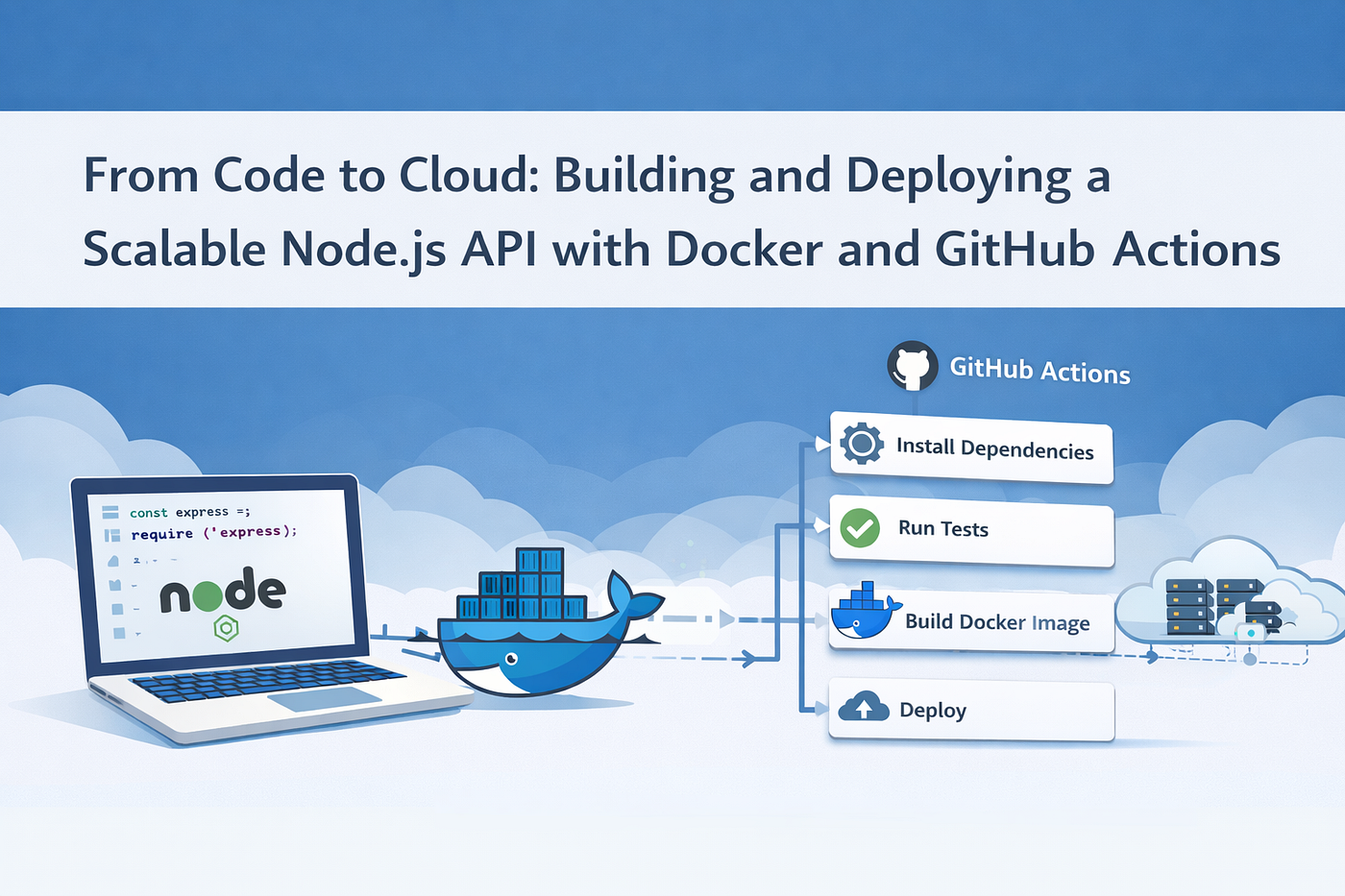
This pipeline:
- Checks out the code
- Installs dependencies
- Runs tests
- Builds a Docker image
It can later be extended to push images or trigger deployments.
Deployment Overview
Rather than focusing on a single provider, think in terms of patterns:
- Managed container services for long-running APIs
- Serverless containers for burst traffic
- Orchestrated platforms for complex systems
The workflow remains consistent:
Code → CI → Container → Runtime
This keeps infrastructure flexible and avoids lock-in.
Best Practices and Common Mistakes
Security
- Never run containers as root
- Validate all incoming input
- Store secrets in environment variables
Observability
- Use structured logs
- Add request correlation IDs
- Expose health and readiness endpoints
CI/CD Pitfalls
- Skipping tests to “save time”
- Overloading pipelines with unrelated steps
- Tight coupling between build and deploy stages
Designing for maintainability early helps avoid costly rewrites later.
Key Takeaways
- Layered architecture keeps Node.js APIs scalable
- Middleware simplifies cross-cutting concerns
- Docker standardizes environments
- GitHub Actions enables reliable automation
- Small structural decisions compound over time
Conclusion
Building a scalable API isn’t about adding complexity — it’s about applying structure and automation early. By combining clean Node.js architecture, Docker-based packaging, and CI pipelines with GitHub Actions, you create services that are easier to deploy, scale, and maintain.
This code-to-cloud workflow forms a solid foundation you can extend as your application and team grow.
메타데이터
- post_id
- ddaecb9d2d9a
- slug
- from-code-to-cloud-building-and-deploying-a-scalable-node-js-api-with-docker-and-github-actions-ddaecb9d2d9a
- url
- https://medium.com/@devikay/from-code-to-cloud-building-and-deploying-a-scalable-node-js-api-with-docker-and-github-actions-ddaecb9d2d9a
- canonical_url
- https://medium.com/@devikay/from-code-to-cloud-building-and-deploying-a-scalable-node-js-api-with-docker-and-github-actions-ddaecb9d2d9a
- author_url
- https://medium.com/@devikay
- status
- ok
- fetched_at
- 2026-06-13 07:35:29