Your Webcam Can Read Your Heartbeat — Here’s How We Taught It To
How we measured heart rate and the tiny rhythm changes between beats, using nothing but an ordinary camera and some signal-processing…
Your Webcam Can Read Your Heartbeat — Here’s How We Taught It To
How we measured heart rate and the tiny rhythm changes between beats, using nothing but an ordinary camera and some signal-processing tricks. No wires, no sensors, no clips on your finger.
TL;DR — Your skin gets very slightly redder and paler every time your heart beats, because each pulse pushes a fresh wave of blood through it. The change is far too subtle for your eyes, but a camera can pick it up. In two research papers, my collaborators and I built (1) a complete system that turns any laptop webcam or phone camera into a contact-free heart monitor, and (2) a smarter algorithm that pulls a much cleaner heartbeat signal out of the video. This article explains the whole thing from scratch — no engineering background needed.
1. The everyday problem
Think about the last time someone measured your heart. A nurse clipped a glowing plastic peg onto your fingertip, or stuck cold electrode pads on your chest, or you strapped on a smartwatch. All of these work — but they all share the same catch: something has to touch your skin.
That’s fine in a hospital. It’s annoying everywhere else, and it’s a real barrier for a lot of people:
- A patient who wants to check on their heart from home.
- A doctor doing a video appointment (telemedicine) who can’t reach through the screen.
- Anyone in a part of the world where a medical device is simply too expensive — but who almost certainly owns a phone with a camera.
So we asked a simple question:
What if the camera you already own could measure your heart, just by looking at your face?
It turns out it can. Here’s the science that makes it possible.

2. The secret your skin is keeping
Every time your heart beats, it pumps blood out into your body. That blood travels through countless tiny vessels just beneath your skin — including the skin on your face.
Blood absorbs light (especially greenish light). So when a pulse of blood arrives, your skin absorbs a tiny bit more light and looks a hair darker/redder. A moment later, between beats, the blood recedes and your skin looks a hair lighter. This happens with every single heartbeat, all day long.

You will never see this with your naked eye — the change is a fraction of a percent. But a camera measures the exact brightness of every pixel, dozens of times per second. If you average up the color of someone’s face across many frames of video and zoom way, way in, a rhythm appears. That rhythm is their pulse.
This effect has a name:
Photoplethysmography (PPG) — recording the swelling of blood using light. That finger clip at the hospital? It’s a PPG sensor — it shines a light through your fingertip and watches how the amount of light changes as blood pulses through. We’re doing the exact same physics, just with a regular camera and from a distance.
Remote PPG (rPPG) — PPG done without touching you, using a camera pointed at your skin. The “remote” is the whole trick.
3. Two numbers we care about: HR and HRV
Once we can see the pulse, we can measure two different things from it. This distinction is the heart (pun intended) of both papers, so let’s be clear.
❤️ Heart Rate (HR)
The easy one. How many times your heart beats per minute. Resting is usually 60–100 bpm. If you count the peaks in the pulse signal over a minute, that’s your heart rate. Done.
〰️ Heart Rate Variability (HRV)
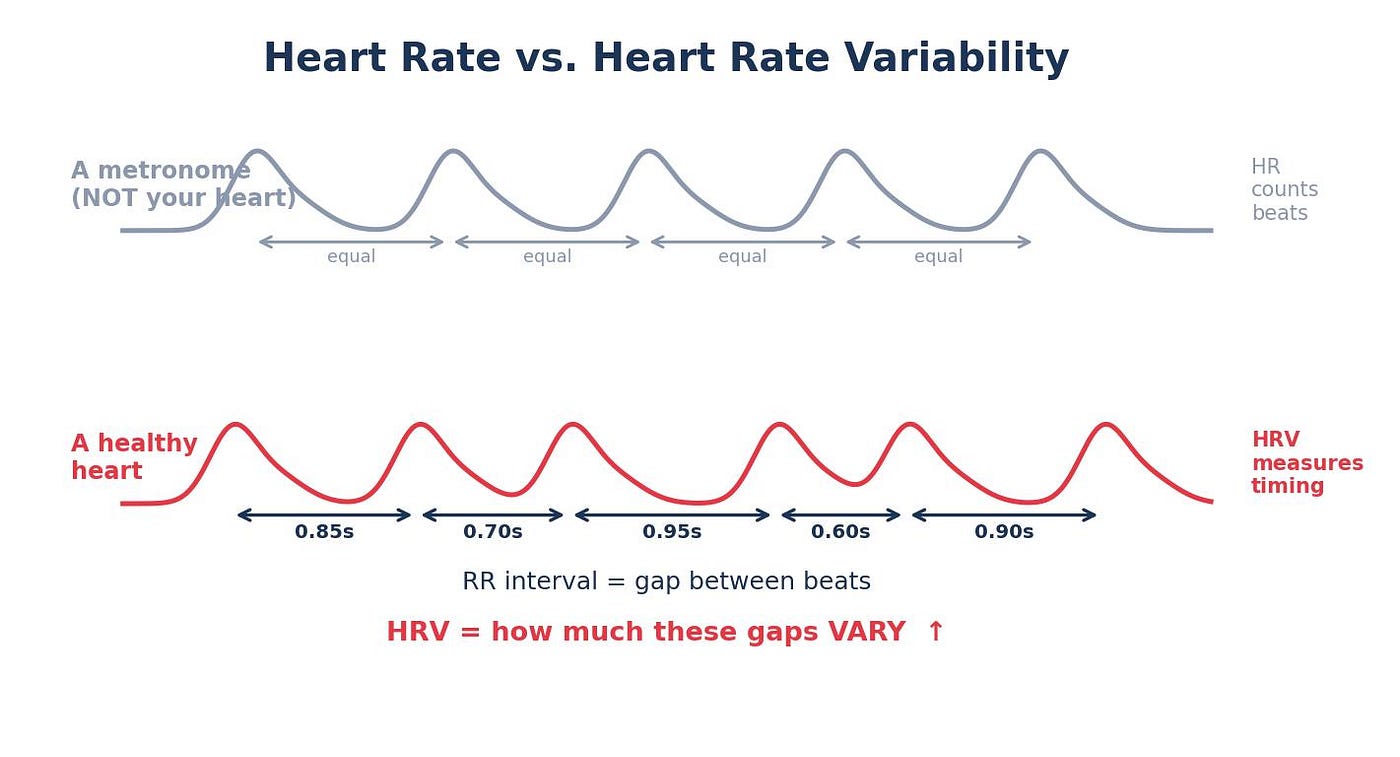
The subtle, more interesting one. A healthy heart does not beat like a perfect metronome. The gap between consecutive beats is always changing slightly — maybe 0.85 seconds, then 0.81, then 0.88, then 0.84.
HRV measures how much those gaps vary.
Why should you care about the variation? Because it’s a window into your autonomic nervous system — the automatic control system that runs your body without you thinking about it (the “fight-or-flight” vs. “rest-and-digest” balance). Higher, healthy variability generally means your body is relaxed and adaptable. Low variability is linked to stress, fatigue, and cardiovascular disease. HRV is used today in everything from cardiology to detecting psychological stress.
The key takeaway: Heart rate just needs you to count beats. HRV needs you to measure the precise timing of each beat — down to milliseconds. That makes HRV much harder to get right from a shaky, noisy webcam video. This difficulty is exactly the problem the second paper attacks.
RR interval — the time gap between one beat and the next. (The “R” comes from the name of the spike in a classic ECG heart tracing.) HRV is really just statistics computed on the list of RR intervals. Two common ones:
SDRR — the standard deviation of all the RR intervals. (Standard deviation = “on average, how spread out are these numbers?”) Big SDRR = lots of variation. RMSSD — a measure focused on beat-to-beat jumpiness (how different each gap is from the very next one). It’s more sensitive, and therefore harder to measure accurately.
4. Building the whole machine
The goal of this module was a complete, working, real-world system with one guiding principle: demand almost nothing from the user’s device. No special camera, no powerful computer. If you have a webcam and an internet connection, you’re in.
The clever design choice: split the work between your device and a powerful server in the cloud.
- Your device’s only jobs:record a short video of your face and send it off. (Light work — even a cheap phone can do it.)
- The cloud server’s job: all the heavy number-crunching to extract your heartbeat. (Hard work — done on a powerful machine you don’t have to own.)
Cloud-based / server — the cloud just means someone else’s powerful computer, accessed over the internet. Instead of doing hard math on your weak phone, you ship the data to a strong computer in a data center and it sends the answer back. This is why the system works even on a budget device.
The pipeline, step by step
Here’s the full journey, from your face to a number on your screen:

Let’s unpack the two steps that sound like jargon but are actually intuitive.
Step 3: “Find the face” — Face Detection
Before we can study someone’s skin, the computer has to know where the face is in the picture. It uses a classic, fast technique called the Viola–Jones detector.
Face detection (Viola–Jones / Haar cascade) — a method from 2001 that’s still the workhorse behind the little square that pops up around faces in your camera app. It was trained by being shown thousands of “this is a face” and “this is not a face” example images until it learned the tell-tale patterns (eyes are darker than cheeks, etc.). It then scans a new image and draws a box around anything matching those patterns. It’s not the fanciest modern AI, but it’s lightning-fast and good enough — which fits the “minimum resources” goal.
Step 4: “Find the skin” — Skin Detection
The face box still contains stuff we don’t want: eyes, eyebrows, hair, glasses, maybe some background in the corners. Only bare skin carries the pulse signal. So the system keeps only the skin-colored pixels.
Skin detection / Region of Interest (ROI) — the “Region of Interest” is just the part of the image we actually care about: the skin. To find it, the system converts the image into a color format called YCrCb (which separates brightness from color — handy, because it makes “is this skin-colored?” easier to judge regardless of lighting) and keeps only pixels in the typical range of human skin tones. Everything else is thrown away.
A nice practical touch
Cheap devices sometimes drop frames (they can’t keep up at 25 frames/sec when busy). Early versions used a 10-second timer, but a slow phone might capture only 200 frames in those 10 seconds — not enough data for an accurate reading. The fix was simple and smart: count frames, not seconds. The video is only sent once it has genuinely collected 250 good frames. And if the lighting is too dim or the face isn’t clearly visible, the system tells you to “go somewhere brighter or refocus the camera” instead of silently giving you a bad number.
5. Why this matters
Step back and look at what this system actually is: a heart monitor that needs nothing but a camera you already own. That sounds small, but the consequences are not.
🩺 Healthcare with a much lower barrier. No sensor to buy, nothing to charge, nothing to strap on. If you have a phone or a laptop, you have the hardware. That matters for people watching a heart condition from home, and it matters even more in places where a dedicated medical device is simply out of reach — exactly the resource-limited settings where remote, low-cost monitoring could do the most good.
💻 A natural fit for telemedicine. During a video visit, a doctor can’t reach through the screen to clip a sensor on you — but the camera is already on. A system like this could read vital signs straight from that same video stream, turning an ordinary video call into something closer to a checkup.
🌍 Built deliberately for “minimum resources.” Every design choice — splitting the work to the cloud, accepting an ordinary webcam, counting frames so even a slow phone keeps up — points the same way: make it work for the most people, not just those with the best gear.

A few honest caveats, because good science says them out loud: this is a convenient screening aid, not a diagnosis — it flags and tracks, it doesn’t replace a cardiologist. It needs reasonable lighting and a clearly visible face; in dim light or with a poorly framed camera, the system would rather tell you “find better light and refocus” than hand you a wrong number. And making it rock-solid when someone is moving a lot is the main road still ahead.
But the direction is what’s exciting. The cameras already surrounding us can quietly become health sensors. We’re teaching ordinary glass and silicon to notice something your own eyes never could — the gentle, constant rhythm of the blood beneath your skin.
The system is open-sourced — code and demo at: https://github.com/Jiachen-Ma-code/rppg-hrv-detection https://github.com/Jiachen-Ma-code/CWT-SNR-Post-Processing-Enhancement-for-robust-hrv-estimation
메타데이터
- post_id
- ddb90a8ab683
- slug
- your-webcam-can-read-your-heartbeat-heres-how-we-taught-it-to-ddb90a8ab683
- url
- https://medium.com/@majiachenchina/your-webcam-can-read-your-heartbeat-heres-how-we-taught-it-to-ddb90a8ab683
- canonical_url
- https://medium.com/@majiachenchina/your-webcam-can-read-your-heartbeat-heres-how-we-taught-it-to-ddb90a8ab683
- author_url
- https://medium.com/@majiachenchina
- status
- ok
- fetched_at
- 2026-07-09 21:48:21




