What Actually Happens After You Upload a Video to YouTube?
Uploading a video to YouTube feels simple.
What Actually Happens After You Upload a Video to YouTube?
Uploading a video to YouTube feels simple.
You drag a file.
Click upload.
Wait a little.
And suddenly your video is live for the world.
But behind that tiny upload button is one of the most sophisticated distributed systems on Earth.
Because YouTube isn’t just storing your video.
It’s:
- Splitting it
- Processing it
- Transcoding it
- Scanning it
- Distributing it globally
All at massive scale.
Let’s break down what actually happens behind the scenes after you click Upload.
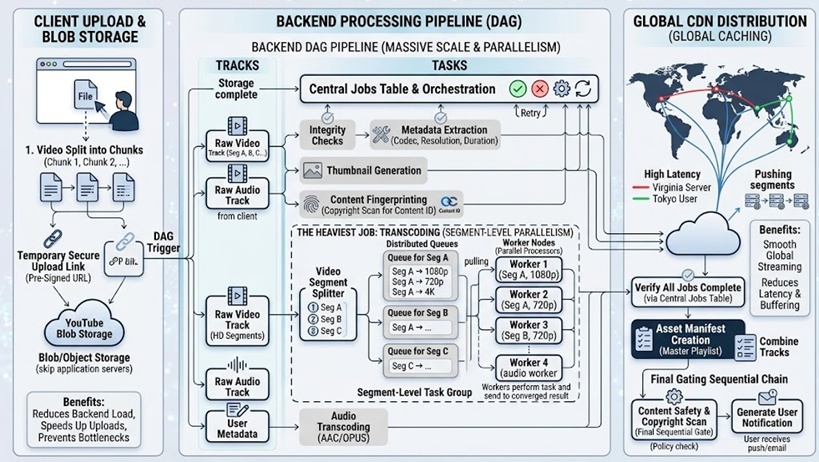
An Extended Directed Acyclic Graph (DAG) Pipeline for YouTube Video Ingestion.
Step 1: The Video Is Split Into Chunks
Imagine uploading a 10 GB video.
If the internet disconnects at 99%…
Would you really want to restart the entire upload?
Of course not.
So instead of uploading one huge file, the client first splits the video into smaller chunks.
Each chunk is uploaded independently.
This is why uploads can resume if your connection drops midway.
Only the failed chunk retries — not the entire file.
Step 2: Upload Goes Directly to Blob Storage
Interestingly, your video usually does not pass through YouTube’s application servers directly.
Instead, the client receives something called a:
Pre-Signed URL
This is a temporary secure upload link that allows the client to upload directly into blob/object storage.
Benefits:
- Reduces backend load
- Improves scalability
- Speeds up uploads
- Prevents application servers from becoming bottlenecks
This is a common large-scale architecture pattern.
Step 3: The Processing Pipeline Fans Out Into a DAG
Once upload completes, YouTube starts a massive backend processing pipeline.
This pipeline behaves like a:
DAG (Directed Acyclic Graph)
Meaning:
Multiple processing jobs run independently and in parallel.
Instead of one giant sequential workflow, the system fans out into multiple branches.
This massively improves throughput.
The Heaviest Job: Video Transcoding
The most expensive part is transcoding.
Your original video cannot simply be streamed directly to every device.
Different users need:
- Different resolutions
- Different formats
- Different bitrates
- Different network optimizations
So YouTube converts your video into many versions:
- 360p
- 480p
- 720p
- 1080p
- 4K
And more.
Step 4: The Video Is Split Again Into Segments
Before transcoding, the video is broken into smaller segments.
Why?
Because segments can be processed independently.
This allows massive parallelism.
Instead of one worker processing the whole video:
- Worker 1 handles Segment A
- Worker 2 handles Segment B
- Worker 3 handles Segment C
At multiple resolutions simultaneously.
Step 5: Jobs Are Queued for Parallel Processing
Each segment + resolution combination becomes a separate job.
Example:
Segment 1 → 360p
Segment 1 → 720p
Segment 1 → 1080p
Segment 2 → 360p
Segment 2 → 720p
...
These jobs are pushed into distributed queues.
Workers pull jobs from the queue and process them in parallel.
This is how YouTube scales to millions of uploads daily.
Meanwhile, Other Backend Jobs Run Simultaneously
While transcoding happens, other branches in the DAG are also working.
Integrity Checks
Ensures the upload is complete and uncorrupted.
Metadata Extraction
Extracts information like:
- Duration
- Codec
- Resolution
- Audio properties
Thumbnail Generation
The system automatically captures frames from the video to create thumbnails if not provided.
Content Fingerprinting
This is critical.
YouTube generates fingerprints to detect copyrighted material.
This powers systems like Content ID.
Step 6: A Central Jobs Table Tracks Everything
With so many parallel tasks running, YouTube needs orchestration.
A central jobs tracking system monitors:
- Which tasks completed
- Which failed
- Which are retrying
- Overall pipeline status
Only when all required branches succeed does the video become publicly available.
Step 7: The Video Is Distributed Globally Through CDNs
Once processing finishes, the final video segments are pushed to:
CDN edge servers worldwide
Why?
Because users should stream content from nearby locations.
A user in Tokyo should not fetch video bytes from a server in Virginia.
That would create:
- High latency
- Buffering
- Poor streaming quality
Instead, CDN edge nodes cache video close to viewers.
This enables smooth global streaming.
Why YouTube’s Architecture Is So Powerful
Notice what YouTube avoids:
- Monolithic processing
- Single-threaded workflows
- Central bottlenecks
Instead, it uses:
- Chunked uploads
- Distributed queues
- Parallel transcoding
- DAG-based orchestration
- Global CDNs
Every design decision optimizes for:
- Scalability
- Reliability
- Performance
- Fault tolerance
The Hidden Engineering Lesson
Uploading a video isn’t just a file transfer problem.
It’s a distributed systems problem.
At YouTube scale, even tiny inefficiencies become catastrophic.
That’s why systems are designed around:
- Parallelism
- Retryability
- Decoupling
- Geographic distribution
The user sees:
“Uploading…”
But behind the scenes, thousands of distributed systems operations are happening simultaneously.
Final Thoughts
The next time you upload a video to YouTube, remember:
Your file is being:
- Split into chunks
- Distributed globally
- Processed in parallel
- Transcoded into multiple formats
- Scanned for copyright
- Replicated across CDNs worldwide
All before someone clicks play.
And all of it happens within minutes.
That’s the kind of engineering required to stream the internet at planetary scale.
메타데이터
- post_id
- ddd952d3de50
- slug
- what-actually-happens-after-you-upload-a-video-to-youtube-ddd952d3de50
- url
- https://medium.com/@imkss/what-actually-happens-after-you-upload-a-video-to-youtube-ddd952d3de50
- canonical_url
- https://medium.com/@imkss/what-actually-happens-after-you-upload-a-video-to-youtube-ddd952d3de50
- author_url
- https://medium.com/@imkss
- status
- ok
- fetched_at
- 2026-06-10 08:17:25





