Reflow and Repaint
When an application is served to the browser, the browser generates tokens such as start tags, end tags, text nodes and comments from the…
Reflow and Repaint
When an application is served to the browser, the browser generates tokens such as start tags, end tags, text nodes and comments from the parsed HTML. From these tokens, the DOM tree is created. On a similar note, a CSSOM tree is created for the styles. Then the DOM and CSSOM trees are combined to create the RenderTree. Tags like <meta>, <script> and those which have display : none are excluded when RenderTree is created as they do not have any effect on the visual output of the page. Once the Render Tree is created, browser performs the layout phase (also called Reflow) where it computes the layout and position of all the elements in the page. Post this, the browser performs painting (or repaint) where pixels are drawn on the screen based on computed layout. Subsequent visual updates that do not affect the layout may re-trigger a repaint. Certain modern browsers also have another step called compositing where different layers are combined and rendered efficiently by GPUs.
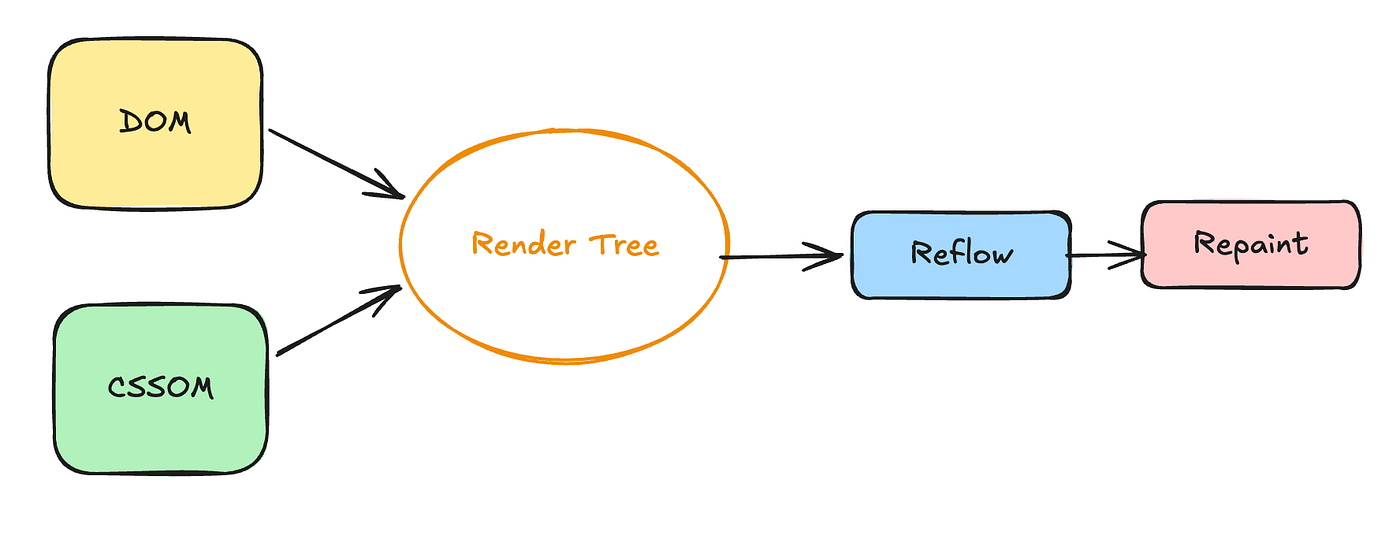
- Frequent reflows (layouts) and repaints can hurt performance, especially in large or complex DOMs.
- A common optimisation is to batch DOM reads together and DOM writes together.
Alternating reads and writes can force the browser to recalculate layout multiple times, a phenomenon often called layout thrashing or forced synchronous reflow. (Write invalidates the current layout, read causes reflow, write again invalidates it again). Properties such as clientHeight, offsetHeight, and getBoundingClientRect() require layout information. If a DOM write is performed and then a layout-related property is read, the browser may be forced to recalculate the layout immediately.
// Bad

heightTest1 = document.getElementById("test1").clientHeight;
document.getElementById("test1").style.height = heightTest1 + 10;

heightTest2 = document.getElementById("test2").clientHeight;
document.getElementById("test2").style.height = heightTest2 + 10;

// Good

// Read phase
heightTest1 = document.getElementById("test1").clientHeight;
heightTest2 = document.getElementById("test2").clientHeight;

// Write phase
document.getElementById("test1").style.height = heightTest1 + 10;
document.getElementById("test2").style.height = heightTest2 + 10;
Note: Reflows are generally more expensive than repaints because a reflow requires the browser to recalculate the layout and geometry of affected elements. In many cases, a reflow is followed by a repaint, making it a costlier operation overall.
메타데이터
- post_id
- de3082c3e37a
- slug
- reflow-and-repaint-de3082c3e37a
- url
- https://medium.com/@siddharthsharmajp/reflow-and-repaint-de3082c3e37a
- canonical_url
- https://medium.com/@siddharthsharmajp/reflow-and-repaint-de3082c3e37a
- author_url
- https://medium.com/@siddharthsharmajp
- status
- ok
- fetched_at
- 2026-06-22 12:55:45




