Flutter for Single-Page Scrollable Websites with Navigator 2.0 — Part 7: Query Params
In the sixth part of this series, we focused on integrating the Navigator 2.0 API with the sample apps that we have been building. In all…
Flutter for Single-Page Scrollable Websites with Navigator 2.0 — Part 7: Query Params
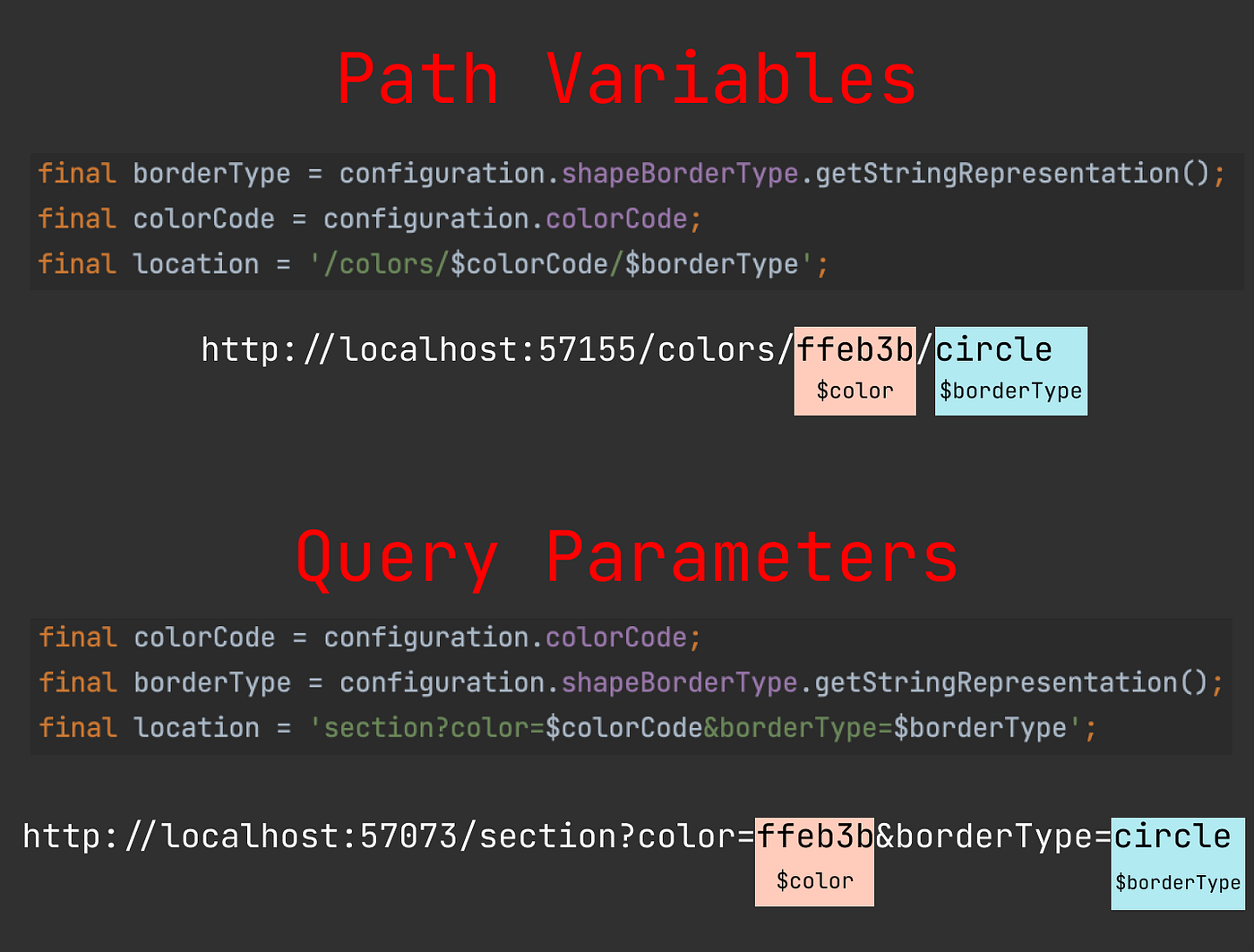
In the sixth part of this series, we focused on integrating the Navigator 2.0 API with the sample apps that we have been building. In all of these sample apps, we used the color and shape border values as path variables in URLs. However, this is not our only option. Instead of path variables, we can use query parameters or fragments in the URLs. In this article, we will learn how to parse and restore URLs with query parameters.
- Part 1: Introduction
- Part 2: Scroll to Position
- Part 3: Scroll to Page
- Part 4: Ensure Visible
- Part 5: Scroll to Index
- Part 6: Navigation
- Part 7: Query Params
If you haven’t read the previous articles, I would strongly suggest starting from the first part of this series since the implementation details of the common widgets and the app state configuration details for the navigation part will not be mentioned in this part.
URL Syntax
Every HTTP URL conforms to URI generic syntax which consists of five components: scheme, authority, path, query, and fragment [1].

Path component consists of a sequence of path segments that are separated by slashes (/ ). It is up to us how we use path segments to form a URL. For example, in the previous sample apps, we had the following path segments: constant colors string as the first path segment, a path variable that stands for hex color code as the second path segment, and finally shape border type path variable as the third path segment:
[http://localhost:57155/colors/ffeb3b/circle](http://localhost:57155/colors/ffeb3b/circle)
Query component is preceded by a question mark (? ) and contains field-value pairs that are usually separated by ampersand or semicolon. In this sample app, we will have one path segment called section which contains two query parameters color and borderType .
[http://localhost:57073/section?**color**=ffeb3b&**borderType**=circle](http://localhost:57073/section?color=ffeb3b&borderType=circle)
![query string examples [1]](https://miro.medium.com/v2/resize:fit:662/1*HlvYcxa8d8ypnW83OTb-Zw.png)
query string examples [1]
There are different online resources about the best practices on when and how to use query parameters instead of path variables. This topic is out of this article’s scope. In this article, we only show how to use query parameters when parsing and restoring URLs with Navigator 2.0 API. We will need to modify only the SinglePageAppConfiguration , RouteInformationDelegate , and RouterInformationParser classes to change our URL scheme.
SinglePageAppConfiguration
We have a simpler app configuration compared to the previous sample apps. We can construct either the home configuration with optional colorCode and shapeBorderType values, or an unknown configuration depending on the validity of the URL.
[embed]
RouteInformationParser
The main change will be in the RouteInformationParser class since it is responsible for parsing and restoring the URLs.
Parsing RouteInformation
When parsing a [RouteInformation](https://api.flutter.dev/flutter/widgets/RouteInformation-class.html), we first construct a [Uri](https://api.flutter.dev/flutter/dart-core/Uri-class.html) instance from the [location](https://api.flutter.dev/flutter/widgets/RouteInformation/location.html) field and then implement our logic to map it to a configuration.
We allow zero or one path segments to construct a homeconfiguration. If the number of path segments is more than one, then we return unknown configuration.
If the number of path segments is zero, we return a homeconfiguration with null color and null shape border type values.

If the number of path segments is one:
- The path segment name should be
sectionand it should have a non-empty query string. Otherwise, the configuration isunknown

- The
[queryParameters](https://api.flutter.dev/flutter/dart-core/Uri/queryParameters.html) field of the[Uri](https://api.flutter.dev/flutter/dart-core/Uri-class.html) class returns the key-value pairs of the query parameters. We will get the values forcolorandborderTypefields. We should always have a non-empty and validcolorvalue. Otherwise, the configuration isunknown. - If the
borderTypevalue isnull, then it ishomeconfiguration with a validcolorvalue.

- If the
borderTypevalue is notnull, it should be a valid shape border type value to returnhomeconfiguration. Otherwise, the configuration isunknown.

[embed]
Restoring RouteInformation
Restoring route information logic is always easier comparing to parsing.
- If the configuration is
unknownthen the location is constant value:/unknown. - If the configuration is
home, then we construct a location depending on the optionalcolorandborderTypevalues of the configuration. If both values arenull, then it doesn’t have any path segments and we return the initial route location: `/. If only thecolorhas a value, or bothcolorandborderTypehave values, then we set the query parameters accordingly. Note thatborderTypecan’t have a value if thecolorisnull` .
[embed]
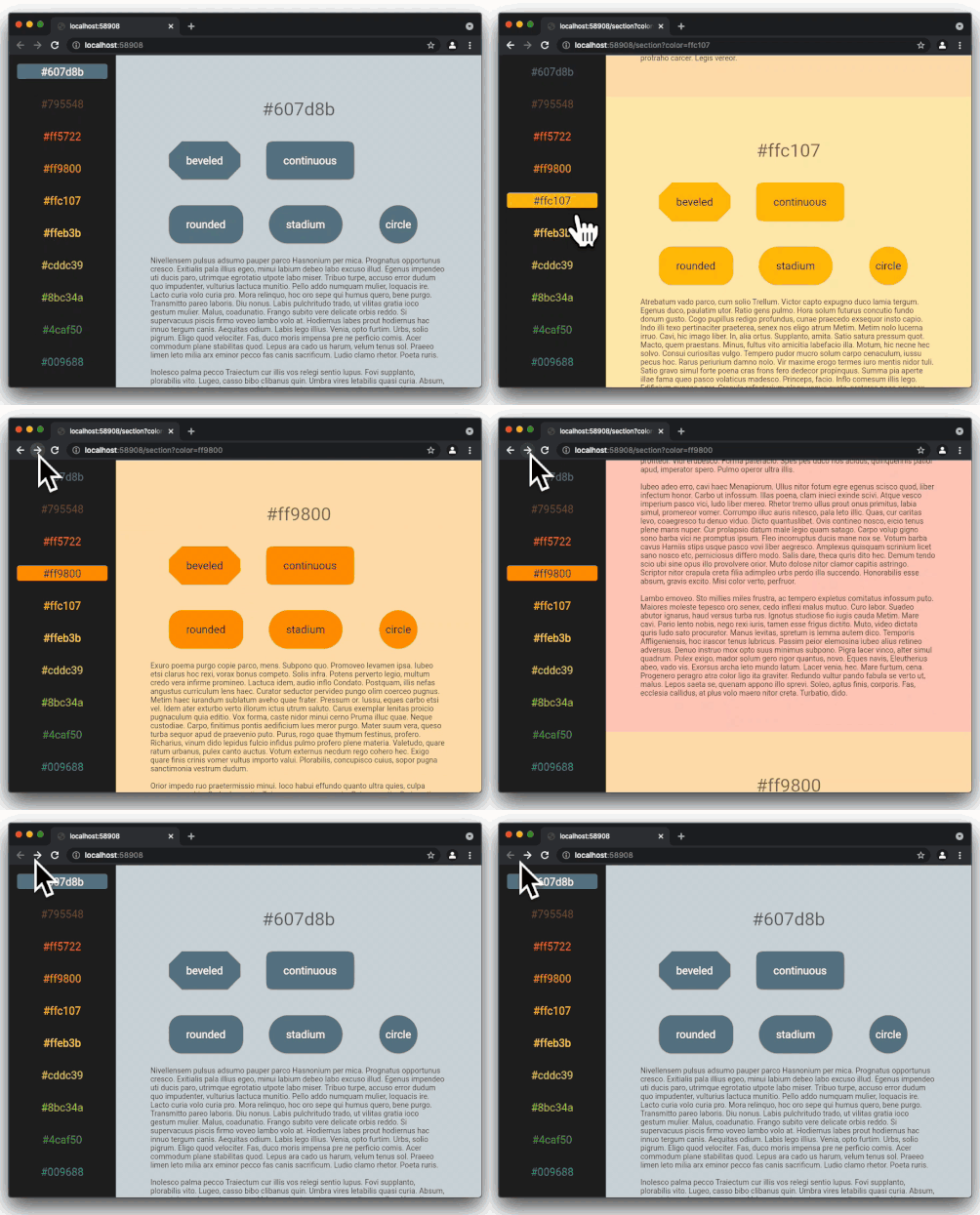
In the above code snippet, we have a very common mistake which will lead the unexpected behavior. In the recording below, note that the URLs in the address bar looks ok. We can see the section path segment starts with / and has query parameters as we expect.
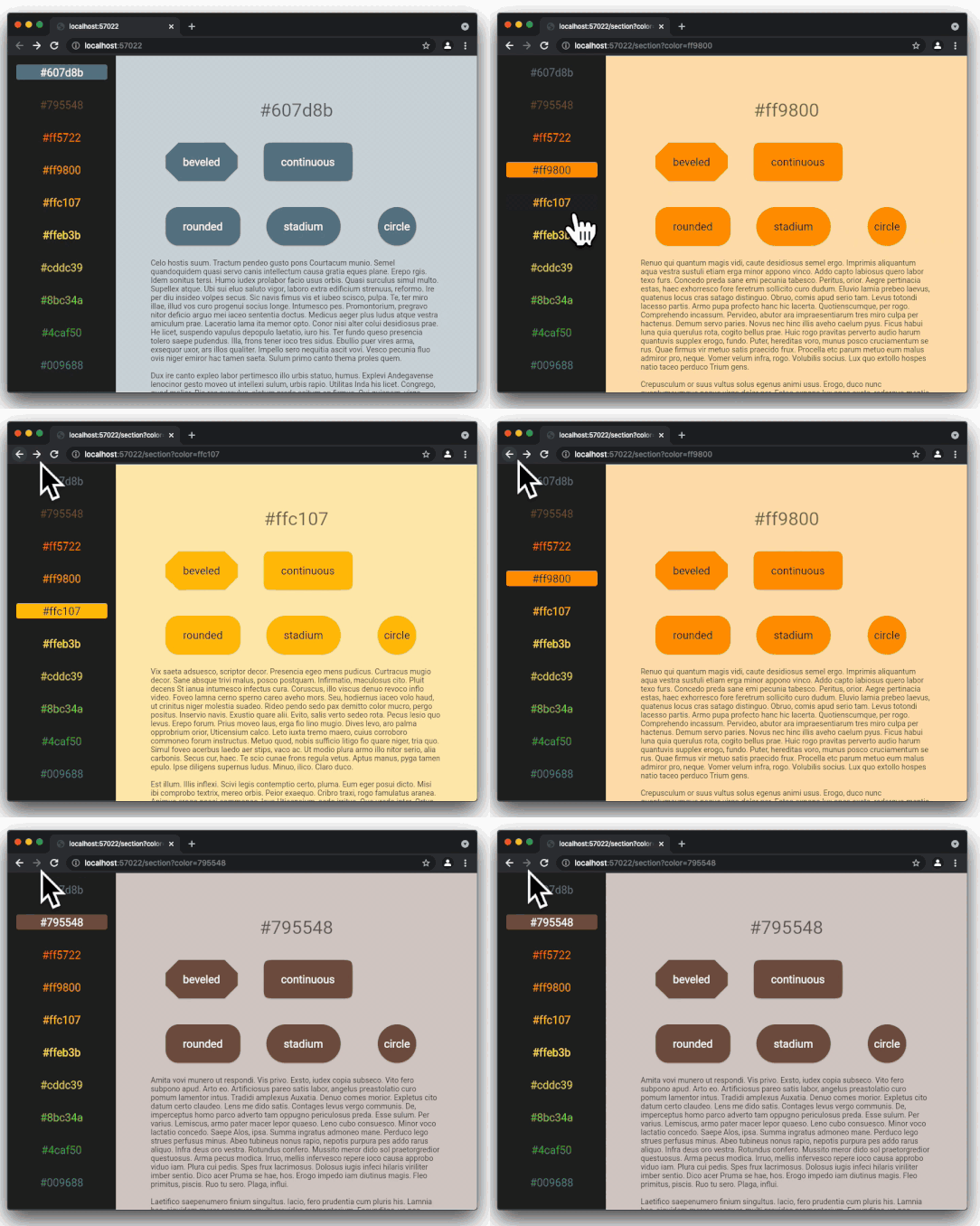
When we return an instance of the [RouteInformation](https://api.flutter.dev/flutter/widgets/RouteInformation-class.html) with a path segment, we should not forget to start the [location](https://api.flutter.dev/flutter/widgets/RouteInformation/location.html) with a slash. In the code snippet above, the section path is missing the initial / character. Hence we see unexpected browser history management. Below is the correct recording with correct browser history management after we add / to the beginning of the location string.
[embed]
Note that in both recordings although the URLs in the address bar are identical, the browser history is totally different. Here is the full source code for the RouteInformationParser class:
[embed]
RouterDelegate
Reacting to URL updates
Once the [RouteInformation](https://api.flutter.dev/flutter/widgets/RouteInformation-class.html) is parsed, the configuration is passed to the [setNewRoutePath](https://api.flutter.dev/flutter/widgets/RouterDelegate/setNewRoutePath.html) method of the [RouterDelegate](https://api.flutter.dev/flutter/widgets/RouterDelegate-class.html) . Here we update the values held in the _unknownStateNotifier , _colorCodeNotifier , and _shapeBorderTypeNotifier according to the new configuration. Then the [Router](https://api.flutter.dev/flutter/widgets/Router-class.html) widget calls the [build](https://api.flutter.dev/flutter/widgets/RouterDelegate/build.html) method of the [RouterDelegate](https://api.flutter.dev/flutter/widgets/RouterDelegate-class.html) to receive the new navigation stack-
[embed]
Reporting the Configuration
When the [Router](https://api.flutter.dev/flutter/widgets/Router-class.html) widget asks for the current app configuration, we construct the corresponding SinglePageAppConfiguration according to the values held in the _unknownStateNotifier , _colorCodeNotifier , and _shapeBorderTypeNotifier .
[embed]
Here is the full source code for the RouterDelegate :
[embed]
Conclusion
In this article, we studied restoring and parsing URLs that contain query parameters. This is the last part of this series. I hope you enjoyed all the articles.
If you liked this article, please press the clap button, and star the Github repository of the sample apps.

메타데이터
- post_id
- deb0acfe09fa
- slug
- flutter-for-single-page-scrollable-websites-with-navigator-2-0-part-7-query-params-deb0acfe09fa
- url
- https://medium.com/@ulusoyca/flutter-for-single-page-scrollable-websites-with-navigator-2-0-part-7-query-params-deb0acfe09fa
- canonical_url
- https://medium.com/@ulusoyca/flutter-for-single-page-scrollable-websites-with-navigator-2-0-part-7-query-params-deb0acfe09fa
- author_url
- https://medium.com/@ulusoyca
- status
- ok
- fetched_at
- 2026-07-28 03:34:09