What is Angular Two-Way Data Binding and How It Works (Angular 18+)
Understanding the Power of Two-Way Data Binding with the Latest Standalone Features of Angular
What is Angular Two-Way Data Binding and How It Works (Angular 18+)
Understanding the Power of Two-Way Data Binding with the Latest Standalone Features of Angular
What is Angular Two-Way Data Binding and How It Works (Angular 18+)
Angular, a powerful and dynamic front-end framework, has undergone several changes over the years, continuously refining its core functionalities. One of the essential concepts in Angular is two-way data binding, allowing seamless interaction between the view and the component logic. With the latest versions of Angular (18 and beyond), many changes have simplified and modernized the process, removing the traditional app.module.ts and embracing standalone components. This article dives deep into two-way data binding, focusing exclusively on these new features, making it highly relevant for both beginners and advanced developers.
What is Two-Way Data Binding?
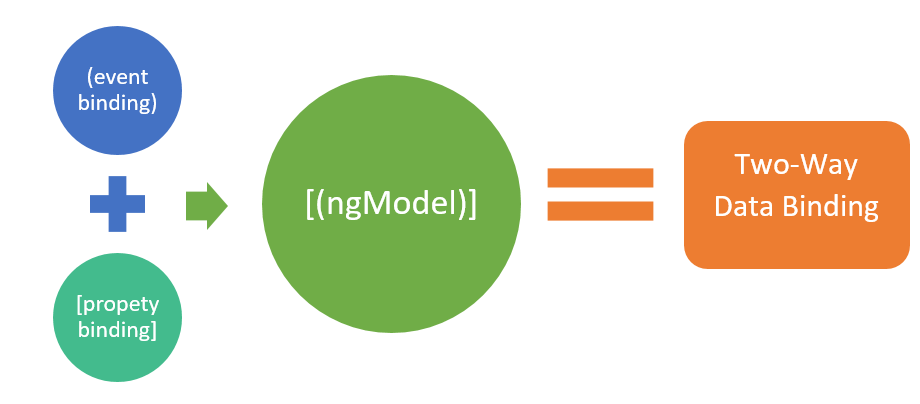
Two-way data binding in Angular allows for automatic synchronization of data between the UI elements and the component class. When the user modifies a form input, the component’s data model is automatically updated, and vice versa. This makes building dynamic and interactive applications simpler and more intuitive.
Unlike one-way data binding, which either binds data from the view to the model or from the model to the view, two-way binding allows data to flow in both directions simultaneously. This feature is particularly useful for form inputs, user interactions, and ensuring that the UI reflects the most up-to-date state of the model.
In Angular 18+, two-way data binding is easier and more streamlined due to standalone components, making the development process faster and reducing boilerplate code.
How Does Two-Way Data Binding Work in Angular 18+?
Angular uses the ngModel directive for two-way data binding. This directive allows you to bind a form input to a variable in your component class. With the standalone architecture of Angular 18+, you no longer need to declare modules in your app.module.ts. Everything can be achieved using standalone components, resulting in a more modular and flexible codebase.
Here’s how two-way data binding works in Angular 18+:
Step-by-Step Implementation with Standalone Components
- Create a Standalone Component
First, you’ll create a component without using a module. Angular 18+ embraces the standalone component architecture, which eliminates the need for
NgModules. The@Componentdecorator has evolved to includestandalone: true.
import { Component } from '@angular/core';
import { FormsModule } from '@angular/forms';

@Component({
  selector: 'app-user-form',
  standalone: true,
  imports: [FormsModule],
  template: `
    <div>
      <label for="username">Username: </label>
      <input [(ngModel)]="username" id="username" />
      <p>Your username is: {{ username }}</p>
    </div>
  `
})
export class UserFormComponent {
  username: string = '';
}
2. Use ngModel for Two-Way Binding
In this example, the [(ngModel)] directive binds the value of the input field to the username property in the component class. Whenever the user types into the input field, the username variable is updated, and vice versa.
3. Simplified Imports In Angular 18+, the FormsModule is imported directly into the component, thanks to the standalone architecture. No need to declare it in a module — making the code leaner and easier to manage.
Running the Component
Once you’ve created the standalone component, you can run it directly in your application. There’s no need to declare it in any module, simplifying the architecture and reducing the initial setup.
import { bootstrapApplication } from '@angular/platform-browser';
import { UserFormComponent } from './user-form.component';

bootstrapApplication(UserFormComponent);
In this setup, we directly bootstrap the UserFormComponent, showcasing Angular’s new approach of using standalone components.
Why Standalone Components Make Two-Way Binding Better
Standalone components in Angular 18+ offer several benefits for implementing two-way data binding:
- Simplified Architecture
Without the need for
NgModules, developers can work directly with components, reducing boilerplate and making the code easier to understand. - Improved Modularity Standalone components promote a more modular approach to development. Each component can be developed, tested, and maintained independently, improving scalability.
- Optimized Performance By reducing the dependency on modules, standalone components allow Angular to optimize bundle sizes more efficiently, improving the overall performance of applications.
Real-World Use Cases for Two-Way Data Binding
- Forms and User Inputs Two-way binding is perfect for forms where you need to track user input in real-time. For example, in login or registration forms, updating both the UI and the underlying data model is crucial for ensuring data consistency.
- Dynamic Data Interactions In scenarios where you have a live preview of user-generated content, such as a text editor or comment box, two-way binding ensures that changes in the input are immediately reflected in the output without extra handling.
- Interactive Dashboards Dashboards often require real-time updates, and two-way data binding helps in reflecting user interactions immediately, making the interface responsive and user-friendly.
Best Practices for Two-Way Data Binding in Angular 18+
- Use Standalone Components Always prefer standalone components in Angular 18+ for modular and maintainable code.
- Keep Forms Simple Two-way data binding is great for forms, but don’t overuse it. In complex scenarios, consider separating the data flow for better performance and maintainability.
- Testing is Key Always test the functionality of two-way binding, especially in complex forms, to ensure that data is correctly synchronized between the model and view.
- Performance Considerations Although two-way binding is convenient, it comes with some performance overhead. For large-scale applications, use it judiciously and consider one-way binding where appropriate.
Conclusion
Two-way data binding in Angular 18+ is more efficient, modular, and easier to implement thanks to the introduction of standalone components. By following best practices and leveraging the latest features, developers can create dynamic and interactive applications without the complexity of managing modules.
Whether you’re a beginner or an experienced developer, understanding and mastering two-way data binding is essential for building responsive and user-friendly Angular applications. With the new architecture and streamlined approach, Angular 18+ makes it easier than ever to create powerful, real-time applications.
In Plain English 🚀
Thank you for being a part of the **In Plain English** community! Before you go:
- Be sure to clap and follow the writer ️👏️️
- Follow us: **X | [LinkedIn](https://www.linkedin.com/company/inplainenglish/) | [YouTube](https://www.youtube.com/channel/UCtipWUghju290NWcn8jhyAw) | [Discord](https://discord.gg/in-plain-english-709094664682340443) | [Newsletter](https://newsletter.plainenglish.io/)**
- Visit our other platforms: **CoFeed | [Differ](https://differ.blog/)**
- More content at **PlainEnglish.io**
메타데이터
- post_id
- defc59eebcc6
- slug
- what-is-angular-two-way-data-binding-and-how-it-works-angular-18-defc59eebcc6
- url
- https://javascript.plainenglish.io/what-is-angular-two-way-data-binding-and-how-it-works-angular-18-defc59eebcc6
- canonical_url
- https://javascript.plainenglish.io/what-is-angular-two-way-data-binding-and-how-it-works-angular-18-defc59eebcc6
- author_url
- https://medium.com/@solomongetachew112
- status
- ok
- fetched_at
- 2026-07-13 06:23:13