How to Integrate AI into Your Existing Web Application
Most AI integration guides assume you are building a new application from scratch. The more challenging — and far more common — scenario is…

How to Integrate AI into Your Existing Web Application
Most AI integration guides assume you are building a new application from scratch. The more challenging — and far more common — scenario is retrofitting AI capabilities into a system that already exists, has users, and cannot afford significant downtime or breaking changes.
Here is a practical, step-by-step approach to integrating AI into your existing web application without starting over.
- Audit Your Current Architecture
Before adding any AI layer, map your existing data flows, APIs, and user touchpoints. AI works best when it enhances a well-understood system. Identify the three to five highest-value use cases where AI could reduce friction or increase output quality.
- Choose the Right Integration Pattern
There are three main patterns: API-first (calling a third-party LLM like OpenAI or Anthropic from your backend), embedded models (running smaller models locally or in your cloud), and hybrid (combining both for latency and cost optimization). Most mature web apps benefit from the API-first approach initially.
- Design for Graceful Degradation
AI calls can fail, time out, or return unexpected results. Build fallback logic so your application remains functional even when the AI layer is unavailable. Never make the AI response a hard dependency for core user flows.
- Monitor and Iterate
AI quality is not static. Log model inputs and outputs, track user satisfaction signals, and build a feedback loop that lets you improve prompts or swap models without redeploying your entire application.
For a deeper dive into practical AI integration strategies, read the full post on Lycore: https://www.lycore.com/how-to-integrate-ai-into-existing-web-application/
The AI Service Layer Pattern: Clean Architecture for Existing Apps
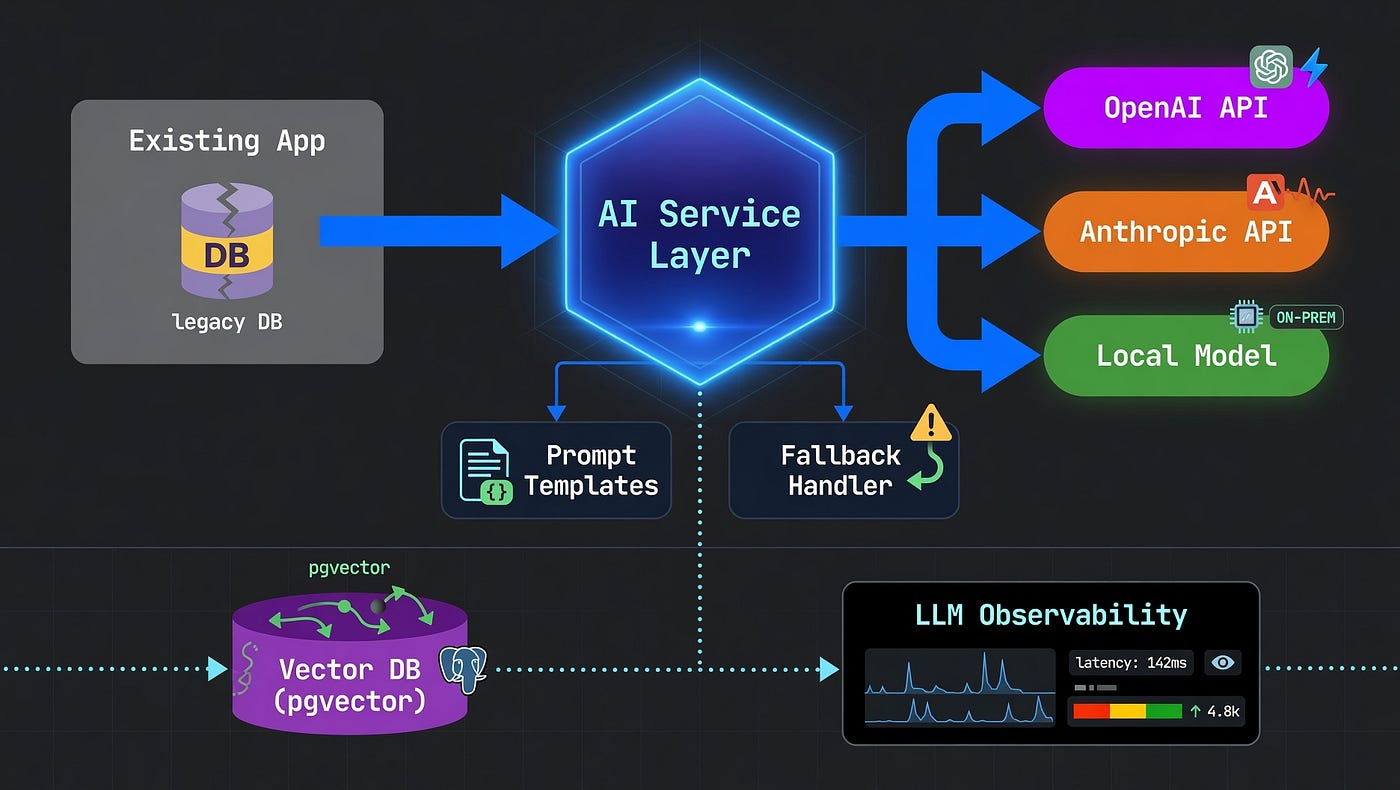
For most web applications, the cleanest way to integrate AI into an existing system is via an AI service layer. This is a set of internal service classes or modules that encapsulate the AI provider API calls, prompt management, response parsing, and error handling, and expose a clean interface to the rest of the application. Your existing Django views, Flask routes, or Express controllers call the AI service layer rather than calling OpenAI, Anthropic, or Google APIs directly.
This separation has several important benefits: the AI provider implementation is swappable without changing application code; prompt engineering is centralised rather than scattered across the codebase; API key management is in one place; and rate limiting, retry logic, and error handling are implemented once and applied consistently. The AI service layer pattern is the equivalent of the repository pattern for databases — it isolates the external dependency behind a clean interface that the application depends on, insulating your business logic from provider-specific details.
Retrieval-Augmented Generation: Grounding AI in Your Data
The most widely applicable pattern for integrating AI into existing web applications with substantial content or data is Retrieval-Augmented Generation, or RAG. RAG allows a large language model to answer questions and generate content grounded in your specific data, rather than relying on its training data alone.
A RAG pipeline has three components. First, an ingestion pipeline that extracts text from your existing content — database records, documents, knowledge base articles — chunks it into segments, generates embedding vectors for each chunk, and stores them in a vector database. Second, a retrieval component that embeds the user’s query, searches the vector database for semantically similar chunks, and returns the most relevant context. Third, a generation component that calls an LLM with the user’s question and the retrieved context, producing an answer grounded in your data.
For Django applications, the ingestion pipeline is typically a management command or Celery task that processes new and updated content on a schedule. pgvector, a PostgreSQL extension, is the simplest vector database option if you are already running PostgreSQL — it avoids introducing a new database service and fits cleanly into your existing operations. For larger content sets of 100,000 or more documents, dedicated vector databases like Qdrant or Weaviate provide better query performance.
Background Processing for Slow AI Operations
LLM API calls typically take one to ten seconds depending on the model and output length — too slow for synchronous request handling in most web applications where users expect responses in under 500 milliseconds. Using background task processing such as Celery for Django or Flask, or BullMQ for Node.js, is essential for AI operations that do not need to complete before the HTTP response is returned.
A document summarisation feature, for example, accepts the document, creates a SummaryRequest record in the database with status pending, returns a 202 Accepted response immediately, and processes the AI summarisation in a background task that updates the SummaryRequest record with the result. The frontend polls or subscribes via WebSocket to receive the result when ready. This async pattern is appropriate for any AI operation over one to two seconds and essential for operations over five seconds.
Managing AI API Costs in Production
LLM API cost management requires monitoring, optimisation, and budgeting from the start of production deployment. Track token usage per feature, per user, and per day using LLM observability logging — this data is essential for understanding which features drive cost and projecting future spend.
The primary cost optimisation levers are: model selection (using the smallest capable model for each task — Claude Haiku or GPT-4o-mini for classification and extraction, Sonnet or GPT-4o for complex reasoning); prompt optimisation (shorter system prompts with the same quality reduce input token cost); caching (returning cached responses for repeated queries eliminates API calls entirely); and batching (processing multiple items in a single API call where the model supports it). Set budget alerts on your LLM provider account and implement application-level rate limiting per user to prevent individual users from generating disproportionate API cost.
Handling AI API Rate Limits and Availability
LLM API rate limits and occasional availability issues require explicit handling in production applications. Implement exponential backoff retry logic for rate limit errors (HTTP 429) — most LLM providers allow requests to be retried after a short delay. For production applications with SLA requirements, implement a fallback provider: if the primary LLM API returns an error after retries, fall back to a secondary provider to maintain availability.
Cache LLM responses for identical or near-identical prompts using Redis with a TTL appropriate to how frequently the underlying content changes — this reduces API cost and latency for common queries without compromising freshness. Set explicit timeouts on all LLM API calls and handle timeout exceptions gracefully. Returning a degraded but functional response — showing existing keyword search results instead of semantic search results, for example — is better than surfacing a timeout error to the user.
Building an Evaluation Pipeline for AI Quality
AI features require different monitoring approaches from standard application features. They can fail silently — producing responses that are technically valid but factually incorrect or unhelpful — in ways that standard error rate monitoring does not detect.
Log every AI API call with the prompt (or a hash of it for privacy), the response, the model used, latency, token counts, and a session or request ID that links to the user’s action that triggered it. Tools like LangSmith, Langfuse, and Helicone provide structured LLM observability without requiring you to build logging infrastructure from scratch. Implement a feedback mechanism on AI-generated content — a thumbs up/down or ‘was this helpful?’ prompt — to collect human evaluations that can be used to assess quality over time and identify systematic failure cases.
Conclusion
Integrating AI into an existing web application is most successful when it follows the same discipline as any other feature development: identifying high-value problems, assessing data readiness, choosing the right integration architecture, building incrementally, and measuring outcomes against business metrics. The AI service layer pattern, background processing for slow operations, RAG for grounding responses in your data, and structured LLM observability are the building blocks that apply across most AI integration projects.
Read the complete guide to integrating AI into existing web applications on Lycore
메타데이터
- post_id
- df4907f4fe4b
- slug
- how-to-integrate-ai-into-your-existing-web-application-df4907f4fe4b
- url
- https://medium.com/@lycore/how-to-integrate-ai-into-your-existing-web-application-df4907f4fe4b
- canonical_url
- https://medium.com/@lycore/how-to-integrate-ai-into-your-existing-web-application-df4907f4fe4b
- author_url
- https://medium.com/@lycore
- status
- ok
- fetched_at
- 2026-06-22 12:55:45





