Claude Code : What is Claude Code?
In the rapidly evolving landscape of AI-powered developer tools, Claude Code has emerged as a groundbreaking terminal-based assistant that…
Claude Code : What is Claude Code?
In the rapidly evolving landscape of AI-powered developer tools, Claude Code has emerged as a groundbreaking terminal-based assistant that transforms how software engineers write, maintain, and understand code. Developed by Anthropic and currently available as a beta research preview as of March 25, 2025, Claude Code extends the capabilities of the Claude AI assistant into the realm of software development, offering an intelligent companion that can handle everything from generating new code to debugging complex issues across an entire codebase.
Photo by Steve Johnson on Unsplash
Claude Code is an AI-driven coding assistant developed by Anthropic that runs directly in your terminal. It functions as a command-line tool (CLI) that allows developers to delegate substantial engineering tasks to AI through natural language interactions. Unlike traditional coding assistants that merely suggest code snippets, Claude Code can actively manipulate files, run commands, analyze entire codebases, and manage coding workflows under your guidance.
At its core, Claude Code is powered by Claude 3.7 Sonnet, Anthropic’s advanced AI model known for its reasoning capabilities and extensive context window. This foundation enables Claude Code to understand programming concepts deeply, reason about complex codebases, and generate syntactically correct, context-aware code across dozens of programming languages.
Released in early 2025 as a research preview (beta), Claude Code represents a significant advancement in what AI assistants can accomplish in software development. It’s designed to serve as an AI pair programmer or “agentic” development tool that can take on substantial portions of the development workflow while keeping humans in the loop for oversight and decision-making.
What Makes Claude Code Different?
Claude Code represents a significant advancement in AI-powered development tools, positioning itself as an agentic coding tool that can truly understand your code. Whether you need to edit files, fix bugs, understand code architecture, execute tests, or manage git operations, Claude Code enables you to communicate these intentions in plain English, eliminating the need for specialized syntax or memorizing complex commands.
What sets Claude Code apart from existing tools is its deep contextual understanding of your entire project and its ability to take meaningful actions directly in your development environment. It doesn’t just suggest code snippets or provide theoretical answers — it can analyze project structures, edit files across multiple locations, manage git operations, and execute numerous practical tasks that genuinely advance your development work.
The Technical Architecture Behind Claude Code
Terminal-Centric Design Philosophy
Claude Code’s terminal-first approach fundamentally changes how developers interact with AI assistants. Unlike browser-based tools that create context-switching overhead, Claude Code operates within the developer’s natural workflow environment — the terminal — eliminating the need to jump between different interfaces or manually provide files as context.
The architecture employs a sophisticated dual-layer context management system:
- It maintains short-term conversation history in memory
- It stores long-term project context through the CLAUDE.md file and .claude directory
- It interfaces directly with shell environments through Model Context Protocol (MCP) servers
This design enables unique capabilities like real-time file modification and Git operation execution while preserving the terminal’s interactive nature. According to community reports, developers experience 63% faster context acquisition in unfamiliar codebases compared to traditional IDE plugins.
Direct API Connection and Security
Claude Code’s architecture ensures both security and efficiency in its operation:
- Direct API Connection: Queries go straight to Anthropic’s API without intermediate servers, maintaining project context while ensuring your code remains secure. This architecture prioritizes the protection of your codebase’s intellectual property while still providing access to advanced AI reasoning capabilities.
- Terminal Integration: It operates where developers work, taking real actions like editing files and creating commits directly in your environment. This eliminates the need to copy code back and forth between different interfaces.
- Context Awareness: Claude Code maintains awareness of your entire project structure, exploring the codebase as needed without requiring manual file additions to the context. This allows it to understand the relationships between different parts of your code.
- Security Features: It implements a tiered permission system (read-only vs. Bash/file modifications) and safeguards against prompt injection through context analysis and input sanitization. These security measures include input sanitization and command blocklisting to prevent execution of potentially dangerous commands.
The tool uses the claude-3–7-sonnet-20250219 model by default, with options to integrate with third-party APIs like Amazon Bedrock and Google Vertex AI for additional flexibility. Its dynamic thinking budget allows it to adapt based on the prompt and available resources, ensuring efficient processing for tasks of varying complexity.
Key Features of Claude Code
Code Generation and Modification
Claude Code can generate new code based on natural language descriptions or specifications. Whether you need a function to perform a specific task or a boilerplate for a new module, it produces syntactically correct, context-aware code that integrates seamlessly with your existing codebase. It supports multiple programming languages including Python, JavaScript, Java, C#, and many others.
One of Claude Code’s standout capabilities is its ability to modify existing code. You can ask it to refactor functions, implement new features, or fix bugs across multiple files. For example, you might say, “In server.js, change the variable db_host to dbHostname throughout the file,” and Claude will locate and replace all instances, showing you a diff of the changes for approval before applying them.
Code Explanation and Debugging
When faced with unfamiliar code or a complex bug, Claude Code shines as an AI code reviewer and debugger. You can ask it to explain what a snippet of code does, and it will provide a clear, detailed explanation of the code’s logic and structure — invaluable for understanding legacy code or onboarding to a new codebase.
For debugging, you can describe a problem or paste an error message, and Claude Code will analyze your project to locate the likely issue and suggest a fix. It can even run tests, observe the failures, and implement fixes for you after approval. This capability extends to writing unit tests or checking code for logical errors, essentially acting as a knowledgeable pair programmer who can explain code in plain language and patch problems on the fly.
Code Transformation and Optimization
Need to improve code quality or modernize legacy code? Claude Code can perform refactoring and optimization through simple instructions. Ask it to refactor a function for clarity, convert a loop to functional style, or break a large function into smaller ones. It can optimize algorithms for performance, migrate code to use newer APIs, or convert between formats.
The tool’s ability to consider the “big picture” of a project means that the optimizations or changes it suggests are consistent across the codebase. It handles code transformations that span multiple files, making it valuable for maintenance tasks that would otherwise consume significant developer time.
Large Context Understanding
Claude 3.7, the model behind Claude Code, can handle up to approximately 200,000 tokens of context (around 150,000 words) in a single session. This extensive context window allows Claude Code to “load” your entire codebase (or large portions of it) into its working memory, enabling it to reason about code relationships across many files.
In practical terms, this means you can point Claude Code to a project directory, and it will understand the code holistically. You can ask questions like, “Find where this API endpoint is defined and update its logic,” and Claude will search through hundreds of files if necessary to perform the task. This ability to maintain understanding across a large codebase sets Claude Code apart from tools with more limited context windows.
Agentic Actions (Terminal Commands and Tool Use)
Claude Code goes beyond static code generation — it has agentic capabilities that allow it to perform sequences of actions on your behalf. Within the CLI, Claude can execute shell commands, run tests, lint code, and perform version control operations. For example, you might ask it to “Compile the project and run all tests,” and it will invoke the appropriate build command, analyze the test output, and potentially fix failing tests.
It understands common developer tools and can help automate workflows like running linters or formatters, starting development servers, or managing Git operations. Claude Code can check Git history, help resolve merge conflicts, draft commit messages, or create pull requests — all through natural language instructions in the terminal.
Multilingual Programming Language Support
Because Claude is trained on diverse programming data, Claude Code works with dozens of programming languages and frameworks. It recognizes syntax and idioms in languages like Python, JavaScript/TypeScript, Java, C/C++, C#, PHP, Ruby, Go, Rust, Swift, Kotlin, and more, as well as web technologies like HTML/CSS and SQL.
This multilingual capability means diverse development teams can use the same AI assistant across different parts of a tech stack. Whether you’re building a Python backend one day and a React frontend the next, Claude Code can assist with both, dynamically switching between language contexts based on your needs.
Chat-Based Interactive Interface
Claude Code operates through a chat-based interaction paradigm in your terminal. You converse with Claude in a prompt-response format, using natural language to describe what you want to accomplish. Each instruction is treated as a message, and Claude responds with explanations, code output, or actions.
The interface supports special command modes: prefixing input with characters like “!” to enter bash command mode or “/” to use Claude Code commands gives you precise control over how Claude interprets your input. This conversational approach makes complex development tasks approachable through simple English instructions.
Automated Testing and Linting
Claude Code offers robust support for automated testing and linting processes, enhancing code quality without requiring manual intervention. The tool can:
- Execute and help fix failing tests
- Run linting commands to identify style violations and potential errors
- Automatically generate comprehensive test suites from existing code implementations
These automated capabilities significantly reduce the effort required to maintain high-quality, reliable code by catching issues early and ensuring adherence to established coding standards.
Git Integration
Claude Code provides seamless Git integration, allowing developers to interact with their repositories using natural language commands. This integration enables users to:
- Search through project history
- Resolve merge conflicts
- Create commits with descriptive messages
- Generate and review pull requests
This deep integration with Git workflows positions Claude Code as a central tool in the software development process, extending its assistance beyond code creation to encompass version control and collaborative aspects of development.
Extended Thinking for Complex Problems
For more challenging programming tasks requiring deeper analysis, Claude Code offers an extended thinking mode. By explicitly instructing Claude to “think” or “think deeply” about a problem, developers leverage the AI’s advanced reasoning capabilities for planning-intensive tasks.
This feature proves particularly valuable for architectural decisions or edge case analysis. Asking Claude to “think hard about the edge cases in our authentication flow” prompts more comprehensive analysis before providing recommendations. The extent of Claude’s thinking scales with the language used — “think hard” triggers more extended reasoning than simply saying “think.”
Installation and Setup
System Requirements
Claude Code runs on:
- macOS 10.15 or later
- Ubuntu 20.04+/Debian 10+ or other Linux distributions
- Windows via WSL2 (Windows Subsystem for Linux) — it doesn’t run natively on Windows
You’ll need Node.js (preferably v18+) and npm installed as prerequisites.
Hardware requirements:
- Minimum 4GB of RAM
Required Software:
- Node.js version 18 or higher
Recommended (Optional) Software:
- Git version 2.23 or later
- GitHub or GitLab command-line interface for pull request workflows
- ripgrep (rg) for enhanced file searching
Connectivity:
- Active internet connection for authentication and AI processing
- Located in a supported country where Claude Code is available
Checking Your Environment
You can verify your system compatibility using these commands:
Operating System Check:
- macOS: Click the Apple icon, then “About This Mac”
- Ubuntu/Debian: Open terminal and type
lsb_release -a - Windows (WSL): Open WSL terminal and type
lsb_release -a
Node.js Version Check:
- Open terminal and type
node -v - If the number starts with 18 or higher, you’re set
- If not, install or update from https://nodejs.org/
Git Version Check (Optional):
- Open terminal and type
git --version
ripgrep Check (Optional):
- Open terminal and type
rg --version - Install using system package manager if needed (e.g.,
brew install ripgrepon macOS orsudo apt-get install ripgrepon Ubuntu/Debian)
Installation Process
macOS & Linux:
- Install Node.js if you haven’t already (from Node’s website or via package managers).
- (Optional) Configure a local npm directory to avoid permission issues:
npm config set prefix ~/.npm-global
export PATH="$HOME/.npm-global/bin:$PATH" # add this to your shell config- Install Claude Code:
npm install -g @anthropic-ai/claude-code- Verify the installation with:
claude --helpWindows 10/11 (via WSL2):
- Enable WSL2 and install a Linux distro (e.g., Ubuntu) following Microsoft’s documentation or by running
wsl --install. - Launch your Linux shell.
- Install Node.js inside WSL.
- Install Claude Code in the WSL shell:
npm install -g @anthropic-ai/claude-code- Always run Claude from the WSL terminal. If you try to run it from PowerShell/CMD, it won’t work.
For VS Code users, the Remote — WSL extension allows you to work in your WSL environment while editing with VS Code’s interface. This provides an ideal setup where Claude Code can interact with files on the WSL filesystem while you edit in a familiar GUI.
Docker/Dev Container (Alternative):
If you prefer isolation or are on an unsupported OS, you can run Claude Code in a Docker container. Anthropic provides a reference Docker setup, which works well with VS Code’s Remote — Containers extension.
Troubleshooting Installation Issues
Permission Errors: If you encounter permission-related errors, configure npm to use a dedicated folder within your user account. Follow the guide at https://docs.npmjs.com/resolving-eacces-permissions-errors-when-installing-packages-globally.
Windows (WSL) Specific Issues:
OS/Platform Detection Issues: Run npm config set os linux before installation, or try installing with npm install -g @anthropic-ai/claude-code --force --no-os-check
“Node Not Found” Errors: This typically indicates Node.js installations on both Windows and Linux environments in WSL. For best results, install Node.js inside your Linux environment using your distribution’s package manager or Node Version Manager (nvm).
Additional WSL considerations:
- Requires Windows Build 22000+
- PowerShell integration needs explicit enabling via /terminal-setup
- File path translations may cause issues in cross-platform projects
First-Time Authentication
After installation, you’ll need to authenticate Claude Code with your Anthropic account:
- Navigate to your project’s root directory using
cd - Run
claudein your project directory - On first run, a browser will open for authentication
- Sign in to your Anthropic account (you’ll need access to Claude Code beta and active billing)
- Authorize Claude Code to access your Anthropic account
- Return to the terminal where Claude Code should indicate successful login
- Choose a text style that suits your terminal
After authentication, Claude Code will remember your credentials for future sessions. If you encounter any authentication issues, ensure your Anthropic account has Claude Code access and billing enabled, as this is a common source of problems.
For first-time users, the recommended approach is to:
- Start Claude Code with the
claudecommand in your terminal - Try a simple command like “summarize this project” to get familiar with the interface
- Generate a CLAUDE.md project guide with the “/init” command
- Commit the generated guide to your repository to document Claude Code’s capabilities for your team
Performance-Tuned Configuration
For professional deployments, you might consider additional configuration options:
Linux/MacOS Production Setup:
export ANTHROPIC_API_KEY=sk_prod_abc123
curl -sL https://cli.anthropic.com/install.sh | bash -s -- \
  --disable-auto-update \
  --config-path /etc/claude \
  --log-level warn
Advanced users should consider modifying these default settings for optimal performance:
claude config set -g contextWindow 180000  # Maximize token allocation
claude config add allowedTools "Bash(git)*"  # Allow full Git control
claude config set autoUpdaterStatus disabled  # Critical for CI pipelines
Using Claude Code: Core Workflows
Viewing and Navigating Code
To view file content, simply ask Claude to open or show a file:
- “Open the file app.js”
- “Show me src/utils/helpers.py”
Claude will display the file contents or a relevant portion if it’s large.
You can ask questions about specific code:
- “What does the function calculateTotal do in order.js?”
- “Explain how the authentication middleware works”
Claude Code will locate the relevant code and provide explanations in plain English.
For navigating through a codebase, you can search:
- “Find where the AUTH_TOKEN constant is defined”
- “Which files call saveUser()?”
To get a comprehensive overview of a new project, use the /init command, which scans your repository and creates a CLAUDE.md file with an overview of your codebase architecture, key files, and dependencies.
Editing and Refactoring Code
Making code changes through conversation is Claude Code’s core strength:
For simple edits:
- “In server.js, change the variable db_host to dbHostname”
Claude will locate the file, find all occurrences, and replace them after confirmation.
For larger refactors:
- “Refactor the code in client.py to improve readability and organization”
Claude will analyze the file and propose a plan of changes (reordering imports, splitting functions, etc.) for your approval before implementing them.
Multi-file edits are also possible:
- “Update the API endpoint URL in both frontend.js and backend/routes.py to use /v2/api instead of /v1/api”
Claude can modify multiple files in one operation after your approval.
To add new code:
- “Add a new function generateReport(data) to reportUtil.js that returns a summary string”
Claude will write the function and either show it for review first or insert it directly.
For complex changes, you can have a dialogue:
- “I want to refactor module X to reduce duplication. What do you suggest?”
Claude might propose extracting a helper function, which you can approve or modify. This back-and-forth makes large refactors safer and more controlled.
Running and Debugging Tests
Claude Code can run your test suite and help fix issues:
To run tests:
- “Run the unit tests”
Claude will execute the appropriate test command (npm test, pytest, etc.) and show the output.
If tests fail, Claude can help debug:
- “Fix the failing test in test_user.py”
Claude will analyze the error, identify the issue, and propose a fix. After your approval, it will modify the code and re-run the test to verify the fix.
You can iterate through multiple failures:
- “Fix any remaining test failures”
Claude will address them one by one, explaining each issue and solution.
Beyond tests, Claude can run other commands:
- “Build the project”
- “Run the server”
- “Compile the TypeScript”
Claude executes these commands with your permission and can help interpret and fix any errors that occur.
Git Operations
Claude Code understands your Git repository and can automate many version control tasks:
To view changes:
- “Show me the diff of my working changes”
Claude will display the modifications and can explain them if asked.
To commit changes:
- “Commit all changes with message ‘Add user null input handling and tests’”
Claude will stage and commit the changes with your specified message.
For branching and merging:
- “Create a new branch feature/login-ui and commit the changes there”
- “Merge branch X into Y”
Claude can perform these operations and help resolve simple merge conflicts.
For reviewing pull requests:
- “/review PR#123”
Claude will fetch the diff (if configured) and provide a detailed analysis of the changes, highlighting potential issues and suggesting improvements.
Running Shell Commands
Beyond tests and Git, Claude Code can execute arbitrary shell commands:
- “Run make to build the project”
- “List the files in the dist directory”
- “Install lodash package”
Each command requires your approval and is executed with your user permissions. This capability allows Claude to perform a wide range of development tasks directly from the conversation.
Asking for Explanations or Design Help
Claude Code isn’t just for writing and modifying code; it’s also a knowledgeable assistant:
For code explanations:
- “Explain how the authentication middleware works”
Claude will inspect the relevant code and provide a clear explanation.
For optimization questions:
- “Why is the processData() function so slow?”
Claude might identify inefficiencies in the code or suggest adding profiling code to diagnose the issue.
For architectural guidance:
- “How can we improve the security of this app?”
Claude could audit your codebase and highlight potential security improvements.
For documentation:
- “Generate docs for this module”
Claude can write docstrings or README content based on analyzing your code.
Usage: Running Claude Code in Various Modes
Claude Code offers multiple modes of operation, providing flexibility for different workflows and use cases.
Interactive REPL Mode
The primary way to use Claude Code is through its interactive Read-Eval-Print Loop (REPL) interface:
- Navigate to your project directory in the terminal
- Type
claudeand press Enter - You’ll see a prompt similar to
claude > - Enter natural language queries or commands to engage with Claude Code
This interactive mode enables ongoing conversations about your code, making it ideal for exploratory work, learning about unfamiliar codebases, or iterative development tasks.
Example Scenario: You’re examining a function written months ago and need to understand its purpose. Usage: Type claude > Explain what this function does: followed by the function name or code.
One-off Query Mode
For quick questions without initiating a full conversation, use the -p flag:
claude -p "Find all files containing the variable 'userId'."This mode provides immediate answers and then exits, making it perfect for quick lookups or integrating Claude Code into scripts and automation workflows.
File Piping
You can direct file contents to Claude Code for analysis using standard Unix piping:
cat error.log | claude -p "Summarize the key errors in this log file."This approach is particularly useful for analyzing log files, examining specific code files, or seeking insights on configuration files.
Non-Interactive Automation
For incorporating Claude Code into scripts or CI/CD pipelines, the non-interactive mode enables programmatic use:
linter-command | claude -p "Fix the linting errors."This allows Claude Code to become part of your automated workflows, potentially handling routine code maintenance tasks without human intervention.
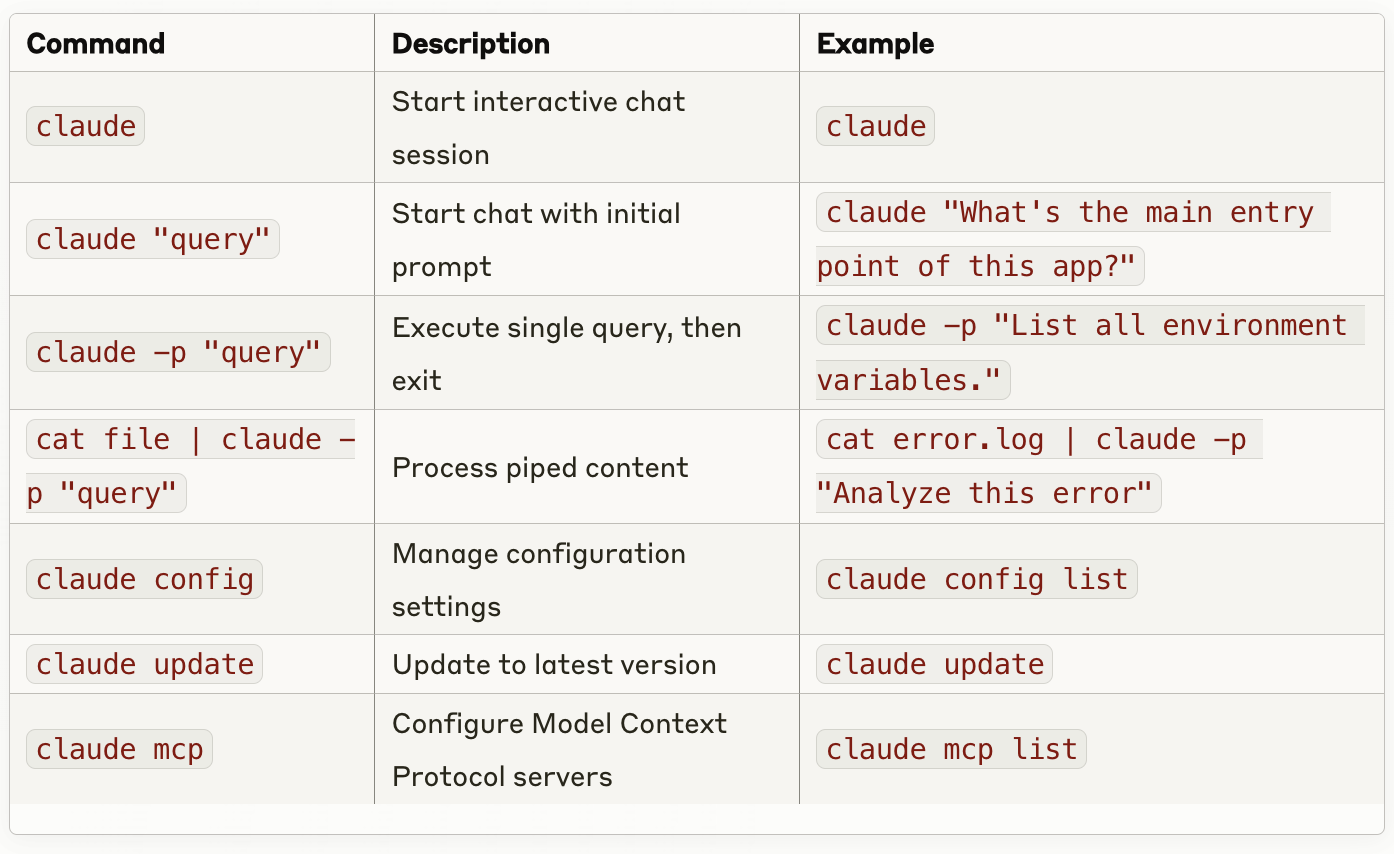
Command Reference
CLI Commands
CLI Flags

Slash Commands
Within an active Claude Code session, slash commands provide convenient shortcuts for common actions:

Keyboard shortcuts include:
- Ctrl+C once to cancel the current operation
- Ctrl+C twice to force-quit
- Enter to approve/confirm
- Arrow keys for navigation
Practical Use Cases
Claude Code demonstrates its value across various development scenarios:
Code Refactoring
Claude Code excels at reorganizing and enhancing existing code. It can:
- Restructure imports for better organization
- Add clarifying section comments
- Simplify complex code segments
- Improve variable naming for clarity
- Consolidate redundant logic
Usage Example: claude > Refactor this code to improve readability and maintainability.
A tutorial from DataCamp highlights Claude Code’s refactoring capabilities with the Supabase Python library. When prompted with “Refactor the code in the client.py file located in the Supabase folder,” Claude Code improved client.py by organizing imports and enhancing readability.
Documentation Generation
Claude Code can automatically generate comprehensive documentation, saving developers from this often tedious task:
- Add meaningful docstrings to functions and classes
- Create module-level documentation
- Insert inline comments explaining complex logic
- Generate section headers for improved navigation
- Document error types and exception handling
Usage Example: claude > Add detailed documentation to this function.
When asked to “Document the client.py code by adding comments to improve understanding,” Claude Code added module-level docstrings and comments, and could verify if the documentation followed project standards.
Bug Fixing
When faced with troublesome bugs, Claude Code can accelerate resolution:
- Analyze error messages and stacktraces
- Identify root causes of issues
- Suggest specific fixes with explanations
- Apply corrections to problematic code
- Verify that fixes resolve the underlying problem
Usage Example: claude > I'm getting this error: [paste error message]. What's going on and how can I fix it?
Claude Code fixed import errors, such as ‘Import gotrue.errors could not be resolved,’ by adding # type: ignore comments when prompted with: “I see some bugs, such as ‘Import gotrue.errors’ could not be resolved. Help me fix all errors in client.py.”
Testing Assistance
Claude Code can dramatically improve testing workflows:
- Generate unit tests for existing functions
- Debug and fix failing tests
- Create comprehensive test suites
- Enhance test coverage
- Implement test fixtures and mocks
Usage Example: claude > Write a unit test for this function. or claude > This test is failing: [paste test code]. How can I fix it?
Git Workflow Optimization
Streamline Git operations through natural language:
- Search commit history for specific changes
- Create meaningful commit messages
- Generate and manage pull requests
- Resolve merge conflicts
- Review code changes
Usage Example: claude > Create a pull request with these changes for the bugfix branch.
Code Understanding
Perhaps one of the most valuable use cases is leveraging Claude Code to understand unfamiliar code:
- Explain project architecture and structure
- Clarify function purposes and behaviors
- Trace data flow through complex systems
- Identify dependencies between components
- Summarize module functionality
Usage Example: claude > Explain the architecture of this project. or claude > What is the purpose of this module?
Project Initialization
When starting a new project or exploring an existing one:
- Use
/initto generate a CLAUDE.md file - Get a comprehensive overview of the codebase
- Understand key components and their relationships
- Identify entry points and critical paths
- Map dependencies and interfaces
This creates a valuable “cheat sheet” for navigating complex projects.
Real-World Examples
Let’s look at some practical examples of how Claude Code can be used:
Example 1: Adding a Feature to an API
Scenario: You need to add a new /hello endpoint to a Flask API that returns "Hello, World!" with the current server time, plus a unit test.
Steps:
- Tell Claude your goal: “Add a new /hello route in our Flask app that returns JSON {“message”: “Hello, World!”, “time”: “<current time>”}. Also write a unit test for it.”
- Claude identifies where to add this and proposes a plan.
- After your approval, Claude adds code like:
@app.route("/hello")
def hello():
    now = datetime.datetime.now().isoformat()
return jsonify({"message": "Hello, World!", "time": now})-
Claude also creates an appropriate test in your test directory.
-
You ask Claude to run the tests; it identifies and fixes any issues.
-
Finally, you ask Claude to commit the changes, which it does with an appropriate message.
Example 2: Refactoring Duplicated Code
Scenario: You have a utility function parse_data() duplicated in two different modules and want to consolidate it.
Steps:
- Ask Claude: “Refactor the duplicated parse_data logic in moduleA.py and moduleB.py into a new function utils.pyand call that from both places.”
- Claude finds the implementations, shows you the similarities, and proposes a unified version.
- After approval, Claude creates/updates utils.py with the consolidated function and modifies both original modules to import and use it.
- Claude shows the diffs for your review.
- You run tests to verify functionality is preserved.
- Claude commits the refactoring with an appropriate message.
Example 3: Debugging a Failed Test
Scenario: You have a failing test in your Django project.
Steps:
- Ask Claude to run the test suite: “Run the tests.”
- A test fails with an error:
test_models.py::TestUserModel::test_age_calculation FAILEDwith an expected age of 30 but got 29. - Claude analyzes the error and identifies an off-by-one error in the age calculation.
- After your approval, Claude fixes the User model’s get_age() method to correctly account for whether the birthday has passed this year.
- Claude re-runs the test, which now passes.
- You commit the fix.
Example 4: Rewriting in a Different Style
Scenario: You want to convert an imperative function to a more functional style.
Steps:
- Ask Claude: “Rewrite the process_items function in a functional style (use list comprehensions or functional utilities, no explicit for loops).”
- Claude examines the function and proposes a transformed version using list comprehensions or filter/map.
- After your approval, Claude implements the changes.
- Claude can add comments explaining the approach if requested.
- You commit the stylistic improvement.
Example 5: Writing Integration Tests
Scenario: Your project lacks integration tests for an API.
Steps:
- Ask Claude: “Create integration tests for the main API endpoints: /login, /data, and /logout. Test successful login, data retrieval, and logout workflow.”
- Claude creates a new test file with appropriate test cases, asking for details as needed.
- You provide specifics like test credentials if necessary.
- Claude writes the complete tests and shows them for review.
- You run the tests and address any issues with Claude’s help.
Example 6: Reviewing a Pull Request
Scenario: A colleague provided a patch file with changes you want to review.
Steps:
- Ask Claude: “Apply the patch colleague.patch.”
- Claude applies the patch to modify your working files.
- Ask: “Review these changes.”
- Claude analyzes the modifications, highlighting potential issues or improvements.
- If Claude finds problems, you can ask it to fix them.
- You run tests to ensure the patch works correctly.
- After review, you commit the changes.
Real-World Workflow Patterns
Codebase Orientation Accelerator
For teams onboarding new developers, Claude Code reduces ramp-up time through comprehensive architecture discovery and documentation:
Architecture Discovery Command Chain:
claude -p "Generate architecture diagram in Mermaid syntax" | mmdc -o docs/architecture.png
claude /init  # Creates interactive CLAUDE.md guide
claude "Trace API request flow from ingress to database" --verbose > request_flow.log
According to industry reports, developers at FinTech startup Decimal reported an 82% reduction in onboarding questions after implementing these patterns. This significantly accelerates the integration of new team members and reduces the burden on existing developers to provide orientation.
Refactoring at Scale
Large-scale code modifications benefit from Claude Code’s multi-file awareness:
# Parallel refactor example
claude -p "Convert callback patterns to async/await in /src/services" &
claude -p "Update test suite for async changes in /test/services" &
wait
claude "Resolve cross-module dependencies" --allowedTools Edit
Key considerations when performing large-scale refactoring:
- Use — allowedTools to constrain modification scopes
- Chain “think hard” prompts for architectural changes
- Always run claude “Verify test coverage post-refactor” before committing
Advanced Debugging Techniques
Heuristic Fault Isolation
Claude Code can be combined with traditional debugging tools for powerful diagnostic workflows:
# 1. Capture runtime error
node --inspect faulty-service.js | tee /tmp/error.log

# 2. Contextual analysis
claude -p "Analyze /tmp/error.log against src/services/faulty-service.js" \
  --allowedTools "Bash(ls)*" Edit
# 3. Hotfix generation
claude "Implement temporary fix with detailed code comments" | patch -p1
Community members suggest wrapping these flows in Makefiles for recurring issues.
Performance Bottleneck Analysis
A three-phase approach often yields the best results:
# Phase 1: Profiling

claude "Instrument /src/app.js with performance markers" node - prof src/app.js

# Phase 2: Flamegraph generation

claude -p "Convert v8.log to flamegraph" - allowedTools "Bash(perf)*" | sh open flamegraph.html

# Phase 3: Optimization

claude "Analyze flamegraph.html and suggest code optimizations" > optimizations.md

### CI/CD Pipeline Integration

Claude Code can be integrated into continuous integration and deployment workflows through its non-interactive mode, particularly valuable for running in headless environments like scripts, pipelines, and GitHub Actions.

#### GitHub Actions Deployment

Sample production-grade workflow:
```yaml
name: Claude Code CI
on: [push]

jobs:
  claude-audit:
    runs-on: ubuntu-latest
    steps:
    - uses: actions/checkout@v4
    - uses: anthropic/claude-code-action@v2
      with:
        command: "claude -p 'Review ${{ github.event.head_commit.message }}'"
        api-key: ${{ secrets.ANTHROPIC_API_KEY }}
        allowed-tools: "Review Readonly"
Security Scanning Workflow
Claude Code can be combined with traditional SAST tools for comprehensive security analysis:
claude "Find potential SQLi vectors in /src" --allowedTools Readonly > claude_scan.txt
semgrep --config auto -q >> claude_scan.txt
claude -p "Correlate findings from claude_scan.txt and semgrep output" | tee audit_report.md
Live Documentation Generation
Real-time documentation synchronization is possible with Claude Code’s daemon mode:
claude --daemon --watch "**/*.ts" \
  -c "On file change: update ./docs/api.md with JSDoc extracts" \
  -c "Weekly: regenerate examples in ./examples from type definitions"
This approach ensures documentation remains current with code changes, addressing a common pain point in software development.
AI-Powered Git Negotiation
Complex merge conflicts can be resolved more efficiently:
git checkout feature/ai-experiments
git fetch origin main
claude "Rebase onto origin/main using strategy from .claude/rebase_rules.md"
Custom rebase rules can be encoded in Markdown for consistent conflict resolution, making the merge process more predictable and less stressful.
Integration with Development Environments
While Claude Code is primarily terminal-based, it integrates well with various development environments:
VS Code
The simplest integration is running claude in VS Code's integrated terminal. This allows you to use the GUI editor for manual coding alongside Claude in the terminal. As Claude makes changes to files, they're reflected in your open editors in real time.
For Windows users, the Remote — WSL extension enables this workflow by letting VS Code open your WSL project. Similarly, Remote — Containers works with Docker-based Claude Code setups.
Other IDEs and Editors
You can run Claude Code in a separate terminal while using any IDE or editor. As long as Claude and your editor are working on the same filesystem, Claude’s changes will be visible in your editor.
For Vim/Neovim users, you can run :term claude inside Vim to have Claude Code in a split window.
Model Context Protocol (MCP)
The Model Context Protocol represents a sophisticated aspect of Claude Code, enabling connections to external tools and data sources beyond local files:
- MCP establishes a standardized method for AI models to interact with development environments
- It provides a unified approach to accessing various context information
- The architecture follows a client-server model with Claude Code acting as an MCP client
- Developers can configure MCP servers using the
claude mcpcommand
This extends Claude Code’s capabilities by allowing integration with third-party data sources and tools.
For those looking to leverage advanced integrations, understanding MCP opens new possibilities for custom workflows and specialized tools.
User Experiences and Feedback
User feedback from platforms like Hacker News and Reddit reveals diverse experiences with Claude Code:
Productivity
Positive Feedback:
- Saves up to 75% energy for tedious tasks like web scraping
- Writes effective tests for various scenarios
- Built entire tools, such as a Rust dbt-like tool
Negative Feedback:
- Occasional mistakes require manual correction
- Needs oversight to ensure quality output
- Can struggle with complex tasks like CSS layouts
Cost Considerations
Positive Perspectives:
- Worth the investment for complex tasks (e.g., $6 for an 80% complete web tool)
- Significant time savings justify the expense for professional developers
Cost Concerns:
- Expensive for small tasks (e.g., 10 cents for a 20-line script)
- Daily costs can range from $5–10 for light use to over $100/hour for intensive work
- Some users report spending $20–300 per month
Functionality Assessment
Strengths:
- Impressive for architectural discussions and code explanations
- Handles large refactoring projects efficiently
- Fixed timestamp standardization issues that had persisted
Limitations:
- Sometimes produces over-engineered solutions
- Can fail on complex migrations
- May mask errors in certain contexts
Cost Management Strategies
Given the variable costs associated with Claude Code, consider these strategies to manage expenses:
- Monitor Usage: Regularly check your session expenses with the
/costcommand. - Break Tasks Down: Work on smaller, incremental changes rather than massive refactors.
- Use Session Management: Utilize
/clearand/compactto reduce token usage when appropriate. - Consider Alternatives: For cost-sensitive tasks, explore tools like Aider, which some users report as more cost-effective.
- Commit Frequently: Make git commits after each successful edit to ensure you can revert changes if needed.
For projects exceeding 150k tokens, consider implementing these strategies:
Chunked analysis:
find src -name '*.ts' -exec claude -p "Analyze {} for type inconsistencies" \;Summary chains:
claude "Summarize /src/components" > .claude/components.summary
claude "Summarize /src/services" > .claude/services.summary
claude "Cross-reference .claude/*.summary for architectural gaps"
Common Issues and Solutions
Users across forums have identified several common issues with Claude Code. Here’s how to address them:
High Costs
Issue: Users report spending $20–300/month, with tasks like $0.73 for a 51-line diff.
Solutions:
- Use Aider (aider.chat) for cost efficiency
- Break tasks into smaller parts
- Monitor expenses with
/cost - Limit context size
Non-Functional Code
Issue: AI output may be over-engineered or require refactoring.
Solutions:
- Review and test manually
- Use incremental changes
- Commit frequently
- Employ test-driven development
Repeated Non-Working Strategies
Issue: Claude may suggest ineffective solutions repeatedly.
Solutions:
- Provide clear feedback
- Adjust prompts
- Update CLAUDE.md for preferences
- Start fresh sessions when needed
Debugging Challenges
Issue: Some users find that 10% of their time with Claude Code is “extremely painful,” especially for multi-file tasks.
Solutions:
- Use for small tasks or architectural discussions
- Limit context to 25k tokens
- Consider Aider for complex tasks
- Simplify project structure when possible
Code Bloat and Style Issues
Issue: Claude Code may generate verbose code with inconsistent styles.
Solutions:
- Start fresh sessions periodically
- Limit context (100–300 tokens per query)
- Use few-shot prompting
- Review outputs carefully
Prompt Guardrails:
claude config add prePrompts "Preserve all code comments verbatim"
claude config add prePrompts "Follow Google TypeScript style guide"
File Protection:
claude config add protectedFiles "src/legacy/**/*.js" # Disallows modificationsTDD Lapses
Issue: May adjust tests incorrectly, leading to passing wrong outcomes.
Solutions:
- Remind Claude to use TDD principles
- Write tests manually when appropriate
- Review test changes carefully
- Ensure proper test coverage
Infinite Loops
Issue: Gets stuck in loops for complex tasks like CSS layouts.
Solutions:
- Simplify projects
- Close and restart sessions
- Provide coherent, incremental inputs
- Break complex tasks into smaller steps
Unexpected Code Alterations
Multiple users report that Claude Code sometimes removes comments or introduces unconventional naming. Mitigation strategies include:
Prompt Guardrails:
claude config add prePrompts "Preserve all code comments verbatim"
claude config add prePrompts "Follow Google TypeScript style guide"
File Protection:
claude config add protectedFiles "src/legacy/**/*.js" # Disallows modificationsSecurity Considerations
Claude Code’s security model employs a three-tiered protection system:
- Data Isolation: All code analysis occurs locally before sending context-limited queries to Anthropic’s API
- Permission Gates: File writes require explicit user approval through interactive prompts
- Session Sandboxing: Each REPL instance runs in a containerized environment with restricted system access
For users working in CI/CD environments, the --dangerously-skip-permissions flag allows operations in containerized settings, but should only be used with read-only filesystems as it disables critical security safeguards.
Claude Code incorporates several additional security-focused features:
- Direct API Connection: Establishes connection directly to Anthropic without intermediary servers
- Local Operation: Functions within your terminal environment
- Tiered Permissions: Requires explicit approval for sensitive actions
- Context-Aware Analysis: Includes safeguards against prompt injection attacks
- Input Sanitization: Processes user input to prevent security vulnerabilities
- Command Blocklisting: Prevents execution of potentially dangerous commands
To maximize security when using Claude Code:
- Always review suggested commands before execution
- Avoid piping untrusted content directly to Claude
- Verify proposed changes to critical files
- Report suspicious activity using the
/bugcommand - Consider restricting network access in development container environments
Privacy Considerations
Anthropic has implemented various privacy protections in Claude Code:
- User feedback may improve the product but won’t train generative models
- User feedback transcripts are stored for a limited duration (30 days)
- Sensitive data retention is limited
- Access to user session information is restricted
These measures help address privacy concerns when using an AI assistant with access to proprietary codebases.
Comparison with Other AI Coding Tools
Claude Code vs. GitHub Copilot
While both tools aim to assist developers, they differ significantly in approach and integration:

Interestingly, GitHub Copilot now integrates Anthropic’s Claude models, creating some overlap between the tools. Some users report that Claude’s performance within Copilot can sometimes be slower than native integration.
Claude Code vs. Aider
- Cost: Aider is more cost-effective ($0.07 for equivalent tasks vs. Claude Code’s $0.73)
- Features: Aider is backend LLM agnostic and integrates with git
- Best For: Budget-conscious developers
Claude Code vs. Cursor
- Complementary: Cursor works well alongside Claude Code
- Handling: Cursor may be better for certain complex tasks
- Cost: Cursor can reach $200–300/month with Anthropic API
- Quality: Some users note better code quality with Cursor on Reddit
Claude Code vs. ChatGPT Code Interpreter
Environment: Code Interpreter runs Python code in a sandboxed environment within ChatGPT’s web interface. Claude Code operates in your development environment, accessing your actual project files.
Integration: ChatGPT’s Code Interpreter is isolated from your local environment — you must upload files for it to process. Claude Code has direct access to your filesystem and development tools.
Language Support: Code Interpreter is limited to Python, while Claude Code works with dozens of programming languages.
Use Cases: Code Interpreter excels at data analysis, plotting, and solving independent coding problems. Claude Code is designed for ongoing software development within existing projects.
Claude Code vs. Replit Ghostwriter
Platform: Ghostwriter is built into Replit’s browser-based IDE, while Claude Code is platform-agnostic and runs in your terminal.
Project Scope: Both can generate entire applications or multiple files from a single prompt. Ghostwriter is optimized for Replit’s cloud development environment, while Claude Code works in any local environment.
Agentic Capabilities: Both offer automation features — Ghostwriter Agents can perform tasks within Replit, similar to how Claude Code operates in your terminal.
Claude Code vs. Google’s Gemini Code Assist
Integration: Gemini integrates with IDEs like VS Code and Google Cloud services, whereas Claude Code is terminal-based.
Multimodal Understanding: Gemini can interpret screenshots or diagrams to generate code, a capability Claude Code doesn’t currently offer.
Autonomous Actions: Claude Code is more focused on executing commands and modifying files autonomously, while Gemini emphasizes suggestions and completions (though this is evolving).
Context Window: Both offer large context windows — Gemini with ~128k tokens and Claude with 100k+ tokens — enabling project-wide understanding.
Broader AI Coding Assistant Landscape
Beyond GitHub Copilot, Aider, Cursor, and the others mentioned, the market includes various IDE-specific plugins and extensions for different AI models.
The choice between these tools ultimately depends on:
- Your preferred development environment
- Specific workflow requirements
- Integration needs
- Performance priorities
- Budget considerations
Performance Benchmarks
Internal Anthropic studies show significant improvements in task completion times:

In terms of context recall accuracy, independent testing reveals Claude Code outperforms competitors:
// Test: Remember API shape across 42 files
const recallAccuracy = {
  claudeCode: 92.4%,
  competitors: {
    toolA: 68.1%,
    toolB: 73.6%
  }
}
Pricing and Availability
Claude Code’s pricing is tied to Anthropic’s Claude AI service:
Research Preview (Beta)
Claude Code was announced in February 2025 as a research preview. Initially, it’s available only to users who sign up for access or have Claude Pro accounts. During the preview, Claude Code is included as a feature of the Claude platform without separate charges.
Claude.ai Plans
Anthropic offers different plans that affect Claude Code access:
- Free Plan: Basic access to Claude models. May not include Claude Code during beta or have restricted access.
- Claude Pro: $20 per month, increases usage limits, provides priority access, and includes advanced models like Claude 3.7 Sonnet. Pro subscribers get early access to Claude Code.
- Team Plan: $25 per user/month (annual billing), offering team management features and higher quotas. Team users should have access to Claude Code.
- Enterprise Plan: Custom pricing with expanded features, including larger context windows and data integrations. Enterprise users have full access to Claude Code.
API Usage Pricing
If using Claude via API (which Claude Code does under the hood), costs are based on tokens:
- Claude 3.7 Sonnet: $3 per million input tokens, $15 per million output tokens
- Claude 3.5 Haiku: $0.80 per million input tokens, $4 per million output
- Claude 3 Opus: $15 per million input tokens, $75 per million output
Claude Code uses Claude 3.7 by default, so token usage is billed at those rates for API users. For Pro users accessing via the Claude.ai interface, reasonable usage is covered by the subscription.
Included vs. Add-on
Unlike GitHub Copilot, which is a distinct paid product, Claude Code is included as part of the Claude suite. If you pay for Claude Pro, you get Claude Code. If you use the API, Claude Code simply uses those tokens.
Advantages of Using Claude Code
Efficiency and Productivity Gains
Claude Code significantly enhances developer productivity by automating repetitive tasks and streamlining complex operations. By handling routine aspects of development through natural language commands, Claude Code allows developers to focus on solving complex problems and the creative aspects of software development.
This efficiency boost is particularly noticeable when dealing with unfamiliar codebases or performing extensive refactoring operations that would otherwise require substantial manual effort. The tool’s ability to understand project context and dependencies eliminates much of the cognitive overhead typically associated with these tasks.
Accuracy and Quality Improvements
Leveraging the advanced reasoning capabilities of Claude 3.7 Sonnet, Claude Code delivers high-quality solutions to programming challenges. The tool can identify subtle bugs, propose optimal refactoring strategies, and ensure code consistency across an entire project. This accuracy translates to fewer regressions, more robust implementations, and generally higher-quality code. By systematically analyzing dependencies and maintaining awareness of project-wide conventions, Claude Code helps prevent the introduction of inconsistencies that might otherwise go unnoticed.
Seamless Integration into Existing Workflows
Claude Code is designed to integrate seamlessly into developers’ existing workflows with minimal setup or disruption. Operating directly in the terminal environment where developers already work, the tool becomes a natural extension of the development process rather than a separate system requiring context switching.
This integration allows developers to adopt Claude Code incrementally, starting with simple queries and gradually expanding to more complex operations as they become comfortable with the tool’s capabilities. The low barrier to entry ensures that teams can begin benefiting from Claude Code without significant upfront investment.
Best Practices for Mastering Claude Code
To maximize your effectiveness with Claude Code, follow these expert practices:
1. Break Tasks Down
Approach complex problems incrementally, committing changes after each successful edit to maintain progress and ensure reversibility if needed. This approach is particularly important for large-scale refactoring or when working with unfamiliar code bases.
2. Embrace Test-Driven Development
Write tests first, then have Claude implement code to match those tests, verifying with “Check if tests pass” to ensure reliability. This approach helps prevent the introduction of bugs and ensures that the code meets the specified requirements.
3. Manage Context Efficiently
Use /clear for new tasks, /compact for summaries, and keep prompts concise (100-300 tokens) to optimize both performance and costs. Efficient context management is essential for maintaining reasonable costs and ensuring that Claude Code has the information it needs to provide accurate responses.
4. Review AI Output Carefully
Always verify code, especially for security risks like hallucinated APIs, using semantic search for reliable information rather than accepting generated code without review. This practice helps prevent the introduction of bugs or security vulnerabilities.
5. Provide Clear Feedback
When Claude Code produces suboptimal results, offer specific feedback about what’s wrong and what you expect, helping it adjust its approach. Clear feedback helps Claude Code understand your preferences and requirements, leading to better results in future interactions.
6. Leverage Few-Shot Prompting
Show Claude Code examples of what you want by providing small code snippets that demonstrate your preferred style or approach. This technique helps Claude Code understand your expectations and produce code that matches your preferred style.
Best Practices for Effective Prompting
To get the most out of Claude Code, follow these prompting guidelines:
- Be Specific: Clearly state your goal (“Refactor this function to use less memory” rather than “Improve this code”).
- Reference File Names and Functions: Mention exact locations (“In payment.py, fix the process_order function”).
- Provide Context When Needed: For complex tasks, paste relevant code snippets or summarize dependencies.
- Break Down Big Tasks: Implement changes step by step rather than attempting massive refactors at once.
- Use Dialogue for Design: Discuss approaches with Claude before implementation.
- Express Your Preferences: Specify coding styles or libraries you prefer.
- Use Comments and TODOs: Ask Claude to address existing TODO comments in your code.
- Verify with Small Queries: Ask Claude to summarize its plan before executing changes.
- Request Explanations: Ask why Claude made specific decisions to learn from its approach.
- Handle Sensitive Code Carefully: Avoid sharing secrets or credentials in prompts.
By following these guidelines, you’ll have more productive interactions with Claude Code and achieve better results.
Limitations and Considerations
Token and Output Limitations
Like many AI systems, Claude Code operates within certain constraints related to token limits and output length. These limitations can impact the development of larger applications or the generation of extensive code blocks.
For instance, when generating code or applications, the maximum output length may be capped at around 2048 tokens in some instances, which can be restrictive when creating applications with extensive logic or multiple components. Developers need to be aware of these constraints and adopt strategies to work effectively within them, such as breaking down larger tasks into more manageable chunks.
Context Window Management
The context window represents the amount of text Claude Code can consider when generating responses. For large projects, managing this context window efficiently becomes crucial for both performance and cost reasons.
As projects grow in complexity, developers may need to implement strategies such as chunked analysis or summary chains to maintain effective interaction with Claude Code. These approaches help ensure that the tool maintains awareness of relevant context without exceeding token limits.
Who Should Use Claude Code?
Developers
Claude Code offers significant productivity benefits for professional developers, particularly for tasks like refactoring, debugging, and understanding unfamiliar codebases. It’s especially valuable for those who work primarily in the terminal and prefer natural language interactions over memorizing complex commands.
Professional developers should approach Claude Code adoption through three phases:
- Augmentation: Replace repetitive tasks with Claude commands
- Integration: Build custom toolchains around Claude’s API
- Transformation: Redesign development processes leveraging AI-native capabilities
Tech Enthusiasts
For those interested in AI’s applications in coding, Claude Code provides a fascinating glimpse into how natural language processing can transform development workflows. It’s accessible enough for hobbyists and students while offering powerful capabilities for exploring and learning from codebases.
Business Users
From a business perspective, Claude Code represents a potential game-changer for software development efficiency. It can accelerate product delivery by automating routine tasks, reducing manual coding efforts, and helping teams understand complex code systems more quickly. Its terminal-based approach ensures compatibility across various IDEs, making it accessible for enterprises seeking scalable AI solutions.
As the ecosystem matures, we anticipate the emergence of Claude Code specialists — developers who combine deep software engineering expertise with prompt engineering skills to maximize team productivity. The future belongs to those who can effectively partner with AI systems while maintaining critical human oversight.
The Future of AI-Assisted Development
Claude Code represents a significant advancement in AI-powered development tools, offering a terminal-centric approach that complements existing workflows rather than replacing them. By leveraging Anthropic’s sophisticated Claude 3.7 Sonnet model, it provides capabilities ranging from code refactoring to Git integration, all accessible through natural language.
The tool’s integration with the Model Context Protocol enhances its ability to understand complex projects, while its security and privacy features address concerns inherent to AI assistance with sensitive codebases. While sharing some similarities with tools like GitHub Copilot, Claude Code’s terminal-focused approach and broader feature set offer a distinct alternative for developers who prefer command-line workflows.
As Claude Code continues to evolve beyond its research preview stage, it promises to further streamline development processes, reduce routine task burdens, and enhance code quality. For developers willing to embrace this new paradigm of AI-assisted coding, Claude Code offers not just a tool but a collaborative partner that understands both code and natural language.
Claude Code represents not just a tool, but a fundamental shift in software development methodology. Through deep terminal integration and context-aware processing, it enables workflows previously impossible with traditional IDEs or standalone AI assistants. While challenges remain in handling ultra-large codebases and complex merge conflicts, continuous improvements in Claude’s underlying models and community-driven customization are rapidly addressing these gaps.
The future of software development likely involves increasing collaboration between human developers and AI assistants like Claude Code, with each bringing complementary strengths to the development process. As these tools mature, they may fundamentally change how code is written, understood, and maintained, potentially democratizing software development by making it more accessible to those with domain expertise but less programming experience.
For developers looking to stay at the cutting edge of their craft, Claude Code represents an important step in the evolution of programming tools — one that merits exploration and integration into existing workflows.
메타데이터
- post_id
- df66bb412cf7
- slug
- claude-code-what-is-claude-code-df66bb412cf7
- url
- https://medium.com/@1kg/claude-code-what-is-claude-code-df66bb412cf7
- canonical_url
- https://medium.com/@1kg/claude-code-what-is-claude-code-df66bb412cf7
- author_url
- https://medium.com/@1kg
- status
- ok
- fetched_at
- 2026-06-17 08:20:12






