File editing with nano/vim, creating simple scripts with nano/vim
🎯 Purpose
File editing with nano/vim, creating simple scripts with nano/vim
🎯 Purpose
This task introduces text editors (nano and vim) and basic shell scripting on Red Hat Linux. It teaches how to edit files efficiently and create simple scripts for automation.
1. 📝File Editing
a. Using Nano
nano is beginner-friendly, easy to navigate
Open or Create a file
nano file.txt → Opens file.txt If it doesn’t exist, it creates itBasic Nano Commands for File Editing
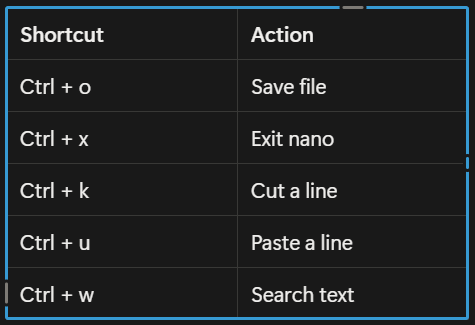
b. Using Vim
vim is powerful but has a learning curve
Open or Create a file
vim file.txt → Opens file.txt if it doesn’t exist, it creates itBasic Modes:
- Normal mode → for navigation (default)
- Insert mode → for editing text ( i to enter insert mode)
- Command mode → for saving, quitting ( : to enter command mode)
- From insert mode to switch to command mode you use ( esc )
Basic Vim commands for file editing

2. 📄 Creating simple scripts
A script is a file containing commands that linux can execute.
Step 1 — Create a Script File
nano myscript.sh or vim myscript.shStep 2 — Add commands
In nano → just start typing
In vim → press “i” to go into insert mode
#!/bin/bash
# This is a simple script
echo "Hello, Red Hat Linux!"
date-
!/bin/bash → tells Linux this is a bash script
- echo → prints text
- date → prints current date and time
Step 3 — Save and Exit
- In Nano: ctrl + o → Enter, then ctrl + x
- In Vim: press “esc” key, then :wq! → Enter
Step 4 — Make Script Executable
chmod +x myscript.shStep 5 — Run the Script
./myscript.sh
Creating Simple Script using nano

Creating simple script using vim
3. 🔐File Permissions for script
- Script need execute ( x ) permission to run:
chmod u+x myscript.sh
- Verify permissions:
ls -l myscript.sh
4. Notes & Best Practices
- Always use
chmod +xfor scripts. - Include
#!/bin/bashat the top of every bash script. - Use comments (
#) to describe what your script does. - Save frequently when using
nanoorvim.
Day 3 Complete — Progress
Learning nano/vim and writing simple scripts today. One step closer to real-world Linux administration.
메타데이터
- post_id
- df76e83ef65a
- slug
- file-editing-with-nano-vim-creating-simple-scripts-with-nano-vim-df76e83ef65a
- url
- https://medium.com/@bamidelebabatundem/file-editing-with-nano-vim-creating-simple-scripts-with-nano-vim-df76e83ef65a
- canonical_url
- https://medium.com/@bamidelebabatundem/file-editing-with-nano-vim-creating-simple-scripts-with-nano-vim-df76e83ef65a
- author_url
- https://medium.com/@bamidelebabatundem
- status
- ok
- fetched_at
- 2026-06-09 15:37:30