Accelerating PaddleOCR-VL with vLLM via PaddleOCR CLI
Making Document AI Truly Production-Ready
Accelerating PaddleOCR-VL with vLLM via PaddleOCR CLI
Making Document AI Truly Production-Ready

Production-Ready
After publishing my previous guide, “One-Click Deployment of PaddleOCR-VL with Docker”, I received a short but very telling piece of feedback from an engineer named Dario:
“Fits perfectly within Google Cloud Run GPU in its smallest configuration (L4 GPU + 16GB RAM).”
That single sentence validates something important — and often overlooked:
Preloaded models + vLLM-style inference services are no longer just about speed, Instead, They directly solve the hardest problems in real production environments.
Concretely, this means:
- Serverless GPU deployment is realistic
- Smallest GPU tiers (such as NVIDIA L4) are sufficient
- Cold-start latency is dramatically reduced
- Cost, performance, and stability reach a practical engineering balance
In this article, we build on the previous Docker deployment tutorial and walk through how to install and run vLLM using the PaddleOCR CLI, turning PaddleOCR-VL into a genuinely production-grade inference service.
If you haven’t completed the base Docker deployment yet, I strongly recommend doing that first. This guide assumes PaddleOCR-VL is already running correctly in your environment.
Let’s get into the hands-on work.
1. Installing vLLM in an Isolated Virtual Environment
Inference acceleration frameworks such as vLLM or SGLang have heavy dependencies on:
- CUDA
- PyTorch
- Native compilation toolchains
These dependencies frequently conflict with existing PaddlePaddle environments.
Therefore, vLLM must be installed inside a dedicated virtual environment. This is not optional if you want a stable setup.
Why FlashAttention Comes First
The official paddleocr-vl Docker image does not include nvcc or full CUDA build tools. As a result, installing FlashAttention from source will fail.
The correct approach is to install a precompiled FlashAttention wheel before installing vLLM.
Complete Installation Flow
# Create a virtual environment
python -m venv .venv_vlm

# Activate it
source .venv_vlm/bin/activate

# Install PaddleOCR with document parsing support
python -m pip install "paddleocr[doc-parser]"

# Install prebuilt FlashAttention (avoids nvcc compilation issues)
python -m pip install \
https://github.com/mjun0812/flash-attention-prebuild-wheels/releases/download/v0.3.14/flash_attn-2.8.2+cu128torch2.8-cp310-cp310-linux_x86_64.whl

# Install vLLM dependencies via PaddleOCR CLI
paddleocr install_genai_server_deps vllm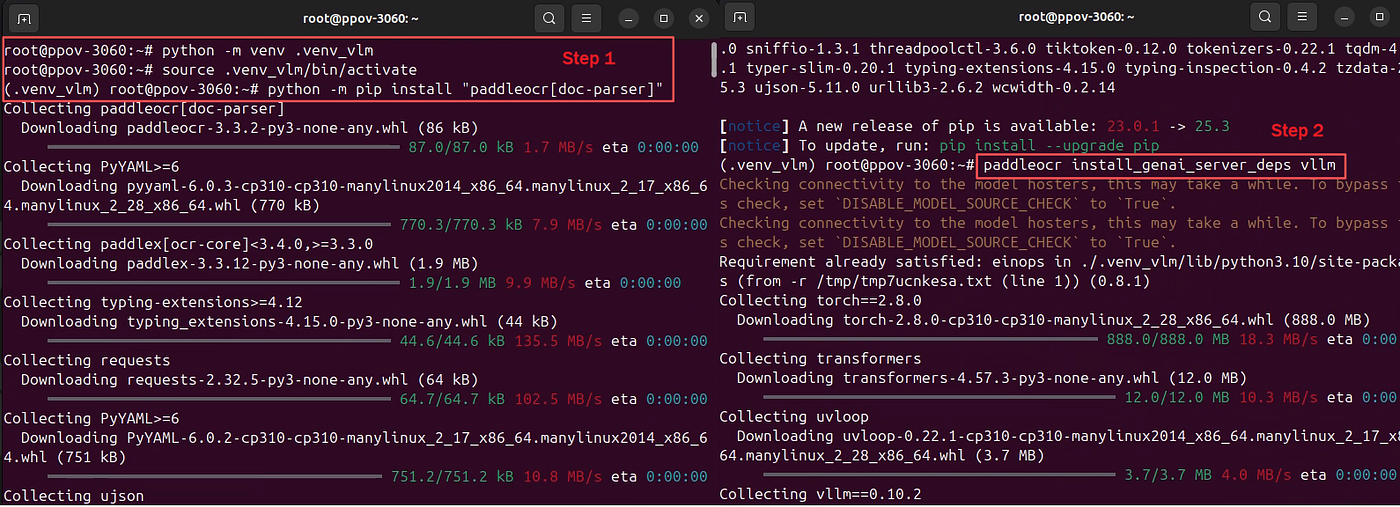
Installation flow
💡 Common pitfall Installing FlashAttention after vLLM often leads to broken builds. The order above is critical.
2. Starting the PaddleOCR-VL Inference Service with vLLM
Once dependencies are installed, launching the inference server is straightforward:
paddleocr genai_server \
  --model_name PaddleOCR-VL-0.9B \
  --backend vllm \
  --port 8118 \
  --backend_config <(echo -e 'gpu-memory-utilization: 0.8')
Launch the server
This single command does three important things:
- Preloads the model at startup (reducing cold starts)
- Uses vLLM as the high-performance inference backend
- Exposes a standardized HTTP inference API
Common genai_server Parameters:
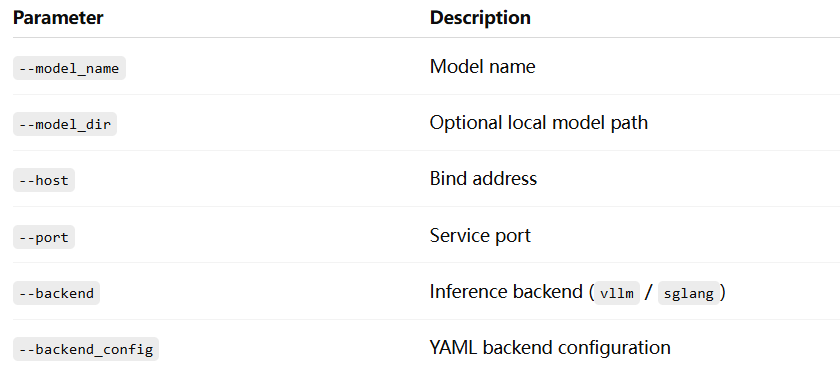
In real production deployments, backend_config is typically used to control:
- GPU memory utilization
- Concurrency limits
- Throughput vs latency trade-offs
Official optimization reference: https://docs.vllm.ai/en/latest/configuration/optimization/
Example vllm_config.yaml:
gpu-memory-utilization: 0.8
max-num-seqs: 128
3. Writing Client Programs to Access the vLLM Service
3.1 Accessing vLLM via PaddleOCR CLI
This is the fastest way to validate that:
- The server is reachable
- vLLM is correctly handling inference
- PaddleOCR-VL outputs structured results as expected
# Download a test image
curl -o paddleocr_vl_demo.png \
https://paddle-model-ecology.bj.bcebos.com/paddlex/imgs/demo_image/paddleocr_vl_demo.png

# Call the vLLM-backed inference service
paddleocr doc_parser \
  --input paddleocr_vl_demo.png \
  --vl_rec_backend vllm-server \
  --vl_rec_server_url http://localhost:8118/v1
Accessing vLLM via PaddleOCR CLI
3.2 Accessing vLLM via Python API
For real applications, the Python API is usually preferred:
from paddleocr import PaddleOCRVL

pipeline = PaddleOCRVL(
    vl_rec_backend="vllm-server",
    vl_rec_server_url="http://127.0.0.1:8118/v1"
)

output = pipeline.predict(
    "https://paddle-model-ecology.bj.bcebos.com/paddlex/imgs/demo_image/paddleocr_vl_demo.png"
)

for res in output:
    res.print()
    res.save_to_json(save_path="output")
    res.save_to_markdown(save_path="output")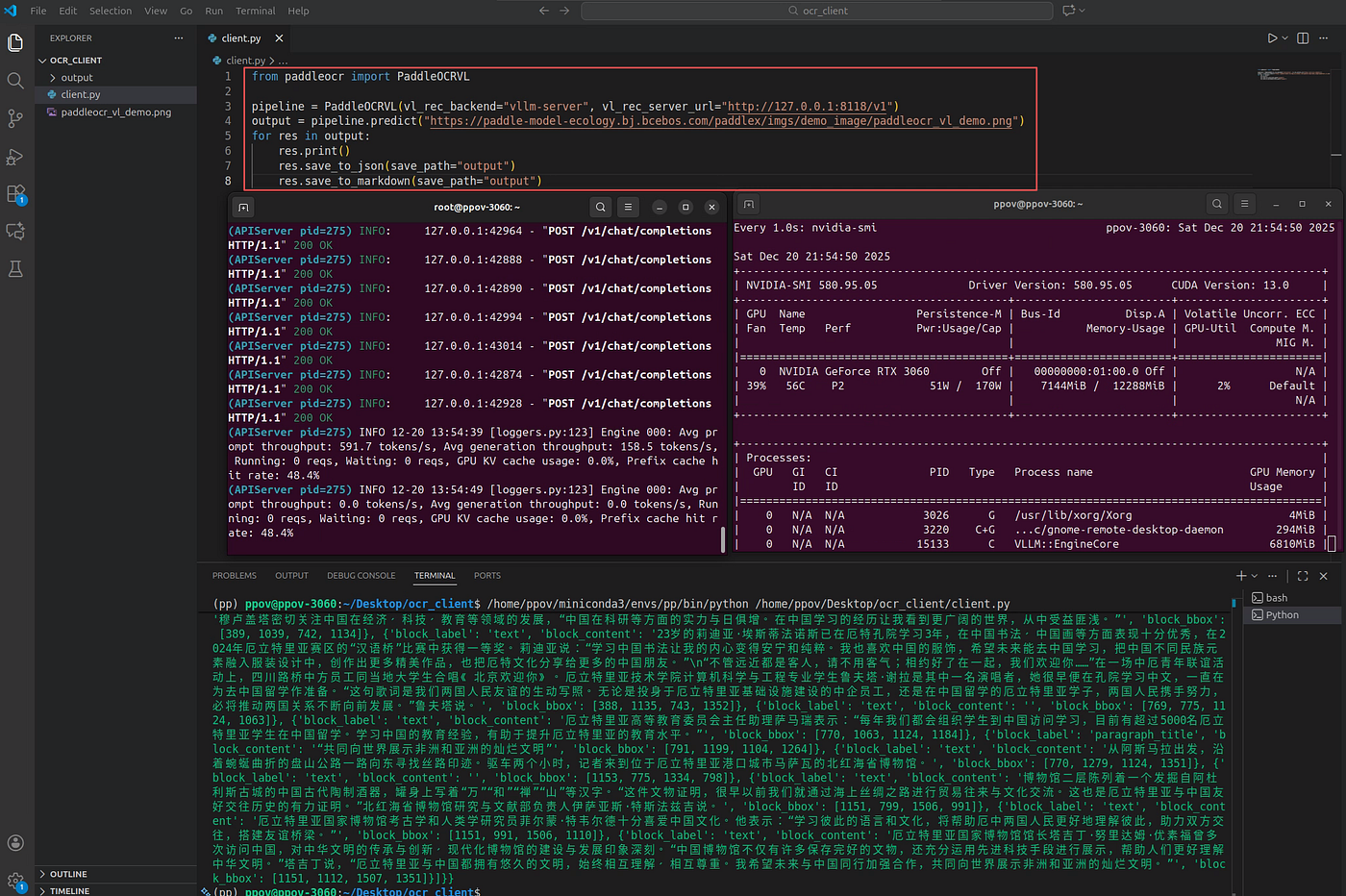
Accessing vLLM via Python API
At this point, PaddleOCR-VL behaves like a stateless document AI service, ready to be integrated into:
- Backend systems
- Batch pipelines
- RAG and search architectures
4. Why This Step Is the Real Production Turning Point
If the previous Docker tutorial answered:
“How do I get PaddleOCR-VL running?”
Then this article answers the more important question:
“How do I run it stably, cost-effectively, and at scale in production?”
Returning to the opening observation:
The reason PaddleOCR-VL fits so well on minimal serverless GPUs is not magic — it’s engineering: model preloading + inference backend decoupling.
This design choice is what makes PaddleOCR-VL not just fast, but operationally viable.
It’s a quietly excellent example of how modern document AI systems should be built.
메타데이터
- post_id
- df7999597a21
- slug
- accelerating-paddleocr-vl-with-vllm-via-paddleocr-cli-df7999597a21
- url
- https://medium.com/@alex_paddleocr/accelerating-paddleocr-vl-with-vllm-via-paddleocr-cli-df7999597a21
- canonical_url
- https://medium.com/@alex_paddleocr/accelerating-paddleocr-vl-with-vllm-via-paddleocr-cli-df7999597a21
- author_url
- https://medium.com/@alex_paddleocr
- status
- ok
- fetched_at
- 2026-07-15 05:17:59