Architecting Heavy Media Mobile Apps: Streaming & Resumable Uploads
Building a feed-heavy application like TikTok or Instagram is a classic system design challenge. While modern libraries abstract away much…
Architecting Heavy Media Mobile Apps: Streaming & Resumable Uploads
Building a feed-heavy application like TikTok or Instagram is a classic system design challenge. While modern libraries abstract away much of the pain, relying purely on “library magic” will inevitably lead to out-of-memory (OOM) crashes, drained batteries, and terrible user experiences when subjected to the realities of mobile networks.
In this article, we will dive into the architectural core of handling heavy media files on mobile clients, focusing on two primary pillars: Scroll-Aware Video Streaming and Robust Resumable Uploads.
1. The “Read” Path: Scroll-Aware Streaming with ExoPlayer
When rendering an endless feed of high-resolution videos, the initial instinct is to simply pass a URL to a media player as soon as a view becomes visible. This is a fatal mistake in a fast-scrolling environment.
The Foundation: Manifest Files
Instead of handling raw MP4 files, the industry standard is to utilize Adaptive Bitrate Streaming (HLS or DASH). The backend provides a Manifest URL containing various resolutions (e.g., 1080p, 720p, 360p) along with their respective pre-signed URLs.
By passing this manifest to ExoPlayer, the library automatically handles the heavy lifting: dynamically switching resolutions based on current network bandwidth, buffering, and caching.
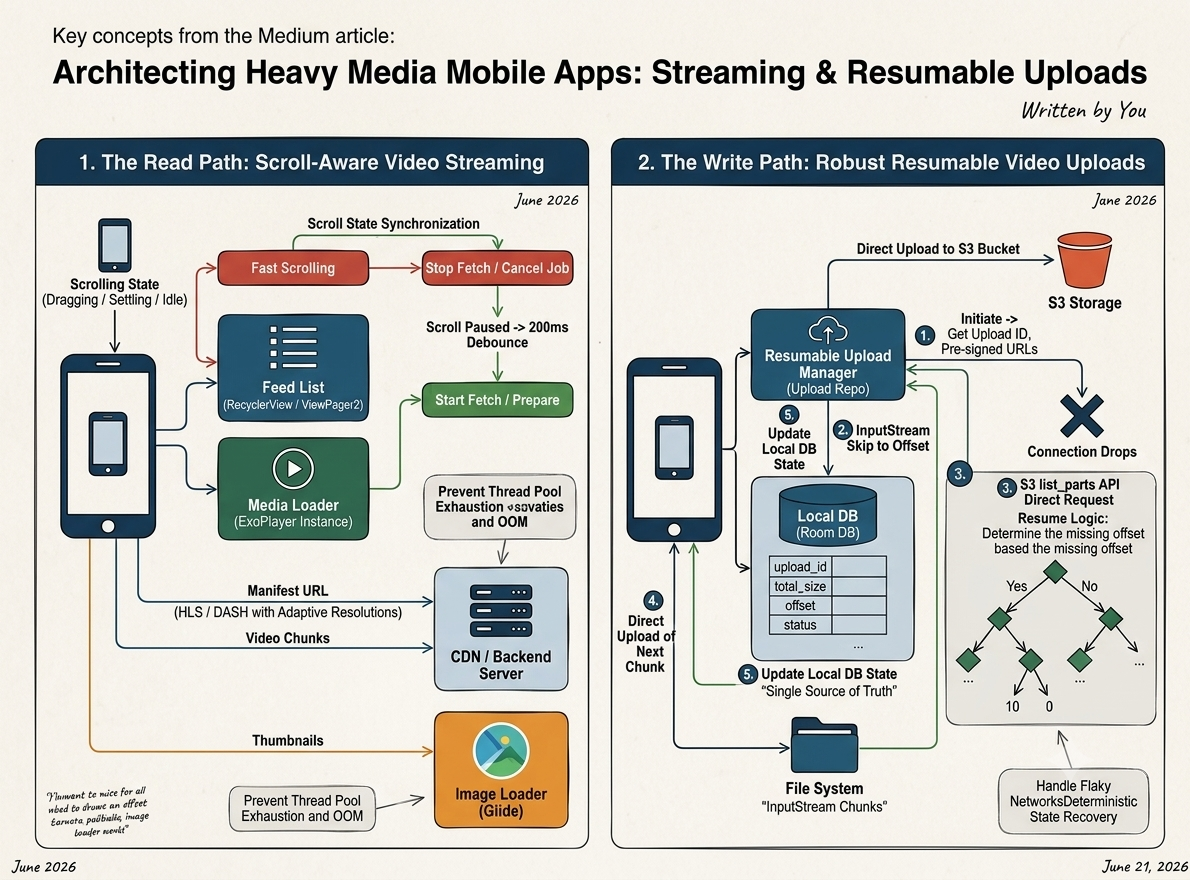
The Secret Sauce: Scroll State Synchronization
While ExoPlayer is powerful, it doesn’t know about your UI lifecycle. If a user frantically swipes through 50 videos in 3 seconds, blindly firing 50 ExoPlayer preparation jobs will exhaust the thread pool and crash the app.
The architecture must enforce Scroll-Aware Job Cancellation:
- Fast Scrolling (
SCROLL_STATE_DRAGGING/SETTLING): When the user is actively swiping, stop and cancel all media fetching processes immediately. Instead of loading videos, fallback to a lightweight, cached thumbnail image (via a library like Glide). This preserves bandwidth and CPU. - Scroll Paused (
SCROLL_STATE_IDLE): When the scroll stops, do not play the video instantly. Introduce a slight debounce (e.g., a 200ms delay). If the user hasn't scrolled again after this delay, fire the ExoPlayer preparation job. If they swipe away during the delay, the coroutine/job is gracefully cancelled before any network request is made.
This simple sync between the UI scroll state and the Media Loader is what separates a stuttering prototype from a production-ready app.
2. The “Write” Path: Bulletproof Resumable Uploads
Uploading a 1GB video file over a flaky 4G/5G mobile network guarantees one thing: the connection will drop. Forcing the user to restart the upload from 0% is unacceptable. We need a deterministic, resumable upload architecture.
The Architecture: Chunking and State Management
To achieve resumable uploads, we bypass simple POST requests and leverage mechanisms like S3 Multi-part Upload.
Here is the architectural flow for handling network interruptions gracefully:
- Local State Persistence (Room DB): Before starting the upload, store the media metadata (upload ID, total size, status) in a local SQLite database (like Room). This acts as the single source of truth for the upload’s lifecycle.
- Observing the File (
InputStream): Instead of loading the entire massive file into RAM (which causes an immediate OOM), observe the video file using anInputStream. This allows you to read the file sequentially in small, memory-safe chunks. - Recovering from Failure (
list_partsAPI): When the connection drops and eventually reconnects, the app shouldn’t guess where it left off. Instead of overloading your own backend, the client directly queries the S3**list_parts** API (typically authenticated via short-lived tokens like AWS Cognito or a specific pre-signed URL) to ask the storage bucket: “What was the last successfully received chunk?” - Seamless Resumption: Once S3 responds with the array of successfully uploaded parts, the client seamlessly identifies the exact missing chunk offset. Using InputStream.skip() or seek, it jumps directly to that specific byte in the local file and directly uploads the remaining parts to S3. The upload resumes precisely where it failed, saving the user’s data plan and patience.
Conclusion
Handling heavy media on mobile is less about knowing how to use video libraries, and more about strictly managing system resources (Network, Memory, and Threads).
By acting as a strict traffic controller — canceling unnecessary downloads during fast scrolls and diligently tracking upload offsets in a local database — you can build media applications that feel incredibly lightweight, even under the worst network conditions.
메타데이터
- post_id
- df889c8ce22f
- slug
- architecting-heavy-media-mobile-apps-streaming-resumable-uploads-df889c8ce22f
- url
- https://medium.com/@aaja2252/architecting-heavy-media-mobile-apps-streaming-resumable-uploads-df889c8ce22f
- canonical_url
- https://medium.com/@aaja2252/architecting-heavy-media-mobile-apps-streaming-resumable-uploads-df889c8ce22f
- author_url
- https://medium.com/@aaja2252
- status
- ok
- fetched_at
- 2026-06-22 17:31:34