Describe the Python Selenium Architecture in detail ?
Selenium Architecture:
Describe the Python Selenium Architecture in detail ?
Selenium Architecture:
Selenium is a popular open-source framework for automating web browser interactions. Its architecture is modular and it follows a client -server model. Here is an example for detailed selenium architecture and its important components.
Example:
[Test Script]
↓ (Selenium Client Libraries)
[WebDriver (Client)]
↓ (HTTP Request via JSON Wire Protocol/W3C WebDriver Standard)
[Browser Driver]
↓ (Browser-Specific Automation Protocol)
[Web Browser]
i) Test script Execution: A user writes a script in any programming language but it needs to add some selenium client libraries. The script includes some WebDriver API commands (Ex: find_element, click, send_keys)
ii) WebDriver (client): As a next step here we need to translate the commands into HTTP requests to communicate with the web browsers. This can be done using JSON format by the selenium client libraries.
iii)Browser Driver : The above translated HTTP requests are sent to the browser specific driver via a RESTful service (Every browser has its own specific driver ). Here the driver acts as a listener for incoming commands from the client.
iv)Web Browsers : Selenium supports various browsers for executing the automated test scripts:
Google Chrome
Mozilla Firefox
Safari
Microsoft edge
Internet Explorer
The supported browser versions depends on the driver compatibility.
v) JSON wire Protocol / W3C WebDriver Standard:
Initially JSON wire protocol was used for communication between WebDriver and browser drivers but in recent times the W3C WebDriver standard replaced it , to make communications more reliable and uniform across different browser vendors.
Selenium provides language bindings in the form of libraries for multiple programming languages such as:
Python, Java, C# , Ruby, Java script (Node.js) etc.
Let’s discuss the architecture of a Python script with Selenium.
[Python Script]
↓ (API Calls)
[Selenium WebDriver]
↓ (HTTP Request using JSON Wire Protocol / W3C WebDriver)
[Browser Driver (e.g., Chrome Driver)]
↓ (Browser Automation Protocol)
[Web Browser (e.g., Chrome)]
↓
[DOM Manipulation and Rendering]
↑
[Response to Python Script]
i) Python Script: This is the topmost layer where test logic is written using python’s Selenium bindings. These bindings translate the commands into API calls to Selenium WebDriver.
High-level commands like find_element, click, or send_keys are converted into lower-level WebDriver commands.
Example:
Python command: driver.find_element(By.ID, “button”).click()
Translates to : POST /session/{session_id}/element HTTP/1.1 Content-Type: application/json Body: {“using”: “id”, “value”: “button”}
ii) Selenium WebDriver : Selenium WebDriver acts as the client that communicates with the browser driver. This will converts the python commands into HTTP requests. Then selenium web driver sends these requests to the browser-specific driver (Ex. Chrome Driver, Gecko Driver).
iii) Browser Driver :
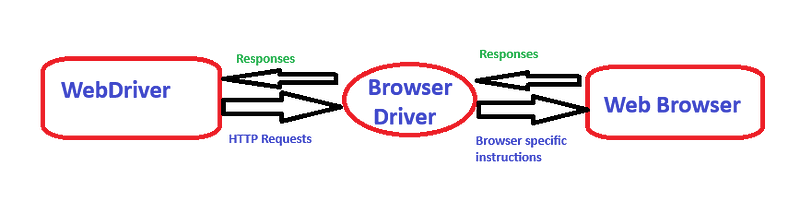
Role of the Browser Driver
Browser driver will acts as a bridge in between WebDriver and the web browser. It receives the HTTP requests from the web driver and translates the commands into browser-specific instructions. Again it sends back the responses to the webdriver.
Example: Chrome Driver for Google Chrome,
Gecko driver for Mozilla firefox etc.
iv) Browser Automation Protocol :
A set of browser specific commands is known as browser automation protocol. It helps in execution of such actions: Locating elements in the DOM(document Object Model), performing actions like clicks, scrolls or data entry, fetching browser state or page data.
All these can reaches to the WEB BROWSER. This will be the actual browser application where actions are performed. A web browser renders the web page and updates the DOM as per the user interactions. It also executes the commands like element clicks, navigation and data input as instructed by the browser driver.
v) DOM Manipulation and Rendering:
The browser processes the commands and updates the Document Object Model (DOM) as required. For example, clicking a button might trigger a JavaScript event, leading to changes in the DOM or page rendering.
The browser driver sends the result of the operation back through WebDriver to the Python Script .
Example:
If the element is found and clicked successfully → Response as 200 OK
If the element is not found → Response as 404 Not Found
In Python → A NoSuchElementException is raised.
Illustrated Workflow of Python with Selenium:
- Input:
- Python script issues a command (e.g., find_element(By.ID, “button”)).
- Processing:
- The command travels through the WebDriver, browser driver, and browser layers.
- The browser performs the requested action (e.g., clicking the button).
- Output:
- The result is sent back to the Python script.
- If successful, the script continues to the next step.
- If an error occurs, it handles exceptions or logs the issue.
Significance of the Python Virtual Environment :
A Python virtual environment is an isolated environment that allows you to create and manage separate spaces for Python projects, each with its own dependencies, libraries and even python versions. Using this kind of environment for each project we can avoid the affect of the changes in one project with other projects or the global python installation.
Key features of a Virtual Environment:
- Isolation: i) Each environment can have separate configurations, operates independently and it keeps all the dependencies within the environment associated to the projects in it. ii) It can prevents conflicts between different projects which requires different library versions.
- Dependency Management: The separate virtual environment can enables installing specific versions of libraries for a project without interfering with other projects.
- Portability: Its easy to share and reproduce project environments using requirements.txt
Why should we use a Virtual Environment?
- Multiple Projects: If you have multiple projects, each might require different versions of the same library.
For instance: Project A: Django==3.2 ,Project B: Django==4.0
A virtual environment ensures that each project uses the correct version.
2. Avoid Global Pollution:
Installing libraries globally can lead to dependency conflicts. A virtual environment prevents unnecessary changes to the system-wide python setup.
3. Reproducibility:
Virtual environments make it easy to share and recreate the same setup across machines or team members.
Conclusion:
A Python Virtual Environment is an essential tool for modern Python development. It simplifies dependency management, avoids conflicts, and provides a clean, organized way to handle multiple projects.
메타데이터
- post_id
- df8fd17a1d0d
- slug
- describe-the-python-selenium-architecture-in-detail-df8fd17a1d0d
- url
- https://medium.com/@vishnuthej23/describe-the-python-selenium-architecture-in-detail-df8fd17a1d0d
- canonical_url
- https://medium.com/@vishnuthej23/describe-the-python-selenium-architecture-in-detail-df8fd17a1d0d
- author_url
- https://medium.com/@vishnuthej23
- status
- ok
- fetched_at
- 2026-09-17 10:48:58





