AiTM Attack Anatomy - Hunting Stolen Tokens in Microsoft Defender XDR
AiTM Attack Anatomy — Hunting Stolen Tokens in Microsoft Defender XDR
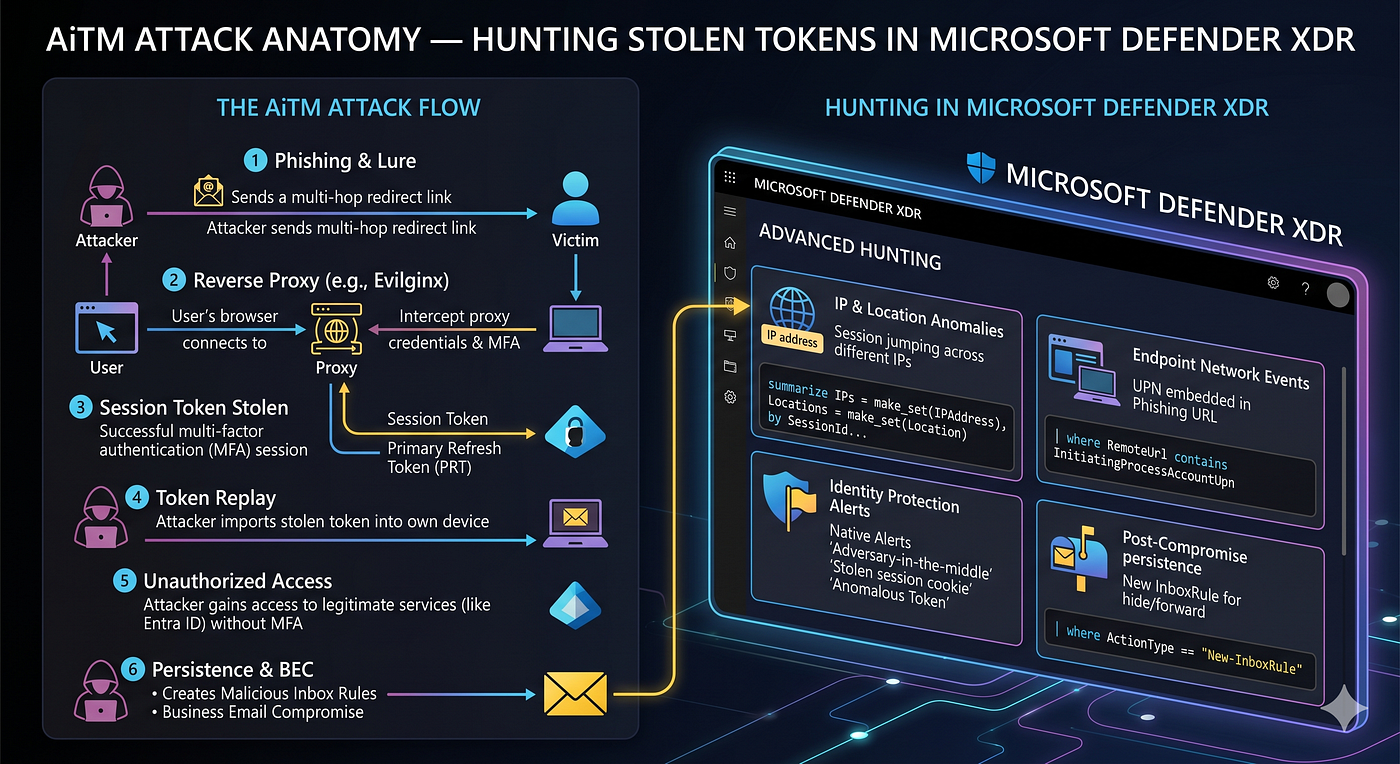
How adversary-in-the-middle phishing bypasses MFA, what the tokens look like in the logs, and the KQL queries that surface them.
I’ve investigated multiple confirmed AiTM (Adversary-in-the-Middle) phishing compromises over the past year. Some were caught early; others weren’t. Each one taught me something about how these attacks work, where they leave traces, and what the investigation actually looks like from inside Defender XDR.
This covers the full picture: how AiTM works, what to look for in sign-in logs, why token persistence survives password resets (and why that catches people off guard), and the KQL queries I run to hunt them.
What AiTM is, and why MFA doesn’t stop it
Traditional phishing steals credentials. AiTM steals something more valuable: the authenticated session itself.
Here’s what happens. The attacker sets up a reverse proxy a phishing kit like Tycoon 2FA, EvilProxy, or Mamba 2FA sitting between the victim and the real Microsoft login page. The victim types their credentials, completes MFA, and gets handed their inbox like nothing happened. Behind the scenes, the proxy relayed everything to Microsoft in real time, got a valid session back, and quietly kept the authenticated session cookie or OAuth refresh token.
MFA was satisfied. The login looked clean. And the attacker now holds a valid session credential they can use against Microsoft 365 services without ever touching the password or MFA again.
This is the part that trips people up: legacy MFA (SMS, TOTP, push notifications) doesn’t stop this. It can’t. The victim completed MFA legitimately; the proxy just happened to be watching. The only methods that are actually immune are phishing-resistant ones FIDO2 hardware keys and certificate-based authentication because they cryptographically bind the auth to the legitimate origin URL. A proxy can’t fake that.
How the lure gets delivered
In the cases I’ve worked, it comes in two main flavours.
Spearphishing links: convincing subject lines (payroll notifications, MFA re-enrolment, HR policy updates) with a URL routed through the proxy. A lot of these come from compromised legitimate tenants, which gives them a clean compauth=pass result meaning they sail straight past Defender for Office 365 and Proofpoint without a flag.
Quishing (QR code phishing): the malicious URL is encoded inside a QR code, embedded in the email body or a PDF attachment. Because it’s an image, URL scanners can’t read it at delivery time. The victim scans it on their phone which usually has weaker controls than their managed work device and the proxy captures the session.
In one case I worked, the lure arrived as a nested .eml attachment inside the email. The outer message looked like a forwarded email; the inner .eml held the QR code. Scanners inspected the outer layer, passed it clean, and never touched what was inside. It’s consistent with a broader pattern: attackers layering attachments specifically to defeat gateway scanning.
What the logs look like
AiTM leaves a recognisable pattern across three tables: SigninLogs, AADNonInteractiveUserSignInLogs, and CloudAppEvents. Once you know what you’re looking for, it’s not subtle.
The initial sign-in. You’ll see a successful interactive sign-in from an IP that doesn’t match the user’s baseline often an anonymous proxy or cloud hosting ASN with a different User-Agent and a country that doesn’t fit their normal pattern. Microsoft flags some of these with: “Malicious sign in from an IP address associated with recognized AiTM attack infrastructure.” But not every proxy IP is in their catalogue yet, so you can’t rely on that alert alone.
When Microsoft doesn’t auto-detect it, impossible travel is your strongest corroboration. If someone authenticated from one country and the next sign-in from a completely different continent happens three or four hours later that’s physically impossible. Pair that with a completely different device profile between the two sessions and the picture is pretty clear.
Token persistence: the bit that survives the password reset. This is where most people get caught out. When the phishing kit captures the session, it captures an OAuth refresh token. These are long-lived up to 90 days by default in Microsoft Entra ID. More importantly: a password reset doesn’t reliably invalidate them. Most tenants don’t have automatic token revocation on password reset enabled, and even in tenants that do, it’s dependent on configuration and user type. The practical implication is significant: always treat session revocation in Entra ID as a mandatory separate step, not something the password reset handles for you.
I’ve seen an attacker re-authenticate against Exchange Online hours after the user did a self-service password reset using a refresh token tied to a legitimate third-party OAuth app the user had previously authorised. The reset did nothing. The attacker just kept going.
That re-authentication shows up in AADNonInteractiveUserSignInLogs as ResultType: 0, AuthenticationProtocol: refreshToken, against Office 365 Exchange Online. No MFA prompt, no interactive login just a quiet token refresh in the background.
Inbox rules. Once Exchange access is confirmed, the attacker’s next move is almost always persistence. Usually a forwarding rule that copies incoming mail to an external address, or one that silently moves emails from finance, HR, or executives into a folder the user won’t check. These show up in CloudAppEvents with ActionType values of New-InboxRule or Set-InboxRule.
The KQL queries
Run these in order when a risky user alert comes in.
- Account status check
let riskyUserNames = dynamic(["User One", "User Two"]);  // <-- replace
IdentityInfo
| where AccountDisplayName in~ (riskyUserNames)
| take_any(*) by AccountObjectId
| project AccountDisplayName, AccountUpn, IsAccountEnabled, AccountObjectId
Start here. Confirms the account still exists and is active. More often than you’d expect, a risky user alert fires on an account that was deleted months ago — stale risk records that Microsoft can’t auto-dismiss without a support case.
- High-risk sign-in events
SigninLogs
| where TimeGenerated > ago(7d)
| where UserDisplayName in ("User One", "User Two")  // <-- replace
| where RiskLevelDuringSignIn == "high" or isnotempty(RiskEventTypes_V2)
| project TimeGenerated, UserDisplayName, IPAddress,
          AppDisplayName, UserAgent, ConditionalAccessStatus,
          RiskLevelDuringSignIn, RiskLevelAggregated
| order by TimeGenerated desc- Token replay — non-interactive sign-ins
AADNonInteractiveUserSignInLogs
| where TimeGenerated > ago(7d)
| where UserDisplayName in ("User One", "User Two")  // <-- replace
| where ResultType == 0
| project TimeGenerated, UserDisplayName, IPAddress,
          AppDisplayName, ResourceDisplayName,
          UserAgent, AuthenticationProtocol, OriginalRequestId
| order by UserDisplayName, TimeGenerated asc
This is the one most people skip. Look for refreshToken as the AuthenticationProtocol against Exchange Online, coming from the same proxy IP as the original sign-in, after a password reset. That’s your token replay. If you see it, the password reset didn’t contain the attacker.
- Inbox rule check
CloudAppEvents
| where Timestamp > ago(7d)
| where ActionType in ("New-InboxRule", "Set-InboxRule", "UpdateInboxRules")
| where AccountDisplayName in ("User One", "User Two")  // <-- replace
| project Timestamp, AccountDisplayName, IPAddress, ActionType, RawEventData
Containment — the order matters more than people think
Within the hour: disable the account, then revoke all sessions. These are two separate actions in Entra ID; disabling stops new sign-ins but doesn’t touch existing tokens. Session revocation is what actually kills them. Do both, in that order.
Within 24 hours: use an admin password reset, not SSPR. The attacker may have added or tampered with registered MFA methods, so you can’t trust the user’s registered methods to be clean. Review every auth method on the account for anything added post-compromise. If you need to wipe MFA entirely, issue a Temporary Access Pass (TAP) for re-enrolment SSPR won’t work after a full method wipe (it needs at least one verified method to function), so TAP is the only clean path. Also pull the Exchange unified audit log for MailItemsAccessed, New-InboxRule, and SendAs covering the compromised session window. Most people skip this log, and it’s where BEC follow-on activity actually shows up. Finally, review OAuth consent grants for anything the attacker may have added.
Long-term: a risk-based Conditional Access policy (sign-in risk: medium or higher → require MFA or block) would stop token replay at the point of re-use. FIDO2 or passkeys for admin and finance accounts removes the phishable MFA problem at the root.
A note on incident graph inflation
When an AiTM alert fires, the incident graph in Defender XDR often shows more “impacted” users than are actually compromised. What happens is that custom detection rules (things like “sign-in from new country”) fire independently and get pulled into the same incident because they share IP evidence with the confirmed AiTM alert. The actual compromise signals are the Microsoft-native ones: Unfamiliar sign-in properties from Entra ID Protection, combined with Malicious sign in from an IP address associated with recognized AiTM attack infrastructure from Microsoft Defender XDR (formerly Microsoft Threat Protection), both firing on the same user in the same session window. If you’ve got those two together, that’s your confirmed case. Triage everything else on the graph independently.
AiTM isn’t some advanced persistent threat technique it’s the standard playbook for anyone targeting M365 right now, and it works because most tenants still rely on phishable MFA. The good news is the traces are there. You just have to know which tables to look in.
All queries are in my mssp-soc-playbooks repo on GitHub.
Tharaka D.
메타데이터
- post_id
- df90df090b31
- slug
- aitm-attack-anatomy-hunting-stolen-tokens-in-microsoft-defender-xdr-df90df090b31
- url
- https://medium.com/@sandakelum.97/aitm-attack-anatomy-hunting-stolen-tokens-in-microsoft-defender-xdr-df90df090b31
- canonical_url
- https://medium.com/@sandakelum.97/aitm-attack-anatomy-hunting-stolen-tokens-in-microsoft-defender-xdr-df90df090b31
- author_url
- https://medium.com/@sandakelum.97
- status
- ok
- fetched_at
- 2026-06-09 15:37:30


