Two-Way Data Binding in Angular
Master Two-Way Data Binding in Angular: A Complete Guide for Beginners and Advanced Developers
Two-Way Data Binding in Angular
Master Two-Way Data Binding in Angular: A Complete Guide for Beginners and Advanced Developers
Two-Way Data Binding in Angular
In the world of front-end development, Angular is a powerful and robust framework widely used for building dynamic and complex applications. One of the essential features that every Angular developer should know is two-way data binding. Whether you are a beginner or an experienced developer, mastering this feature can significantly improve your productivity and code efficiency.
In this guide, we’ll explore what two-way data binding is, how it works in Angular, and provide real-world examples with code snippets. By the end, you will have a strong understanding of this concept and be able to implement it in your own projects.
What is Two-Way Data Binding in Angular?
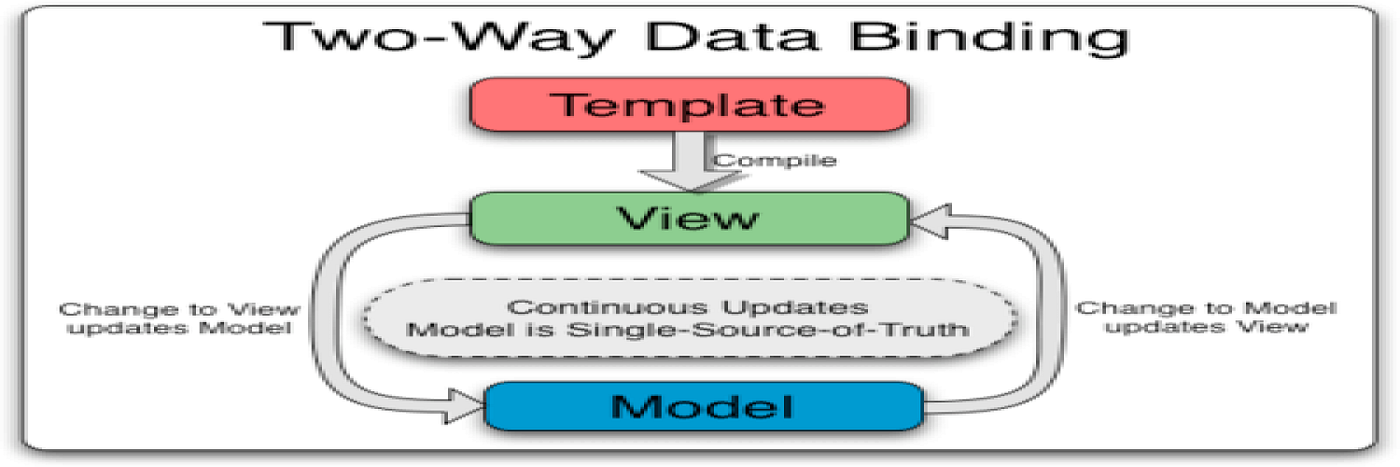
Two-way data binding is a mechanism in Angular that allows synchronization of data between the component and the view (template). Any changes in the component’s data model are instantly reflected in the view, and vice versa — any changes made in the view will update the component’s data.
This is especially useful for handling form inputs, where users interact with the UI and input data that needs to be passed back to the application for further processing.
In Angular, two-way data binding is achieved using the ngModel directive, which allows for seamless communication between the data model and the user interface.
Why Use Two-Way Data Binding?
The main advantage of two-way data binding is that it simplifies communication between the UI and the data model. Instead of manually writing code to handle events and updating data, Angular takes care of this for you, making your code cleaner and more maintainable.
Two-way data binding is particularly useful in forms where user input needs to be reflected in the component and updated automatically in real-time.
How Two-Way Data Binding Works in Angular
Two-way data binding in Angular is done using a combination of property binding and event binding. The most common example is using the ngModel directive.
Here’s the syntax for two-way data binding using [(ngModel)]:
<input [(ngModel)]="username" placeholder="Enter your name">In this example, any changes made in the input field will automatically update the username property in the component, and any changes to the username property will be reflected in the input field.
Breaking Down the Syntax:
- [ ] represents property binding.
- ( ) represents event binding.
- [(ngModel)] is a shorthand for combining both property and event bindings.
By using ngModel, Angular handles the event of input change and property updates behind the scenes, creating a two-way binding between the input element and the property in the component.
Example: Simple Two-Way Data Binding in Angular
Let’s dive into a complete example to see how two-way data binding works in an Angular application. We’ll build a simple form that updates user data in real-time.
Component Code (app.component.ts):
import { Component } from '@angular/core';

@Component({
  selector: 'app-root',
  templateUrl: './app.component.html',
  styleUrls: ['./app.component.css']
})
export class AppComponent {
  username: string = '';
  email: string = '';

  updateEmail(newEmail: string): void {
    this.email = newEmail;
  }
}
Template Code (app.component.html):
<h1>Two-Way Data Binding Example</h1>

<label for="username">Username:</label>
<input id="username" [(ngModel)]="username" placeholder="Enter your username">

<p>Your username is: {{ username }}</p>

<label for="email">Email:</label>
<input id="email" [(ngModel)]="email" placeholder="Enter your email">

<p>Your email is: {{ email }}</p>
Explanation:
- The
ngModeldirective is used to bind the input elements (usernameandemail) to their respective properties in the component (usernameandemail). - As the user types in the input fields, the
usernameandemailproperties in the component are updated in real-time. - The values of the
usernameandemailfields are displayed in the view using interpolation ({{ username }}and{{ email }}).
Best Practices for Using Two-Way Data Binding in Angular
- Use with Forms: Two-way data binding is most commonly used with forms where user input needs to be captured and stored in the component.
- Avoid Overuse: While two-way data binding is powerful, overusing it can make your code difficult to debug. Always consider if one-way binding or event binding might be more appropriate for certain cases.
- Always Use
ngModelwith FormsModule: Make sure that theFormsModuleis imported into your Angular module to usengModelfor two-way data binding. - Understand its Impact: Two-way data binding works with both primitive and complex data types. However, be cautious when binding to complex objects as any changes can have significant effects across your app.
Example with a Custom Two-Way Data Binding
You can also create custom two-way data bindings by combining input and output decorators. Here’s how you can create a custom two-way data binding for a custom input component:
Custom Component Code (custom-input.component.ts):
import { Component, Input, Output, EventEmitter } from '@angular/core';

@Component({
  selector: 'custom-input',
  template: `
    <input [value]="value" (input)="onInput($event)">
  `
})
export class CustomInputComponent {
  @Input() value: string = '';
  @Output() valueChange: EventEmitter<string> = new EventEmitter<string>();

  onInput(event: any): void {
    this.valueChange.emit(event.target.value);
  }
}
Using the Custom Component in Another Component:
<custom-input [(value)]="username"></custom-input>
<p>Username: {{ username }}</p>
This example demonstrates how you can bind the value property in the custom-input component to the username property in another component, using a custom two-way binding mechanism.
Conclusion
Two-way data binding is a key concept in Angular that simplifies communication between your application’s data and user interface. It’s especially useful for forms and user inputs, where you need real-time synchronization between the UI and the data model.
By understanding and applying two-way data binding in Angular, you can write cleaner, more maintainable, and efficient code.
Thank you for reading until the end. Before you go: Please consider clapping and follow Me 👏
In Plain English 🚀
Thank you for being a part of the **In Plain English** community! Before you go:
- Be sure to clap and follow the writer ️👏️️
- Follow us: **X | [LinkedIn](https://www.linkedin.com/company/inplainenglish/) | [YouTube](https://www.youtube.com/channel/UCtipWUghju290NWcn8jhyAw) | [Discord](https://discord.gg/in-plain-english-709094664682340443) | [Newsletter](https://newsletter.plainenglish.io/) | [Podcast](https://open.spotify.com/show/7qxylRWKhvZwMz2WuEoua0)**
- **Create a free AI-powered blog on Differ.**
- More content at **PlainEnglish.io**
메타데이터
- post_id
- df961e5ca7e7
- slug
- two-way-data-binding-in-angular-df961e5ca7e7
- url
- https://javascript.plainenglish.io/two-way-data-binding-in-angular-df961e5ca7e7
- canonical_url
- https://javascript.plainenglish.io/two-way-data-binding-in-angular-df961e5ca7e7
- author_url
- https://medium.com/@solomongetachew112
- status
- ok
- fetched_at
- 2026-07-13 06:23:13