Digital Image Processing in C (Chapter 4): Edge Detection and Grayscale Transformation: Laplacian…
Chapter 4: Edge Detection and Grayscale Transformation with Complete Code in C
Digital Image Processing in C (Chapter 4): Edge Detection, Laplacian, Sobel, Gamma Correction, and Histogram Equalization
0. Complete Code
The complete code for this chapter is available in: Chapter 4. Edge Detection and Grayscale Transformation
For more chapters on digital image processing and all original images, see: Introduction to Digital Image Processing
Please give my repository a star ⭐️ if you like it.
1. Edge Detection
1.1 Laplacian Operator:
Algorithm:
Laplace operator is a second-order differential operator, and use the following formula:

In a two-dimensional function f(x, y), the second-order differences in the two directions of x and y are respectively:

We get the difference form of the Laplace operator:

And we can implement Laplacian using 3x3 coefficient convolution as follows:
Results (lena, goldhill):


Analysis:
The Laplacian Operator achieves a sharpening effect by enhancing the grayscale contrast of the image. As a second-order differential operator, it enhances areas with sudden grayscale changes in the image and weakens areas with slow grayscale changes. But the processed image loses the direction information of the edges and enhances the noise.
Code Implementation:
Image *Laplacian(Image *image) {
    unsigned char *tempin, *tempout;
    int sum = 0;
    Image *outimage;
    outimage = CreateNewImage(image, (char*)"#testing function");
    tempin = image->data;
    tempout = outimage->data;

    for(int i = 0; i < image->Height; i++) {
        for(int j = 0; j < image->Width; j++) {
            sum = 0;
            for(int m = -1; m <= 1; m += 2) {
                for(int n = -1; n <= 1; n += 2) {
                    // use boundary check:
                    sum += boundaryCheck(j + n, i + m, image->Width, image->Height) ? tempin[image->Width * (i + m) + (j + n)] : 0;
                }
            }
            int temp = tempin[image->Width * i + j] * 4 - sum;
            // handle excess values:
            if(temp > 255) temp = 255;
            if(temp < 0) temp = 0;
            tempout[image->Width * i + j] = temp;
        }
    }
    return (outimage);
}
1.2 Sobel Operator:
Algorithm:
The Sobel operator is a first-order differential operator:

where ∇ f represents the direction of the maximum rate of change at (x, y). The horizontal and vertical convolutions we use are:

Then combine the horizontal and vertical gray values of each pixel to calculate the new grey value:

Results (lena, goldhill):
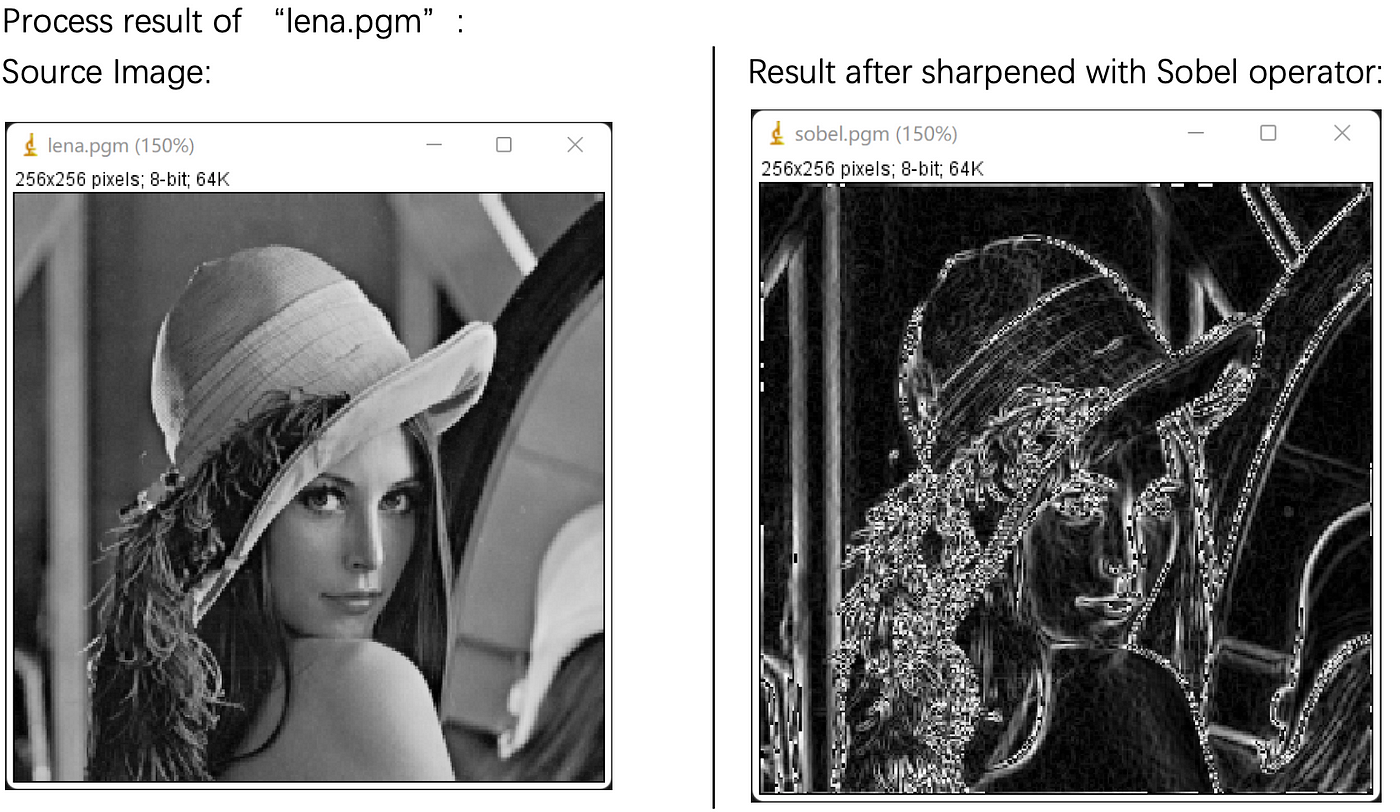

Analysis:
The Sobel operator is a first-order differential edge detection operator. It introduces an operation similar to local averaging, so it has a smoothing effect on noise while strengthening the edges of image objects.
After differentiation, the value at the flat is almost 0, while the absolute value at the edge is large. However, the Sobel operator does not strictly distinguish between the image subject and the background, so the extracted image contours are sometimes unsatisfactory.
Code Implementation:
Image *Sobel(Image *image) {
    unsigned char *tempin, *tempout;
    int index, square[9], temp1, temp2;
    Image *outimage;
    outimage = CreateNewImage(image, (char*)"#testing function");
    tempin = image->data;
    tempout = outimage->data;

    for(int i = 0; i < image->Height; i++) {
        for(int j = 0; j < image->Width; j++) {
            index = 0;
            // record the values in the 3x3 square:
            for(int m = -1; m <= 1; m++) {
                for(int n = -1; n <= 1; n++) {
                    // use boundary check:
                    square[index++] = boundaryCheck(j + n, i + m, image->Width, image->Height) ? tempin[image->Width * (i + m) + (j + n)] : 0;
                }
            }
            temp1 = abs(square[2] + 2*square[5] + square[8] - square[0] - 2*square[3] - square[6]);
            temp2 = abs(square[6] + 2*square[7] + square[8] - square[0] - 2*square[1] - square[2]);
            tempout[image->Width * i + j] = sqrt(pow(temp1, 2) + pow(temp2, 2));
        }
    }
    return (outimage);
}
2. Gamma Correction
Algorithm:
The pixels are first processed using normalization: converting the pixel values into real numbers between 0 and 1. The algorithm is (𝑓 + 0.5)/256, where 𝑓 is the original pixel value.
Then use the formula for gamma correction:

Finally, the correction values are denormalized: the compensated real values are inversely transformed into integer values between 0 and 255. The algorithm is s × 256–0.5 .
Results (lena, goldhill):


The variance results:

Analysis:
Gamma correction is a non-linear color editing method that changes the ratio of dark and light parts of an image, thereby changing the effect of image contrast. When 𝛾<1, the contrast decreases, and when 𝛾>1, the contrast increases. It can be seen from the results that the lower 𝛾, the lower the contrast of the image and the smaller the variance of the intensity values in the image.
Code Implementation:
Image *Gamma(Image *image, float ratio) {
    unsigned char *tempin, *tempout;
    float temp;
    float variance, average, sum = 0, N = image->Width * image->Height; // calculate variance

    Image *outimage;
    outimage = CreateNewImage(image, (char*)"#testing function");
    tempin = image->data;
    tempout = outimage->data;

    for(int i = 0; i < image->Height; i++) {
        for(int j = 0; j < image->Width; j++) {
            temp = ((float)tempin[image->Width * i + j] + 0.5) / 256; // normalized
            temp = pow(temp, ratio); // power the parameter
            temp = (int)(temp * 256 - 0.5); // denormalization
            tempout[outimage->Width * i + j] = (unsigned char)temp;
            sum += temp;
        }
    }

    // calculate & output the variance:
    average = sum / N;
    sum = 0;
    for(int i = 0; i < image->Height; i++) {
        for(int j = 0; j < image->Width; j++) {
            sum += pow(tempout[outimage->Width * i + j] - average, 2);
        }
    }
    variance = sum / N;
    printf("The variance of gamma value %.1f is: %.2f\n", ratio, variance);
    return (outimage);
}
3. Histogram Equalization
3.1 Global Histogram Equalization:
Algorithm:
Define rk as the pixel value of the kth intensity in the image, and nk as the number of pixels in the image with a value of rk.
sk is the value of the output pixel, and pk is the normalized pixel value.
Therefore, the algorithm for global histogram equalization is:

where M × N is the image size and L = 256 in the grey image.
Results (lena, goldhill):


Analysis:
The effect of global histogram equalization is that the pixels of the image tend to occupy the entire possible gray level and are evenly distributed, so that the image has rich grayscale details and a large dynamic range. It can be seen from the results that the image contrast is significantly enhanced after processing.
Code Implementation:
Image *Global_histogram(Image *image) {
    unsigned char *tempin, *tempout, temp;
    int histogram_sum[256], histogram[256], currSum = 0; // used for statistics
    float constant = (float)255 / (float)(image->Width * image->Height);// (L-1)/(M*N)

    Image *outimage;
    outimage = CreateNewImage(image, (char*)"#testing function");
    tempin = image->data;
    tempout = outimage->data;

    // initialize the array:
    for(int i = 0; i < 256; i++) histogram[i] = 0;

    for(int i = 0; i < image->Height; i++) {
        for(int j = 0; j < image->Width; j++) {
            temp = tempin[image->Width * i + j];
            histogram[temp] += 1;
        }
    }
    for(int i = 0; i < 256; i++) {
        currSum += histogram[i];
        histogram_sum[i] = currSum;
    }

    // output the image:
    for(int i = 0; i < image->Height; i++) {
        for(int j = 0; j < image->Width; j++) {
            temp = tempin[image->Width * i + j];
            tempout[outimage->Width * i + j] = (int)(histogram_sum[temp] * constant);
        }
    }
    return (outimage);
}
3.2 Local Histogram Equalization
Algorithm:
The principle of local histogram equalization is similar to global histogram equalization, but it will recalculate nk in the 3x3 area (the number of pixels with value rk) for each pixel in the image. So the algorithm of local histogram equalization is:

Results (lena, goldhill):


This algorithm is used for local contrast enhancement of the image, requiring a moving convolution and sequentially changing the value of the convolution center.
The algorithm is implemented using overlapping convolutions, which can fully enhance the contrast of local details in the image and eliminate blocking artifacts. However, since the total number of sub-block equalization times is equal to the total number of pixels in the image, the algorithm is more computationally intensive.
Code Implementation:
Image *Local_histogram(Image *image) {
    unsigned char *tempin, *tempout, temp;
    int histogram_sum[256], histogram[256]; // used for statistics
    float constant = (float)255 / (float)9; // M*N changed to 9

    Image *outimage;
    outimage = CreateNewImage(image, (char*)"#testing function");
    tempin = image->data;
    tempout = outimage->data;

    // process all the pixels:
    for(int i = 0; i < image->Height; i++) {
        for(int j = 0; j < image->Width; j++) {
            // initialize the array:
            for(int k = 0; k < 256; k++) histogram[k] = 0;

            for(int x = -1; x <= 1; x++) {
                for(int y = -1; y <= 1; y++) {
                    // use boundary check:
                    temp = boundaryCheck(j + y, i + x, image->Width, image->Height) ? tempin[image->Width * (i + x) + (j + y)] : 0;
                    histogram[temp] += 1;
                }
            }
            for(int k = 0, currSum = 0; k < 256; k++) {
                currSum += histogram[k];
                histogram_sum[k] = currSum;
            }

            // output the image:
            temp = tempin[image->Width * i + j];
            tempout[outimage->Width * i + j] = (int)(histogram_sum[temp] * constant);
        }
    }
    return (outimage);
}
-END-
메타데이터
- post_id
- dfb8de02f213
- slug
- digital-image-processing-in-c-chapter-4-edge-detection-and-grayscale-transformation-laplacian-dfb8de02f213
- url
- https://medium.com/@wilson.linzhe/digital-image-processing-in-c-chapter-4-edge-detection-and-grayscale-transformation-laplacian-dfb8de02f213
- canonical_url
- https://medium.com/@wilson.linzhe/digital-image-processing-in-c-chapter-4-edge-detection-and-grayscale-transformation-laplacian-dfb8de02f213
- author_url
- https://medium.com/@wilson.linzhe
- status
- ok
- fetched_at
- 2026-07-24 22:13:21

