XQuery Makeover to Improve Testability with XSpec
Refactor main module to create a testable library function
XQuery Makeover to Improve Testability with XSpec
Refactor main module to create a testable library function
XSpec tests for XQuery modules operate on library modules, not main modules. The XSpec vocabulary provides the <x:call> element for calling a function in a library module but has no element for executing an XQuery main module. As a general rule, to maximize the amount of XQuery code that XSpec is able to test, place as much of the code as possible within functions in a library module.
This topic illustrates how to refactor a main module to improve XSpec testability without changing the main module’s behavior. The new architecture consists of a library module and a new main module that imports the library module.
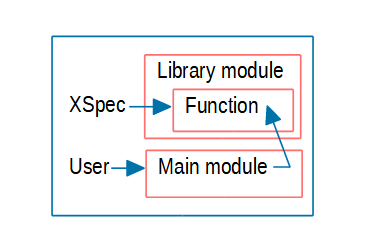
As background, recall that a main module has a query body, while a library module does not. Both kinds of modules can contain a prolog. The prolog can set properties, import definitions from other files, and declare namespaces, functions, global variables, and options.
While refactoring, you decide where each piece of the original main module belongs in the new architecture: in the new main module or in the library module. (You might choose to create multiple library modules, but the example here shows only one library module in the new architecture.)
Original Main Module
In this example, the query body is designed to read a sequence of numbers contained in elements of an XML document, filter out numbers less than a certain threshold, and output the remaining numbers in a particular format. The main module provides sample XML as a default context item, but you or another end user typically specifies the path to an XML file of interest when you execute the query. To illustrate refactoring, this main module includes a variety of declarations.
The main module starts with a version declaration and namespace declaration:
xquery version "3.1";
declare namespace output =
"http://www.w3.org/2010/xslt-xquery-serialization";
Next is a property setter, in this case to define a named format for numbers that the format-number function emits. This declaration and the later format-number function call cause the query to output one thousand as 1 000 with a space character separating the thousands digit from the other digits.
Example 1. Decimal format declaration (setter)
declare decimal-format spaced grouping-separator = " ";The next declaration initializes the context item for the query. The initial value illustrates an XML markup format that is compatible with the query body. This declaration uses the keyword external to enable an end user to specify the context item externally instead of using the initial value. The ability to provide the data when executing the main module is relevant for refactoring, because you want to preserve that capability.
Example 2. Context item declaration
declare context item as document-node() external := document {
  <root>
    <num>1000</num>
    <num>5000</num>
    <num>500</num>
    <num>2000.75</num>
  </root>
};
The global variable declaration shown next also uses the keyword external, enabling an end user to vary the minimum for filtering. Like the context item, this variable provides a capability that refactoring should preserve.
Example 3. Variable declaration
declare variable $min as xs:integer external := 1000;The following output declaration specifies the output method of the query.
declare option output:method "text";Finally, the query body appears:
(: Query body :)
for $n in //num/number()[. ge $min]
return
  format-number($n, '### ###', 'spaced')
Notice how it relies on declarations from the prolog:
- The expression
//numrelies on the context item, either an externally specified XML file or the default from Example 2. - Use of
$mindepends on the global variable value, either an externally specified value or the default value from Example 3. - The
format-numberfunction call relies on the format declaration in Example 1.
Overview of Refactoring
This refactoring example converts one main module into a library module plus a new main module. Here is an overview of what each piece does before and after the refactoring:
- External environment: Both before and after refactoring, the user executes the main module, typically specifying a value for the context item and global variable.
- Main module: Before refactoring, the query body performs the computation. After refactoring, the query body calls the library module’s function with parameter values.
- Library module: Exists only after refactoring. A function in this module performs the computation, using the parameter values passed in, and returns the result to the main module.
- XSpec test: Exists only after refactoring. One or more test scenarios call the library module’s function with parameter values and verify results.
Refactoring the Query Body
To set up files for the refactored main module and the new library module, you can copy main.xqm to main-refactored.xqm and create an empty file named library.xqm.
Start adding content to library.xqm by declaring the XQuery version and the module namespace.
xquery version "3.1";
module namespace f = "urn:x-xspec-book:functions:xquery-modules";
Next, consider the query body of the original main module. The simplest plan for refactoring the query body for XSpec testability is:
- Declare a function in
library.xqmand move the query body frommain-refactored.xqminto the body of this function. The function output is the same as the result of evaluating the query body. - Where the original main module declares a context item and variables as externally specifiable using the
externalkeyword, make those correspond to parameters of the function. Then,main-refactored.xqmcan supply values when calling the function (shown later, in “Query body inmain-refactored.xqm”). Function parameters are also accessible to XSpec. - Where the new function body refers to a context item, reference the function parameter that represents the context item. That is, augment the path
//numto form$context//num.
The following code block shows the function declaration that goes in library.xqm.
declare function f:filter-round(
$context as document-node(),
$min as xs:integer
) as xs:string* {
for $n in $context//num/number()[. ge $min]
return
  format-number($n, '### ###', 'spaced')
};
The
format-numberfunction call relies on the decimal format namedspaced, and making that available to the library module is mentioned later, in “Retaining or Moving Declarations.” If you forgot that step, an error (Decimal format spaced has not been defined) while running the XSpec scenario would be a reminder.
Potential Variations
If the original query body had a dependency on functions declared in the original main module, you would move those declarations to library.xqm, too. You would also change the function names to use the module namespace (e.g., use the prefix f that is bound to the module namespace). In this example, the original main module has no function declarations, so this task does not apply.
You can refactor further by dividing the original query body among multiple functions in library.xqm. Sometimes, testing a few smaller, simpler functions is easier than testing one larger, more complex function. This example uses a single function in library.xqm because switching from a query body to a function provides the largest increase in XSpec testability.
Effect of Refactoring on New Main module
The new main module, main-refactored.xqm, can use the new f:filter-round function by importing library.xqm and calling the function from the query body. The next two blocks of code show a module import that you insert in main-refactored.xqm and the new query body, which is nothing but a function call.
Example 4. main-refactored.xqm imports library.xqm
import module namespace f = "urn:x-xspec-book:functions:xquery-modules"
at "library.xqm";
Example 5. Query body in main-refactored.xqm
(: Query body :)
f:filter-round(., $min)
In the new query body, the value of the first function parameter (.) comes from the context item declaration that remains unchanged in main-refactored.xqm. The value of the second function parameter ($min) comes from the variable declaration that remains unchanged in main-refactored.xqm. In this arrangement, the end user can specify data at run time as usual, and main-refactored.xqm passes the data to the f:filter-round function in library.xqm.
Retaining or Moving declarations
Declarations from the original main module belong in main-refactored.xqm, library.xqm, or both. Where the refactoring puts each declaration depends on its usage.
- Version declaration: Place in both
main-refactored.xqmandlibrary.xqm. - Namespace declaration: Place in
main-refactored.xqm. In this example, the namespace prefixoutputappears inmain-refactored.xqmand not inlibrary.xqm. In other situations, a namespace declaration might appear in the library module only or in both modules. - Decimal format declaration: Place in
library.xqm, becausef:filter-round, located inlibrary.xqm, directly uses this declaration. By contrast,main-refactored.xqmdoes not need this declaration because it uses the decimal format only indirectly throughlibrary.xqm. - Context item declaration: Place in
main-refactored.xqm, retaining theexternalkeyword so end users can specify a value at run time. FYI, only a main module is allowed to initialize a context item. - Variable declaration: Place in
main-refactored.xqm, retaining theexternalkeyword so end users can specify a value at run time.library.xqmdoes not need the declaration because the function uses its parameter to get the data. - Output declaration: Place in
main-refactored.xqm. In XQuery, only a main module can contain an output declaration.
Testing the Library Function, At Last
Now that the query body from the original main module is in a function in a library module, XSpec can test the function!
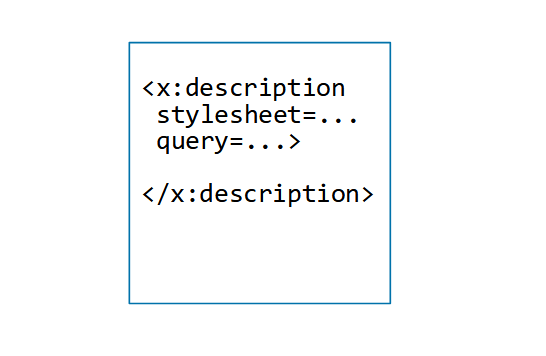
As in other XSpec tests for XQuery modules, the query and query-at attributes of <x:description> point to the namespace URI and location, respectively, of the library module.
<x:description xmlns:f="urn:x-xspec-book:functions:xquery-modules"
  xmlns:x="http://www.jenitennison.com/xslt/xspec"
  query="urn:x-xspec-book:functions:xquery-modules"
  query-at="library.xqm">
The function requires two parameters. The scenario shown below uses the default values of the context item and $min variable, from the main module, as parameter values. That way, if those default values take effect because the user does not provide data externally at run time, the query results are correct. If the default values are not especially meaningful, the scenario can use more suitable values in the <x:param> elements.
<x:scenario label="Test 'f:filter-round' function">
  <x:call function="f:filter-round">
    <x:param select="/">
      <root>
        <num>1000</num>
        <num>5000</num>
        <num>500</num>
        <num>2000.75</num>
      </root>
    </x:param>
    <x:param>1000</x:param>
  </x:call>
  <x:expect label="Numbers at least 1000, in expected format"
    select="('1 000', '5 000', '2 001')"/>
</x:scenario>
The fact that the original query can process data other than the initial value of the context item suggests that a test suite should verify behavior with a representative sample of the data that occurs in production. This example shows only one scenario because the example has served its purpose of demonstrating testability.
Key Takeaways
- To increase XSpec testability of XQuery code, place as much code as possible within one or more functions in a library module — not within a main module’s query body. This topic illustrated how to refactor a main module into a combination of library module and main module.
- When moving code from a query body into a function, create function parameters for data you want the flexibility to vary at testing time or run time. Also, you might need to adjust path expressions that rely on the query’s context item.
- Both library modules and main modules can contain various kinds of declarations. To determine whether a declaration belongs in the library module or main module, look at the declaration’s usage.
- Refactoring can be time-consuming or challenging. It can also add risk, if you don’t have tests to help you prevent an inadvertent change in the code’s output. Ideally, if you consider testability up-front when writing an XQuery module, you can save the time and effort of refactoring later.
Code is downloadable from https://github.com/galtm/xspectacles/ on GitHub, in the src/xquery-modules folder.
메타데이터
- post_id
- dfd36432c3c7
- slug
- xquery-makeover-to-improve-testability-with-xspec-dfd36432c3c7
- url
- https://towardsdev.com/xquery-makeover-to-improve-testability-with-xspec-dfd36432c3c7
- canonical_url
- https://towardsdev.com/xquery-makeover-to-improve-testability-with-xspec-dfd36432c3c7
- author_url
- https://medium.com/@xspectacles
- status
- ok
- fetched_at
- 2026-07-23 10:42:44