Tracking Markers in Chroma Keying and Their Applications
What Are Tracking Marks?
Tracking Markers in Chroma Keying and Their Applications
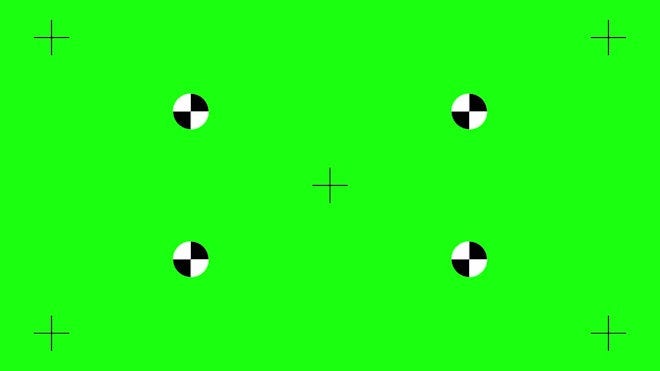
What Are Tracking Marks?
Tracking marks are symbols or indicators placed on objects, walls, or green screens during filming. They are used in post-production to track the motion of the camera, actors, or objects.
Without these markers, accurately tracking movement in a video would be extremely difficult or even impossible. Software requires reference points that remain visible and traceable across frames. The primary purpose of these markers is to allow computer software to accurately track the movement of the camera or objects in the scene during post-production.
Definition of Tracking
Tracking in visual effects refers to the process by which software follows the motion of one or more points in an image over time. This process enables precise synchronization of graphical elements, text, 3D objects, or effects with the live-action footage.
The main goal of tracking is to digitally reconstruct these movements so that new elements (2D or 3D) can be realistically integrated into the original scene, making them appear as if they were always part of the shot. In other words, tracking acts as a bridge between the real filmed world and the virtual digital world.
In many cases, the real footage lacks distinct textures or reference points for tracking — especially in scenes with green screens, plain walls, or uniform objects. To overcome this, tracking markers are used.
Applications of Tracking Markers
Camera Tracking
The most common use of tracking markers is for camera tracking. By analyzing the movement of these markers across different frames, VFX software can reconstruct the exact camera movement — including position, rotation, and lens angles — in 3D space. This information is then used to place 3D elements (such as CGI models, characters, or virtual environments) into the real scene in a way that appears natural and seamlessly integrated.
Object Tracking
These markers can also be placed on moving objects to track their motion. For example, if an actor’s costume is to be digitally altered or a digital element is to be attached to a specific object, tracking markers help achieve this.
In summary:
- To reconstruct real camera movement inside 3D software.
- To follow the precise motion of an object or face for applying visual effects.
Characteristics of Effective Markers
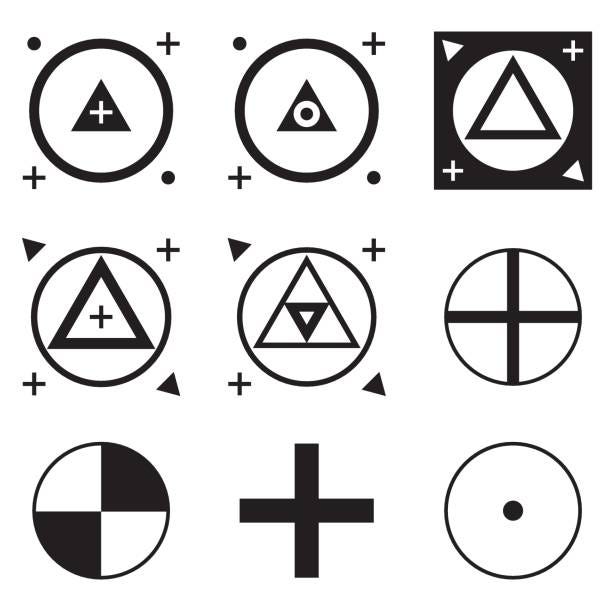
Tracking markers can take various forms, but they typically need to have high contrast with the background and distinct shapes so that the software can easily detect them.
- High Contrast: They should stand out strongly from the background (e.g., black and white squares on a green screen).
- Proper Size: Large enough to be visible, but not so big that they disrupt the scene.
- Distinct Shape: Simple geometric shapes such as squares, circles, or crosses, which are easy for the software to identify and track.

Purpose of Using Tracking Markers
Tracking markers can be placed by the production crew or filming team on set — on green screens, walls, floors, furniture, or any other surface — to define the precise coordinates and position of a digital object or element that will be added later in post-production.
These markers are typically made using tape, colored dots, cross marks, or other visual cues, and serve as accurate visual guides for VFX artists. Thus, tracking markers act as a bridge between the production and post-production stages and are specifically designed for this interaction.
This interaction allows for:
- Precise placement of the digital element (such as a robot, image, or text).
- Tracking to be done without guesswork or trial and error.
- A final output that looks natural and seamlessly integrated with the live-action footage.
Imagine a scenario where a digital creature is to be placed on a couch between two real actors. Since the creature doesn’t exist during filming, its exact location must be determined in advance.
During filming, tracking markers are placed on the couch to:
- Mark the exact spot where the digital creature will sit.
- Help actors know how to position themselves to leave space for the creature.
- Guide the VFX artist during the final compositing stage by indicating which parts of the image to track and where to attach the digital model.
Challenges
Although tracking markers play a crucial role in achieving accurate VFX results, they may interfere with the keying process during post-production and are not always easy to remove.
As previously explained, keying refers to the process of removing a background color (such as green) and replacing it with transparency, allowing another image or video to be placed behind it.
[embed]Chroma Key and Its Concepts What Is Chroma Key?medium.com
If the color of the tracking markers is sufficiently different from the green screen, they can be removed using a separate keying tool or effect. This means that, in addition to removing the green screen color, the software can also detect and remove the color of the markers.
As previously explained, tracking markers are essential for helping the software accurately track the movement of the camera and objects. These markers are usually in contrasting colors (such as black, white, or orange) so they can be easily recognized by the software.
However, the issue is that during the green screen keying process, the software might not properly remove these markers, since their color is not green. As a result, the markers may remain as unwanted spots in the final image and need to be removed.
Suppose your markers are black. You can key out the green screen first, and then apply another “key” specifically targeting the black color of the markers to make them transparent as well. This method is effective as long as the marker color does not overlap with any important part of the image (such as the actor’s clothing or scene details). If the marker color overlaps with crucial details, this method could accidentally remove those elements too.
Rotoscoping: The Alternative Solution
If keying is not possible or lacks sufficient accuracy, an alternative solution is to use rotoscoping.
Rotoscoping is a technique in which a portion of the image is manually masked or separated frame by frame. Simply put, you trace around the edges of a specific element in each frame — pixel by pixel or shape by shape — to isolate it from the rest of the image. This process is highly time-consuming and requires great precision.
In cases where tracking markers cannot be keyed out due to color, poor lighting, or being too close to the main subject, rotoscoping often becomes the only viable solution.
For example, if a black tracking marker is placed exactly on the edge of a black jacket worn by an actor, it cannot be removed by black keying — because doing so would also remove parts of the jacket. In such cases, you have to manually mask around the marker in each frame to hide or eliminate it.
Conclusion
Tracking markers are small yet vital tools in the production of visual projects. They help VFX teams accurately analyze and reconstruct camera movement, surface positions, and interactions between real and digital elements.
In essence, they serve as a bridge between the real world and the digital realm. Without them, many realistic visual effects, precise 3D object placement, or seamless compositing would not be possible.
However, their use must be carefully managed, as they can interfere with processes like keying if not properly handled — in which case, techniques like rotoscoping become necessary to remove them precisely.
메타데이터
- post_id
- dfd5ab144a73
- slug
- tracking-markers-in-chroma-keying-and-their-applications-dfd5ab144a73
- url
- https://medium.com/@anamigeditor/tracking-markers-in-chroma-keying-and-their-applications-dfd5ab144a73
- canonical_url
- https://medium.com/@anamigeditor/tracking-markers-in-chroma-keying-and-their-applications-dfd5ab144a73
- author_url
- https://medium.com/@anamigeditor
- status
- ok
- fetched_at
- 2026-08-06 06:16:05