An Interactive 3D Tool to Finally Make Rotation Representations Click
For anyone who has ever stared at a quaternion and wondered what on earth w, x, y, z actually mean.
An Interactive 3D Tool to Finally Make Rotation Representations Click
For anyone who has ever stared at a quaternion and wondered what on earth w, x, y, z actually mean.
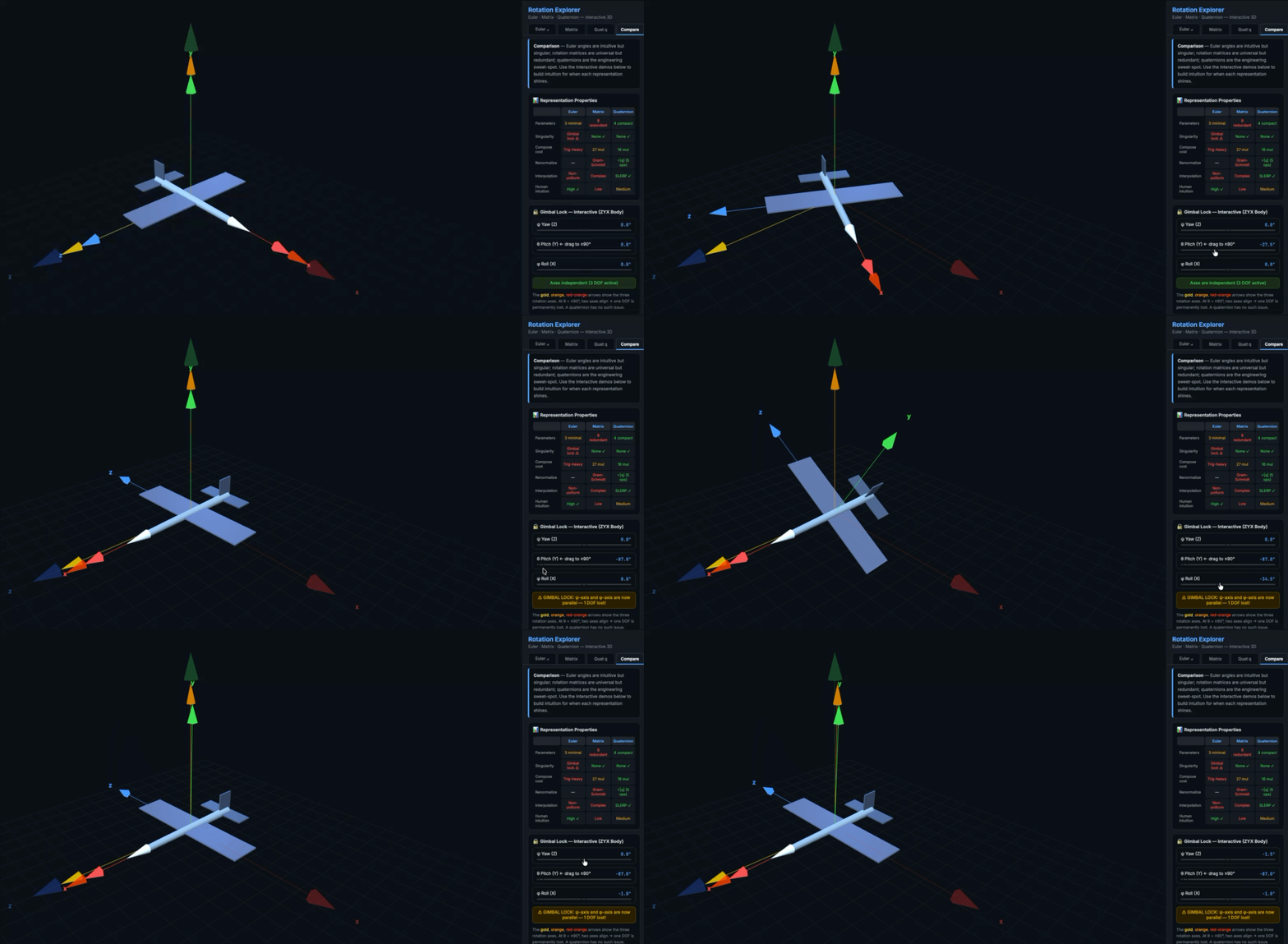
Demonstrating Gimbal Lock
Every robotics and aerospace engineer hits the same wall. You understand rotations conceptually — you know things spin, you know there are different ways to describe that spin — but the moment someone asks you to reason intuitively about a quaternion, or explain exactly why gimbal lock kills a degree of freedom, the abstraction falls apart.
I’ve been building control systems for quadrotors, and I decided to build something I actually needed: a tool that makes all three rotation representations visual, interactive, and connected in real time.
What Problem Does This Actually Solve?
There are three standard ways to represent a 3D rotation in engineering:
- Euler Angles
- Rotation Matrix
- Quaternion
Every textbook covers these. Almost none of them let you feel the difference. You read that gimbal lock collapses a degree of freedom, but you don’t viscerally understand it until you watch it happen and ask “wait, why can’t I roll anymore?”
That’s the gap I wanted to close.
What the Tool Does
Rotation Explorer, built with Claude Code, has four tabs — one for each representation plus a dedicated comparison view — all connected through a single shared rotation state. Change anything in one tab and every other representation updates instantly.
Euler Angles Tab
Set your convention (body/intrinsic or space/extrinsic), choose your rotation order (all 12 Tait-Bryan and classic Euler sequences), and drag three sliders for φ (roll), θ (pitch), and ψ (yaw). The resulting rotation matrix and quaternion update live. The formula shown — R = Rz(ψ)·Ry(θ)·Rx(φ) for aerospace 3-2-1 — is always specific to your current selection, never generic.
Intermediate frames can be toggled on to visualize the sequential nature of body-fixed rotations: you can watch each rotation axis move with the body.
Rotation Matrix Tab
Enter any 3×3 matrix directly. The app validates it against SO(3) conditions in real time — checking det(R) and ‖RᵀR − I‖ — and color-codes the result. The Orthogonalize button projects any invertible matrix onto SO(3) via Gram-Schmidt. Axis-Angle extraction uses:
θ = arccos((tr(R) − 1) / 2)and recovers the unit rotation axis from the skew-symmetric part of R.
Quaternion Tab
Rather than just showing four sliders, this tab actually makes the derivation visible. You set a rotation angle θ and axis direction n, and the tool shows you exactly how the components are computed:
q = cos(θ/2) + sin(θ/2)·(nₓi + nᵧj + nzk)Watch w, x, y, z update as you drag the angle slider. The connection between the geometric interpretation (rotate by θ about n) and the algebraic form (four numbers) becomes immediate.
The SLERP interpolation section lets you capture two orientations A and B, then animate the shortest-path interpolation between them on SO(3). This is the feature that most clearly shows why quaternions are preferred for animation and trajectory planning.
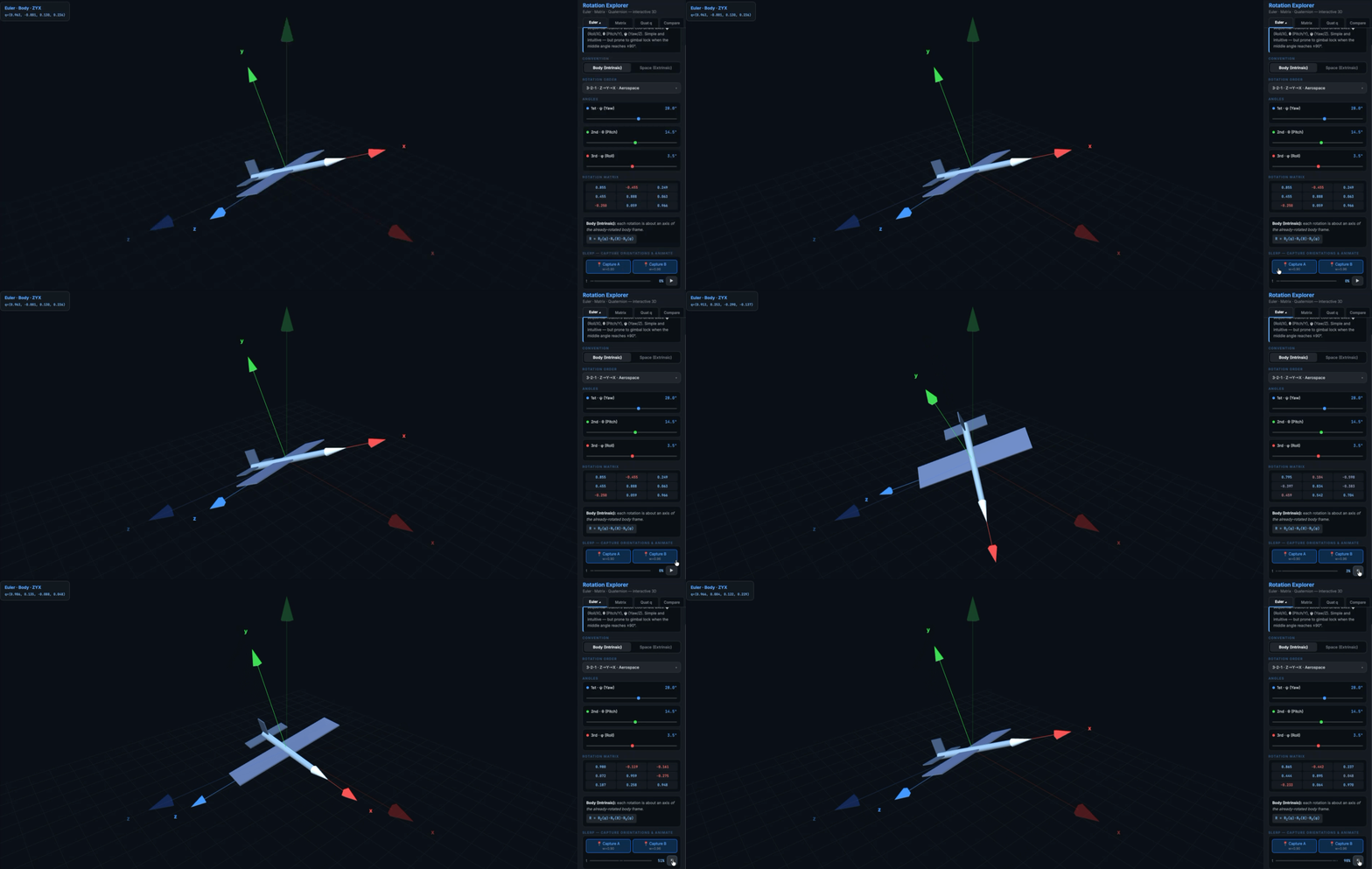
SLERP interpolation Animation
Compare Tab
Four sections that put the representations side by side:
- Properties table — storage cost, singularities, composition cost, renormalization, interpolation quality
- Gimbal lock demo — three colored arrows in the 3D view show the yaw, pitch, and roll axes. Drag θ toward ±90° and watch two of the three arrows converge. One degree of freedom visibly disappears.
- Numerical drift simulation — run N random rotation compositions and measure ‖RᵀR − I‖ for the matrix and |1 − |q|| for the quaternion. Run it multiple times and compare. It is clearly visible that even if drift magnitude is similar, quaternion renormalization costs ~5 operations (divide by norm) versus Gram-Schmidt’s ~40.
- Composition cost — 16 multiplications for quaternion vs 27 for matrix, 40% fewer operations!
Why I Built This
My background is in mechanical engineering with a focus on robotics and control systems. Rotation representations come up constantly in state estimation, in trajectory planning and in sensor fusion, just to name a few.
But most tools I found were either too abstract (pure math derivations) or too specific (a library function with no visual feedback). I wanted something that sits between a textbook and a debugger — something you can touch, spend time with and feel the greatness of the quaternions in its glory! :)
Interesting Facts
A few things that you might find interesting about different representations:
Gimbal lock is geometric, not algebraic. The Euler angle representation doesn’t “break” — the math still works. What breaks is the rank of the Jacobian mapping angle rates to angular velocity. When two axes align, you lose a column of independence. Watching it happen in the 3D view makes this far more concrete than any derivation ever could!
Quaternion double cover is subtle. q and −q represent identical rotations. This seems like a minor footnote until you’re doing SLERP and wonder why your interpolation takes the long way around.
Floating point drift is real but manageable. After 10,000 random rotation compositions, both matrix and quaternion accumulate error. The matrix orthogonality error is typically larger, but more importantly, fixing it requires Gram-Schmidt (~40 operations) while fixing a quaternion just requires dividing by its norm (~5 operations). The simulation runs live in the browser so you can verify this yourself.
Try It
→ Rotation Explorer (replace with your GitHub Pages URL)
The source is on GitHub. It’s a single file — open it locally, deploy it anywhere, or just run it in the browser directly.
If you work in robotics, aerospace, computer graphics, or control systems and have feedback, I’d love to hear it. Drop a comment or find me on GitHub.
Tags: Robotics, Aerospace, Control Systems, Computer Graphics, Linear Algebra, JavaScript, Three.js, WebGL, Claude
메타데이터
- post_id
- dfd8d3de4d5e
- slug
- an-interactive-3d-tool-to-finally-make-rotation-representations-click-dfd8d3de4d5e
- url
- https://medium.com/@sahand72/an-interactive-3d-tool-to-finally-make-rotation-representations-click-dfd8d3de4d5e
- canonical_url
- https://medium.com/@sahand72/an-interactive-3d-tool-to-finally-make-rotation-representations-click-dfd8d3de4d5e
- author_url
- https://medium.com/@sahand72
- status
- ok
- fetched_at
- 2026-07-07 12:17:01